By: Tal Olier | Comments (10) | Related: 1 | 2 | 3 | 4 | 5 | 6 | 7 | > Locking and Blocking
Problem
One of the issues you'll face with SQL Server is blocking which is caused by other processes that are holding locks on objects. Until the locks are removed on an object the next process will wait before proceeding. This is a common process that runs within SQL Server to ensure data integrity, but depending on how transactions are run this can cause some issues. Are there ways to get around blocking by using different indexes to cover the queries that may be running?
Solution
In order to explain my point I am going to use one table and run queries from two different sessions.
The table that we will be using has the following columns:
- display name - my application use this name in order to display customer related information.
- current quota - this is a number stating the current quota (of irrelevant item) of a customer, in my scenario this field is monitored by a specific process for specific customers.
- next month's quota - this is a number stating the planned quota for next month, note this field is used in a long running transactions calculating quota for all customers.
- support level - a number between 1 and 3 stating the level of support granted to a customer (1=high, 3=low), we have several applications, processes and transaction (business transactions) that deal with different customers according to their support level.
Create Table Customers
IF OBJECT_ID ('customers') IS NOT NULL DROP TABLE customers
GO
CREATE TABLE customers
(
   id INT NOT NULL,
   display_name VARCHAR(10) NOT NULL,
   current_quota bigint NOT NULL,
   next_month_quota bigint NOT NULL,
   support_level smallint NOT NULL,
   some_other_fields_size_1k CHAR(1000) NULL
)
GO
ALTER TABLE customers ADD CONSTRAINT customers_pk PRIMARY KEY (id)
GO
As you can see I have added an additional column called "some_other_fields_size_1k". This column is simulating an additional 1K of customer data; I like adding it to my tests to make the optimizer respond to more authentic requests.
Let's fill the table with some data, we will do the following:
- Insert 1000 records
- Every 150 customers I'll place a customer with support level = 1 and the rest will have to settle for support level = 3.
- Extend some quota as current and set next month's quota to 0.
Table Customers - fill with data
SET nocount ON
DECLARE @i AS INT
SET @i = 0
WHILE @i<1000
BEGIN
   SET @i = @i + 1
   INSERT INTO customers (
   id,
   display_name,
   current_quota,
   support_level,
   next_month_quota,
   some_other_fields_size_1k)
   VALUES (
   @i,
   'name-' + CAST (@i AS VARCHAR (10)),
   100000 + @i,
   --making customer with id 150, 300, 450, 600, 750
   -- and 900 with support level 1
   CASE @i%150 WHEN 0 THEN 1 ELSE 3 END,
   0,
   'some values ...')
END
SET nocount OFF
GO
As I mentioned earlier, I have two processes that will be running:
- A general dashboard application that checks the status of the current quota of our top customers.
- A planning module that performs various calculations and changes quotas of customers based on calculations done by the application.
Dashboard Application SELECT Statement
SELECT display_name, current_quota
FROM customers
WHERE support_level = 1 ORDER BY 1
Planning Module UPDATE Statement
UPDATE customers
SET next_month_quota = <some quota>
WHERE id=<some id>
I would like to state this scenario assumes that we are working with the default isolation level (READ COMMITTED) of Microsoft SQL Server.
READ COMMITTED isolation level allows good concurrency with reasonable integrity (some might argue it is not that good and not that reasonable - and we'll get to that but hey, most of the OLTP applications we know use it).
The core of the READ COMMITTED isolation level is composed of two building blocks called exclusive locks and shared locks that comply with the following guidelines:
- An exclusive lock (A.K.A. "X lock") is taken for any resource that requires a write.
- A shared lock (A.K.A. "S lock") is taken for any resource that requires a read.
- S lock can be taken on a specific resource unless there is an X lock already taken for it.
- X lock can be taken on a specific resource as long as there is not already another lock taken (not even an S lock).
Now to the challenge: there are cases where the planning module (long running transactions) locks a specific record and does not allow the dashboard application to view specific information for a long time; believe me, it happens - I know - I have built this scenario :).
We all know that indexes boost database performance by keeping an ordered list (tree based) of keys and a linkage to the actual data location. So when our application has some performance issues the intuitive solution would be to look at the SQL statement that does not perform well and possibly add indexes. Here is our statement that we are trying to run that is getting blocked.
Dashboard Application SELECT Statement
SELECT display_name, current_quota
FROM customers
WHERE support_level = 1 ORDER BY 1
We could add an index on support_level, but since adding this index will not solve our blocking issue we will not bother adding this index.
Let's start from the beginning...
Phase 1 - Check for bottlenecks
In short, we first check the database machine's CPU, disk and memory. When we see it is not that, some of us would turn to the event log. Not finding anything unusual in the event log, scratching our head over enough time - the locks issue may pop up (hard to admit but the locks part is somehow always a surprising part :) - I usually turn to check the locks when I see that some SQL is stuck and the machine is saying: "I am going to sleep, please wake me when you need something".
Phase 2 - Drill down into locks
In order to view the locks there is of course the famous sp_lock and even sp_lock2, but I like to use my own get_locks procedure (which also gives additional information regarding the locked objects (e.g. owner object and index name etc') this can be created in any SQL Server 2005 server with the following SQL script:
get_locks stored procedure - creation script
CREATE PROCEDURE get_locks
AS
SELECT OBJECT_NAME(tl.resource_associated_entity_id%2147483647) obj, tl.request_session_id ,
   tl.request_mode, tl.request_status, tl.resource_type, OBJECT_NAME (pa.OBJECT_ID) owner_obj,
   pa.rows, tl.resource_description, si.name index_name, si.type_desc index_type_desc
FROM sys.dm_tran_locks tl LEFT OUTER JOIN sys.partitions pa
   ON (tl.resource_associated_entity_id = pa.hobt_id)
   LEFT OUTER JOIN sys.indexes si
   ON (pa.OBJECT_ID = si.OBJECT_ID AND pa.index_id = si.index_id)
WHERE resource_type NOT LIKE 'DATABASE'
ORDER BY tl.request_session_id, tl.resource_type
GO
Now let's check to see that there are any locks, by running:
get_locks
GO
We get the following result, which shows there are no current locks.

Now let's open two sessions (SQL Server Management Studio query windows), in the first (we'll call it Session A) we'll run the following SQL:
Session A - Dashboard Application SELECT
SELECT @@SPID
GO
SELECT display_name, current_quota FROM customers WHERE support_level = 1 ORDER BY 1
GO
This statement (when not blocked by others) is fetching the display_name and current_quota of customers with support level = 1:
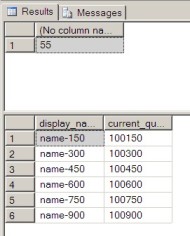
In the second session (we'll call it Session B) let's run the following update statement:
Session B - Planning Module UPDATE
SELECT @@SPID --added just for session identification in the dm views.
GO
BEGIN TRAN
UPDATE customers SET next_month_quota = 2500 WHERE id=150
This is returned:
The above statement opened a transaction, updated a record and did not close the transaction (with either commit or rollback command), so it is currently locking some of the resources.
Let's review the locks with get_locks
get_locks
GO
This time the result would be:

What we can see here is the process # 56 (Our Session B) has locked:
- The object 'customers' which is a table with "IX lock".
- The page '1:334' which is actually page 334 in file #1 with "IX lock".
- The key '(96009b9e9046)' which is an indicator describing the record with id = 150 in the 'customers_pk' with "X lock".
"IX lock" is a way to notify the database not to allow any shared locking that will block my update later on, when an object is locked with "IX lock" it:
- Assumed that a lower granularity will acquire a specific "X Lock".
- It allows only IX and IS locks to be acquired on the same resource.
For more information please refer to Lock Compatibility (Database Engine) in SQL Server 2005 Books Online.
Now let's re-run the dashboard application query within Session A:
Session A - Dashboard Application SELECT
SELECT @@SPID
GO
SELECT display_name, current_quota FROM customers WHERE support_level = 1 ORDER BY 1
GO
This time we can see that the query is blocked, because it is still executing.
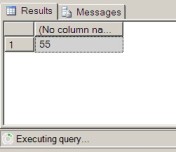
Re-checking the locks with get_locks We can see the following lock status:
get_locks
GO

As you can see the previous locks from session B (spid = 56) are still there and we've got some new locks from session A (spid = 55):
- Same as session B this session also succeeded placing an "I Lock" (this
time "IS Lock") on:
- 'customers' object (table).
- Page '1:334' (which is actually page 334 in file #1).
- Unlike Session B, when trying to place an "S Lock" on the key '(96009b9e9046)' which is an indicator describing the record with id = 150 in the 'customers_pk' this session finds out that there is already "X Lock" there and gets into a 'WAIT' state (see request_status column).
Phase 3 - Trying an index
Well I've started the 'Solution' description by telling that adding an index on the support_level column in order to boost performance still won't help, but it will get us closer - let's try:
-- Before doing that we'll need to:
-- 1. Stop Session A (which is still running).
-- 2. Rollback Session B (which is still locking).
-- 3. Run:
CREATE INDEX customers_ix1 ON customers (support_level)
GO
-- 4. Rerun Session B (for locking)
-- 5. Re-run Session A (to be blocked)
OK, now that we have done the above if we run Session B UPDATE, Session A SELECT and get_locks, we will get the following:
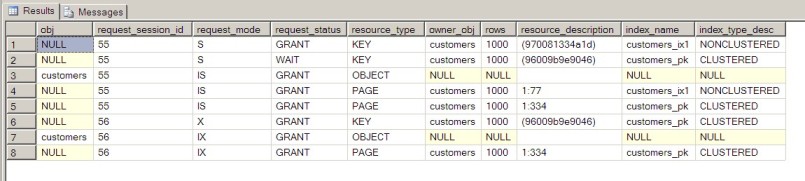
As you can see same locks as before are used plus customers_ix1 index's got a new page "IS Lock" (page 77 in file 1) and a new "S Lock" on key '(970081334a1d)' placed by Session A.
Some might ask why did Session A succeed with placing a lock on customers_ix1 (line 1 in the above table) let's check the execution plan for the select statement by running:
-- 1. Stop running Session B
-- 2. Press Ctrl-T to change results to text:
-- 3. Run:
SET SHOWPLAN_TEXT ON
GO
SELECT display_name, current_quota FROM customers WHERE support_level = 1 ORDER BY 1
GO
SET SHOWPLAN_TEXT OFF
GO
This will yield:

As you can see Session A is accessing the data through the customers_ix1, so it tries to place an "S Lock" on it (and of course succeeds).
Well, this encapsulates two great hints for our solution:
- When performing a write operation, SQL Server does not lock related indexes (e.g. our Session B did not lock customers_ix1; note it would not have locked it regardless if we used it or not!), only the relevant data row.
- When performing a read operation, SQL Server locks only the objects (e.g. indexes, data rows etc') that it found and used within its access path.
So current status is that we can use indexes as a solution for Session A activity as long as they do not access the actual data row.
Voila!!!
By adding an index that will cover all columns of the table that are required for Session A's specific query (A.K.A. Covering Index), we will have a solid bypass without requiring specific access to the actual data row. Having achieved this, Session A will not be blocked while fetching data from a row that is actually blocked for writing (as done by Session B).
Adding the index is done by the following:
-- Before doing that we'll need to:
-- 1. Rollback Session B which is still locking.
-- 2. Run:
CREATE INDEX customers_ix2 ON customers (support_level, display_name, current_quota)
GO
Now let's re-run the locking update of Session B and the select for Session A.
Session B
SELECT @@SPID --added just for session identification in the dm views.
GO
BEGIN TRAN
UPDATE customers SET next_month_quota = 2500 WHERE id=150
Session A
SELECT display_name, current_quota
FROM customers
WHERE support_level = 1 ORDER BY 1
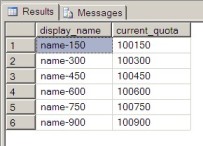
Trying to run Session A's SELECT statement (while Session B's transaction is still locking) will produce the following results without being blocked:
Review New Query Plan
SET SHOWPLAN_TEXT ON
GO
SELECT display_name, current_quota FROM customers WHERE support_level = 1 ORDER BY 1
GO
SET SHOWPLAN_TEXT OFF
GO
the result is:

As you can see the only database object that is participating in fetching the
data is customers_ix2 which we've just created. By using this covering index
we were able to use a totally different index than the update statement and therefore
have the statement complete without issue.
Some might argue that we would not need to go through a whole article just for putting a covering index and they might be correct, still there are certain situations when a covering index is not that straight forward, but it can be used to overcome locking challenges such as the above example.
Next Steps
- Review you database looking for blocking issues can be done in more that
one way, allow me to suggest a few:
- Random usage of get_locks above or any other T-SQL script that identify blocking sessions.
- SQL Server Profiler (Using the Lock:Timeout event).
- Other 3rd party tools.
- Indexing with all columns as part of the index key is not a must, as you can learn to Improve Performance with SQL Server 2005 Covering Index Enhancements.
- Finally, when modeling our data in the database for some applications (e.g. standard OLTP application) we think and design by gathering entities' attributes with same granularity into the same database table (A.K.A. the process of normalizing out database tables), we might want to consider going a bit further than that and design according to data access not only according to data belonging.






About the author
 Tal Olier is a database expert currently working for HP holding various positions in IT and R&D departments.
This author pledges the content of this article is based on professional experience and not AI generated.
View all my tips
