By: Armando Prato | Comments | Related: > Locking and Blocking
Problem
Using the default SQL Server READ COMMITTED isolation level, my application sometimes falls victim to the dreaded "lost update" condition where two of my users edit the same row for update but the user who submits his/her change last overwrites changes made by the other user. Is there a good way to check for this and prevent it?
Solution
There are two ways to manage concurrency in SQL Server: either pessimistically or optimistically.
Pessimistic concurrency works under the assumption that there will be frequent user conflicts when modifying data and attempts to alleviate this by acquiring locks up front and using long transactions to control access to data. One way I've seen this implemented is with the use of the REPEATABLE READ isolation level. However, this can potentially lead to deadlocks if the first user attempts to select and later update a row while a 2nd user at the same time also attempts to select and update the same row. To avoid this, you could stay with the default READ COMMITTED isolation level and use the UPDLOCK locking hint on the SELECT query that retrieves the row for modification. Using the UPDLOCK hint, a second user can still acquire share (S) locks on the data and read it in. However if a 2nd user attempts to also SELECT the row using UPDLOCK, he/she will be blocked until the first user commits or rolls back. What if the first user walks away from his/her client to go to a meeting? The 2nd user could potentially sit at his/her own client with a constantly churning hourglass while he/she waits for the lock to be released. A READPAST hint added to the UPDLOCK won't help because the 2nd user would not be able to select the row. You could instead try to set a LOCK_TIMEOUT and capture error message 1222 (lock request time out period exceeded) if a user is blocked for a number of seconds.
Optimistic concurrency assumes the likelihood of a conflict is low, allowing concurrent access to data while minimizing blocking and deadlocks. One way I've seen it done is with addition of a modified datetime column to the row. When a row is read in, this modified datetime is captured. When the user issues an UPDATE or DELETE, the system would check the captured datetime in a WHERE clause to see if there was a change. If no rows were processed, then the row was modified by another user. Another way is to compare all the columns of the row to their original values. Unfortunately, both these approaches entail extra coding.
SQL Server 2005 introduced a new SNAPSHOT isolation level that can be used for optimistic concurrency but it unfortunately has some tempdb disk and I/O overhead and there can be a performance hit if the engine has to roll back an update due to a modification conflict.
When I use optimistic concurrency, I implement it by adding a column of type ROWVERSION to my tables. Columns defined with a rowversion data type are automatically updated whenever a row is modified by a user. The SQL Server engine does all the work. This data type was introduced in SQL Server 2000 to eventually replace the timestamp data type. In the ANSI-SQL definition, timestamp is defined as a date and time whereas Microsoft implemented it as a binary value that changes every time a row changes. Microsoft has warned that the use of timestamp will eventually be changed to adhere to the ANSI standard so its use for concurrency management should be avoided. Currently, both timestamp and rowversion are analogous to each other but that may change by the time SQL Server 2008 is finally released.
The following example illustrates how I use rowversion datatype to implement optimistic concurrency under SQL Server's default READ COMMITTED isolation level.
First, we'll build a new table called Part with a rowversion added to it.
| create table dbo.Part ( partid int identity(1,1) not null primary key, partname nvarchar(50) not null unique, sku nvarchar(50) not null, rowid rowversion not null ) go insert into dbo.Part (partname, sku) select 'Widget', 'default sku' go |
Now, in a new Management Studio connection, run the following script
| declare @rowid rowversion select @rowid = rowid from dbo.Part where partid = 1 -- wait 30 seconds to simulate -- a user examining the row and -- making a data modification waitfor delay '00:00:30' update dbo.Part set sku = 'connection 1: updated' where partid = 1 and rowid = @rowid if @@rowcount = 0 begin if not exists (select 1 from dbo.Part where partid = 1) print 'this row was deleted by another user' else print 'this row was updated by another user.' end go |
Now, in another Management Studio connection, run the following script while the previous script is running
| update dbo.Part set sku = 'connection 2: updated' where partid = 1 go |
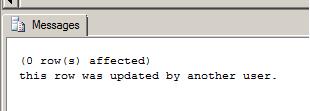
You'll receive the following message in the results pane of the first connection:
Re-run the first connection but this time run the following script to delete the part in a separate connection while the previous script is running
| delete from dbo.Part where partid = 1 go |
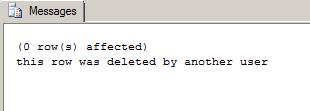
You'll now receive the following message in the results pane of the first connection:
Next Steps
- Read more about SQL Server 2005's new Snapshot Isolation level
- Read this blog about Snapshot Isolation overhead
- Read more about Lock Compatibility in the SQL Server 2000 and 2005 Books Online






About the author
 Armando Prato has close to 30 years of industry experience and has been working with SQL Server since version 6.5.
This author pledges the content of this article is based on professional experience and not AI generated.
View all my tips
