By: Greg Robidoux | Updated: 2021-07-22 | Comments (77) | Related: 1 | 2 | 3 | 4 | 5 | 6 | 7 | More > Scripts
Problem
As a DBA, sometimes there is a need to find if a string value exists in any column in your table in your SQL Server database. Although there are system stored procedures that do a "for each database" or a "for each table", there is not a system stored procedure that does a "for each column" from Microsoft. So, trying to find a value in any column in your database requires you to build the query to look through each column you want to search using an OR operator between each column. Is there any way this can be dynamically generated?
Solution
Once again this is where T-SQL comes in handy along with the use of system tables or system views. The code below allows you to search for a value in all text data type columns such as (char, nchar, ntext, nvarchar, text and varchar).
The stored procedure gets created in the master database so you can use it in any of your databases and it takes three parameters:
- stringToFind - this is the search string you are looking for. This could be a simple value as 'test' or you can also use the % wildcard such as '%test%', '%test' or 'test%'.
- schema - this is the schema owner of the object
- table - this is the table name you want to search, the procedure will search all char, nchar, ntext, nvarchar, text and varchar columns in the base table
Option 1 - Uses a Cursor (original method)
The first thing you need to do is create this stored procedure by copying the SQL statement below and executing it in a query window in SQL Server Management Studio (SSMS).
USE master
GO

CREATE PROCEDURE dbo.sp_FindStringInTable @stringToFind VARCHAR(100), @schema sysname, @table sysname
AS

SET NOCOUNT ON

DECLARE @sqlCommand VARCHAR(8000)
DECLARE @where VARCHAR(8000)
DECLARE @columnName sysname
DECLARE @cursor VARCHAR(8000)

BEGIN TRY
   SET @sqlCommand = 'SELECT * FROM [' + @schema + '].[' + @table + '] WHERE'
   SET @where = ''

   SET @cursor = 'DECLARE col_cursor CURSOR FOR SELECT COLUMN_NAME
   FROM ' + DB_NAME() + '.INFORMATION_SCHEMA.COLUMNS
   WHERE TABLE_SCHEMA = ''' + @schema + '''
   AND TABLE_NAME = ''' + @table + '''
   AND DATA_TYPE IN (''char'',''nchar'',''ntext'',''nvarchar'',''text'',''varchar'')'

   EXEC (@cursor)

   OPEN col_cursor
   FETCH NEXT FROM col_cursor INTO @columnName

   WHILE @@FETCH_STATUS = 0
   BEGIN
       IF @where <> ''
           SET @where = @where + ' OR'

       SET @where = @where + ' [' + @columnName + '] LIKE ''' + @stringToFind + ''''
       FETCH NEXT FROM col_cursor INTO @columnName
   END

   CLOSE col_cursor
   DEALLOCATE col_cursor

   SET @sqlCommand = @sqlCommand + @where
   PRINT @sqlCommand
   EXEC (@sqlCommand)
END TRY
BEGIN CATCH
   PRINT 'There was an error. Check to make sure object exists.'
   PRINT error_message()

   IF CURSOR_STATUS('variable', 'col_cursor') <> -3
   BEGIN
       CLOSE col_cursor
       DEALLOCATE col_cursor
   END
END CATCH
Option 2 - Does Not Use a Cursor (new method)
This is a newer and simpler approach and eliminates the need for a cursor.
We recently ran into an issue that I worked on with Russ Mittler where the database setting had cursors set to local, so the script above did not work because it needed that setting to be global. This database setting can be checked using the below code:
SELECT is_local_cursor_default FROM sys.databases WHERE name = DB_NAME()
So based on that issue, I wrote a different version of this stored procedure that does not use cursors, with the following syntax:
USE master
GO

CREATE PROCEDURE dbo.sp_FindStringInTable @stringToFind VARCHAR(max), @schema sysname, @table sysname
AS

SET NOCOUNT ON

BEGIN TRY
   DECLARE @sqlCommand varchar(max) = 'SELECT * FROM [' + @schema + '].[' + @table + '] WHERE '

   SELECT @sqlCommand = @sqlCommand + '[' + COLUMN_NAME + '] LIKE ''' + @stringToFind + ''' OR '
   FROM INFORMATION_SCHEMA.COLUMNS
   WHERE TABLE_SCHEMA = @schema
   AND TABLE_NAME = @table
   AND DATA_TYPE IN ('char','nchar','ntext','nvarchar','text','varchar')

   SET @sqlCommand = left(@sqlCommand,len(@sqlCommand)-3)
   EXEC (@sqlCommand)
   PRINT @sqlCommand
END TRY

BEGIN CATCH
   PRINT 'There was an error. Check to make sure object exists.'
   PRINT error_message()
END CATCH
After the stored procedure has been created it needs to be marked as a system stored procedure.
USE master
GO

EXEC sys.sp_MS_marksystemobject sp_FindStringInTable
GO
Example Uses
Once the stored procedure has been created you can run some tests with the following SQL queries.
Here are some tests that were done against the AdventureWorks database.
Find the value 'Irv%' in the Person.Address table.
USE AdventureWorks
GO
EXEC sp_FindStringInTable 'Irv%', 'Person', 'Address'

Find the value '%land%' in the Person.Address table.
USE AdventureWorks
GO
EXEC sp_FindStringInTable '%land%', 'Person', 'Address'
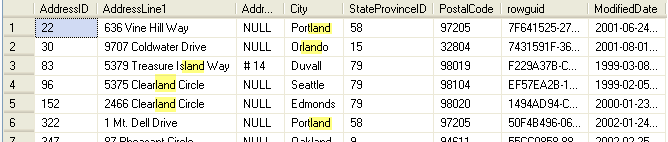
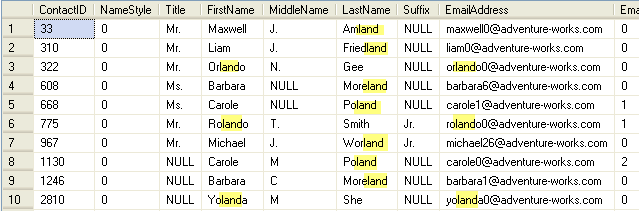
Find the value '%land%' in the Person.Contact table.
USE AdventureWorks
GO
EXEC sp_FindStringInTable '%land%', 'Person', 'Contact'
Another Version to Show Columns that Match
Here is another version that shows which columns match along with the data from the table.
CREATE PROCEDURE dbo.sp_FindStringInTable_with_flag @stringToFind VARCHAR(max), @schema sysname, @table sysname
AS

SET NOCOUNT ON

BEGIN TRY
   DECLARE @sqlCommand varchar(max) = 'SELECT '

   SELECT @sqlCommand = @sqlCommand + 'case when [' + COLUMN_NAME + '] LIKE ''' + @stringToFind + ''' then 1 else 0 end as ' + COLUMN_NAME + '_found, '
   FROM INFORMATION_SCHEMA.COLUMNS
   WHERE TABLE_SCHEMA = @schema
   AND TABLE_NAME = @table
   AND DATA_TYPE IN ('char','nchar','ntext','nvarchar','text','varchar')

   SELECT @sqlCommand = @sqlCommand + ' * FROM [' + @schema + '].[' + @table + '] WHERE '

   SELECT @sqlCommand = @sqlCommand + '[' + COLUMN_NAME + '] LIKE ''' + @stringToFind + ''' OR '
   FROM INFORMATION_SCHEMA.COLUMNS
   WHERE TABLE_SCHEMA = @schema
   AND TABLE_NAME = @table
   AND DATA_TYPE IN ('char','nchar','ntext','nvarchar','text','varchar')

   SET @sqlCommand = left(@sqlCommand,len(@sqlCommand)-3)
   EXEC (@sqlCommand)
   PRINT @sqlCommand
END TRY

BEGIN CATCH
   PRINT 'There was an error. Check to make sure object exists.'
   PRINT error_message()
END CATCH
After the stored procedure has been created it needs to be marked as a system stored procedure.
USE master
GO

EXEC sys.sp_MS_marksystemobject sp_FindStringInTable_with_flag
GO
We can run as follows:
USE AdventureWorks
GO
EXEC sp_FindStringInTable_with_flag 'Irv%', 'Person', 'Address'
Here are the results.

Summary
That's all there is to it. Once this has been created you can use this against any table and any database on your server.
Next Steps
- Add this to your scripts toolbox in case you have the need to search through a table to find a certain value.
- Take a look at this tip that allows you search across all tables in your database.
- Thanks to Paul for the idea for this tip
- One thing to keep in mind is that if you are using the % in front of the value such as '%land' this will force SQL Server to scan the table and not use the indexes. Also, since you are searching through all columns using an OR clause it is a pretty good bet that you will do a table scan, so be aware of this on large tables.






About the author
 Greg Robidoux is the President and founder of Edgewood Solutions, a technology services company delivering services and solutions for Microsoft SQL Server. He is also one of the co-founders of MSSQLTips.com. Greg has been working with SQL Server since 1999, has authored numerous database-related articles, and delivered several presentations related to SQL Server. Before SQL Server, he worked on many data platforms such as DB2, Oracle, Sybase, and Informix.
This author pledges the content of this article is based on professional experience and not AI generated.
View all my tips
Article Last Updated: 2021-07-22
