![]() |
|
|
|
By: Ken Simmons | Read Comments (15) | Related Tips: More > Import and Export |
Problem
Since the transition from DTS to SSIS, I have found myself looking for alternative ways to do simple tasks such as exporting data from SQL Server into text files. SSIS is a far more powerful tool than DTS, but I generally try to stay away from it for simple operations. With the combination of a few T-SQL commands this tip shows you a simple way to export data to text files.
Solution
One of the ways I have worked around this is by using bcp with xp_cmdshell. It's fast, easy and I can integrate it right into my code.
The first thing you have to do is make sure xp_cmdshell is enabled. You can do this in one of two ways.
1. You can use sp_configure and execute the following script.
| EXEC master.dbo.sp_configure 'show advanced options', 1 RECONFIGURE EXEC master.dbo.sp_configure 'xp_cmdshell', 1 RECONFIGURE |
2. You can use the Surface Area Configuration Tool.
Select Surface Area Configuration for Features and check the Enable xp_cmdshell checkbox.
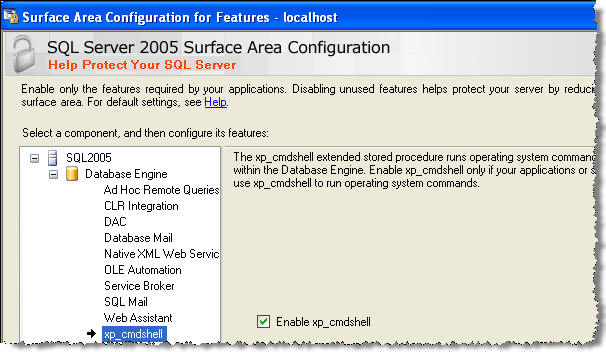
Now that you have xp_cmdshell enabled you are ready to export your files.
Here is a sample command that will export the results of the sysfiles table to a comma delimited file called bcptest.txt. Just copy and paste this into a query window and execute the query.
| EXEC xp_cmdshell 'bcp "SELECT * FROM sysfiles" queryout "C:\bcptest.txt" -T -c -t,' |
Note: BCP is a command line utility and xp_cmdshell is only required to use it within a SQL Batch.
This is the output for the above command when run in the "master" database.

The parameters that were used are:
Another parameter you may need to use is -S to specify the server name. If you have a named instance, you will need to use this parameter. Here is an example connecting to server "DEVELOP" and instance "DEV1".
| EXEC xp_cmdshell 'bcp "select name, type_desc, create_date from sys.objects" queryout "C:\bcptest2.txt" -T -SDEVELOP\DEV1 -c -t,' |
Also be aware that the case of the parameter such as -t and-T makes a difference, so make sure you have correct case for the parameter you are using. You can find more options for BCP here: http://msdn.microsoft.com/en-us/library/ms162802.aspx
Next Steps
| Tuesday, December 09, 2008 - 1:09:23 AM - mrhappi | Read The Tip |
|
http://www.sqlservercentral.com/scripts/Miscellaneous/31136/ here's an stored proc that will export and script the object as well... |
|
| Wednesday, December 17, 2008 - 1:55:53 PM - Dr DBA | Read The Tip |
|
Sort of works with SQL 2005 and SQL 2008 |
|
| Wednesday, October 05, 2011 - 11:35:54 AM - GlennC | Read The Tip |
|
Excellent tip, well illustrated. It worked the first time, thanks! |
|
| Wednesday, March 14, 2012 - 6:24:26 AM - Mike | Read The Tip |
|
I'm having trouble with special characters. Do you have any idea on how to prevent a problem like this? For example, when I open the resulting text file with Notepad2, I get € instead of Ç |
|
| Thursday, May 03, 2012 - 3:01:41 AM - Theo | Read The Tip |
|
we have designed few tables in the Sql server 2005, DoctorDetails as one of them. It has attributes (DoctorID, FirstName, LastName, Address, Phone_Num, Employment_Type, WardID and Specialization). so i am facing a trouble with a question that says "In a text file , store the details of all doctors who have managed a particular ward in the current month. Make use of the required Tools to perform the data transfer. |
|
| Friday, August 17, 2012 - 1:37:00 PM - Krishna | Read The Tip |
|
Hello, How do I extract data from SQL Server table with a hexadicimal delimiter. In specific, I wanted to extract a table in a delimited file format with hex of '19' (Reall value would be: ^Y) as my delimiter. Thanks, Krishna |
|
| Tuesday, October 30, 2012 - 12:02:55 PM - Orlando Colamatteo | Read The Tip |
|
I am surprised that not one mention was made about the risks of enabling xp_cmdshell, the privileges required to utilize it or references on how to properly secure it. A much safer and more robust option is to use SSIS for exporting data from a table to a file. Alternatively you could invoke bcp directly from a PowerShell script. There are other ways as well that do not involve enabling xp_cmdshell. Ideally we should find a way to do this work without ever enabling xp_cmdshell. |
|
| Thursday, December 06, 2012 - 10:22:14 AM - Scott Coleman | Read The Tip |
|
The simplest way to export data to a text file is probably use Results-to-Text mode in management studio. Scripts executed by SQLCMD can include ":OUT <filename>" commands to write to a file. BCP is a very useful and powerful utility, but I wouldn't put it at the top of my "simple" list. And you would have to have a better reason than simple file export before enabling xp_cmdshell. If BCP is the preferred export method, the BCP command could be put in a SQL Agent job and then that could be invoked on demand. Or a SQLCMD script could be used to run BCP with a "!!BCP ..." line, no xp_cmdshell required. |
|
| Thursday, December 06, 2012 - 10:23:08 AM - Scott Coleman | Read The Tip |
|
Sorry, I meant Results-to-File mode in the first line of my previous comment. |
|
| Saturday, December 29, 2012 - 12:11:28 PM - KARTHIKEYAN S | Read The Tip |
|
HI ALL I HAVE ONE TXT FILE,ITS CONTINT 10 COLUMN .I WANT IMPORT 2 COLUMN IN SQL SERVER WITH BULK INSERT ITS POSSIBLE.KINDLY HELP ME.
THANK YOU |
|
| Tuesday, January 15, 2013 - 9:23:41 AM - Orlando Colamatteo | Read The Tip |
|
I wish Microsoft would implement this suggestion so we are not compelled to enable xp_cmdshell as a way to export data from T-SQL: http://connect.microsoft.com/SQL/feedback/ViewFeedback.aspx?FeedbackID=224026 As a side note Microsfot recommends using the SQLCLR as a replacement for xp_cmdshell, which I can almost see the writing on the wall, will be deprecated in a future version of SQL Server. |
|
| Tuesday, January 15, 2013 - 10:59:13 AM - KaptKos | Read The Tip |
|
Why not just perform the query in Mgt Studio and then export it or cut and paste into a text file? DUH!?!?! |
|
| Tuesday, January 15, 2013 - 11:15:46 AM - Greg Robidoux | Read The Tip |
|
@KaptKos - yes you could copy and paste the data from SSMS to a text file, but if you have a large data set instead of selecting the data twice you could write out directly to a text file which will be much faster than using copy and paste. |
|
| Thursday, April 04, 2013 - 5:27:59 PM - victor | Read The Tip |
|
I need ur help. Im working with sql server 2012 express edition. I need to export results from a query into a txt file. I have a query in a .sql file. I just wanna open it and execute. How can i use bcp? I tried with: bcp "select * from myTable" queryout d:\test.txt -c -T And SQL server says Incorrect syntax near 'queryout' What am i doing wrong?
PD Sorry for my english i speak spanish.
|
|
| Wednesday, May 08, 2013 - 3:09:11 AM - Rajasekhar Pasalapudi | Read The Tip |
| Try the following syntax. Exec xp_cmdshell 'bcp "SELECT * FROM [TESTDB].[dbo].[MYTEST]" queryout "d:\creatFile.txt" -T -c' Include [DBName].[dbo].[tablename] and add Exec xp_cmdshell (if you are executing from SSMS) if above things didn't worked, check bcp enabled or not, if not try following command to enable xp_cmdshell then execute BCP command) here are the commands EXEC master.dbo.sp_configure 'show advanced options', 1 RECONFIGURE EXEC master.dbo.sp_configure 'xp_cmdshell', 1 RECONFIGURE Exec xp_cmdshell 'bcp "SELECT * FROM [TESTDB].[dbo].[MYTEST]" queryout "d:\creatFile.txt" -T -c' Note: Important thing is if you are exporting specific columns from the table then all the columns should be in a row (i.e. no carriage returns (enter) spaces won't work ) | |
|
privacy | disclaimer | copyright | advertise | about authors | contribute | feedback | giveaways | user groups Some names and products listed are the registered trademarks of their respective owners. Edgewood Solutions LLC | MSSharePointTips.com | MSSQLTips.com |