By: Atif Shehzad | Comments (12) | Related: 1 | 2 | 3 | 4 | 5 | > Constraints
Problem
Foreign key constraints are an integral part of SQL Server database design. These are used to maintain integrity among related data in different tables. While implementing update and delete operations on values in the parent table (referenced table with primary key) we have to consider the impact on related values in the child table. SQL Server provides different rules for managing the effect of updates and deletes on child table values. How can these rules be used effectively without threatening the relational integrity?
Solution
Foreign key constraints may be created by referencing a primary or unique key. Foreign key constraints ensure the relational integrity of data in associated tables. A foreign key value may be NULL and indicates a particular record has no parent record. But if a value exists, then it is bound to have an associated value in a parent table. When applying update or delete operations on parent tables there may be different requirements about the effect on associated values in child tables. There are four available options in SQL Server Server 2005 and later as follows:
- No Action
- Cascade
- SET NULL
- SET Default
It is not necessary that the same rule be applied for both update and delete operations. There may be different rules for each of the update and delete operations on a single FK constraint. Before proceeding with the demo, here is summary of the effects for update and delete operations:
| Specification | Update operation on parent table | Delete operation on parent table |
|---|---|---|
| No Action | Not allowed. Error message would be generated. | Not allowed. Error message would be generated. |
| Cascade | Associated values in child table would also be updated. | Associated records in child table would also be deleted. |
| Set NULL | Associated values in child table would be set to NULL. Foreign key column should allow NULL values to specify this rule. | Associated values in child table would be set to NULL. Foreign key column should allow NULL values to specify this rule. |
| Set Default | Associated values in child table would be set to default value specified in column definition. Also default value should be present in primary key column. Otherwise basic requirement of FK relation would fail and update operation would not be successful. If no default value is provided in foreign key column this rule could not be implemented. | Associated values in child table would be set to default value specified in column definition. Also default value should be present in primary key column. Otherwise basic requirement of FK relation would fail and delete operation would not be successful. If no default value is provided in foreign key column this rule could not be implemented. |
The following demonstrates each of these options.
Create and populate tables having FK relation
Now let's create a couple of tables to resemble a foreign key relationship.
-- Use required database
Use AdventureWorks
GO
-- Create child table
IF EXISTS (SELECT * FROM sys.objects
WHERE name = N'EmpEducation' AND [type] = 'U')
DROP TABLE EmpEducation
CREATE TABLE EmpEducation
(
EduID SMALLINT IDENTITY(1,1) PRIMARY KEY,
empno SMALLINT NULL DEFAULT 100,
DegreeTitle VARCHAR(50)
)
GO
-- Create parent table
IF EXISTS (SELECT * FROM sys.objects
WHERE name = N'employees' AND [type] = 'U')
DROP TABLE employees
CREATE TABLE employees
(
empno SMALLINT PRIMARY KEY ,
EmpName VARCHAR(70)
)
GO
The foreign key relation can be created either through SSMS GUI or T-SQL. Rules for update/delete operations may be specified explicitly. However if nothing is specified then the default rule is No Action. The rule may be changed to any other option at any time later by recreating the FK relation. Let's create the foreign key with the default specification through T-SQL.
-- Create FK relationship
IF EXISTS (SELECT * FROM sys.objects
WHERE name = N'FK_EmpEducation_Employees' AND [type] = 'F')
ALTER TABLE EmpEducation
DROP Constraint FK_EmpEducation_Employees
GO
ALTER TABLE EmpEducation
ADD CONSTRAINT [FK_EmpEducation_Employees]
FOREIGN KEY (empno)REFERENCES employees(empno)
GO
Now populate the tables with sample data.
-- Insert records in parent table
INSERT INTO employees
SELECT 1, 'Atif' UNION ALL
SELECT 2, 'Shehzad' UNION ALL
SELECT 3, 'khurram' UNION ALL
SELECT 4, 'Ahmed' UNION ALL
SELECT 5, 'Uzair'
GO
-- Insert records in parent table
INSERT INTO EmpEducation
SELECT 1, 'MS' UNION ALL
SELECT 2, 'MBA' UNION ALL
SELECT 1, 'BS' UNION ALL
SELECT 2, 'MS' UNION ALL
SELECT 3, 'BS'
GO
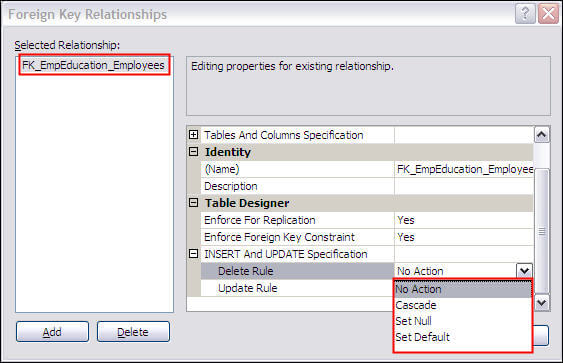
Now we can look at the relationship along with the rules available in SSMS. In SSMS, right click on the FK for table EmpEducation and select modify to open the relationships frame as shown below.
NO ACTION option
For our data with default specification (No Action) SQL Server would not allow an update or delete operation on referenced values of the primary key table. Since we did not define a specification for our foreign key the default No Action is used. So based on this, no update or delete should be allowed for values that are referenced in the child table.
Let's verify the effect of the No Action rule.
-- Try to update referenced PK
UPDATE Employees
SET empno = 100 WHERE empno = 1
GO
-- Try to delete record with referenced PK
DELETE FROM Employees
WHERE empno = 2
GO
The following error messages are generated as result of the above script and the update and delete did not take place.
The UPDATE statement conflicted with the REFERENCE constraint "FK_EmpEducation_Employees". The conflict occurred in database "AdventureWorks", table "dbo.EmpEducation", column 'empno'.
The statement has been terminated.
Msg 547, Level 16, State 0, Line 3
The DELETE statement conflicted with the REFERENCE constraint "FK_EmpEducation_Employees". The conflict occurred in database "AdventureWorks", table "dbo.EmpEducation", column 'empno'.
The statement has been terminated.
CASCADE option
Now let's change the default specification (No Action) to Cascade. Select the CASCADE rule from the SSMS GUI as shown in the above screenshot or use this T-SQL code.
The following script adds "ON DELETE CASCADE ON UPDATE CASCADE"
-- Create FK relationship
IF EXISTS (SELECT * FROM sys.objects
WHERE name = N'FK_EmpEducation_Employees' AND [type] = 'F')
ALTER TABLE EmpEducation
DROP Constraint FK_EmpEducation_Employees
GO
ALTER TABLE EmpEducation
ADD CONSTRAINT [FK_EmpEducation_Employees]
FOREIGN KEY (empno)REFERENCES employees(empno)
ON DELETE CASCADE ON UPDATE CASCADE
GO
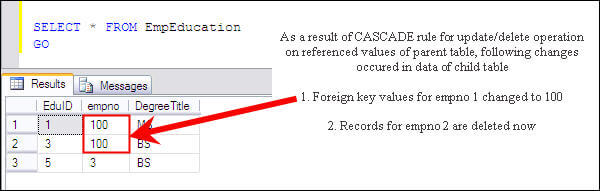
Run script #4 again to verify the result produced with the cascade option.
SET NULL option
To utilize the SET NULL rule for update/delete operations the foreign key column should allow NULL values otherwise the SET NULL specification would fail by generating an error message.
- Run script # 1 - to recreate the objects
- Run the following script which adds "ON DELETE SET NULL ON UPDATE SET NULL"
-- Create FK relationship
IF EXISTS (SELECT * FROM sys.objects
WHERE name = N'FK_EmpEducation_Employees' AND [type] = 'F')
ALTER TABLE EmpEducation
DROP Constraint FK_EmpEducation_Employees
GO
ALTER TABLE EmpEducation
ADD CONSTRAINT [FK_EmpEducation_Employees]
FOREIGN KEY (empno)REFERENCES employees(empno)
ON DELETE SET NULL ON UPDATE SET NULL
GO
- Run script # 3 to create the test data
- Run script # 4 to verify the functionality
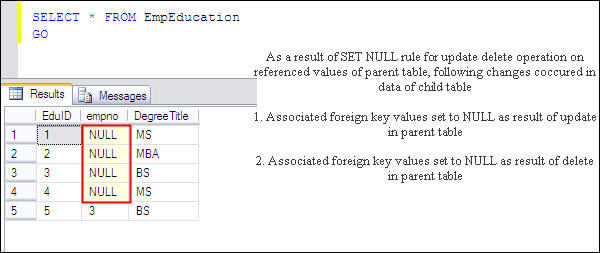
The data in child table (EmpEducation) shows that as a result of the update and delete operations foreign key values are set to NULL as shown below.
SET DEFAULT option
For utilizing the SET DEFAULT rule for update/delete operations default value should be there for foreign key column. Else SET DEFAULT specification would fail by generating error message. Our foreign key column has default value 100, so we may proceed with following steps
- Run script # 1 - to recreate the objects
- Run the following script which adds "ON DELETE SET DEFAULT ON UPDATE SET DEFAULT"
-- Create FK relationship
IF EXISTS (SELECT * FROM sys.objects
WHERE name = N'FK_EmpEducation_Employees' AND [type] = 'F')
ALTER TABLE EmpEducation
DROP Constraint FK_EmpEducation_Employees
GO
ALTER TABLE EmpEducation
ADD CONSTRAINT [FK_EmpEducation_Employees]
FOREIGN KEY (empno)REFERENCES employees(empno)
ON DELETE SET DEFAULT ON UPDATE SET DEFAULT
GO
- Run script # 3 to create the test data
- Run script # 4 to verify the functionality
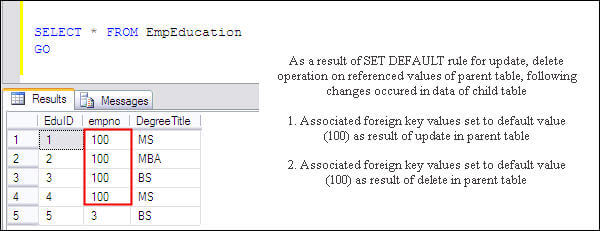
We have specified a default value of 100 for empno in the child table. Script 4 would change the corresponding four values to 100 as shown below.
Drop the created objects
The following script drops the objects we created for this demo.
-- Use required database
Use AdventureWorks
GO
-- Drop child table
IF EXISTS (SELECT * FROM sys.objects
WHERE name = N'EmpEducation' AND [type] = 'U')
DROP TABLE EmpEducation
GO
-- Drop parent table
IF EXISTS (SELECT * FROM sys.objects
WHERE name = N'employees' AND [type] = 'U')
DROP TABLE employees
GO
Next Steps
- Analyze your tables and create proper foreign key relations where they are missing.
- It's good to have full understanding of these rules, but keeping the default rule NO ACTION and using scripts to first operate on foreign key values and then primary keys is a safer option.
- To avoid unexpected results comprehensive testing should be performed before using these rules for a given situation.






About the author
 Atif Shehzad is a passionate SQL Server DBA, technical reviewer and article author.
This author pledges the content of this article is based on professional experience and not AI generated.
View all my tips
