By: Ashish Kumar Mehta | Comments | Related: > Error Handling
Problem
SQL Server 2012, has introduced the THROW statement which can be used for enhanced error handling. In this tip we will discuss how the THROW statement in SQL Server 2012 can help developers to effectively handle errors.
Solution
Microsoft introduced the TRY...CATCH construct in SQL Server 2005 which helped database developers to effectively handle errors within their T-SQL code. Using the CATCH block a developer could easily write the error handling logic that needs to be executed whenever a problem occurs within the TRY block. Prior to the introduction of TRY...CATCH construct developers had to use the @@ERROR in-built system function to check for error conditions after every operation. In the previous versions of SQL Server you had to use RAISERROR statement to show an error message. However, a RAISERROR requires a user defined message to be added to sys.messages table before you use it to raise an error.
In SQL Server 2012, when you use THROW statement it doesn't require an error number to exist within the sys.messages table however, the error number used should be greater than 50000. It is important to note that all exceptions raised using the THROW statement will have a severity of 16 and the statement before the THROW statement must be followed by the semicolon (;) statement terminator.
Using THROW Statement in SQL Server 2012
Let us go through a simple example to demonstrate the THROW statement in SQL Server 2012.
SYNTAX: -
THROW [ { error_number | @local_variable },
{ message | @local_variable },
{ state | @local_variable }
] [ ; ]
Use TempDB
GO
CREATE TABLE ErrorHistory
(
 ErrorTime   DATETIME
,ErrorSeverityLevel  NVARCHAR(100)
,ErrorMessage   NVARCHAR(1000)
)
GO
BEGIN TRY
 DECLARE @TryDivision int = 10/0
END TRY
BEGIN CATCH
 /* Insert Error Information & Then Re-Throw the error message received */
 INSERT INTO ErrorHistory VALUES(GETDATE(), ERROR_SEVERITY(), ERROR_MESSAGE());
 THROW;
END CATCH
GO
SELECT * FROM ErrorHistory
GO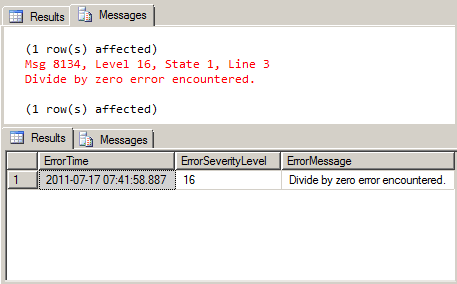
In the above snippet you could see that in the code CATCH block the error information is instered into a table and the error message is re-thrown to the client application.
Next Steps
- Read THROW (Transact-SQL)
- Stay tuned for more tips on SQL Server 2012 and check out these related tips:






About the author
 Ashish Kumar Mehta has been contributing to the MSSQLTips.com community since 2009 with over 60 tips.
This author pledges the content of this article is based on professional experience and not AI generated.
View all my tips
