Overview
The UNICODE function returns the Unicode standard value of the character used in the function. Unicode is a standard for the encoding representation in the writing system. Basically, it is a universal way to represent characters from around the world.
Explanation
Syntax
UNICODE(expression)Parameters
- expression – this is the character used to get the UNICODE number.
Simple UNICODE Example
The following example will show the UNICODE of the character “υ”.
SELECT UNICODE(N'υ') as code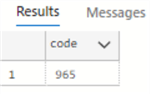
Note that if several characters are used as input, the UNICODE function will only return the code of the first letter which is “a”.
SELECT UNICODE(N'aei') as code
UNICODE with NULL values
UNICODE will return NULL if a NULL value is used.
SELECT UNICODE(NULL) as code
Convert from UNICODE to NCHAR
The following example will convert the UNICODE to a character.
SELECT NCHAR(UNICODE('&')) as character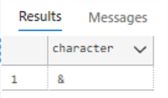
Getting UNICODE from a Table Column
The following example will show the UNICODE of the first letter of column AddressLine1.
SELECT UNICODE(AddressLine1) as msg
FROM [Person].[Address]
Show the List of UNICODE Values of a String
The following example will create a function to return all the UNICODE values of a string separated by commas.
CREATE FUNCTION showUnicode( @string NVARCHAR(100))
returns varchar(500)
AS
BEGIN
   DECLARE @length smallint = LEN(@string)
   DECLARE @position smallint = 0
   DECLARE @codes varchar(max) = ''

   WHILE @length >= @position
   BEGIN
      SELECT @codes = @codes + CONCAT(UNICODE(SUBSTRING(@string,@position,1)),',')
      SELECT @position = @position + 1
   END

   SELECT @codes = SUBSTRING(@codes,2,LEN(@codes)-2)
   RETURN @codes
END
Next, we will execute the function.
SELECT dbo.showUnicode('hello world') as codes
Here is how we can use this function to get the data from a table.
SELECT FirstName, dbo.showUnicode('FirstName') as codes
FROM [Person].[Person]
Get List of All NCHAR Values and Integer Value
The following will get a list of the UNICODE values and the corresponding Unicode character.
DECLARE @counter INT = 0

CREATE TABLE #NCharValues ([nchar] nchar(1), [unicode] int)

WHILE (@counter <= 144697)
BEGIN
   BEGIN TRY
      INSERT INTO #NCharValues
      SELECT NCHAR(@counter), UNICODE(NCHAR(@counter))
      SET @counter = @counter + 1
   END TRY
   BEGIN CATCH;
      SET @counter = @counter + 1
      IF @counter > 144697
      BEGIN
         BREAK
      END
   END CATCH
END

SELECT [UNICODE], [nchar] FROM #NCharValues

DROP TABLE #NCharValues
Here are a few rows from the query results.

Additional Information

Daniel Calbimonte is a Microsoft Most Valuable Professional, Microsoft Certified Trainer and Microsoft Certified IT Professional for SQL Server. He is an accomplished SSIS author, teacher at IT Academies and has over 10 years of experience as a QE and developer for SQL Server related software. He has worked for the government, oil companies, web sites, magazines and universities around the world. Daniel also regularly speaks at SQL Servers conferences and blogs.
- MSSQLTips Awards: Author of the Year Contender – 2015-2018, 2022, 2023 | Champion (100+ tips) – 2018
