Overview
The GETUTCDATE() function returns the system timestamp using the datetime format. This function returns the date and time in UTC format. UTC stands for Coordinated Universal Time and is the successor to Greenwich Mean Time (GMT).
Explanation
Syntax
GETUTCDATE()Parameters
- No parameters required
Simple GETUTCDATE() Example
The following example will show the current server datetime in UTC format.
SELECT GETUTCDATE() as date
Difference between GETUTCDATE() , CURRENT_TIMESTAMP and GETDATE()
The following example shows the difference of 5 hours on my machine between GETUTCDATE() and GETDATE().
SELECT DATEDIFF(HOUR, GETDATE(), GETUTCDATE()) as difference
Following is the output from each of these functions.
SELECT GETUTCDATE() as getutcdate, GETDATE() as getdate, CURRENT_TIMESTAMP as current_timestamp
We can see that GETDATE() and CURRENT_TIMESTAMP are the same, but CURRENT_TIMESTAMP is 5 hours ahead.
How to set the GETUTCDATE() in a custom format
The following example will show the GETUTCDATE() in dddd-MMMM yyyy hh:mm:ss tt format.
SELECT FORMAT(GETUTCDATE(), 'dddd-MMMM yyyy hh:mm:ss tt') as formatdate
How to set the GETUTCDATE() with a different Cultural Format
The following example will set the GETUTCDATE to the Spanish date format.
SELECT FORMAT(GETUTCDAY(), 'dddd dd, MMMM, yyyy', 'ES-es') as spanish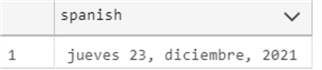
Use GETUTCDATE() with Table Data
The following example, will show the products with startdate between 7 and 8 years ago.
SELECT Productid, DATEDIFF(YEAR, StartDate, GETUTCDATE()) as years
FROM Production.ProductCostHistory
WHERE DATEDIFF(YEAR, StartDate, GETUTCDATE()) BETWEEN 7 AND 8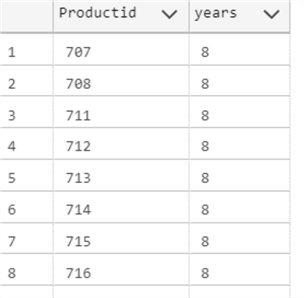
Additional Information
- SQL FORMAT
- How to Get Current Date in SQL Server
- Mimic timestamp behavior of other database platforms to store last modified date
- SQL Convert Date to YYYYMMDD
- SQL Server DIFFERENCE Function
- SQL Server CONCAT Function
- Format SQL Server Dates with FORMAT Function
- DATEDIFF SQL Server Function

Daniel Calbimonte is a Microsoft Most Valuable Professional, Microsoft Certified Trainer and Microsoft Certified IT Professional for SQL Server. He is an accomplished SSIS author, teacher at IT Academies and has over 10 years of experience as a QE and developer for SQL Server related software. He has worked for the government, oil companies, web sites, magazines and universities around the world. Daniel also regularly speaks at SQL Servers conferences and blogs.
- MSSQLTips Awards: Author of the Year Contender – 2015-2018, 2022, 2023 | Champion (100+ tips) – 2018


