![]() |
|
|
|
By: Kun Lee | Read Comments (20) | Related Tips: 1 | 2 | 3 | 4 | 5 | More > Microsoft Excel Integration |
Problem
Loading data from SQL Server to Excel is a common practice in many automated and ad-hoc processes completed by DBAs on a daily basis. Traditionally loading data from Excel to SQL Server has been completed by DTS, SSIS, BCP, OPENROWSET, Import\Export Wizard, etc. Unfortunately, for a simple ad-hoc process this can be a time consuming task with a fair amount of clicks and\or coding. With all of the new features with in SQL Server 2005, are any new tricks available to streamline the Excel to SQL Server loading process?
Solution
Yes - SQL Server 2005 Management Studio provides the ability to copy and paste columns directly from Excel to SQL Server when the table and column names match up. Let's walk through a simple example. Assume you have a database called 'Test' with a table called 'MyTable' consisting of two columns (MyID, MyDesc). In addition, you have an Excel worksheet where you want to load data directly from Excel to SQL Server. Let's walk through setting up and testing that scenario.
|
Step 1 - Create the Database and Table |
| CREATE DATABASE Test GO CREATE TABLE [dbo].[MyTable]( [MyID] [int] NOT NULL, [MyDesc] [varchar](100) NOT NULL) |
|
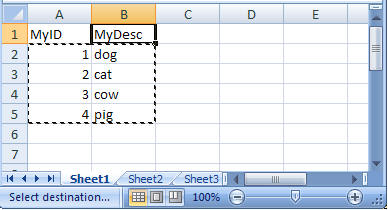
Step 2 - Open the Excel worksheet, select data only and copy the data 'Ctrl +C' |
|
|
|
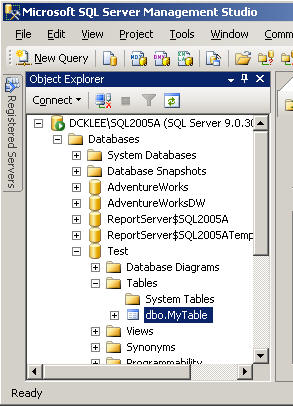
Step 3 - Open SQL Server 2005 Management Studio and navigate to the table |
|
|
|
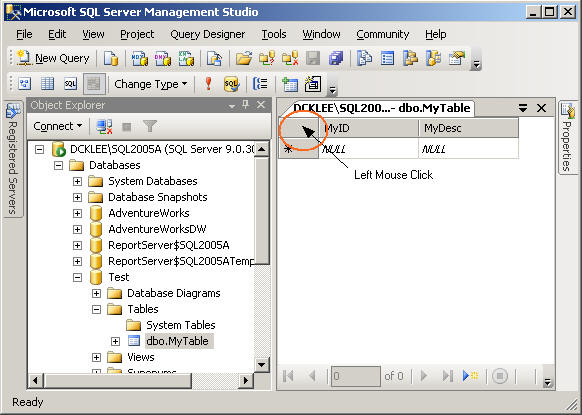
Step 4 - Right click on dbo.MyTable, choose 'Open Table' then left click on below area |
|
|
|
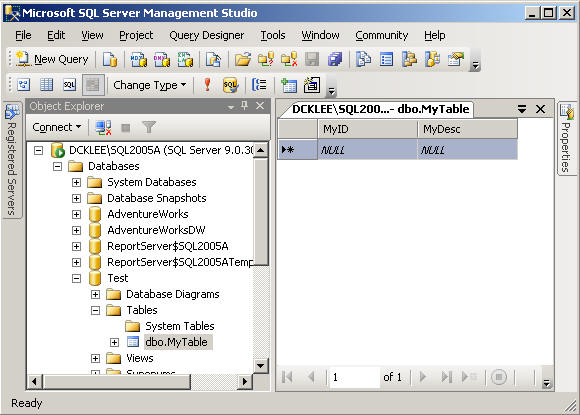
Step 5 - The area below will be highlighted, then right click and choose 'Paste' |
|
|
|
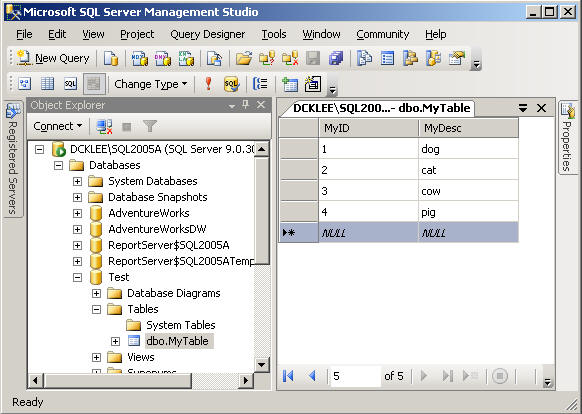
Step 6 - Validate the data will be inserted into the table |
|
|
Next Steps
| Wednesday, August 11, 2010 - 2:22:45 AM - Ashish | Read The Tip |
|
Hi, Is this feature also available in SQL 2008? Regards, Ashish |
|
| Wednesday, August 11, 2010 - 4:16:24 AM - Kun Lee | Read The Tip |
|
Yes. Please keep in mind that, this is not going to be as fast as BCP though. Not even close to that speed. So, I'd recommend using small set of data to get it done quickly. Regards, Kun |
|
| Tuesday, January 04, 2011 - 9:30:51 PM - Ixchel Ornelas | Read The Tip |
|
thanks :D! |
|
| Thursday, May 19, 2011 - 7:35:28 AM - John | Read The Tip |
|
Excellent! Atleast someone knows how to do this without writing code that reads excel documents and then writes it to a database.. >_> that's just plain dumb. Thanks for this ;) |
|
| Wednesday, March 14, 2012 - 6:17:41 AM - PRAVIN WADE | Read The Tip |
|
Hi, I want to insert only some columns data in my sql table. is it possible to insert the limited column data or copy paste it. Please reply.
thanks, Pravin Wade Learn <a href="www.welcomeconsultancy.in">What is Sharepoint</a> |
|
| Thursday, March 15, 2012 - 11:16:39 AM - Kun Lee | Read The Tip |
|
Hi Pravin Wade,
I am a little confused about what you asking though. If you want to insert some columns data in your sql table and leave rest of them as NULL, you can just make your excel format to match with it. If you have existing data and fill up some columes, that I can't think any easy way to do so in that case, I will just create a stage table to have data that you want to fill up and use typical update statements by using the stage table that you just created. I hope that answers to your question. Regards, Kun |
|
| Wednesday, May 02, 2012 - 7:44:48 AM - Ashish Gupta | Read The Tip |
|
HI I want to learn SQL Server 2005 / 2008. please provide me information regarding level of SQL Server and any perfect book. i am very confused. i want to know difference between DB2 / DKB / DBA / Warehousing and Sql Programmer. Please clarify. and mail me some good books of SQL. My id is : contact.ashish126@gmail.com. |
|
| Tuesday, May 08, 2012 - 8:04:30 AM - Ashish Gupta | Read The Tip |
|
I Am still waiting for answer.please help me. Thnks in Advance
Warm Reg. |
|
| Wednesday, May 16, 2012 - 2:24:39 AM - Sumanta | Read The Tip |
|
Thank you very much. It is working fine in SQL Server 2008.
|
|
| Thursday, May 17, 2012 - 11:32:19 AM - Kun Lee | Read The Tip |
|
Thank you for the feedback Sumanta..
Ashish, I am sorry for late response for your question. I really can't answer your question because I don't know what your skill level is and also SQL server is way to broad so that topic that you mentioned is not that easy to cover in a few books though. If you haven't, I highly recommend going SQL Server user group and ask those questions there and there should be a good people can help you to go to right direction. You can google it "sql server user group" and pick the local area. If you leave washington DC area, let me know. I can meet you there at the NOVA SQL User group and can give you some recommendation based on my experience.
Personally, I love books from WROX like http://www.amazon.com/Professional-Microsoft-Server-Administration-Programmer/dp/0470247967 And also I like this book too.
But that is just administrative part and there is a lot more that I like about SQL books...
I hope you have a great time learning SQL!!
|
|
| Sunday, June 03, 2012 - 8:24:10 AM - Adi | Read The Tip |
|
Here's another option, which works great for even more complex data - It's called ClipTable - a free tool that instantly turns any clipboard data into a SQL Table. You can find it here - http://www.doccolabs.com/products_cliptable.html
|
|
| Tuesday, June 12, 2012 - 8:36:43 PM - Saba | Read The Tip |
|
Thanks you so much.......simple and painless...Thanks again |
|
| Wednesday, June 13, 2012 - 7:20:56 AM - richard | Read The Tip |
|
Excel to database tool includes validation of data, multiple task setup and sending the data to a stored procedure! The software also allows you quickly create a template into which you can paste data. Templates can be reused and even shared accross a network. Works fine with SQL Server, Access, MySQL and other databases too. Well worth a look
|
|
| Friday, June 22, 2012 - 7:09:45 PM - Bandita Pradhan | Read The Tip |
|
Thank You, really helpful. |
|
| Saturday, June 30, 2012 - 5:04:34 PM - rafat | Read The Tip |
|
it is a way to import data from excel file to sql database when the the date on the excel file is littel(100 - 2000) records , but when it up to 2000 it a problem ,it is take several minuet's ,,,, what is the solution in this case ?? |
|
| Tuesday, July 03, 2012 - 10:40:58 AM - richard | Read The Tip |
|
rafat - [url=http:\\leansoftware.net]Excel to database[url] will validate & upload 2000 rows in approx 6 seconds, depending on how many columns and current load on the database. It is free to try.
|
|
| Tuesday, July 24, 2012 - 2:07:45 AM - Bryan Bailey | Read The Tip |
|
You can use this method with success, but it's not exactly an intuitive process for the light-intermediate Excel user. XLhub is a powerful Excel add-in that will easily import Excel data into SQL Server using a wizard driven process that guides you through, step by step. After you've tied your spreadsheet to a SQL server database, XLhub also allows multi-user access and live edits -- thus tracking each user edits so you know who's done what. You can learn more by checking out their website at www.xlhub.com |
|
| Wednesday, August 01, 2012 - 8:31:28 AM - Richard | Read The Tip |
|
A new verion of the Excel-to-database project (allowing copy/paste/validate/send of data) has been released today: Relese detail (blog) http://leansoftware.net/en-us/blog.aspx Product detail http://leansoftware.net/en-us/products/exceltodatabase.aspx New features include the 'Active Legend' : [img]http://leansoftware.net/Portals/0/ActiveLegend2.png[/img] Thank you all very much for the interest from this thread :) 60 days Free as usual :)
|
|
| Wednesday, August 29, 2012 - 9:02:38 PM - Guillermo | Read The Tip |
|
Thanks |
|
| Tuesday, December 04, 2012 - 3:23:40 PM - Madhuri | Read The Tip |
|
Hi, I tried the above steps to copy paste data from excel. I am getting the following error: --------------------------- The data in row 17 was not committed. The statement has been terminated. Correct the errors and retry or press ESC to cancel the change(s). ********************** I checked the microsoft support forum and it says that: This issue occurs if the following conditions are true:
To work around this issue, create a new query window in SQL Server Management Studio. Then, run a SQL UPDATE statement to update the row in the table.
***********************
Can you suggest what to do when the data is of type "text".
Thanks, Madhuri
|
|
|
privacy | disclaimer | copyright | advertise | about authors | contribute | feedback | giveaways | user groups Some names and products listed are the registered trademarks of their respective owners. Edgewood Solutions LLC | MSSharePointTips.com | MSSQLTips.com |