By: Divya Agrawal | Comments (8) | Related: > JOIN Tables
Problem
This topic is nothing new, but well worth revisiting for those who have not used CROSS JOINS. You may have faced a problem where you need to compare historical records for a particular set of records to ensure that records have been saved in the correct order. This could be for comparisons of dates or numbers or anything. The need is to ensure that the historical records have been saved in the correct order and this tip will show you a simple technique for identifying records that have been stored out of order for a subset of records.
Solution
Let's say I have table in which there are three fields:
- PersonID
- Version
- DEDate (date entry date)
Here, PersonID is an integer field and could be considered our primary ID. Version is again an integer field and could be considered a secondary ID. So, in all PersonID and Version will form the Composite Key. There can be many versions of the same PersonID and each Version would have a corresponding Data Entry Date (DEDate). Our problem is to compare the Data Entry Dates of all the versions of a particular person on an iterative basis using a single query to ensure the Data Entry Dates are in order based on the Version for a particular person.
Data Entry Date's for all versions of a particular PersonID should be compared in in such a way that the succeeding version's Data Entry Date should be greater than its preceding version's Data Entry Date. If the records are stored correctly, then that PersonID's version is said to be in proper order, otherwise it is said to be in an improper order.
I have tried lots of ways to tackle this problem, using cursors, loops, subqueries, etc... , but the best solution I have found is by using CROSS JOINS.
The following script will help you understanding the problem and its solution. I am creating a new table, adding some data and then using the query to determine which records are out of order.
CREATE TABLE [dbo].[Person](
     [PersonID] [int] NOT NULL,
     [Version] [int] NOT NULL,
     [DEDate] [datetime] NULL,
CONSTRAINT [PK_Person] PRIMARY KEY CLUSTERED
(
     [PersonID] ASC,
     [Version] ASC
))
GO
INSERT INTO Person VALUES(1,0,'03/10/2000')
INSERT INTO Person VALUES(1,1,'03/16/2000')
INSERT INTO Person VALUES(1,2,'03/19/2000')
INSERT INTO Person VALUES(1,3,'03/18/2000')
INSERT INTO Person VALUES(1,4,'03/17/2000')
INSERT INTO Person VALUES(2,0,'02/10/2000')
INSERT INTO Person VALUES(2,1,'02/11/2000')
INSERT INTO Person VALUES(2,2,'02/18/2000')
INSERT INTO Person VALUES(3,0,'03/25/2000')
INSERT INTO Person VALUES(3,1,'03/23/2000')
INSERT INTO Person VALUES(3,2,'03/26/2000')
INSERT INTO Person VALUES(3,3,'03/30/2000')
INSERT INTO Person VALUES(4,0,'08/19/2000')
INSERT INTO Person VALUES(4,1,'08/20/2000')
INSERT INTO Person VALUES(4,2,'08/23/2000')
INSERT INTO Person VALUES(4,3,'08/24/2000')
GO
SELECT *,
     (SELECT
          CASE WHEN (SUM(CASE WHEN B.DEDate<C.DEDate THEN 0
               ELSE 1
               END))>=1 THEN 1
          ELSE 0
          END AS IsNotProper
     FROM Person2 B CROSS JOIN
          Person2 C
     WHERE B.PersonID=A.PersonID
          AND C.PersonID=A.PersonID
          AND B.Version<>C.Version
          AND B.Version<C.Version)
     AS [OutOfOrder]
FROM Person2 A
In the output it will display all the records with a flag called OutOfOrder. If the flag is 1 that means there is a problem with the record order. Otherwise, the PersonID's versions are in proper order.
In this example we can see that PersonID 1 has two records that are out of order. The 2003-03-18 record came before the 2008-03-17 record, so the query picked these up as being out of order. Also, for PersonID 3 the 2000-03-25 record came before the 2000-03-23 record, so again these are out of order.
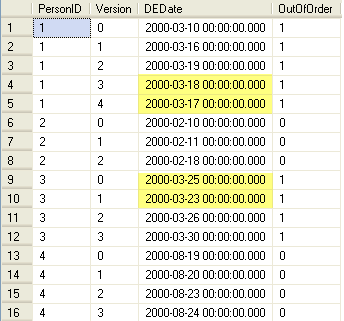
So, instead of using loops and cursors to determine if there is an issue it handles everything in a single query.
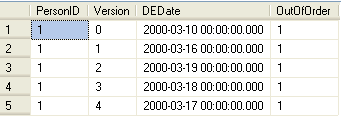
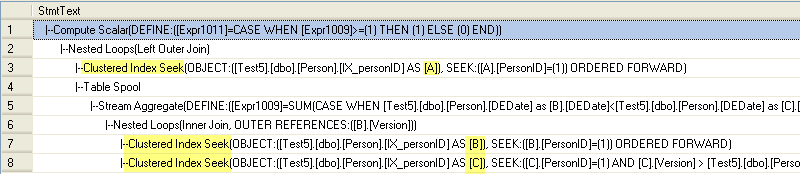
In this next example we are looking at just one record (PersonID =1) and we can also see the execution plan that is generated.
SELECT *,
     (SELECT
          CASE WHEN (SUM(CASE WHEN B.DEDate<C.DEDate THEN 0
               ELSE 1
               END))>=1 THEN 1
          ELSE 0
          END AS IsNotProper
     FROM Person2 B CROSS JOIN
          Person2 C
     WHERE B.PersonID=A.PersonID
          AND C.PersonID=A.PersonID
          AND B.Version<>C.Version
          AND B.Version<C.Version)
     AS [OutOfOrder]
FROM Person2 A
WHERE A.PersonID = 1
Query Output
Statistics I/O
Table 'Worktable'. Scan count 1, logical reads 0, physical reads 0, read-ahead reads 0, lob logical reads 0, lob physical reads 0, lob read-ahead reads 0.
Table 'Person'. Scan count 7, logical reads 14, physical reads 0, read-ahead reads 0, lob logical reads 0, lob physical reads 0, lob read-ahead reads 0.
Execution Plan
Next Steps
- In this article dates are compared, but the same process can be used if you have some other field that needs to be compared
- Even multiple comparisons can be made on many fields at the same time.
- You can even look at the performance impact by using a huge amount of data to see that this approach is still easier and faster than using loops and/or cursors.






About the author
 Divya Agrawal's bio is coming soon...
This author pledges the content of this article is based on professional experience and not AI generated.
View all my tips
