By: Thomas LaRock | Comments (1) | Related: More > Scripts
Problem
You have configured your database backup jobs without any problems. The backups themselves seem to be working, but are the files still where you think they are? How do you know they have not been moved, or worse, deleted to free up some space on your server? And when would you find out that the files were no longer there? If you are looking for the file to do a restore, and cannot find it, then it is too late. In this tip, I will show you a simple way to check through the backup history to find the last full backup for each database and also to check that the file still exists where it is supposed to exist.
Solution
The database backup file information is readily available inside the msdb database, making the solution as easy as a few lines of T-SQL. The code below will work for SQL2005/8 by going into the msdb database, extracting the file name, and using the undocumented system stored procedure xp_fileexist. Yes, I said undocumented, which means you need to use at your own risk as Microsoft does not support the undocumented stored procedures and they are subject to change. This system stored procedure is used in a lot of places, so don't be frightened by its undocumented nature.
The code will return the backup file details for each active database on the instance at the moment the code is executed. It will read some tables in the msdb database and return the filename for the last full backup of each database. It will then use xp_fileexist to determine if the file still exists where it was originally created. If it does not, then it will print out a brief error message that includes the name of the missing file and the database.
Returning the details
SET NOCOUNT ON

DECLARE @FileName VARCHAR(255)

DECLARE @File_Exists INT

DECLARE @DBname sysname


--get list of files to check

DECLARE FileNameCsr CURSOR

READ_ONLY

FOR
   SELECT physical_device_name, sd.name

   FROM msdb..backupmediafamily bmf

   INNER JOIN msdb..backupset bms ON bmf.media_set_id = bms.media_set_id

   INNER JOIN master..sysdatabases sd ON bms.database_name = sd.name

   AND bms.backup_start_date = (SELECT MAX(backup_start_date) FROM [msdb]..[backupset] b2

                                   WHERE bms.database_name = b2.database_name AND b2.type = 'D')

   WHERE sd.name NOT IN ('Pubs','tempdb','Northwind', 'Adventureworks')


BEGIN TRY

   OPEN FileNameCsr


   FETCH NEXT FROM FileNameCsr INTO @FileName, @DBname

   WHILE (@@fetch_status <> -1)

   BEGIN
       IF (@@fetch_status <> -2)

       BEGIN

           EXEC Master.dbo.xp_fileexist @FileName, @File_Exists OUT


           --if the file is not found, print out a message

           IF @File_Exists = 0 --0 means file is not found, 1 means it is found

               PRINT 'File Not Found: ' + @FileName + ' -- for database: ' + @DBName

       END


   FETCH NEXT FROM FileNameCsr INTO @FileName, @DBName

   END


END TRY


BEGIN CATCH

    SELECT

        ERROR_NUMBER() AS ErrorNumber

        ,ERROR_SEVERITY() AS ErrorSeverity

        ,ERROR_STATE() AS ErrorState

        ,ERROR_PROCEDURE() AS ErrorProcedure

        ,ERROR_LINE() AS ErrorLine

        ,ERROR_MESSAGE() AS ErrorMessage;

END CATCH


CLOSE FileNameCsr

DEALLOCATE FileNameCsr

GO
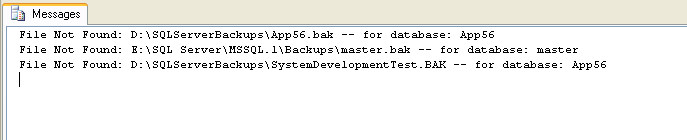
The script will not return a result set, it will only return a brief message regarding any files not found.
Here is a screenshot of a sample result set returned by the script.
Next Steps
- Take the above code and execute against your instance. You could also put this into a SQL Agent job and automate the task to alert you of missing files.
- The code as written only looks at missing full backups. You can extend this script to look for all backup types to make sure that all files for the entire backup set still exist.






About the author
 Thomas LaRock is a Head Geek at SolarWinds and a Microsoft Certified Master, Microsoft Data Platform MVP, VMware vExpert, and a former Microsoft Certified Trainer with over 20 years’ experience.
This author pledges the content of this article is based on professional experience and not AI generated.
View all my tips
