By: Dattatrey Sindol | Updated: 2021-04-21 | Comments (36) | Related: 1 | 2 | 3 | 4 | 5 | 6 | More > Scripts
Problem
I am a database tester and one of my tasks involves getting row counts from all the tables in the source database and comparing it against the corresponding table row counts in the target database. How do I get the row counts from all the tables in a SQL Server Database? What are the different approaches to get this information? Check out this tip to get these questions and more answered.
Solution
It is a common step in any ETL project to validate the row counts between source and target databases as part of the testing phase. Getting the row count from each table one by one and comparing and consolidating the results can be a tedious task. Hence any script/solution which can get the row count information from all the tables in a database can be really helpful and effective thereby considerably reducing the effort involved. In this tip we will see four different approaches to get the row counts from all the tables in a SQL Server database.
Let's take a look at each of the approaches:
- sys.partitions Catalog View
- sys.dm_db_partition_stats Dynamic Management View (DMV)
- sp_MSforeachtable System Stored Procedure
- COALESCE() Function
Approach 1: sys.partitions Catalog View
sys.partitions is an Object Catalog View and contains one row for each partition of each of the tables and most types of indexes (Except Fulltext, Spatial, and XML indexes). Every table in SQL Server contains at least one partition (default partition) even if the table is not explicitly partitioned.
The T-SQL query below uses the sys.partitions catalog view to capture the row counts for all tables in a database.
SELECT
      QUOTENAME(SCHEMA_NAME(sOBJ.schema_id)) + '.' + QUOTENAME(sOBJ.name) AS [TableName]
      , SUM(sPTN.Rows) AS [RowCount]
FROM
      sys.objects AS sOBJ
      INNER JOIN sys.partitions AS sPTN
            ON sOBJ.object_id = sPTN.object_id
WHERE
      sOBJ.type = 'U'
      AND sOBJ.is_ms_shipped = 0x0
      AND index_id < 2 -- 0:Heap, 1:Clustered
GROUP BY
      sOBJ.schema_id
      , sOBJ.name
ORDER BY [TableName]
GO
Below are the highlights of this approach:
- Requires membership in the public role.
- Can be used even when working with source systems which offer limited privileges such as read-only.
Approach 2: sys.dm_db_partition_stats Dynamic Management View (DMV)
sys.dm_db_partition_stats is a Dynamic Management View (DMV) which contains one row per partition and displays the information about the space used to store and manage different data allocation unit types - IN_ROW_DATA, LOB_DATA and ROW_OVERFLOW_DATA.
The T-SQL query below uses the sys.dm_db_partition_stats DMV to capture the row counts for all tables in a database.
SELECT
      QUOTENAME(SCHEMA_NAME(sOBJ.schema_id)) + '.' + QUOTENAME(sOBJ.name) AS [TableName]
      , SUM(sdmvPTNS.row_count) AS [RowCount]
FROM
      sys.objects AS sOBJ
      INNER JOIN sys.dm_db_partition_stats AS sdmvPTNS
            ON sOBJ.object_id = sdmvPTNS.object_id
WHERE
      sOBJ.type = 'U'
      AND sOBJ.is_ms_shipped = 0x0
      AND sdmvPTNS.index_id < 2
GROUP BY
      sOBJ.schema_id
      , sOBJ.name
ORDER BY [TableName]
GO
Below are the highlights of this approach:
- VIEW DATABASE STATE permissions are required in the database.
- The values in the sys.dm_db_partition_stats DMV are reset on server restart or when an object/partition is dropped and recreated.
In general, querying the Dynamic Management Views (DMVs), requires VIEW SERVER STATE or VIEW DATABASE STATE permissions based on the Dynamic Management View/Function which is being queried.
Approach 3: sp_MSforeachtable System Stored Procedure
sp_MSforeachtable is an undocumented system stored procedure which can be used to iterate through each of the tables in a database. In this approach we will get the row counts from each of the tables in a given database in an iterative fashion and display the record counts for all the tables at once.
The T-SQL query below uses the sp_MSforeachtable system stored procedure to iterate through each of the tables to capture the row count for all the tables in a database.
DECLARE @TableRowCounts TABLE ([TableName] VARCHAR(128), [RowCount] INT) ;
INSERT INTO @TableRowCounts ([TableName], [RowCount])
EXEC sp_MSforeachtable 'SELECT ''?'' [TableName], COUNT(*) [RowCount] FROM ?' ;
SELECT [TableName], [RowCount]
FROM @TableRowCounts
ORDER BY [TableName]
GO
Below are the highlights of this approach:
- This is an iterative approach which captures the row count for each of the individual tables, puts them together and displays the results for all the tables.
- sp_MSforeachtable is an undocumented system stored procedure.
- This approach can be used for testing purposes but it is not recommended for use in any production code. sp_MSforeachtable is an undocumented system stored procedure and may change anytime without prior notification from Microsoft.
Approach 4: COALESCE() Function
The COALESCE() function is used to return the first non-NULL value/expression among its arguments. In this approach we will build a query to get the row count from each of the individual tables with UNION ALL to combine the results and run the entire query.
The T-SQL query below uses the COALESCE() function to iterate through each of the tables to dynamically build a query to capture the row count from each of the tables (individual COUNT queries combined using UNION ALL) and provides the row counts for all the tables in a database.
DECLARE @QueryString NVARCHAR(MAX) ;
SELECT @QueryString = COALESCE(@QueryString + ' UNION ALL ','')
                      + 'SELECT '
                      + '''' + QUOTENAME(SCHEMA_NAME(sOBJ.schema_id))
                      + '.' + QUOTENAME(sOBJ.name) + '''' + ' AS [TableName]
                      , COUNT(*) AS [RowCount] FROM '
                      + QUOTENAME(SCHEMA_NAME(sOBJ.schema_id))
                      + '.' + QUOTENAME(sOBJ.name) + ' WITH (NOLOCK) '
FROM sys.objects AS sOBJ
WHERE
      sOBJ.type = 'U'
      AND sOBJ.is_ms_shipped = 0x0
ORDER BY SCHEMA_NAME(sOBJ.schema_id), sOBJ.name ;
EXEC sp_executesql @QueryString
GO
Below are the highlights of this approach:
- Can be used in cases where the number of tables is huge like say few hundred tables. This query can be modified to capture the row counts from a set of tables at one time instead of all the tables which might otherwise put a lot of load on the system.
- Can be used even when working with source systems which offer limited privileges such as read-only.
Sample Output
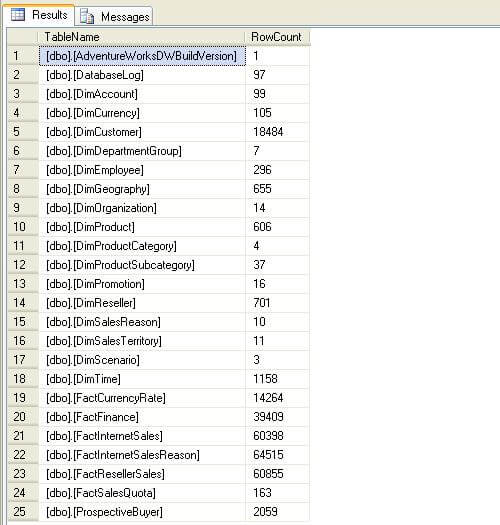
Below is sample output from AdventureWorksDW database. Note - the results in your AdventureWorksDW database might vary slightly from what is displayed below due to various reasons like the version of database being used, any changes/data manipulation done on the database for testing purposes, etc.
Next Steps
- Review the scripts/approaches in this tips to see which approach suits the best for your scenario.
- Check out these additional resources:






About the author
 Dattatrey Sindol has 8+ years of experience working with SQL Server BI, Power BI, Microsoft Azure, Azure HDInsight and more.
This author pledges the content of this article is based on professional experience and not AI generated.
View all my tips
Article Last Updated: 2021-04-21
