By: Ashish Kumar Mehta | Comments (3) | Related: 1 | 2 | 3 | 4 | 5 | 6 | > Functions System
Problem
SQL Server 2012, has new String functions such as FORMAT and CONCAT that can be used to perform an operation on a string input value and return a string or numeric value. In this tip we take a look at some basic examples of how this could be used.
Solution
In this tip we will discuss how to utilize the below mentioned new String functions available in SQL Server 2012.
1. FORMAT Function
2. CONCAT Function
Using FORMAT Function
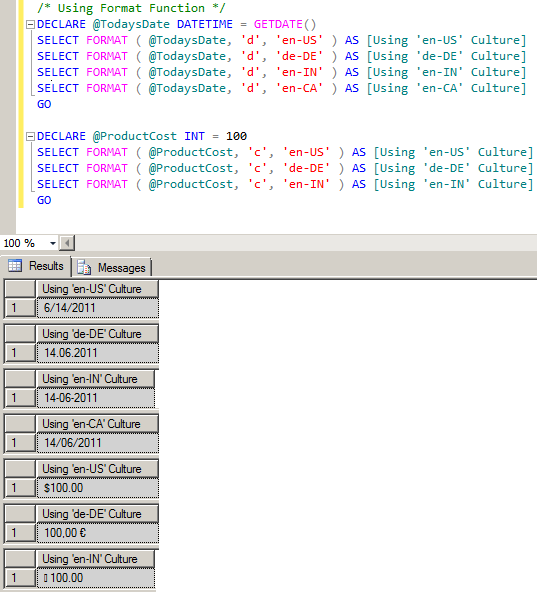
The FORMAT function, which is available in SQL Server 2012, returns a returns a value formatted with the specified format and optional culture as shown in the below query result.
--SYNTAX: - FORMAT (value, format [, culture])

/* Using Format Function */
DECLARE @TodaysDate DATETIME = GETDATE()
SELECT FORMAT ( @TodaysDate, 'd', 'en-US' ) AS [Using 'en-US' Culture]
SELECT FORMAT ( @TodaysDate, 'd', 'de-DE' ) AS [Using 'de-DE' Culture]
SELECT FORMAT ( @TodaysDate, 'd', 'en-IN' ) AS [Using 'en-IN' Culture]
SELECT FORMAT ( @TodaysDate, 'd', 'en-CA' ) AS [Using 'en-CA' Culture]
GO
DECLARE @ProductCost INT = 100
SELECT FORMAT ( @ProductCost, 'c', 'en-US' ) AS [Using 'en-US' Culture]
SELECT FORMAT ( @ProductCost, 'c', 'de-DE' ) AS [Using 'de-DE' Culture]
SELECT FORMAT ( @ProductCost, 'c', 'en-IN' ) AS [Using 'en-IN' Culture]
GO
Using CONCAT Function
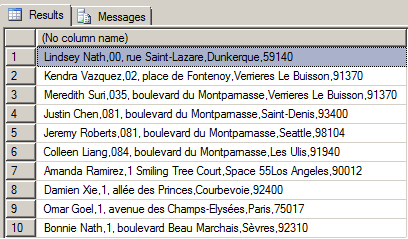
The CONCAT function, which is available in SQL Server 2012, returns a string that is the result of concatenating two or more string values as shown in the below query result. The CONCAT function implicitly coverts all arguments to string types and then concatenate the inputs. The CONCAT function requires a minimum of two input values else the concatenation fails.
--SYNTAX: - CONCAT (string_value1, string_value2 [,string_valueN])
/* Using CONCAT Function */
Use AdventureWorks2008R2
GO
SELECT
 TOP 10
 CONCAT( PP.FirstName ,' ',
  PP.LastName ,',',
  PA.AddressLine1 ,',',
  PA.AddressLine2 ,'',
  PA.City ,',',
  PA.PostalCode)
FROM Person.Address PA
 INNER JOIN Person.BusinessEntityAddress PBEA
  ON PA.AddressID = PBEA.AddressID
 INNER JOIN Person.Person PP
  ON PBEA.BusinessEntityID = PP.BusinessEntityID
GO
Developers can also use the CONCAT function with a PRINT statement an example is shown below.
SET NOCOUNT ON
SELECT CONCAT('MSSQLTips published this tip on ', GETDATE())
GO
PRINT CONCAT('MSSQLTips published this tip on ', GETDATE())
GO
SET NOCOUNT OFF
Results --------------------------------------------------- MSSQLTips published this tip on Jan 21 2011 12:00AM MSSQLTips published this tip on Jan 21 2011 12:00AM
Next Steps
- Stay tuned for more tips on SQL Server 2012 and check out these related tips:






About the author
 Ashish Kumar Mehta has been contributing to the MSSQLTips.com community since 2009 with over 60 tips.
This author pledges the content of this article is based on professional experience and not AI generated.
View all my tips
