By: Sherlee Dizon | Comments (17) | Related: 1 | 2 | 3 | 4 | 5 | 6 | > Functions System
Problem
In this article I would like to share some tips on using concatenation efficiently for application development. Here I would like to point out some things that we must consider and look at when concatenating values or fields in our queries or stored procedures. Check out this tip to learn more.
Solution
String concatenation is appending one string to the end of another string. The SQL language allows us to concatenate strings, but the syntax varies according to which database system we are using. Concatenation can be used to join strings from different sources including column values, literal strings, output from user defined functions, scalar sub queries, etc. Let's jump into how to concatenate strings.
How Does SQL Server Concatenate Strings?
From SQL Server 2008 R2 version and below the "+" (plus sign) is an operator used in a string expression that concatenates two or more character or binary strings, columns, or a combination of strings and column names into one expression or into another column.
From SQL Server 2008, 2008 R2 and 2012 versions "+=" (add equals sign) is another string concatenation operator, which can be used to concatenate two strings and sets the string to the result of the operation. This operator cannot be used without a variable otherwise the query execution fails.
Now SQL Server 2012 and later brings us CONCAT() which is a new function for concatenation. It returns a string that is the result of concatenating two or more string values. The new function implicitly converts all arguments to string types and then concatenates the inputs. It requires a minimum of two input values or the concatenation fails.
SQL Server Database Design Considerations
One of the principles of relational database design is that the fields of the data tables should reflect a single characteristic of the table's subject, which means that they should not contain concatenated strings. For example, to display the physical address of a certain employee, the data might include building subunit number, building name, street name, city name, province name, postal code, and country name, e.g., "Unit 2307 ABC Tower Salcedo St. Makati City, 1402, Philippines", which combines 7 fields.
However, the employees data table should not use one field to store that concatenated string; rather, the concatenation of the 7 fields should happen upon running the report or the application. The reason for such principles is that without them, the entry and updating of large volumes of data becomes error-prone and labor-intensive. Separately entering the city, ZIP code, and nation allows data-entry validation (such as detecting an invalid zip code). Then those separate items can be used for sorting or indexing the records, such as all with "Makati" as the city name.
Uses of String Concatenation in SQL Server
Concatenation can deliver result in a more readable format while maintaining data in separate columns for greater flexibility. Below are some uses of string concatenation in SQL Server:
- To join strings from different sources including column values, literal strings, output from user defined functions or scalar sub queries.
- For creating a comma separated file (.csv file) or a text file (.txt file).
- For combining multiple column values into single column that can be separated by a comma, a single space or by another separator.
- For combining numeric, date and varchar data types into a single column or any combination.
- When we need to combine multiple string values into one long string where a comma, period or special character is added.
- To concatenate multiple rows into a single string or column.
Considerations for using String Concatenation in a Query
1. Know where the query result set will be used.
- When concatenation is desired in a report, it should be provided at the time of running the report.
- When concatenation is desired for displaying a list of data on a web page or in an application (Windows form), it should be created at the code behind or in a class.
- If the query result set will be used for generating reports using a reporting tool it is best to do the string concatenation using the reporting tool.
- If the query result set will be used for displaying list of data for a web page or a particular application, concatenating column values or expressions from multiple rows are usually best done in a client side of the application language. However, you can do these using different approaches in Transact SQL, but avoiding such methods for long term solutions many be your best bet.
2. Know who will use or who will need the query result set.
- If the user who will use the query result set is not familiar with the reporting tool or any application language, it is generally best to perform the concatenation or data formatting for them.
3. Know how large the strings to be concatenated are.
- We must determine the maximum characters of the string we are going to concatenate. There's a limitation in concatenating strings with particular data types.
4. Know how big the data you need to query and to display is.
- You must weigh the cost of the extra data returned versus the cost of processing the data. Also keep in mind the maintenance implications both in SQL Server and in the front end application.
5. Know if the data you need can be a null value.
- Always check on null values when concatenating multiple fields or values in your query to prevent incorrect output especially if you are not yet using MSSQL 2012. Make your query as flexible as possible because we may never know when our client or user will change its report requirements.
Sample Usage of SQL Concatenation in Multiple Database Platforms
Concatenation varies by database type and version. Check out these examples to see code in action.
Database: Microsoft Access
Microsoft Access uses the "+" plus operator to perform concatenation. The example below appends the value in the FirstName column with a blank space i.e. ' ' and then appends the value from the LastName column. The resulting string is given an Alias of FullName so we can easily identify it in our result set.
SELECT FirstName + ' ' + LastName As FullName FROM Employees
Database: Oracle
Oracle uses the CONCAT(string1, string2) function or the || operator. The Oracle CONCAT function can only take two strings so the above example would not be possible as there are three strings to be joined (FirstName, ' ' and LastName). To achieve this in Oracle we would need to use the || operator which is equivalent to the + string concatenation operator in SQL Server and Access.
SELECT FirstName || ' ' || LastName As FullName FROM Employees
Database: MySQL
MySQL uses the CONCAT(string1, string2, string3...) function. The above example would appear as follows in MySQL.
SELECT CONCAT(FirstName, ' ', LastName) As FullName FROM Employees
Database: SQL Server using the "+" (plus sign) syntax - Concatenating characters
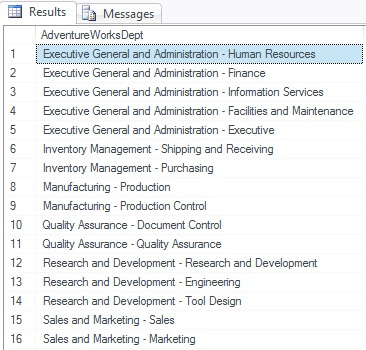
In this example I will concatenate 2 columns which are both using string characters with data type of nvarchar into one column.
USE AdventureWorks;
SELECT GroupName + ' - ' + Name as AdventureWorksDept
FROM [HumanResources].[Department]
ORDER BY GroupName
Here's the result set.
Database: SQL Server using the "+" (plus sign) syntax - Concatenating characters and numbers
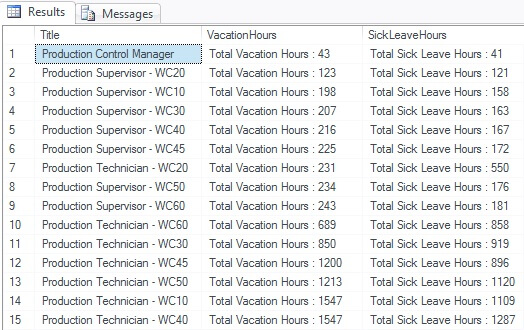
In concatenating numbers we need to convert them into string. We can use CAST() or CONVERT() function to do that. In this example, I will calculate the sum of all vacation and sick leave hours per production department then concatenate a string to the total hours.
USE AdventureWorks;
SELECT [Title],
   'Total Vacation Hours : ' + CONVERT(varchar(5),SUM([VacationHours])) AS VacationHours,
   'Total Sick Leave Hours : ' + CONVERT(varchar(5),SUM([SickLeaveHours])) AS SickLeaveHour
FROM [AdventureWorks].[HumanResources].[Employee]
WHERE TITLE LIKE 'Production%'
GROUP BY [Title]
ORDER BY SUM([VacationHours]),SUM([SickLeaveHours])
Here's the result set.
Database: SQL Server using the "+" (plus sign) syntax - Concatenating numbers and dates
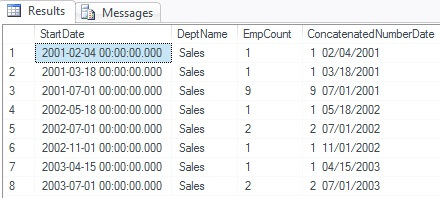
Just like in concatenating numbers we need to convert dates into string as well. We can use CAST() or CONVERT() function too.
USE AdventureWorks;
SELECT empDeptHist.[StartDate],HRDept.[Name] as DeptName,
   CONVERT(varchar(5),COUNT(empDeptHist.[EmployeeID])) AS EmpCount,
   CONVERT(varchar(5),COUNT(empDeptHist.[EmployeeID])) + '  ' +
   CONVERT(varchar(12), empDeptHist.[StartDate], 101) as ConcatenatedNumberDate
FROM [HumanResources].[EmployeeDepartmentHistory] empDeptHist
LEFT OUTER JOIN [HumanResources].[Department] HRDept
  ON empDeptHist.[DepartmentID] = HRDept.[DepartmentID]
WHERE HRDept.[Name] = 'Sales'
GROUP BY empDeptHist.[StartDate],HRDept.[Name]
Here's the result set.
Database: SQL Server using the "+" (plus sign) syntax - Concatenating characters and dates
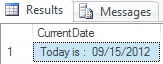
Here's the easiest way to concatenate string and a date.
SELECT 'Today is :' + SPACE(5) + CONVERT(varchar(12), GETDATE(), 101) AS CurrentDate
Here's the result set.
Database: SQL Server using the "+" (plus sign) syntax - Concatenating with multiple values
Now let's try to concatenate different data types into one column.
USE AdventureWorks;
SELECT  empDeptHist.[StartDate],HRDept.[Name] as DeptName,
   CONVERT(varchar(5),COUNT(empDeptHist.[EmployeeID])) AS EmpCount,
   HRDept.[Name] + ' with  ' + CONVERT(varchar(5),COUNT(empDeptHist.[EmployeeID])) +
   ' employee hired for  ' +  CONVERT(varchar(12), empDeptHist.[StartDate], 101) as ConcatenatedValues
FROM [HumanResources].[EmployeeDepartmentHistory] empDeptHist
LEFT OUTER JOIN [HumanResources].[Department] HRDept
  ON empDeptHist.[DepartmentID] = HRDept.[DepartmentID]
WHERE HRDept.[Name] like 'Shipping%'
GROUP BY empDeptHist.[StartDate],HRDept.[Name]
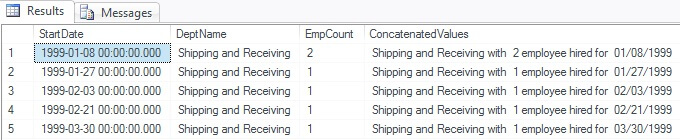
Here's the result set.
Database: SQL Server using the "+" (plus sign) syntax - Concatenating with NULL values
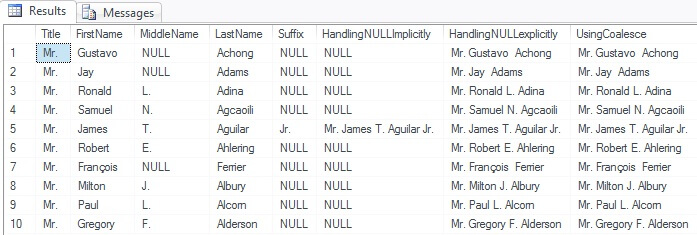
In this example I will show how to handle the NULL values IMPLICITY and EXPLICITLY. We can handle null values explicitly by using ISNULL() or the COALESCE() function.
USE AdventureWorks;
SELECT TOP 10 [Title],[FirstName],[MiddleName],[LastName],[Suffix]
   ,[Title]+' '+[FirstName]+' '+[MiddleName]+' '+[LastName]+' '+[Suffix] as HandlingNULLImplicitly
   ,ISNULL([Title],'') + ' ' + ISNULL([FirstName],'') + ' ' + ISNULL([MiddleName],'')
   + ' ' + ISNULL([LastName],'') + ' ' + ISNULL([Suffix],'') as HandlingNULLexplicitly
   ,COALESCE([Title],'') + ' ' + COALESCE([FirstName],'') + ' ' + COALESCE([MiddleName],'')
   + ' ' + COALESCE([LastName],'') + ' ' + COALESCE([Suffix],'') as UsingCoalesce
FROM [AdventureWorks].[Person].[Contact]
WHERE [Title]='Mr.'
Here's the result set.
Database: SQL Server using the "+" (plus sign) syntax - Concatenating GUIDs
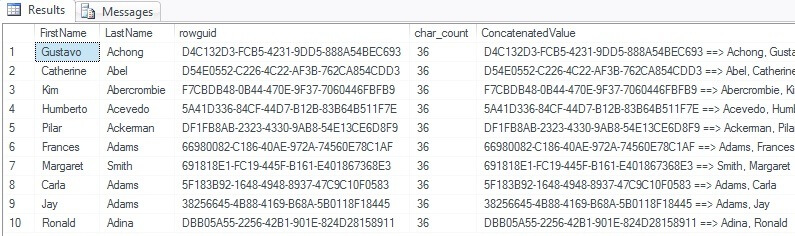
In this example I will try to concatenate rowguid which has a unique identifier data type.
USE AdventureWorks;
SELECT TOP 10 [FirstName], [LastName], [rowguid], len([rowguid]) as char_count
   ,CAST([rowguid] as varchar(36)) + ' ==> ' + [LastName] +  ', '+ [FirstName] as ConcatenatedValue
FROM [AdventureWorks].[Person].[Contact]
Here's the result set.
Database: SQL Server using the "+" (plus sign) syntax - Concatenating rows of values into a single column
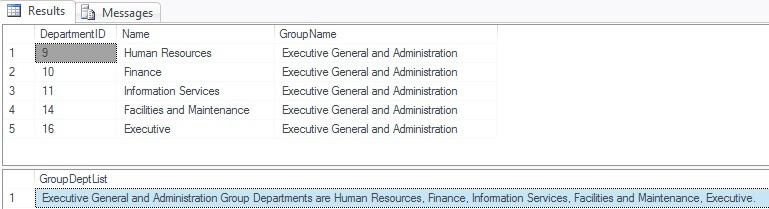
In this example I will show how to concatenate the list of department of a specific group separated by a comma into one column only.
USE AdventureWorks;
SELECT [DepartmentID],[Name],[GroupName]
FROM [AdventureWorks].[HumanResources].[Department]
WHERE [GroupName]= 'Executive General and Administration'

DECLARE @GroupDept VARCHAR(8000)
SELECT  @GroupDept = COALESCE(@GroupDept + ', ', '') + Name
FROM [AdventureWorks].[HumanResources].[Department]
WHERE [GroupName]= 'Executive General and Administration'

SELECT 'Executive General and Administration Group Departments are ' + @GroupDept + '.'  AS GroupDeptList
Here's the result set. To check if the concatenated values are correct I've included the list of department name for the selected group name.
Database: SQL Server using the "+" (plus sign) syntax - Concatenating rows with FOR XML PATH
In this example I will summarize data into groups or list of values in two ways by using correlated sub query or by using CROSS APPLY.
USE AdventureWorks;
-- Using correlated subquery
SELECT G.GroupName,
  STUFF( (SELECT ', ' + DN.Name
    FROM HumanResources.Department AS DN
    WHERE DN.GroupName = G.GroupName
    ORDER BY G.GroupName
    FOR XML PATH('') ), 1, 1, '') AS dept_list
FROM HumanResources.Department AS G
GROUP BY GroupName

-- Using CROSS APPLY
SELECT G.GroupName, STUFF(P.dept_list, 1, 1, '') AS dept_list
FROM HumanResources.Department AS G
CROSS APPLY (SELECT ', ' + DN.Name
   FROM HumanResources.Department AS DN
   WHERE DN.GroupName = G.GroupName
   ORDER BY G.GroupName
   FOR XML PATH('') ) AS P (dept_list)
GROUP BY GroupName,P.dept_list
Here's the result set. This approach can be use in some reporting purposes to summarize normalized tables into groups or list of values. There are also some reporting and client side tools that support this directly. This method is often called the XML black box method. The PATH clause is used with the input string that indicates the name of the wrapper element that will be created. When the PATH clause is used with an empty string it is used as an input it results in skipping the wrapper element generation.
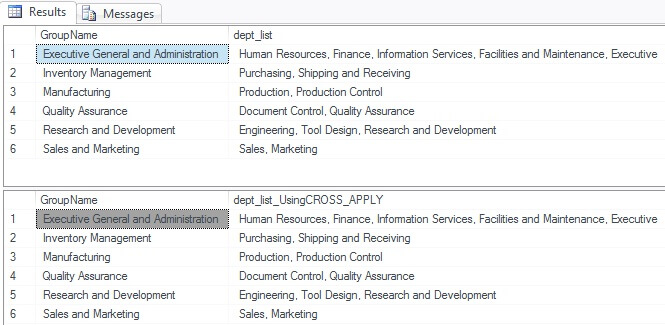
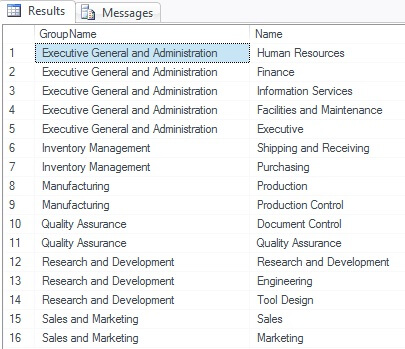
Here's the query to validate the data is correct.
USE AdventureWorks;
SELECT GroupName, Name FROM HumanResources.Department
ORDER BY GroupName
Database: SQL Server 2012 and later using the CONCAT() function - Concatenating characters
In this example I will concatenate 2 columns which are both nvarchar data types into one column, but this time by using the new CONCAT function in SQL Server 2012.
USE AdventureWorks;
SELECT CONCAT([GroupName] , ' - ' , [Name]) as AdventureWorksDept2012
FROM [HumanResources].[Department]
ORDER BY [GroupName]
Here's the result set.
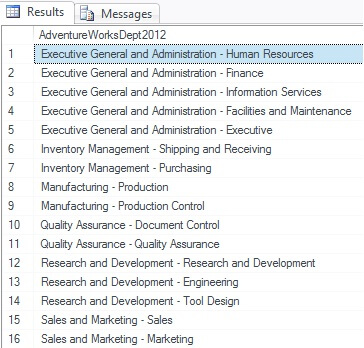
Keep in mind even though we are currently using Microsoft SQL Server 2012 we can still use the previous syntax which is "+" (plus sign). It will produce the same results. There's nothing to worry about if you have to use or migrate your previous stored procedure created with the previous syntax.
Database: SQL Server 2012 and later using the CONCAT() function - Concatenating characters and numbers
USE AdventureWorks;
SELECT [Title], CONCAT('Total Vacation Hours : ', SUM([VacationHours])) AS VacationHours
   ,CONCAT('Total Sick Leave Hours : ', SUM([SickLeaveHours])) AS SickLeaveHour
FROM [AdventureWorks].[HumanResources].[Employee]
WHERE TITLE LIKE 'Production%'
GROUP BY [Title]
ORDER BY SUM([VacationHours]),SUM([SickLeaveHours])
Here's the result set.
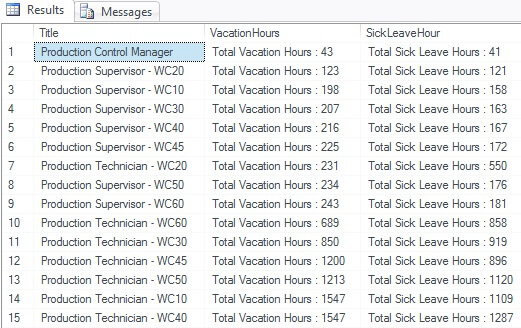
Database: SQL Server 2012 and later using the CONCAT() function - Concatenating numbers and dates
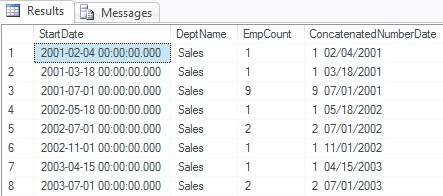
Here's how easy it is to concatenate numbers and dates in SQL Server 2012. For this example I try to concatenate the total count of employee hired per department based on their start date.
USE AdventureWorks;
SELECT  empDeptHist.[StartDate],HRDept.[Name] as DeptName,
   CONVERT(varchar(5),COUNT(empDeptHist.[EmployeeID])) AS EmpCount,
   CONCAT(COUNT(empDeptHist.[EmployeeID]) , '  ',
   CONVERT(varchar(12), empDeptHist.[StartDate], 101)) as ConcatenatedNumberDate
FROM [HumanResources].[EmployeeDepartmentHistory] empDeptHist
LEFT OUTER JOIN [HumanResources].[Department] HRDept
  ON empDeptHist.[DepartmentID] = HRDept.[DepartmentID]
WHERE HRDept.[Name] = 'Sales'
GROUP BY empDeptHist.[StartDate],HRDept.[Name]
Here's the result set.
Database: SQL Server 2012 and later using the CONCAT() function - Concatenating characters and dates
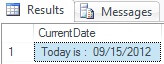
For this example I will concatenate a string to the current date and display it in one column.
SELECT CONCAT('Today is :', SPACE(5), CONVERT(varchar(12), GETDATE(), 101)) AS CurrentDate
Here's the result set.
Database: SQL Server 2012 and later using the CONCAT() function - Concatenating multiple data types
USE AdventureWorks;
SELECT  empDeptHist.[StartDate],HRDept.[Name] as DeptName,
   CONVERT(varchar(5),COUNT(empDeptHist.[EmployeeID])) AS EmpCount,
   CONCAT(HRDept.[Name] , ' with  ', COUNT(empDeptHist.[EmployeeID]) ,
   ' employee hired for  ',  CONVERT(varchar(12), empDeptHist.[StartDate], 101)) as ConcatenatedValues
FROM [HumanResources].[EmployeeDepartmentHistory] empDeptHist
LEFT OUTER JOIN [HumanResources].[Department] HRDept
  ON empDeptHist.[DepartmentID] = HRDept.[DepartmentID]
WHERE HRDept.[Name] like 'Shipping%'
GROUP BY empDeptHist.[StartDate],HRDept.[Name]
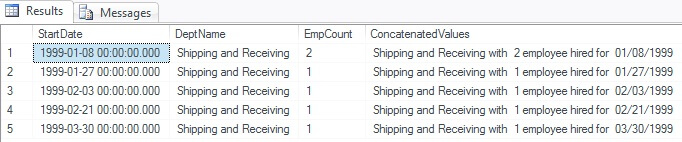
Here's the result set.
Database: SQL Server 2012 and later using the CONCAT() function - Concatenating NULL values
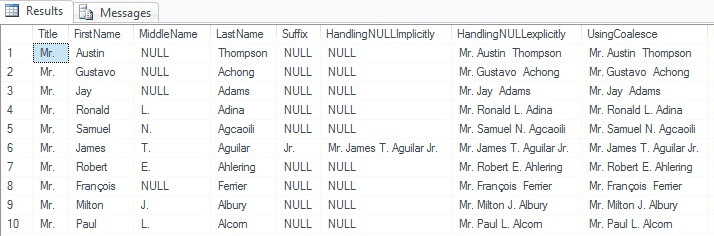
In this example I will show that the "+" plus sign still works in 2012 and how it differs to the new CONCAT() function.
USE AdventureWorks;
SELECT TOP 10 [Title],[FirstName],[MiddleName],[LastName],[Suffix]
   ,[Title]+' '+[FirstName]+' '+[MiddleName]+' '+[LastName]+' '+[Suffix] as HandlingNULLImplicitly
   ,ISNULL([Title],'') + ' ' + ISNULL([FirstName],'') + ' ' + ISNULL([MiddleName],'') + ' '
   + ISNULL([LastName],'') + ' ' + ISNULL([Suffix],'') as HandlingNULLexplicitly
   ,COALESCE([Title],'') + ' ' + COALESCE([FirstName],'') + ' ' + COALESCE([MiddleName],'') + ' '
   + COALESCE([LastName],'') + ' ' + COALESCE([Suffix],'') as UsingCoalesce
   ,CONCAT([Title] , ' ' + [FirstName] , ' ' , [MiddleName] , ' ' , [LastName] , ' ' , [Suffix]) as UsingCONCAT
FROM [AdventureWorks].[Person].[Contact]
WHERE [Title]='Mr.'
Here's the result set. From the result set below notice that CONCAT function implicitly coverts all arguments to string types and then concatenate the inputs. The CONCAT function only requires a minimum of two input values else the concatenation fails.
Database: SQL Server 2012 and later using the CONCAT() function - Concatenating GUIDS
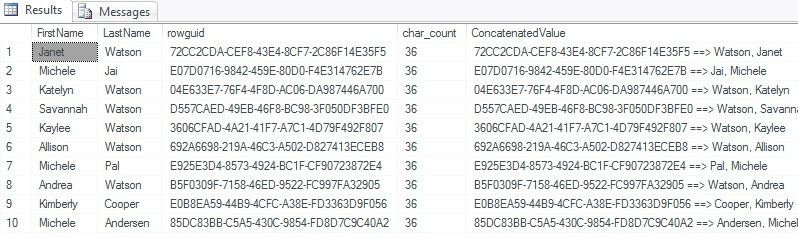
In this example I will try to concatenate rowguid which has a unique identifier data type using the new function and the previous syntax for concatenation to be able to see their difference.
USE AdventureWorks;
SELECT TOP 10 [FirstName], [LastName], [rowguid], len([rowguid]) as char_count
   ,CAST([rowguid] as varchar(36)) + ' ==> ' + [LastName] +  ', '+ [FirstName]   as ConcatenatedValue
   ,CONCAT([rowguid] , ' ==> ' , [LastName] ,  ', '+ [FirstName])   as UsingCONCAT
FROM [AdventureWorks].[Person].[Contact]
Here's the result set.
Database: SQL Server 2012 and later using the CONCAT() function - Concatenating rows of values into a single column
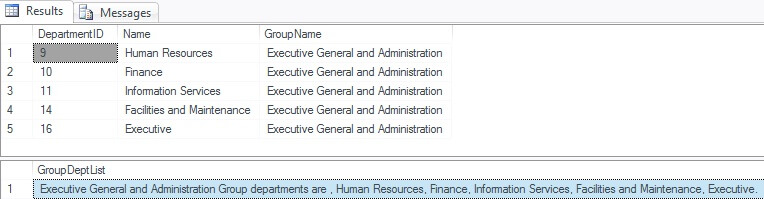
In this example I will show how to concatenate the list of department of a specific group separated by a comma into one column only.
USE AdventureWorks;
SELECT [DepartmentID],[Name],[GroupName]
FROM [AdventureWorks].[HumanResources].[Department]
WHERE [GroupName]= 'Executive General and Administration'

DECLARE @GroupDept VARCHAR(8000)
SELECT  @GroupDept = CONCAT(@GroupDept,', ', Name )
FROM [AdventureWorks].[HumanResources].[Department]
WHERE [GroupName]= 'Executive General and Administration'

SELECT CONCAT('Executive General and Administration Group departments are ', @GroupDept , '.')  AS GroupDeptList
Here's the result set. To check if the concatenated values are correct I've included the list of department names for the selected group name.
Database: SQL Server 2012 and later using the CONCAT() function - Concatenating rows with FOR XML PATH
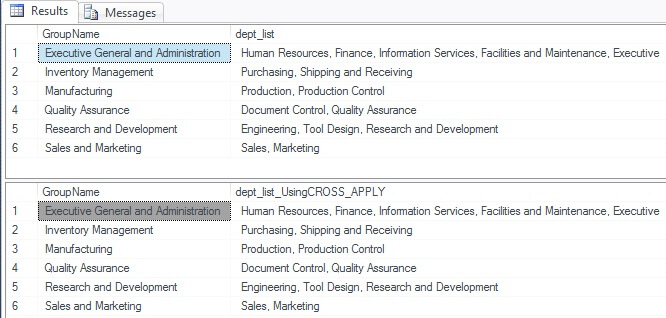
In this example I will summarize data into groups or list of values in two ways by using correlated sub query or by using CROSS APPLY.
USE AdventureWorks;
-- Using correlated subquery
SELECT G.GroupName,
  STUFF( (SELECT CONCAT(', ' , DN.Name)
    FROM HumanResources.Department AS DN
    WHERE DN.GroupName = G.GroupName
    ORDER BY G.GroupName
    FOR XML PATH('') ), 1, 1, '') AS dept_list
FROM HumanResources.Department AS G
GROUP BY GroupName

-- Using CROSS APPLY
SELECT G.GroupName, STUFF(P.dept_list, 1, 1, '') AS dept_list_UsingCROSS_APPLY
FROM HumanResources.Department AS G
CROSS APPLY (SELECT CONCAT(', ' , DN.Name)
   FROM HumanResources.Department AS DN
   WHERE DN.GroupName = G.GroupName
   ORDER BY G.GroupName
   FOR XML PATH('') ) AS P (dept_list)
GROUP BY GroupName,P.dept_list
Here's the result set. This approach can be use in some reporting purposes to summarize normalized tables into groups or list of values. There are also some reporting and client side tools that support this directly. This method is often called the XML black box method. The PATH clause is used with input string that indicates the name of the wrapper element that will be created. When PATH clause with an empty string is used as an input it results in skipping the wrapper element generation.
Here's the query to check the data.
USE AdventureWorks;
SELECT GroupName, Name
FROM HumanResources.Department
ORDER BY GroupName
Conclusion
It is not enough that we know how to concatenate strings or values. We must also know where and when to use it. Also always take into consideration the end-user who will use the output. Various programming considerations are to be carefully considered to choose one method over another depending on the situations. Always check and remember the limitations of each approach. One of the most logical choices would be the availability of a built-in operator with optional configurable parameters that can perform the concatenation of the values depending on the data type.
Next Steps
- To learn more read and explore the following resources:






About the author
 Sherlee Dizon is an IT consultant and web application developer with over 14 years of experience as a software and web developer.
This author pledges the content of this article is based on professional experience and not AI generated.
View all my tips
