Problem
One issue with creating backups is that the LSNs (log sequence numbers) get stored in the backup files and these LSNs are referenced when you do a restore of your database. The reason the LSNs are stored with the backup file is to verify that the backup files are being restored in the proper sequence when you go to do your restores. So if you try to restore your database files out of sequence you will get an error message from SQL Server such as the following:
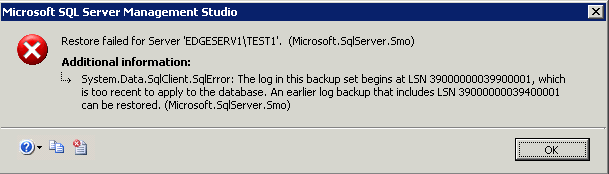
The problem with having the LSNs stored with the backup file is that you can not do off schedule backups without affecting the LSNs of your regularly scheduled backups.
Here is a scenario:
You normally run a full backup at midnight, transaction logs throughout the day and differentials every 3 hours. Then you need to run a special full backup to load your test server. If you then need to restore your production server you will need to use this most recent full backup, any differentials done after that and then any transaction log backups that were done after the differential. Another approach to restore your database would be to restore your original backup and then just use only the transaction log backups, since the full backup does not affect the LSNs in the transaction log backup this will also work, but you loose the advantage of doing differential backups.
Solution
Starting with SQL Server 2005, a new backup option has been added that allows you to take full and transaction log backups in between your regularly scheduled backups without affecting the LSNs and therefore the sequence of files that would need to be restored. Since Differential backups backup all data pages since the last full backup, these types of backups do not affect the LSNs and there is no difference when using the COPY_ONLY feature.
This new option is called COPY_ONLY. To use this option you would write your backup command as follows:
BACKUP LOG AdventureWorks TO DISK='C:\AdventureWorks_log1.TRN' WITH COPY_ONLY
Now when we go to do a restore using the most recent full backup file along with all of the transaction logs except this COPY_ONLY version, the restore still works as planned.
Full and Transaction Log Backups
Here is a simple way of testing this out with just full and transaction log backups. You can run the following backup commands and then the restore commands
-- step 1
USE master
GO
BACKUP DATABASE AdventureWorks TO DISK='c:\AdventureWorks_full.BAK' WITH INIT
BACKUP LOG AdventureWorks TO DISK='c:\AdventureWorks_log1.TRN' WITH INIT
BACKUP LOG AdventureWorks TO DISK='c:\AdventureWorks_log2.TRN' WITH INIT
--step 2
RESTORE DATABASE AdventureWorks FROM DISK='C:\AdventureWorks_full.BAK' WITH NORECOVERY, REPLACE
--RESTORE LOG AdventureWorks FROM DISK='C:\AdventureWorks_log1.TRN' WITH NORECOVERY
RESTORE LOG AdventureWorks FROM DISK='C:\AdventureWorks_log2.TRN' WITH RECOVERY
At this point your restore will fail and the database will be in a LOADING mode.
To test the same process out, but this time using the COPY_ONLY option, you can run the commands below.
-- step 1
USE master
GO
BACKUP DATABASE AdventureWorks TO DISK='c:\AdventureWorks_full.BAK' WITH INIT
BACKUP LOG AdventureWorks TO DISK='c:\AdventureWorks_log1.TRN' WITH INIT, COPY_ONLY
BACKUP LOG AdventureWorks TO DISK='c:\AdventureWorks_log2.TRN' WITH INIT

--step 2
RESTORE DATABASE AdventureWorks FROM DISK='C:\AdventureWorks_full.BAK' WITH NORECOVERY, REPLACE
--RESTORE LOG AdventureWorks FROM DISK='C:\AdventureWorks_log1.TRN'
RESTORE LOG AdventureWorks FROM DISK='C:\AdventureWorks_log2.TRN' WITH RECOVERY
As you can see the restore process worked this time even though we had a backup that was not used for the restore process.
Full, Differential and Transaction Log Backups
Here is another way of testing full, differential and transaction log backups.
--step 1
USE master
GO
BACKUP DATABASE AdventureWorks TO DISK='c:\AdventureWorks_full.BAK' WITH INIT
BACKUP LOG AdventureWorks TO DISK='c:\AdventureWorks_log1.TRN' WITH INIT
BACKUP DATABASE AdventureWorks TO DISK='c:\AdventureWorks_diff.BAK' WITH INIT, DIFFERENTIAL
BACKUP LOG AdventureWorks TO DISK='c:\AdventureWorks_log2.TRN' WITH INIT
--run special full backup
BACKUP DATABASE AdventureWorks TO DISK='c:\AdventureWorks_full2.BAK' WITH INIT
--resume normal backup process
BACKUP DATABASE AdventureWorks TO DISK='c:\AdventureWorks_diff2.BAK' WITH INIT, DIFFERENTIAL
BACKUP LOG AdventureWorks TO DISK='c:\AdventureWorks_log3.TRN' WITH INIT
--step 2
RESTORE DATABASE AdventureWorks FROM DISK='C:\AdventureWorks_full.BAK' WITH NORECOVERY, REPLACE
RESTORE DATABASE AdventureWorks FROM DISK='C:\AdventureWorks_diff2.BAK' WITH NORECOVERY
RESTORE LOG AdventureWorks FROM DISK='C:\AdventureWorks_log3.TRN' WITH RECOVERY
If we try to restore our original full backup, our latest full backup and any transaction log backup after the differential we get this error.
Msg 3136, Level 16, State 1, Line 1
This differential backup cannot be restored because the database has not been restored to the correct earlier state.
Msg 3013, Level 16, State 1, Line 1
RESTORE DATABASE is terminating abnormally.
If we rerun the process, but this time use the COPY_ONLY option for our special full backup, the restore process works as planned.
--step 1
USE master
GO
BACKUP DATABASE AdventureWorks TO DISK='c:\AdventureWorks_full.BAK' WITH INIT
BACKUP LOG AdventureWorks TO DISK='c:\AdventureWorks_log1.TRN' WITH INIT
BACKUP DATABASE AdventureWorks TO DISK='c:\AdventureWorks_diff.BAK' WITH INIT, DIFFERENTIAL
BACKUP LOG AdventureWorks TO DISK='c:\AdventureWorks_log2.TRN' WITH INIT
--run special full backup
BACKUP DATABASE AdventureWorks TO DISK='c:\AdventureWorks_full2.BAK' WITH INIT, COPY_ONLY
--resume normal backup process
BACKUP DATABASE AdventureWorks TO DISK='c:\AdventureWorks_diff2.BAK' WITH INIT, DIFFERENTIAL
BACKUP LOG AdventureWorks TO DISK='c:\AdventureWorks_log3.TRN' WITH INIT
--step 2
RESTORE DATABASE AdventureWorks FROM DISK='C:\AdventureWorks_full.BAK' WITH NORECOVERY, REPLACE
RESTORE DATABASE AdventureWorks FROM DISK='C:\AdventureWorks_diff2.BAK' WITH NORECOVERY
RESTORE LOG AdventureWorks FROM DISK='C:\AdventureWorks_log3.TRN' WITH RECOVERY
Next Steps
- Add this option to your list of tools
- Make sure to use this option whenever you need to do an out of sequence backup for whatever reason

Greg Robidoux has been working with databases for 35+ years with extensive hands on SQL Server experience from version 6.5 to 2025. He has authored over 250 technical articles and delivered several presentations online and at various conventions. Greg is also the President and founder of Edgewood Solutions, a technology services company delivering services and solutions for Microsoft SQL Server.


