Free SQL Server Learning - Using SQL Server DMVs to Help Improve Performance
solving sql server problems for millions of dbas and developers since 2006


SQL Server DBA Tips SQL Server Developer Tips SQL Server Business Intelligence Tips SQL Server Career Tips SQL Server Tip Categories SQL Server Tutorials SQL Server Webcasts SQL Server Whitepapers SQL Server Tools SQL Server Questions and Answers MSSQLTips Authors About MSSQLTips SQL Server User Groups SQL Server Events I am MSSQLTips MSSQLTips Advertising Options

MSSQLTips Facebook Page MSSQLTips LinkedIn Page MSSQLTips RSS Feed MSSQLTips Pinterest Page MSSQLTips Twitter Page MSSQLTips Google+ Page


SQL Server Performance Monitoring Tools

By:   |   Read Comments (9)   |   Related Tips: More > Performance Tuning

Problem

Being able to identify SQL Server performance issues at the drop of a hat is easier said than done.  Without a means to collect and analyze the performance data it is difficult at best to understand and correct the items in a timely manner. SQL Server ships with a handful of tools to include Profiler, Sysmon\Perfmon and the Database Engine Tuning Advisor\Index Tuning Wizard.  Much of the time these tools meet the needs for manual collection and analysis, but what if you need to go beyond the tools that are available and to resolve a performance issue quickly?

Solution

A handful of vendors have built SQL Server performance products that can be quickly deployed to collect performance metrics to focus resources on the most resource intensive portions of SQL Server.  These products include:

ID Product Monitoring Tuning SQL Server Windows Network Reporting Alerting Advice
1 Confio Ignite * * * * * * * *
2 Embarcadero DB Performance Center XE *   *     *   *
3 Heroix Longitude *   * * * * *  
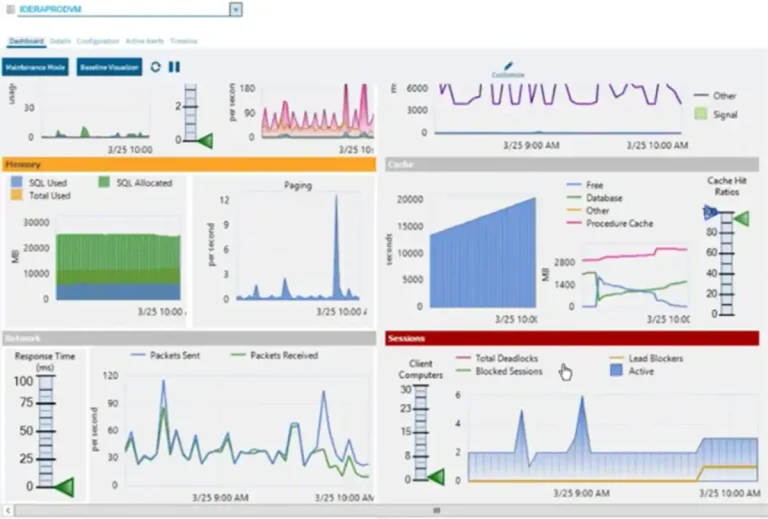
4 Idera's SQL diagnostic manager * * * *   * * *
5 Lepide SQL Storage Manager * * *     * * *
6 Microsoft's System Monitor *   * * *   *  
7 Microsoft's SQL Server Profiler *   *          
8 Microsoft's SQL Server Database Engine Tuning Advisor   * *     *   *
9 Pearl Knowledge Solution's SQL Centric *   * * * * *  
10 Precise i3 for SQL Server * * * * * * * *
11 Quest Products for SQL Server * * *     * * *
12 Red-Gate SQL Monitor * * *     * * *
13 SQL Power Tools *  * *  *  * *  * *
14 SQL Sentry Performance Advisor * * * * * * *  
15 TNT Software's ELM Performance Manager *   * *   *    


Check out the complete listing of SQL Server tools.

Next Steps

  • If you do not have performance problems you are in the minority.  When they occur from adding more users or applications to your SQL Server, turn to these products as a means to improve the overall ROI on your platform.
  • Most of these products have a trial version for 15 to 30 days.  Check out the trial versions to see if they will meet your needs so you can focus on building and supporting your business applications.
  • These products are built by organization's who solely focus on performance issues.  As such, these products can save you a great deal of time as opposed to building an internal solution and not being confident of the results.
  • If you use another tool or work for a company that builds a performance monitoring or tuning tool for SQL Server please send an email to tips@mssqltips.com so we can add it to the list.


Last Update: 12/20/2012

About the author

Jeremy is the CTO @ Edgewood Solutions, co-founder of MSSQLTips.com and SQL Server MVP since 2009.

View all my tips


Print  
Become a paid author


Comments and Feedback:

Friday, July 24, 2009 - 5:16:03 AM - Dr DBA Read The Tip

Nice list of vendors. SQL server monitoring tools have come a long way over the years and I believe every shop should have some. I would like to point out the there is an error on your matrix. The Quest SQL server (Spotlight is it's name) does monitor/alert/advice on  Windows OS and networking. I have been using this product for 10 years now and have also evaluated most of the other products. It seems that time and time again it works the best and no I do not work and/or get kick backs from Quest. Every DBA / Developer I have shown this product to purchase it. It just works that well. 

There is a enterprise version that will colllect information/stats from all your SQL servers (including Windows and network stats) and stores them into a centralized database. From that you can use and/or create customized reports it get everything you ever wanted to know. We have used this product to help determine which SQL servers would best operate in a consolidated server, meaning a server with several instances of SQL server installed.

 To all the readers, take my advice and get some tools. It really make life a lot easier.

 Thanks,

DR DBA


Monday, September 10, 2012 - 7:08:30 PM - Jason Read The Tip

You're missing an important player: Confio's Ignite.  I've been really impressed with the full featured trial version so far:


http://www.confio.com/performance/sql-server/ignite/


Tuesday, September 11, 2012 - 5:54:37 PM - Jeremy Kadlec Read The Tip

Jason,

Agreed.  I need to update this tip with all of the product changes from the last few years.

Thank you,
Jeremy Kadlec


Thursday, December 20, 2012 - 1:13:35 PM - Jeremy Kadlec Read The Tip

Everyone,

I posted a few quick updates to this tip today.  I plan on additional updates in the future.

Thank you,
Jeremy Kadlec
Community Co-Leader


Monday, December 24, 2012 - 5:49:10 AM - William Read The Tip

Very nice comparision of SQL monitoring tools ...really appreciable

I think some important tools are miising in the comaprision listingas mentioned jason

Lepide SQL Storage Manager is one of them which is the most cost effective solution is this category


http://www.lepide.com/sql-storage-manager/


Thursday, December 27, 2012 - 2:52:46 PM - Jeremy Kadlec Read The Tip

William,

Thank you for the post.  I have updated the tip to include Lepide's tool.

Thank you,
Jeremy Kadlec
Community Co-Leader


Monday, June 03, 2013 - 4:17:45 AM - Philipp Read The Tip

Hi Jeremy,

Very interesting posting indeed. FYI Found recently that in addition to i3 Precise released a new tool called SQLYzer which is very easy to install and provide nice monitoring/tuning feature. I liked the trial version and I'm currently trying to persuad my boss to buy licenses.

Cheers

Philipp


Monday, June 03, 2013 - 6:27:19 PM - Nicole Garris Read The Tip

Did you consider Microsoft's Management Data Warehouse? Seems to me that it is a partial solution in that it collects performance information to a database, and also includes reports. I'm thinking of using it (once I can get it working!) and would really like your opinion on it.


Friday, June 07, 2013 - 6:34:49 AM - William Read The Tip

Hi jereny 

Thanks for your reply and Adding the Lepide SQL Storage Manager  in your splendid comparision of SQL server Monioring tool 

Your Comparision definitely helping in different community and resolving the doubts of many DBAs 

I have personally refering your article in some places 

Thanks 

William 


Post a Comment or Question

Keep it clean and stay on the subject or we may delete your comment.
Your email address is not published. Required fields are marked with an asterisk (*)

*Name   *Email Notify for updates

Signup for our newsletter


Comments
*Enter Code refresh code


Sponsor Information
SQL Server having some performance issues? Idera SQL check. FREE SQL Server enhancement.

NEW! Top 5 hard-earned lessons of a DBA from Grant Fritchey & the DBA Team. Read it now

Wish your SQL Servers could run wide open? Learn how the Edgewood SQL Server Consultants can make it happen.

Spring Clean Your Data - Clean your global contact data with Melissa Data tools for SSIS. Download a free trial!

Free SQL Server Learning - Lock Down SQL Server Security


Copyright (c) 2006-2013 Edgewood Solutions, LLC All rights reserved
privacy | disclaimer | copyright | advertise | about
authors | contribute | feedback | giveaways | user groups
Some names and products listed are the registered trademarks of their respective owners.


Edgewood Solutions LLC | MSSharePointTips.com | MSSQLTips.com