Problem
In this article we look at how to load an XML file into a SQL Server table and then how to query the XML data with several query examples.
Solution
There are different ways to achieve this task of importing data from an XML file into a SQL Server table, but I am going to demonstrate one of easiest ways to accomplish this task.
These are the steps I performed for importing data into SQL Server and then parsing the XML into a relational format.
- Import XML data from an XML file into SQL Server table using the OPENROWSET function
- Parse the XML data using the OPENXML function
Importing XML data from XML file using OPENROWSET
I have an XML file downloaded from my FTP location to a local folder and data in this XML file looks like below. You can download the sample data here.

Now in order to import data from the XML file to a table in SQL Server, I am using the OPENROWSET function as you can see below.
In the script below, I am first creating a table with a column of data type XML and then reading the XML data from the file using the OPENROWSET function by specifying the file location and name of the XML file as you can see below:
CREATE DATABASE OPENXMLTesting
GO
USE OPENXMLTesting
GO
CREATE TABLE XMLwithOpenXML
(
Id INT IDENTITY PRIMARY KEY,
XMLData XML,
LoadedDateTime DATETIME
)
INSERT INTO XMLwithOpenXML(XMLData, LoadedDateTime)
SELECT CONVERT(XML, BulkColumn) AS BulkColumn, GETDATE()
FROM OPENROWSET(BULK 'D:\OpenXMLTesting.xml', SINGLE_BLOB) AS x;
SELECT * FROM XMLwithOpenXML
When I query the table in which I have imported the XML data, it looks like this. The XMLData column is an XML data type, it will output a hyperlink as shown below:

Clicking on the hyperlink, in the above image, will open another tab within SSMS with the XML data displayed as shown below.

Process XML data using OPENXML function
Now as I said before, XML data stored in a column of data type XML can be processed either by using XML functions available in SQL Server or by using the sp_xml_preparedocument stored procedure along with the OPENXML function.
We will first call the sp_xml_preparedocument stored procedure by specifying the XML data which will then output the handle of the XML data that it has prepared and stored in internal cache.
Then we will use the handle returned by the sp_xml_preparedocument stored procedure in the OPENXML function to open the XML data and read it.
Note: the sp_xml_preparedocument stored procedure stores the XML data in SQL Server’s internal cache, it is essential to release this stored XML data from internal cache by calling the sp_xml_removedocument stored procedure. We should call the sp_xml_removedocument stored procedure as early possible, so that internal cache can be freed for other usage.
USE OPENXMLTesting
GO
DECLARE @XML AS XML, @hDoc AS INT, @SQL NVARCHAR (MAX)
SELECT @XML = XMLData FROM XMLwithOpenXML
EXEC sp_xml_preparedocument @hDoc OUTPUT, @XML
SELECT CustomerID, CustomerName, Address
FROM OPENXML(@hDoc, 'ROOT/Customers/Customer')
WITH
(
CustomerID [varchar](50) '@CustomerID',
CustomerName [varchar](100) '@CustomerName',
Address [varchar](100) 'Address'
)
EXEC sp_xml_removedocument @hDoc
GO
From the above XML data, I want to retrieve all the customer information, so I am navigating to the Customer element and querying CustomerID and CustomerName (please note the use of “@” before the name of the attribute) attributes and Address element in the above SELECT statement using the OPENXML function.
The structure of the resultset can be determined with the “WITH” clause as shown above.

From the above XML data, I now want to retrieve all the customer information along with OrderID and OrderDate placed by each individual customer and hence I am navigating to the Order element and then querying OrderID and OrderDate attributes.
If we want to navigate back to the parent or grand parent level and get data from there, we need to use “../” to read the parent’s data and “../../” to read the grand parent’s data and so on.
USE OPENXMLTesting
GO
DECLARE @XML AS XML, @hDoc AS INT, @SQL NVARCHAR (MAX)
SELECT @XML = XMLData FROM XMLwithOpenXML
EXEC sp_xml_preparedocument @hDoc OUTPUT, @XML
SELECT CustomerID, CustomerName, Address, OrderID, OrderDate
FROM OPENXML(@hDoc, 'ROOT/Customers/Customer/Orders/Order')
WITH
(
CustomerID [varchar](50) '../../@CustomerID',
CustomerName [varchar](100) '../../@CustomerName',
Address [varchar](100) '../../Address',
OrderID [varchar](1000) '@OrderID',
OrderDate datetime '@OrderDate'
)
EXEC sp_xml_removedocument @hDoc
GO
The result of the above query can be seen in the image below. You can see below all the customers and all the orders placed by each customer.
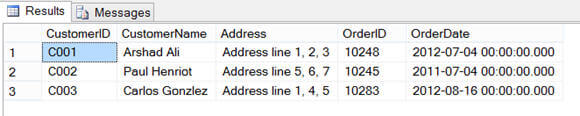
Now let’s go one level deeper. This time from the above XML data, I want to retrieve all the customer information and their orders along with ProductID and Quantity from each order placed. And hence, as you can see below I am navigating to the OrderDetail and retrieving the ProductID and Quantity attributes’ values. At the same time I am using “../” to reach the parent level to get Order information available at the parent level whereas I am using “../../../” to reach to the great grand parent level to grab Customer information as shown below:
USE OPENXMLTesting
GO
DECLARE @XML AS XML, @hDoc AS INT, @SQL NVARCHAR (MAX)
SELECT @XML = XMLData FROM XMLwithOpenXML
EXEC sp_xml_preparedocument @hDoc OUTPUT, @XML
SELECT CustomerID, CustomerName, Address, OrderID, OrderDate, ProductID, Quantity
FROM OPENXML(@hDoc, 'ROOT/Customers/Customer/Orders/Order/OrderDetail')
WITH
(
CustomerID [varchar](50) '../../../@CustomerID',
CustomerName [varchar](100) '../../../@CustomerName',
Address [varchar](100) '../../../Address',
OrderID [varchar](1000) '../@OrderID',
OrderDate datetime '../@OrderDate',
ProductID [varchar](50) '@ProductID',
Quantity int '@Quantity'
)
EXEC sp_xml_removedocument @hDoc
GO
The result of the above query can be seen in the image below. You can see all the customer information and their orders along with ProductID and Quantity from each order placed.

Next Steps
- Review these related tips

Arshad specializes in Database, Data Warehousing and Business Intelligence application design, development and deployment, at enterprise level, with SQL Server, SSIS, SSRS, SSAS, Service Broker, MDS, DQS, SharePoint and PPS. He is a Microsoft Certified IT Professional in Microsoft SQL Server. He also has experience developing applications in VB/ASP/.NET/ASP.NET/C#, and is a Microsoft Certified Application Developer and Solution Developer for the .NET platform in Web/Windows/Enterprise. Arshad has Master’s degrees in Computer Applications and Business Administration in IT.
Disclaimer: Arshad worked for Microsoft and helped people and businesses make better use of technology to realize their full potential. The opinions mentioned in his tips and articles herein are solely his and do not reflect those of his current or previous employers.
- MSSQLTips Awards: Champion (100+ tips) – 2014


Hi there, thanks for this tip. It works fine with the xml you posted as sample.
However, I have xml that it just will not work with. It gives me the rows, but no values.
Is there any chance you could have a look at the xml and help?
Dear Arshad or other friends , could you help to extract this XML RAML formats since (RAML and Header lines ) prevent from true extraction of the values, what is the true syntax in this regard?
—————————————-
DECLARE @docHandle int;
DECLARE @XmlDocument XML;
SET @XmlDocument = ‘
<raml version=”2.0″>
<cmData type=”actual”>
<header>
<log dateTime=”2022-11-21T09:34:57″ action=”created” appInfo=”ActualExporter”>InternalValues are used</log>
</header>
<managedObject class=”MRBTS” version=”SBTS17A_1707_001″ distName=”PLMN-PLMN/MRBTS-840009″ id=”14512301″>
<p name=”name”>MRBTS-ILG0009</p>
<p name=”btsName”>ILG0009</p>
</managedObject>
</cmData>
</raml><br> ';
EXEC sp_xml_preparedocument @docHandle OUTPUT, @XmlDocument;
SELECT *
FROM OPENXML (@docHandle, ‘/raml/cmData/header/log/managedObject/p’)
WITH ( Parameters varchar(50) ‘@name’,
Value varchar(50) ‘.’
);
EXEC sp_xml_removedocument @docHandle;
—————————————-
Thanks Indeed
I have an xml document that has a inline schema.
?xml version=”1.0″ encoding=”utf-8″?>
<RS >
<xsd:schema xmlns_xsd=”http://www.w3.org/2001/XMLSchema” xmlns:saw-sql=”urn:saw-sql” targetNamespace=”urn:schemas-microsoft-com:xml-analysis:rowset”>
<xsd:complexType name=”R”>
<xsd:sequence>
<xsd:element name=”C0″ type=”xsd:string” minOccurs=”0″ maxOccurs=”1″ saw-sql:type=”varchar” saw-sql:sqlFormula=”"ADHOC Analytics"."Soldier Attributes"."Employee ID (EMPLID)"” saw-sql:displayFormula=”"Soldier Attributes"."Employee ID (EMPLID)"” saw-sql:aggregationRule=”none” saw-sql:aggregationType=”nonAgg” saw-sql:tableHeading=”Soldier Attributes” saw-sql:columnHeading=”Employee ID (EMPLID)” saw-sql:isDoubleColumn=”false” saw-sql:columnID=”c23a70d28a923ef93″ saw-sql:length=”11″ saw-sql:scale=”0″ saw-sql:precision=”11″/>
</xsd:sequence>
</xsd:complexType>
</xsd:schema>
Is there a way to read the schema and get the attributes from it?
The reason is that is that it is possible that the element C0 might not be EmployeeID as in the example. However, the next time the adhoc query creates the report EmployeeID could be C1 and C0 be another value.
So I want to be able to test that my data is the correct element and if not, I need to adjust.
Thanks for any help.
Jay
you’r the best , thank you so very much.
Hi Tal.
try this:
declare @xml as xml
set @xml=’
<Details>
<StoreData>
<StoreCode>1234</StoreCode>
<Lines>
<ItemBarcode>abcd</ItemBarcode>
<ItemQty>1</ItemQty>
<Qty>box</Qty>
</Lines>
</StoreData>
<StoreData>
<StoreCode>987</StoreCode>
<Lines>
<ItemBarcode>djhdufgre</ItemBarcode>
<ItemQty>2</ItemQty>
<Qty>pack</Qty>
</Lines>
</StoreData>
</Details>’
–this is my query:
–DECLARE @XML AS XML,
declare @hDoc AS INT, @SQL NVARCHAR (MAX)
–SELECT @XML = XmlCol FROM T
EXEC sp_xml_preparedocument @hDoc OUTPUT, @XML
SELECT StoreCode, itemqty
FROM OPENXML(@hDoc, ‘Details/StoreData/Lines’)
WITH
(
StoreCode [varchar](150) ‘../StoreCode’,
itemqty [varchar](100) ‘ItemQty’
)
EXEC sp_xml_removedocument @hDoc
GO
Hello,
pleas can you help me, I am trying to extract the data from the xml like in your example but i only get the StoreCode. can you pleas advise why?
this is my xml:
<Details>
<StoreData>
<StoreCode>1234</StoreCode>
<Lines>
<ItemBarcode>abcd</ItemBarcode>
<ItemQty>1</ItemQty>
<Qty>box</Qty>
</Lines>
</StoreData>
<StoreData>
<StoreCode>987</StoreCode>
<Lines>
<ItemBarcode>djhdufgre</ItemBarcode>
<ItemQty>2</ItemQty>
<Qty>pack</Qty>
</Lines>
</StoreData>
</Details>
this is my query:
DECLARE @XML AS XML, @hDoc AS INT, @SQL NVARCHAR (MAX)
SELECT @XML = XmlCol FROM T
EXEC sp_xml_preparedocument @hDoc OUTPUT, @XML
SELECT StoreCode, itemqty
FROM OPENXML(@hDoc, ‘Details/StoreData’)
WITH
(
StoreCode [varchar](150) ‘StoreCode’,
itemqty [varchar](100) ‘itemqty’
)
EXEC sp_xml_removedocument @hDoc
GO
the result:
1234NULL
987NULL
Hello.
I have a similar problem, I have several XML files in a folder, but when reading these, I only read the last file I have, be it 2, 5 or more. It will always read the latest file.
This is my Query.
CREATE TABLE dbo.XMLFilesTable
–(
–Id INT IDENTITY PRIMARY KEY,
–FileName VARCHAR(100),
–XMLData XML,
–LoadedDateTime DATETIME
–)
select * from dbo.XMLFilesTable
–delete from dbo.XMLFilesTable
————————————————————————————————————————————————
IF OBJECT_ID(‘tempdb..#FileList’) IS NOT NULL
DROP TABLE #FileList
–Folder path where files are present
Declare @SourceFolder VARCHAR(100)
SET @SourceFolder=’C:\XML_TEST\’
CREATE TABLE #FileList (
Id int identity(1,1),
FileName nvarchar(255),
Depth smallint,
FileFlag bit)
–Load the file names from a folder to a table
INSERT INTO #FileList (FileName,Depth,FileFlag)
EXEC xp_dirtree @SourceFolder, 10, 1
–Use Cursor to loop throught files
–Select * From #FileList
Declare @FileName VARCHAR(500)
DECLARE Cur CURSOR FOR
SELECT FileName from #FileList
where fileflag=1
OPEN Cur
FETCH Next FROM Cur INTO @FileName
WHILE @@FETCH_STATUS = 0
BEGIN
DECLARE @InsertSQL NVARCHAR(MAX)=NULL
–Prepare SQL Statement for insert
SET @InsertSQL=
‘INSERT INTO dbo.XMLFilesTable(FileName, LoadedDateTime,XMLData)
SELECT ”’+@FileName+”’,getdate(),Convert(XML,BulkColumn ) As BulkColumn
FROM Openrowset( Bulk ”’+@SourceFolder+@FileName+”’, Single_Blob) as Image’
–Print and Execute SQL Insert Statement to load file
Print @InsertSQL
EXEC(@InsertSQL)
FETCH Next FROM Cur INTO @FileName
END
CLOSE Cur
DEALLOCATE Cur
GO
DECLARE @XML AS XML, @hDoc AS INT, @SQL NVARCHAR (MAX)
SELECT @XML = XMLData FROM dbo.XMLFilesTable
EXEC sp_xml_preparedocument @hDoc OUTPUT, @XML
INSERT INTO MasterData
SELECT entityType,purchaseOrganization,uniqueCreatorIdentification,gln,name,requestedDeliveryDate,CancelDate,gtin,requestedQuantity
FROM OPENXML(@hDoc, ‘Orders/lineItem/tradeItemIdentification’)
WITH
(
entityType varchar(5) ‘../../orderIdentification/entityType’,
purchaseOrganization varchar(5) ‘../../orderIdentification/purchaseOrganization’,
uniqueCreatorIdentification varchar(20) ‘../../orderIdentification/uniqueCreatorIdentification’,
gln [varchar](10) ‘../../shipTo/gln’,
name [varchar](60) ‘../../shipTo/nameAndAddress/name’,
requestedDeliveryDate datetime ‘../../orderLogisticalDateGroup/orderDeliveryInformation/requestedDeliveryDate’,
CancelDate datetime ‘../../orderLogisticalDateGroup/OrderCancelInformation/CancelDate’,
gtin varchar(13) ‘gtin’,
requestedQuantity int ‘../requestedQuantity’
)
WHERE NOT EXISTS (select gtin from MasterData);
select * from [dbo].[MasterData]
EXEC sp_xml_removedocument @hDoc
GO
——————————————-