Overview
In this example we will return a single column in our SELECT statement and add a WHERE clause to limit the records being returned. In this circumstance all of the values from the column will be returned from the table only when the WHERE criteria is met. Let’s take a look at an example.
Explanation
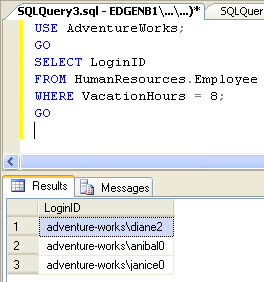
In the example below we are selecting the LoginID column from the HumanResources.Employee table where the VacationHours column equals 8.
USE AdventureWorks;
GO

SELECT LoginID
FROM HumanResources.Employee
WHERE VacationHours = 8;
GO
Below is the sample result set:

Jeremy Kadlec is a Founder, Editor and Author at MSSQLTips.com with more than 300 contributions and 25+ years of SQL Server experience. Jeremy leads a team of more than 300 authors helping millions of SQL Server professionals around the globe every second of the day for the last 20 years. He is also the CTO @ Edgewood Solutions and a six-time SQL Server MVP based on his community contributions. Jeremy brings 25+ years of SQL Server DBA and Developer knowledge to the community and holds a bachelor’s degree from SSU and master’s degree from UMBC.


