Problem
No doubt you likely have a monstrous database infrastructure to manage and the tasks required to keep it maintained and healthy can be daunting. For that reason those tasks should not be performed all in one sitting, nor during peak-hours of use. As a general rule, maintenance tasks should be performed during down times or periods of relative inactivity, which likely means you aren’t sitting in the office when it needs to be done.
Taking time to think about maintenance strategy and dividing up the tasks into smaller, manageable chunks saves resources on your server and allows for reaction to issues that arise. The first and most important aspect of database maintenance is the backup and restore strategy. To make sure your backup files are readable you can create a procedure to test each file and email the results of unsuccessful tests to whomever needs the information.
Solution
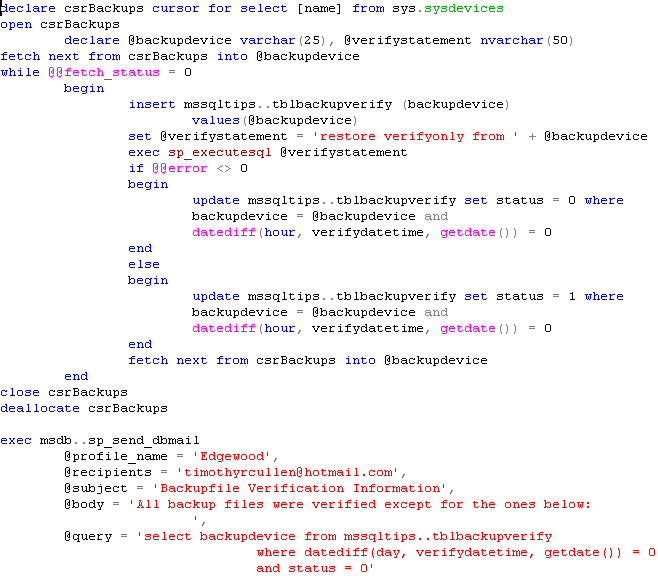
You must make sure all databases and transaction logs are backed up in a way that provides for minimal recovery time, yet it’s difficult to know if those files are even readable without performing some kind of test. In a previous tip we discussed the RESTORE VERIFYONLY statement as a way of determining the readability of backup files. You can create a stored procedure that loops through the backup devices and runs the RESTORE VERIFYONLY statement against each one. In this case we created a table that houses the results of each test. Once the loop testing completes the results can be obtained and included in an email. The procedure could be written this way:
SQL Server 2005
SQL Server 2000
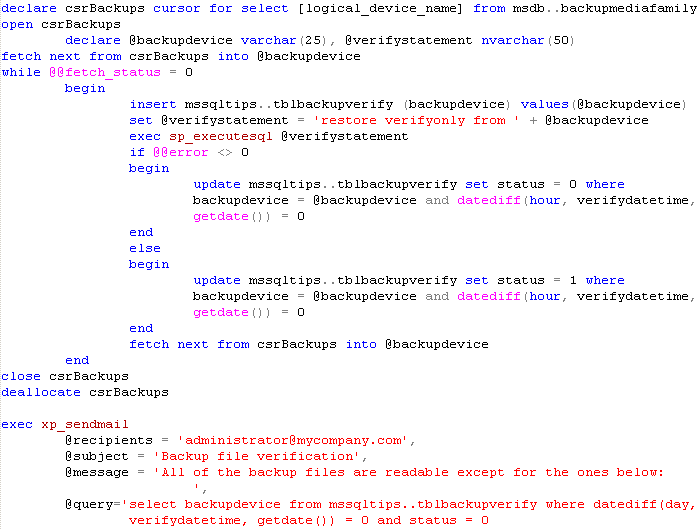
Note that this procedure is written based on the fact that backup devices are used. You can modify the script to look for all backups that are performed straight to disk as well.
This type of procedure should be run weekly to make sure backup files are not corrupting, but should be done during non-peak hours, since the verification process takes time and resources. Remember, however, that RESTORE VERIFYONLY checks only the readability of the file, not necessarily the integrity of the file. In order to test the restore process you should perform an actual restore of the data. This should take place at least quarterly using a non-production server. Testing the actual restore process will provide you with an estimated time required for recovery, as well as prepare you for any issues that may arise during the restore process.
Next Steps
- Review your procedure for backup and restoration of databases and, if necessary, document the process
- Consider automating the process of testing the readability of the files to ensure backups are being adequately created
- Download these sample SQL Server 2000and SQL Server 2005 scripts
- Check out these tips on backup and recovery:

For 20+ years, MSSQLTips.com has been delivering comprehensive technical solutions on a daily basis for the Microsoft SQL Server platform. In that time, an innovative team of over 300 authors from around the globe have delivered over 7000 articles and 1000 webcasts ranging from beginner topics to advanced solutions. Our community prides itself on delivering human only generated content.