solving sql server problems for millions of dbas and developers since 2006


SQL Server DBA Tips SQL Server Developer Tips SQL Server Business Intelligence Tips SQL Server Career Tips SQL Server Tip Categories SQL Server Tutorials SQL Server Webcasts SQL Server Whitepapers SQL Server Tools SQL Server Questions and Answers MSSQLTips Authors About MSSQLTips SQL Server User Groups MSSLQTips Giveaways MSSQLTips Advertising Options

MSSQLTips Facebook Page MSSQLTips LinkedIn Page MSSQLTips RSS Feed MSSQLTips Twitter Page MSSQLTips Google+ Page


Custom Logging in SQL Server Integration Services SSIS

By: | Read Comments (25) | Print

Ray is a Principal Architect at RDA Corporation and a MSSQLTips.com BI Expert.

Related Tips: 1 | 2 | More

Problem
We have quite a few SSIS packages that we run on a regular basis to extract data from our OLTP systems and transform/load into our data warehouse.  We would like to capture some basic information about these SSIS packages such as what packages were run, when, how long did they take to run, and how many rows were extracted and loaded.  We have looked in to the built-in logging that comes with SSIS but we just don't see a straight forward way to get row counts.  Are we missing something?

Solution
SSIS provides a flexible logging mechanism that is tightly integrated with the various events raised during package execution.  However, the issue that you raise is accurate and the best approach is to use the built-in SSIS logging where appropriate and augment it with your own custom logging.  A simple, straight-forward custom logging schema can provide the information you need.  Let's take a look at a sample schema that can be used to capture the basic logging information that you have requested:

Sample SSIS Logging Data Model
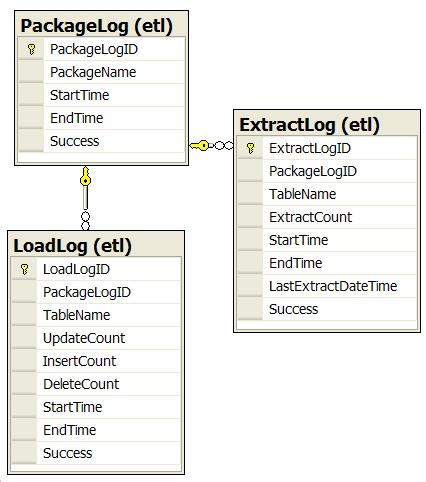
 

Main points about the above schema:

  • All of the tables are in the etl schema; it's a good idea to isolate these kinds of tables from other tables in your database.
  • A row is inserted into the PackageLog table by every SSIS package that executes. 
  • A row is inserted into the ExtractLog when an SSIS package extracts rows from a table in the OLTP database.
  • A row is inserted into the LoadLog table when an SSIS package inserts, updates or deletes rows in a dimension or fact table in the data warehouse.
  • The EndTime and Success columns are updated if the package runs to completion.
  • The above schema does not provide for error logging which is probably best handled using the built-in SSIS logging capabilities.

The pattern for populating the logging tables is to implement an "Init" and an "End" stored procedure for each table.  The stored procedures are executed in the SSIS package using the Execute SQL task.  The PackageLog stored procedures are as follows:

  • stp_InitPackageLog is called at the beginning of the SSIS package to insert a row into the PackageLog table with the Start Time and Package Name; it returns the PackageLogID (identity value).  The PackageLogID is saved in a package variable to update the row when the package is done.
  • stp_EndPackageLog is called at the end of the SSIS package to update the row inserted in the PackageLog with the EndTime and set the Success column to 1.

Packages that extract data from a table in an OLTP system will update the ExtractLog table as follows:

  • stp_InitExtractLog is called to insert a row into the ExtractLog table with the Start Time and OLTP Table Name that is being processed and return the ExtractLogID (identity value).  The ExtractLogID is saved in a package variable to update the row when the extract is done.  In addition the stored procedure returns the maximum LastExtractDateTime for the table; this value is stored in a package variable and used in the Data Flow to only get the rows that have changed since the last extract.
  • stp_EndExtractLog is called when the extract is complete to update the ExtractCount (number of rows extracted), EndTime, LastExtractDateTime, and Success columns.  The LastExtractDateTime column is a DATETIME type that is set to the maximum last update date/time extracted from the OLTP table. The OLTP table needs to provide a reliable last update date/time column in order to make this work.  For example, tables in the AdventureWorks database have a ModifiedDate column that reflects the last date and time the row was updated.

Packages that update dimension or fact tables in the data warehouse will update the LoadLog table using the same pattern; i.e. stp_InitLoadLog and stp_EndLoadLog.  The LoadLog table records the number of rows that were inserted, updated or deleted for a given dimension or fact table in the warehouse.

Now let's take a look at a simple SSIS package that implements the custom logging.  We'll use the AdventureWorks sample database as our OLTP source, extract rows from the Sales.Customer table, and save the rows in a staging table.  The following is the Control Flow for the package:

SSIS Control Flow


Next let's drill in to the Data Flow:

SSIS Data Flow


The Get Updated Customers task selects the rows from the Sales.Customer table where the ModifiedDate is greater than the maximum ModifiedDate the last time the package was run.  The maximum ModifiedDate is stored in the LastExtractDateTime column in the ExtractLog table and returned in the call to the stp_InitExtractLog stored procedure (Init Extract Log task in the Control Flow).  The Get Extract Row Count task simply assigns the number of rows passing through to a package variable; the row count is passed as a parameter to the stp_EndExtractLog stored procedure (End Extract  Log task in Control Flow) and stored in the ExtractLog table.

Next Steps

  • Download the sample SSIS package and database scripts here and try it out to see how you might craft your own custom logging.  Note that the sample uses the AdventureWorks sample database and another database called MSSQLTIPS; both must be available in the default SQL Server instance or you can edit the Connection Managers in the SSIS package as appropriate.
  • The sample described in this tip is just a starting point; in your particular circumstances you may find additional information that should be logged.
  • The custom logging that you implement will likely provide future benefits as well; for instance in a major upgrade to an existing ETL process the information in the custom logging tables can be used to compare  results between the currently deployed ETL process and your development environment.
  • Custom logging is just one of a number of things that should be defined early in your development effort and made part of an SSIS package "template" that you use as the starting point for each new package.


Related Tips: 1 | 2 | More | Become a paid author


Last Update: 1/22/2008

Share: Share 


Comments and Feedback:

Tuesday, July 29, 2008 - 4:08:37 AM - Patricia Martinez Read The Tip
Thanks a LOT for your tip!!! It has been very helpful to customize my log files, and it has given me ideas to update the log files in a structured way.

Patricia 


Wednesday, May 11, 2011 - 8:11:21 AM - Jason Yousef Read The Tip

Great article, thanks for sharing the knowledge, we use the same, but we even log the updated, inserted, and unchanged counts, along with the extracted counts of course.


Friday, July 01, 2011 - 9:46:32 AM - Johanna Read The Tip

This works fine, thanks for sharing! Does someone have an example of a stored procedure that will log the updated, inserted and deleted records in dimension and fact tables? I use slowly changing dimensions in SSIS 2008.

/Johanna


Friday, July 01, 2011 - 10:16:39 AM - Ray Barley Read The Tip

Take a look at the OUTPUT clause: http://msdn.microsoft.com/en-us/library/ms177564.aspx

This allows you to "output" to another table when you're doing an insert, update or delete.  The above page shows a bunch of examples that output into a table variable but you can use a regular table as well.

This is essentially what you could do in a trigger; this just allows you to do it without having the trigger.


Friday, July 01, 2011 - 4:13:50 PM - Jeremy Kadlec Read The Tip

Johanna,

Here is a tip on the OUTPUT clause - http://www.mssqltips.com/tip.asp?tip=1381.

Thank you,
Jeremy Kadlec


Monday, July 04, 2011 - 2:39:16 AM - Johanna Read The Tip

Thanks a lot! The OUTPUT clause was very useful.

/Johanna


Thursday, April 12, 2012 - 5:08:12 PM - KRK Read The Tip

Great article.

Which version of the AdventureWorks Database do I need and where can I get the MSSQLTIPS DB?

Thanks.


Thursday, April 12, 2012 - 5:37:31 PM - Ray Barley Read The Tip

The download (link is in the Next Steps section of the tip) has a text file with the T-SQL statements to create the database objects.  You can create a database called MSSQLTIPS and run the T-SQL commands in it.

As far as AdventureWorks this tip is pretty old so it was probably the version that came with SQL Server 2005.

I don't think any of the logging is dependent on having adventureworks; in other words you test the logging and not even have the Extract Customers data flow.  There is a package variable that gets set with the number of rows extracted but that's all that happens in the data flow as far as what affects the logging.


Thursday, April 12, 2012 - 7:00:59 PM - krk Read The Tip

Thanks for the reply.

Before and after each load I must got a count from the source system and staging.

If they do not match I need to record the mismatch.

I did something like this in DTS in 2004 but I can't remeber exactly how I did it. 

I seem to remeber having an Execute SQL Task to output the counts as output parameters and save in a global variable and log the error in the next task.

I want to keep the table structures as generic as possible but I still pondering the design.

Thank again. 


Friday, April 13, 2012 - 8:32:27 AM - KRK Read The Tip

I ran your create_db_objects.txt script and it is missing some tables. Please advise.

What file format is the CustomLogging.database?

I was hoping to get the correct version of AdventureWorks and MSSQLTIPS Database.

Thank you.

Msg 4902, Level 16, State 1, Line 1

Cannot find the object "etl.ExtractLog" because it does not exist or you do not have permissions.

Msg 4902, Level 16, State 1, Line 1

Cannot find the object "etl.ExtractLog" because it does not exist or you do not have permissions.

Msg 4902, Level 16, State 1, Line 2

Cannot find the object "etl.LoadLog" because it does not exist or you do not have permissions.

Msg 4902, Level 16, State 1, Line 1

Cannot find the object "etl.LoadLog" because it does not exist or you do not have permissions.


Friday, April 13, 2012 - 10:22:00 AM - KRK Read The Tip

I created the DDL for the tables based on your ERD.

CREATE SCHEMA etl

GO

CREATE TABLE etl.PackageLog(
PackageLogID int Identity (1,1) NOT NULL,
PackageName VARCHAR(255) NOT NULL,
StartTime SmallDateTime NOT NULL,
EndTime SmallDateTime,
Success bit
CONSTRAINT PK_PackageLog
PRIMARY KEY (PackageLogID)
)
GO


CREATE TABLE etl.ExtractLog (
ExtractLogID int IDENTITY (1,1) NOT NULL,
PackageLogID int NOT NULL,
TableName VARCHAR(55) NOT NULL,
ExtractCount int NOT NULL,
StartTime SmallDateTime NOT NULL,
EndTime SmallDateTime,
Sucess bit
CONSTRAINT PK_Extract_Log
PRIMARY KEY (ExtractLogID),
CONSTRAINT FK_ExtractLog_PackageLog
FOREIGN KEY (PackageLogID)
REFERENCES etl.PackageLog (PackageLogID)
)
GO

CREATE TABLE etl.LoadLog (
LoadLogID int IDENTITY (1,1) NOT NULL,
PackageLogID int NOT NULL,
AS400TableName VARCHAR(20) NOT NULL,
SQLServerTableName VARCHAR(55) NOT NULL,
BeforeAS400Count INT NOT NULL,
BeforeSQLServerCount INT NOT NULL,
StartTime SmallDateTime NOT NULL,
EndTime SmallDateTime,
Success int,
CONSTRAINT FK_LoadLog_Package_Log
FOREIGN KEY (PackageLogID)
REFERENCES etl.PackageLog (PackageLogID),
CONSTRAINT PK_Load_Log
PRIMARY KEY (LoadLogID)
)
GO

Unfortunately I do not understand how to configure a RowCount Task.


Friday, April 13, 2012 - 10:37:34 AM - Ray Barley Read The Tip

You define a package variable (typically at the package level) then add a row count transformation in your data flow after a data source; i.e. you read data from somewhere then each row flows through the row count.  You give the row count your package variable and it populates it with the number of rows that you retrieved.

Here are the details: http://msdn.microsoft.com/en-us/library/ms141136.aspx


Friday, April 13, 2012 - 12:05:46 PM - KRK Read The Tip

Thanks for the Link on Row Count Transformation. Actually I found this article earlier this morning.

It did not go into thjat much detail, for example, how does the  Input and Output Properties get defined?


I created all of the DB objects but the EXEC SQL Task that calls EXEC etl.stp_InitExtractLog ?,'Customer' fails.

The stored procedure has two paramters, one for PackageID and that variable has no value.

I do not see what the packageID Variable is being set?

So the Stored procedure fails because it can't insert a null value in the ExtractCount Column.

The second paramater is 'Customer'. I believe that it should be 'Sales.Customer'.

Thanks for replying. 


Friday, April 13, 2012 - 12:37:06 PM - KRK Read The Tip

ok, my bad the task that calls EXEC etl.stp_InitExtractLog completed successfully.

However there seems to be an issue with the OLE DB Source. The parameter does not appear to be mapped.

When I click on Preview for Get Updated Customers I get an message box 'No value given for 1 or more required paramaters?


Friday, April 13, 2012 - 12:44:26 PM - Ray Barley Read The Tip

The PackageID variable is set in the Init Package Log Execute SQL Task.  The stored proc that's called returns the value.  Pay close attention to how you configure the task.  On the General tab ResultSet is set to SingleRow.  On the Parameter Mapping tab a package variable is passed as a parameter to the stored proc.  On the Result Set tab the first column of the result set returned by the stored proc is assigned to the package variable User::v_PackageLogID


Friday, April 13, 2012 - 2:04:24 PM - KRK Read The Tip

Ray,


I checked everything and is configured as you specified.


WHen I execute the Stored Procedure in SSMS it returns the package ID,


On the results table the result name is 0 and the variable name is User::v_PackageLogID.


It appears that the variable User::v_PackageLogID Variable is not being set?


Friday, April 13, 2012 - 2:34:02 PM - KRK Read The Tip

The OLE DB SOurce and Destination task faile and I'm getting the following errors:

[SSIS.Pipeline] Error: SSIS Error Code DTS_E_PRIMEOUTPUTFAILED.
 The PrimeOutput method on component "Get Updated Customers" (1) returned error code 0xC02020C4.
 The component returned a failure code when the pipeline engine called PrimeOutput(). The meaning of the failure code is defined by the component, but the error is fatal and the pipeline stopped executing.  There may be error messages posted before this with more information about the failure.

[Put Updated Customers in Staging [56]] Error: SSIS Error Code DTS_E_INDUCEDTRANSFORMFAILUREONERROR.  The "input "OLE DB Destination Input" (69)" failed because error code 0xC020907B occurred, and the error row disposition on "input "OLE DB Destination Input" (69)" specifies failure on error. An error occurred on the specified object of the specified component.  There may be error messages posted before this with more information about the failure.

[SSIS.Pipeline] Error: SSIS Error Code DTS_E_PROCESSINPUTFAILED.  The ProcessInput method on component "Put Updated Customers in Staging" (56) failed with error code 0xC0209029 while processing input "OLE DB Destination Input" (69). The identified component returned an error from the ProcessInput method. The error is specific to the component, but the error is fatal and will cause the Data Flow task to stop running.  There may be error messages posted before this with more information about the failure.

[Get Updated Customers [1]] Error: The attempt to add a row to the Data Flow task buffer failed with error code 0xC0047020.

[SSIS.Pipeline] Error: SSIS Error Code DTS_E_PRIMEOUTPUTFAILED.  The PrimeOutput method on component "Get Updated Customers" (1) returned error code 0xC02020C4.  The component returned a failure code when the pipeline engine called PrimeOutput(). The meaning of the failure code is defined by the component, but the error is fatal and the pipeline stopped executing.  There may be error messages posted before this with more information about the failure.


Friday, April 13, 2012 - 3:44:00 PM - KRK Read The Tip

Ray,

I created the destination table with a SELECT INTO WHERE 1 = 2.

There were NOT NULL Constraints, I removed them and it worked.

Thanks for being patient with me?

Did you write an article on Package Error Loging?


Friday, April 13, 2012 - 4:55:30 PM - Ray Barley Read The Tip

I did not but if you search the MSSQLTips site for SSIS Error Log" you will get a number of tips.  Click the Tips tab to get to the tips.


Saturday, April 14, 2012 - 8:25:31 AM - krk Read The Tip

Ray,

I have 69 tables in each of two schemas (138 Tables). The tables are the same in each schema.

Do you know how I could modifiy the Package to include the Schema Name?

Thanks again.


Saturday, April 14, 2012 - 9:28:51 AM - Raymond Barley Read The Tip

Add a SchemaName column to the ExtractLog and LoadLog tables.  Add a SchemaName parameter to the stp_InitExtractLog and stp_InitLoadLog stored procedures; add the SchemaName column to the INSERT statements.


Saturday, April 14, 2012 - 11:43:44 AM - krk Read The Tip

I just need to add a paramater and modify the stored procedure & table to include the schema column.

I can't think of an alternative way other than hard code the table & schema.

I appreciate your replies.

Thanks.


Sunday, April 15, 2012 - 7:51:44 AM - Ray Barley Read The Tip

Hard-coding the schema name and table name is usually okay unless they are going to change.  If they will change then you may be able to put them in a table that you read or possibly supply them a parameters when you run the package.  Either way if the schema and table name are variable, then your SQL statements will need to by dynamic.


Monday, May 07, 2012 - 10:48:52 AM - Jackie Read The Tip

I just read this article today and I was able to get everything to work except the LoadLog - where is the store procedure logic for

stp_InitLoadLog and stp_EndLoadLog  - it was not in the zip file above?  Can I use LoadLog for my load into staging and into dimensions and fact tables?  If so can you show me how?


Monday, May 07, 2012 - 1:52:25 PM - Raymond Barley Read The Tip

The package only dealt with extracting data into staging.  To do custom logging for loading dimension or fact tables, stp_InitLoadLog and stp_EndLoadLog would look almost identical to stp_InitExtractLog and stp_EndExtractLog; the execute SQL tasks would also be just about the same as they are in the package in this tip.


Post a Comment or Question

Keep it clean and stay on the subject or we may delete your comment.
Your email address is not published. Required fields are marked with an asterisk (*)

*Name   *Email   Notify for updates
Comments
*Enter Code refresh code


Sponsor Information
Try the free performance monitoring tool from Idera!

It takes just 5 minutes to connect your SQL Databases to source control. Got 5 minutes? Get started now.

SQL Servers keeping you up at night? Contact expert SQL Server consultants for a Health Check.

Free Trial: Get Proactive Insight with SpotlightŪ for SQL Server Enterprise.

Join the over million SQL Server Professionals who get their issues resolved daily.

Valuable SQL Server web casts on Performance Tuning, Development, Administration, SSIS and more...


Copyright (c) 2006-2012 Edgewood Solutions, LLC All rights reserved
privacy | disclaimer | copyright | advertise | about
authors | contribute | feedback | giveaways | user groups
Some names and products listed are the registered trademarks of their respective owners.


Edgewood Solutions LLC | MSSharePointTips.com | MSSQLTips.com