Problem
SQL Server is used to support many applications and one such feature of most applications is the storage of passwords. Sometimes there is a need to reset a password using a temporary password or generate a random password for a new user. In this tip I cover a simple stored procedure to generate random passwords that can be incorporated into your applications.
Solution
The following stored procedure creates strings of random characters based on four parameters that configure the result.
- LEN – specifies the length of the result (required)
- MIN – sets the starting ASCII code (optional: defaults to “48”: which is the number zero)
- RANGE – determines the range of how many ASCII characters to include (optional: defaults to “74” (48 + 74 = 122) where 122 is a lowercase “z”)
- EXCLUDE – a string of characters to exclude from the final output (optional: defaults include zero, capital “O”, and these punctuation marks :;<=>?@[]`^\/)
Here is the stored procedure:
create proc [dbo].uspRandChars
@len int,
@min tinyint = 48,
@range tinyint = 74,
@exclude varchar(50) = ‘0:;<=>?@O[]`^\/’,
@output varchar(50) output
as
declare @char char
set @output = ”while @len > 0 begin
select @char = char(round(rand() * @range + @min, 0))
if charindex(@char, @exclude) = 0 begin
set @output += @char
set @len = @len – 1
end
end
;
go
To use the stored procedure issue commands such as the following.
declare @newpwd varchar(20)


— all values between ASCII code 48 – 122 excluding defaults

exec [dbo].uspRandChars @len=8, @output=@newpwd out

select @newpwd


— all lower case letters excluding o and l

exec [dbo].uspRandChars @len=10, @min=97, @range=25, @exclude=’ol’, @output=@newpwd out

select @newpwd


— all upper case letters excluding O

exec [dbo].uspRandChars @len=12, @min=65, @range=25, @exclude=’O’, @output=@newpwd out

select @newpwd


— all numbers between 0 and 9

exec [dbo].uspRandChars @len=14, @min=48, @range=9, @exclude=”, @output=@newpwd out

select @newpwd
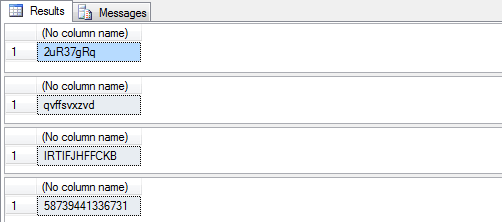
Here is sample output from the above commands:
Next Steps
- Unsure what ASCII codes to use, refer to this list of ASCII codes
- See where this procedure can be used in your application. Some examples include users inviting their friends or generating a new password by request or as a temporary replacement.
- Determine your environment’s security policy including password length and valid characters.
- Implement your password policy in the parameters.

Biography
Brent Shaub has been creating, renovating and administering databases since 1998. He’s worked on nearly two dozen professional systems, most incorporating web front-ends, iterating many times over the SDLC. After 14 years in the corporate world working for Foster Wheeler, Design Strategy and Research Pharmaceutical Services, Brent has created his own company, Buoyant Creations LLC, to provide health education.
Community Activity
Brent’s role as technical lead on his company’s flagship site Library of Learning, is to create the first web-based, database-driven Feldenkrais search tool, complete with recordings. The global endeavor will use insights from 30 senior practitioners and serve over 2,000 practitioners and their students. Brent has worked with the Australian Feldenkrais Guild on their website and teaches Feldenkrais classes.
SQL Server Interests
Open to alternative viewpoints, Brent encourages constructive debate in his articles on MSSQLTips.com. Impressed with the elegance of clear design, Brent digs into structural relationships. He’s a whiz at redesigning existing schemas and creating systems from ideas. Through fine-tuning logical differences organizing data, Brent aims to minimize the ripple-effect of