Problem
Generating random numbers from a normal distribution is essential for accuracy and realistic modeling. Used for simulation, inference, cryptography, and algorithm design for scientific, engineering, statistical, and AI domains. Is it possible to create random Gaussian numbers in SQL Server using the Ziggurat algorithm without external tools?
Solution
The Ziggurat algorithm is among the fastest and most efficient method for generating Gaussian random numbers. It uses a called rejection sampling technique speeding it up by partitioning the target probability distribution into slices which will resembling a ziggurat structure. Ziggurat is the name of an ancient Mesopotamian stepped pyramid structure. The technique randomly generates a point in the probability density function and tests if this point is inside the desired distribution, and if not, tries again.
Terms and Definitions
Before we get started, here are some things that will be helpful to understand the algorithm:
- m1 – used to scale integers to floats in SHR3 function with a constant value of 2^31 = 2147483648.
- m2 – used to normalize integer values from bitwise generators with a constant value of 2^32 = 4294967296.
- dn – X-position where the tail start for the normal distribution, defining the rightmost x boundary of the Ziggurat.
- vn – Is the area under the normal curve to the right of dn and it is used to decide when to fall back to tail sampling.
- tn – Often is equal to dn and it is used to express tail logic in code.
- kn – Integer cutoff thresholds for fast rejection.
- wn – Floating-pointing widths of rectangles for scaling.
- fn – Height of probability density function at rectangle tops calculated by
 for normal and calculated by
  exponential tables.
 - iz – Randomly selects which Ziggurat layer to sample from, usually for normal ranges from 0 to 127 and for exponential from 0 to 255.
- hz – Random signed integer used to compute iz and x.
- x – It is a candidate sample value that can be rejected or accepted depending of the probability density function test.
- uni – Uniform random value from uni function that is used in rejection sampling logic.
- shr3 – Shift-register random number generator with 3 operations that performs bitwise XOR and shift operations on an internal state (jsr). It is fast with no use of multiplications or divisions.
- jsr – Jump shift register that must be initialized with a random or non-zero seed before calling shr3 function that will change it through the deterministic bit-shift XOR.
- Skewness – Measure of symmetry of a distribution or data set. A normal distribution has a skewness of zero and any symmetric data should have a skewness near zero.
- Kurtosis – Measure of whether the data are heavy-tailed, which tend to have outliers, or light-tailed lack of outliers, relative to a normal distribution. A normal distribution has a kurtosis of three.
- Histogram – effective graphical technique for showing both the skewness and kurtosis of a data set.
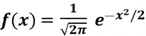
Normal distribution – probability density function
Ziggurat pre-computation
Before generating any random numbers, the algorithm sets up a table of values that defines the Ziggurat shape.
Ziggurat Method Steps for Normal Distribution
- Select a Region: A random integer i from 0 to 127 is chosen.
- Generate a Candidate: A uniform random number is generated and scaled by the pre-computed width of the selected rectangle. This produces a candidate number, x.
- Fast Path Acceptance: If the candidate number x is less than the solid part of the rectangle’s width, it’s accepted immediately. This is the most frequent outcome and avoids more complex calculations.
- Rejection Test: If the candidate falls in the small “overhang” area (the part of the rectangle that extends beyond the curve), a more precise rejection test is performed. A second random number is generated to determine a y-coordinate, and the point (x, y) is checked to see if it is actually under the normal distribution curve. The number is accepted only if this test passes.
- Tail Case: If the initial random number from step 1 corresponds to the tail region, a separate procedure is used to generate a number directly from that part of the distribution. This is a rare event.
- Apply Sign: After a positive number is successfully generated, a random sign (+ or -) is applied with a 50% probability to produce a number from the full, symmetric normal distribution.
SQL Tables
Random generated data
This table includes an extra column called src, that I used solely to trace which part of the calculation generated each value pair. This help me to identify the specific calculation step where a problem might occur and I kept it in case you encounter another flaw.
-- MSSQLTips (TSQL)

CREATE TABLE [dbo].[RndGenData](
    [PointId] [int] NOT NULL,
    [x] [float] NOT NULL,
    [y] [float] NOT NULL,
    [src] [smallint] NULL,
 CONSTRAINT [PK_RndGenData_1] PRIMARY KEY CLUSTERED
(
    [PointId] ASC
)WITH (PAD_INDEX = OFF, STATISTICS_NORECOMPUTE = OFF, IGNORE_DUP_KEY = OFF, ALLOW_ROW_LOCKS = ON, ALLOW_PAGE_LOCKS = ON, OPTIMIZE_FOR_SEQUENTIAL_KEY = OFF) ON [PRIMARY]
) ON [PRIMARY]
GO
Pre-computed Normal distribution values
-- MSSQLTips (TSQL)

CREATE TABLE [dbo].[RndZigguratNor](
    [PointId] [int] IDENTITY(0,1) NOT NULL,
    [kn] [bigint] NULL,
    [wn] [float] NULL,
    [fn] [float] NULL,
 CONSTRAINT [PK_RndZigguratNor] PRIMARY KEY CLUSTERED
(
    [PointId] ASC
)WITH (PAD_INDEX = OFF, STATISTICS_NORECOMPUTE = OFF, IGNORE_DUP_KEY = OFF, ALLOW_ROW_LOCKS = ON, ALLOW_PAGE_LOCKS = ON, OPTIMIZE_FOR_SEQUENTIAL_KEY = OFF) ON [PRIMARY]
) ON [PRIMARY]
GO
SQL Function
Table-valued function SHR3
-- =============================================
-- Author:      SCP - MSSQLTips
-- Create date: 20250718
-- Description: SHR3 pseudo-random generator
-- =============================================
CREATE OR ALTER FUNCTION [dbo].[tvfRndGenSHR3]
                (@jsr bigint
                ,@rectangles int)
RETURNS             TABLE
AS
RETURN
(
    WITH step1 AS
        (SELECT  jsr1 = (@jsr ^ (@jsr << 13)) & 0xFFFFFFFF),
         step2 AS
        (SELECT  jsr2 = (jsr1 ^ (jsr1 >> 17)) & 0xFFFFFFFF
            FROM step1),
         step3 AS
        (SELECT  jsr_final = (jsr2 ^ (jsr2 << 5)) & 0xFFFFFFFF
            FROM step2)
        ,result AS
        (SELECT  shr3 = (@jsr + jsr_final) & 0xFFFFFFFF
                ,jsr_new = jsr_final
            FROM step3)
    SELECT   shr3
            ,jsr_new
            ,CONVERT(float,0.5 + shr3 / 4294967296.0) AS uni
            ,CASE WHEN shr3 >= 2147483648
                  THEN CONVERT(int, shr3 - 4294967296)
                  ELSE CONVERT(int, shr3)
             END AS hz
            ,CASE WHEN shr3 >= 2147483648
                  THEN CONVERT(int, shr3 - 4294967296) & @rectangles
                  ELSE CONVERT(int, shr3) & @rectangles
             END AS iz
        FROM result
);
GO
SQL Stored Procedures
Generating pre-computed values for Normal distribution
-- =============================================
-- Author:      SCP - MSSQLTips
-- Create date: 20250804
-- Description: Ziggurat RNOR precomputed Tables
-- =============================================
CREATE OR ALTER PROCEDURE [dbo].[uspRandGenZigguratRNorIni]
WITH EXECUTE AS CALLER
AS
BEGIN;
    SET NOCOUNT ON;
    BEGIN TRY

        DECLARE      @jsr bigint
                    ,@jsrseed bigint
                    ,@m1 float = 2147483648.0
                    ,@dn float = 3.442619855899
                    ,@tn float
                    ,@vn float = 0.00991256303526217
                    ,@q  float
                    ,@i  int = 0
                    ,@NumRects int = 128;

        SET @jsrseed = FLOOR(RAND(CHECKSUM(NEWID())) * (@m1 - 1));
        SET @tn = @dn;
        SET    @jsr ^= @jsrseed & 0xFFFFFFFF;

        TRUNCATE TABLE [dbo].[RndZigguratNor];

        SET @q = @vn / Exp(-0.5 * @dn * @dn);

        WHILE @i < @NumRects BEGIN
            INSERT INTO  [dbo].[RndZigguratNor]
                        ([kn])
                VALUES  (0);

            SET @i += 1;
        END

        UPDATE       [dbo].[RndZigguratNor]
            SET      kn = @dn / @q * @m1
                    ,wn = @q / @m1
                    ,fn = 1.0
            WHERE    PointId = 0;

        UPDATE       [dbo].[RndZigguratNor]
            SET      wn = @dn / @m1
                    ,fn = Exp(-0.5 * @dn * @dn)
            WHERE    PointId = 127;

        SET @i = @NumRects - 2;

        WHILE @i > 0 BEGIN
            SET @dn = SQRT(-2.0 * LOG(@vn / @dn + EXP(-0.5 * @dn * @dn)));

            UPDATE       [dbo].[RndZigguratNor]
                SET      kn = @dn / @tn * @m1
                WHERE    PointId = @i + 1;

            SET @tn = @dn;

            UPDATE       [dbo].[RndZigguratNor]
                SET      wn = @dn / @m1
                        ,fn = EXP(-0.5 * @dn * @dn)
                WHERE    PointId = @i;

            SET @i -= 1;
        END;

        RETURN;
    END TRY
    BEGIN CATCH
        PRINT    'Error: ' + CONVERT(varchar(50), ERROR_NUMBER()) +
                ', Severity: ' + CONVERT(varchar(5), ERROR_SEVERITY()) +
                ', State: ' + CONVERT(varchar(5), ERROR_STATE()) +
                ', Procedure: ' + ISNULL(ERROR_PROCEDURE(), '-') +
                ', Line: ' + CONVERT(varchar(5), ERROR_LINE());
        PRINT ERROR_MESSAGE();
    END CATCH;
END
GO
Generating RNOR values
-- =============================================
-- Author:      SCP - MSSQLTips
-- Create date: 20250719
-- Description: Ziggurat RNOR
-- =============================================
CREATE OR ALTER PROCEDURE [dbo].[uspRandGenZigguratRNor]
                (@Points int)
WITH EXECUTE AS CALLER
AS
BEGIN;
    SET NOCOUNT ON;
    BEGIN TRY

        TRUNCATE TABLE [dbo].[RndGenData];

        IF (SELECT COUNT(*) FROM [dbo].[RndZigguratNor]) = 0
            EXEC [dbo].[uspRandGenZigguratRNorIni];

        DECLARE  @shr3 bigint
                ,@jsr bigint = FLOOR(RAND(CHECKSUM(NEWID())) * 2147483647)
                ,@kn bigint
                ,@src smallint
                ,@wn float
                ,@fn float
                ,@fnPrevious float
                ,@x float
                ,@y float
                ,@r float = 3.442619855899
                ,@hz int
                ,@iz bigint
                ,@rectangles int
                ,@i int = 0
                ,@uni float;

        SET @rectangles = (SELECT     COUNT(*) - 1
                                FROM [dbo].[RndZigguratNor]);

        WHILE @i < @Points BEGIN
            SET @src = 0;

            SELECT       @shr3 = shr3
                        ,@jsr = jsr_new
                        ,@hz = hz
                        ,@iz = iz
                        ,@uni = uni
                FROM     [dbo].[tvfRndGenSHR3] (@jsr,@rectangles);

            SELECT       @kn = kn
                        ,@wn = wn
                        ,@fn = fn
                FROM     [dbo].[RndZigguratNor]
                WHERE    [PointId] = @iz;

            IF ABS(@hz) < @kn AND @iz <> 0 BEGIN
                SET @x = @hz * @wn;
                IF @fn < EXP(-0.5 * @x * @x)
                    SET @y = @fn;
                ELSE
                    SET @y = EXP(-0.5 * @x * @x);
            END ELSE BEGIN
                SET @src = 3;

                WHILE 1 = 1 BEGIN
                    SELECT       @shr3 = shr3
                                ,@jsr = jsr_new
                                ,@hz = hz
                                ,@iz = iz
                                ,@uni = uni
                        FROM     [dbo].[tvfRndGenSHR3] (@jsr,@rectangles);

                    SELECT       @kn = kn
                                ,@wn = wn
                                ,@fn = fn
                        FROM     [dbo].[RndZigguratNor]
                        WHERE    [PointId] = @iz;

                    SET @x = @hz * @wn;
                    SET @y = EXP(-0.5 * @x * @x);

                    IF @iz = 0 BEGIN
                        SET @src = 5;

                        WHILE @y + @y < @x * @x OR @y = 1 BEGIN
                            SELECT   @x = -LOG(uni) / @r
                                    ,@jsr = jsr_new
                                FROM dbo.[tvfRndGenSHR3] (@jsr,@rectangles);

                            SELECT   @y = -LOG(uni)
                                    ,@jsr = jsr_new
                                FROM dbo.[tvfRndGenSHR3] (@jsr,@rectangles);
                        END

                        IF @hz > 0
                            SET @x = @r + @x;
                        ELSE
                            SET @x = -@r - @x;

                        SET @y = EXP(-0.5 * @x * @x);

                        BREAK;
                    END ELSE BEGIN
                        SET @src = 7;

                        SELECT       @fnPrevious = fn
                            FROM     [dbo].[RndZigguratNor]
                            WHERE    [PointId] = @iz - 1;

                        IF @fn + (@uni * (@fnPrevious - @fn)) < EXP(-0.5 * @x * @x) BEGIN
                            SET @y = EXP(-0.5 * @x * @x);
                            BREAK;
                        END;
                    END

                    IF ABS(@hz) < @kn
                        BREAK;
                END
            END

            INSERT INTO  [dbo].[RndGenData]
                        ([PointId]
                        ,[X]
                        ,[Y]
                        ,[src])
                VALUES  (@i
                        ,@x
                        ,@y
                        ,@src);

            SET @i += 1;
        END

        DECLARE @xMean float;
        SELECT @xMean = AVG(x) FROM [dbo].[RndGenData];

        DECLARE @xStd float;
        SELECT @xStd = STDEV(x) FROM [dbo].[RndGenData];

        SELECT       COUNT(*) AS n
                    ,AVG(x) AS mean
                    ,STDEV(x) AS std
                    ,SUM(POWER((x - @xMean) / @xStd, 3)) / COUNT(*) AS skewness
                    ,SUM(POWER((x - @xMean) / @xStd, 4)) / COUNT(*) AS kurtosis
            FROM     [dbo].[RndGenData];

        RETURN;
    END TRY
    BEGIN CATCH
        PRINT    'Error: ' + CONVERT(varchar(50), ERROR_NUMBER()) +
                ', Severity: ' + CONVERT(varchar(5), ERROR_SEVERITY()) +
                ', State: ' + CONVERT(varchar(5), ERROR_STATE()) +
                ', Procedure: ' + ISNULL(ERROR_PROCEDURE(), '-') +
                ', Line: ' + CONVERT(varchar(5), ERROR_LINE());
        PRINT ERROR_MESSAGE();
    END CATCH;
END
GO
Histogram
-- =============================================
-- Author:      SCP - MSSQLTips
-- Create date: 20250809
-- Description: Histogram
-- =============================================
CREATE OR ALTER PROCEDURE [dbo].[uspRandGenHistogram]
                (@BarWidth float = 0.09
                ,@Ratio float = 100)
WITH EXECUTE AS CALLER
AS
BEGIN;
    BEGIN TRY

        DECLARE          @Histogram
            TABLE       (x float
                        ,y int
                        ,id int DEFAULT 0);

        INSERT INTO      @Histogram
                        (x
                        ,y)
            SELECT       round(X,1)
                        ,COUNT(*)
                FROM     [dbo].[RndGenData]
                GROUP BY round(X,1)
                ORDER BY 1;

        DECLARE @Scale float = (SELECT COUNT(*) FROM [dbo].[RndGenData]) / @Ratio;

        SELECT         id
                    ,geometry::CollectionAggregate(SpatialLocation) AS [Geom]
            FROM    (SELECT      id
                                ,geometry::STPolyFromText(
                                 'POLYGON((' +
                                 CAST(X - @BarWidth/2 AS VARCHAR(10)) + ' 0, ' +
                                 CAST(X - @BarWidth/2 AS VARCHAR(10)) + ' ' + CAST(ROUND(y / @Scale, 2) AS VARCHAR(10)) + ', ' +
                                 CAST(X + @BarWidth/2 AS VARCHAR(10)) + ' ' + CAST(ROUND(y / @Scale, 2) AS VARCHAR(10)) + ', ' +
                                 CAST(X + @BarWidth/2 AS VARCHAR(10)) + ' 0, ' +
                                 CAST(X - @BarWidth/2 AS VARCHAR(10)) + ' 0))',0) AS SpatialLocation
                        FROM     @Histogram) AS D
            GROUP BY id;

        RETURN;
    END TRY
    BEGIN CATCH
        PRINT    'Error: ' + CONVERT(varchar(50), ERROR_NUMBER()) +
                ', Severity: ' + CONVERT(varchar(5), ERROR_SEVERITY()) +
                ', State: ' + CONVERT(varchar(5), ERROR_STATE()) +
                ', Procedure: ' + ISNULL(ERROR_PROCEDURE(), '-') +
                ', Line: ' + CONVERT(varchar(5), ERROR_LINE());
        PRINT ERROR_MESSAGE();
    END CATCH;
END
GO
Example 1
Let´s starting generating 10,000 random normal points.
-- MSSQLTips (TSQL)

EXEC [dbo].[uspRandGenZigguratRNor] @Points = 10000;
GO
Resulting in

Observe the values and the ideal ones are mean = 0, std = 1, skewness = 0, and kurtosis = 3. If you are not comfortable with the values, run again or increase the number of points.
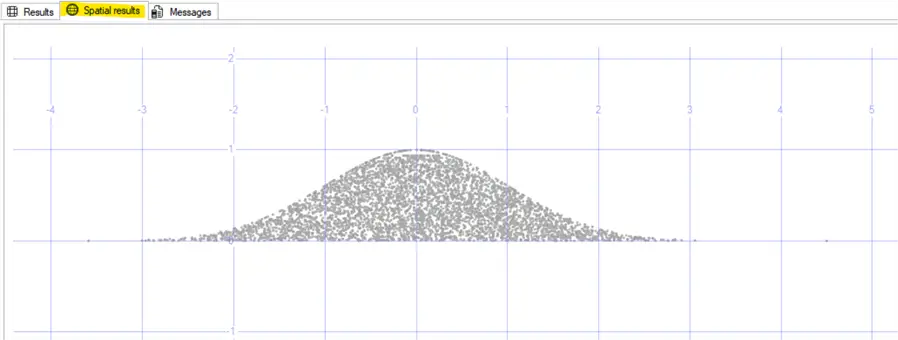
To have a look at the Spatial results of our data run the following. There is a limitation in how much data points can be shown on the Spatial results tab.
-- MSSQLTips (TSQL)

SELECT top 5000 [PointId]
      ,[X]
      ,[Y]
      ,[src]
      ,([geometry]::Point([x],[y],(0))).STBuffer(0.01)
  FROM [MsSqlTips].[dbo].[RndGenData];
GO
Resulting in
Or if you want to see the histogram:
-- MSSQLTips (TSQL)

EXECUTE [dbo].[uspRandGenHistogram]
GO
Resulting in
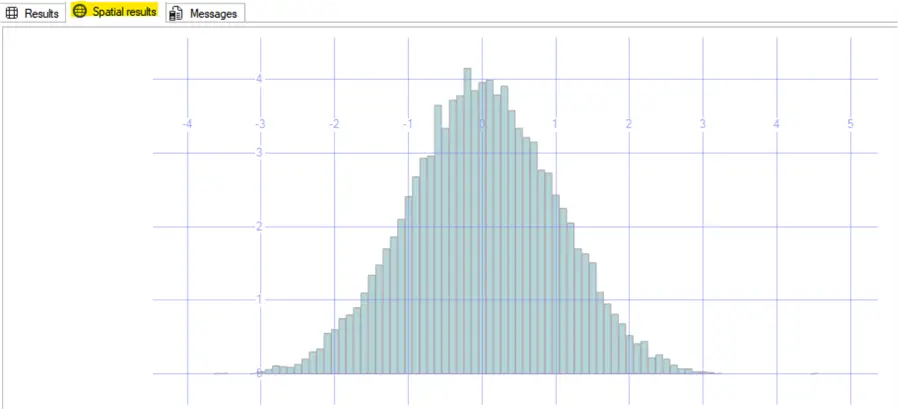
You can adjust the generated values stored at the table RndGenData applying to the x values the mean as x-offset and the standard deviation as x-scale and them obtain the data that you need.
Random Human Height Values Example
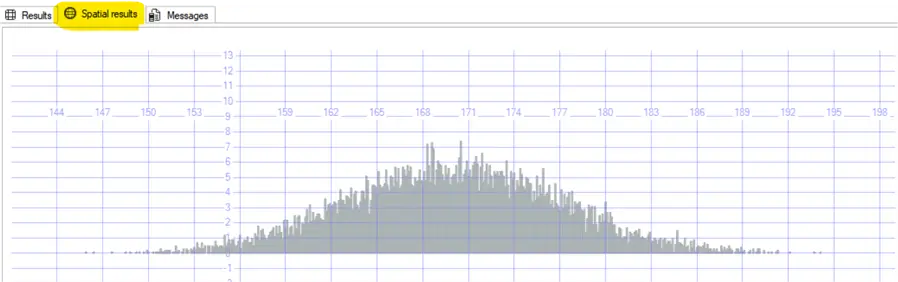
Let´s say that I need a table of random values of human height distribution, I will assume a standard deviation of 7 cm and a mean of 170 cm.
-- MSSQLTips (TSQL)

UPDATE       [dbo].[RndGenData]
    SET      [x] = [x] * 7 + 170;
GO
EXECUTE [dbo].[uspRandGenHistogram] 0.09,1000;
GO
Resulting in
Next Steps

Sebastião Pereira has over 40 years of experience in database development including T-SQL, algorithm design, machine learning and bringing innovative mathematical formulas to SQL Server. He started his career at a transnational fast-moving consumer goods (FMCG) company as an employee then later transitioning into a consultant role. He eventually founded his own company to develop software solutions for the healthcare industry. Sebastião is a respected award-winning author on MSSQLTips.com extending SQL Server capabilities beyond traditional workloads.
- MSSQLTips Awards
- Author of the Year – 2025
- Trendsetter (25+ tips) – 2025
- Rookie of the Year – 2024



Hello Phi Data DBA,
The operator ^ is the special Bitwise operator ‘OR’ that perform bit manipulations between two expressions of any of the data types of the integer data type category (https://learn.microsoft.com/en-us/sql/t-sql/language-elements/bitwise-or-transact-sql?view=sql-server-ver17) not a POWER function.
How are you able to get the Function to compile with ^ instead of using the POWER function?