Problem
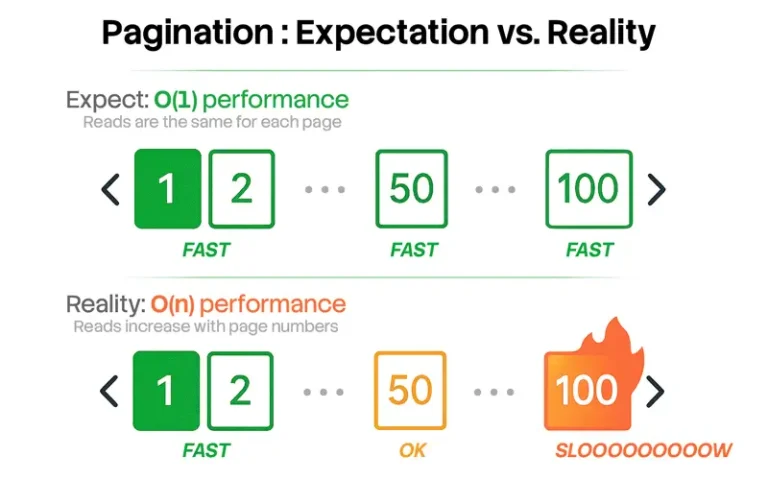
In my previous tip, Pagination Performance in SQL Server, I showed how to make SQL pagination more predictable – turning O(n) into O(1). I materialized and cached row numbers to page through instead of calculating them on every request. It wasn’t the whole story, though; real pagination queries rarely get to sort without filtering. Users always want more control, and filtering can threaten that predictability.
Solution
If pagination is a feature of your site, users will have all kinds of expectations about how it should work. They’ll want to filter in addition to sort; for example: only users named Aaron, or users created in the last two weeks, or users with at least 150 UnicornPoints.
Recall our underlying Users table:
CREATE TABLE dbo.Users
(
  UserID              int IDENTITY(1,1) NOT NULL,
  UserName            nvarchar(128)     NOT NULL,
  CreationDate        date              NOT NULL DEFAULT sysdatetime(),
  UnicornPoints       int               NOT NULL DEFAULT 0,
  ForceOneRowPerPage  char(4000)        NOT NULL DEFAULT 'x',
  CONSTRAINT PK_Users PRIMARY KEY(UserID),
  CONSTRAINT UQ_Users_UserName UNIQUE(UserName)
);
INSERT dbo.Users(UserName, CreationDate, UnicornPoints)
SELECT LEFT(NEWID(), 10 + ASCII(LEFT(NEWID(), 1)) % 10),
       DATEADD(MINUTE, value+ABS(CHECKSUM(NEWID()) % 10), '20220101'),
       ABS(CHECKSUM(NEWID())) % 100
  FROM GENERATE_SERIES(1, 300000);
And a separate table where we materialize row numbers for various ranking:
CREATE TABLE dbo.UserPaginationRowNumbers
(
  UserID                                 int NOT NULL,
  RowNumber_ByCreationDate               int NOT NULL,
  RowNumber_ByUnicornPointsDesc          int NOT NULL,
  RowNumber_ByUserName                   int NOT NULL,
  RowNumber_ByUnicornPointsDesc_UserName int NOT NULL,
  CONSTRAINT PK_UserPaginationRowNumbers PRIMARY KEY (UserID),
  INDEX IX_UserPagination_ByCreationDate
        UNIQUE (RowNumber_ByCreationDate),
  INDEX IX_UserPagination_ByUnicornPointsDesc
        UNIQUE (RowNumber_ByUnicornPointsDesc),
  INDEX IX_UserPagination_ByUserName
        UNIQUE (RowNumber_ByUserName),
  INDEX IX_UserPagination_ByUnicornPointsDesc_UserName
        UNIQUE (RowNumber_ByUnicornPointsDesc_UserName)
);
We populate this using a query like:
TRUNCATE TABLE UserPaginationRowNumbers;
INSERT dbo.UserPaginationRowNumbers
(
  UserID,
  RowNumber_ByCreationDate,
  RowNumber_ByUnicornPointsDesc,
  RowNumber_ByUserName,
  RowNumber_ByUnicornPointsDesc_UserName
)
SELECT UserID,
/* these need a tie-breaker: */
  ROW_NUMBER() OVER (ORDER BY CreationDate, UserID),
  ROW_NUMBER() OVER (ORDER BY UnicornPoints DESC, UserID),
/* already unique, no tie-breaker: */
  ROW_NUMBER() OVER (ORDER BY UserName),
  ROW_NUMBER() OVER (ORDER BY UnicornPoints DESC, UserName)
FROM dbo.Users;
Once the row numbers table is populated, paging is straightforward. If I want page n, sorted on CreationDate, I just ask for those row numbers and join back to Users:
DECLARE @PageNumber int = 3000, @PageSize int = 10;
WITH x AS
(
  SELECT UserID, RowNumber_ByCreationDate
    FROM dbo.UserPaginationRowNumbers
   WHERE RowNumber_ByCreationDate BETWEEN @PageSize * (@PageNumber-1) + 1
                                      AND @PageSize *  @PageNumber
)
SELECT u.*
  FROM dbo.Users AS u
 INNER JOIN x
    ON u.UserID = x.UserID
 ORDER BY x.RowNumber_ByCreationDate;
This produces a very nice plan with two ordered seeks:

Support Various Filters
Now, let’s say I want to support various filters to limit the results.
Score >= / <= x
I want to page through by CreationDate (or any materialized ranking column), but I only want to see users with some minimum or maximum score – let’s say a minimum of 20. If I have these rows:
UserID   Users.UserName   RowNumber_ByCreationDate   Users.UnicornPoints
------   --------------   ------------------------   -------------------
4        Aaron            1                          19
7        Frank            2                          32
2        Bob              3                          17
9        Lisa             4                          27
6        Megan            5                          67
…
I can’t just say this…
DECLARE @PageNumber int = 1, @PageSize int = 10, @MinScore int = 20;
WITH x AS
(
  SELECT UserID, RowNumber_ByCreationDate
    FROM dbo.UserPaginationRowNumbers
   WHERE RowNumber_ByCreationDate BETWEEN @PageSize * (@PageNumber-1) + 1
                                      AND @PageSize *  @PageNumber
)
SELECT u.*
  FROM dbo.Users AS u
 INNER JOIN x
    ON u.UserID = x.UserID
 WHERE u.UnicornPoints >= @MinScore
 ORDER BY x.RowNumber_ByCreationDate;
…because my first page is going to be missing rows! In fact, it could be empty if none of the first 10 users (by creation date) have a score of 20 or better. The problem, of course, is that you can’t filter after numbering the rows without breaking pagination. I might try to apply a row number on top of the row number, to benefit from an ordered scan on my materialized row numbers:
DECLARE @PageNumber int = 1, @PageSize int = 10, @MinScore int = 20;
SELECT * FROM
(
  SELECT u.*, r.RowNumber_ByCreationDate,
         rn = ROW_NUMBER() OVER (ORDER BY r.RowNumber_ByCreationDate)
    FROM dbo.Users AS u
   INNER JOIN dbo.UserPaginationRowNumbers AS r
      ON u.UserID = r.UserID
   WHERE u.UnicornPoints >= @MinScore
) AS x
WHERE rn BETWEEN @PageSize * (@PageNumber-1) + 1
             AND @PageSize *  @PageNumber
   ORDER BY RowNumber_ByCreationDate;
Now I get the right results. And the plan doesn’t look too bad on page 1, aside from that index scan, executing sub-second:

But it takes longer (~1.5s) at higher page numbers, even when it yields zero rows:
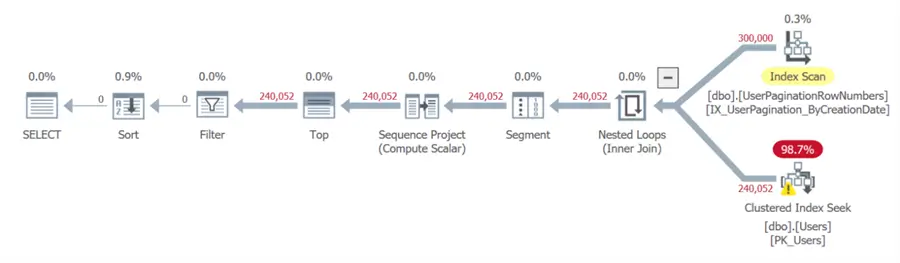
This is where a watermark can help. At a high level, a watermark helps me figure out the last row that still meets my filter and never scan past it. With this watermark, I can at least eliminate all the users with a score of less than 20, with a single scan at the beginning of the session:
DECLARE @watermark int;
SELECT @watermark = MAX(RowNumber_ByUnicornPointsDesc)
  FROM dbo.UserPaginationRowNumbers AS p
 WHERE EXISTS
 (
   SELECT 1
     FROM dbo.Users
    WHERE UserID = p.UserID
      AND UnicornPoints >= @MinScore
 );
SELECT @watermark;
/*  keep this watermark for the session, e.g. put it in SESSION_CONTEXT()
    if the table gets refreshed, your code will need to check somewhere
    to know it needs to re-establish its watermark
*/
WITH x AS
(
  SELECT UserID, rn = ROW_NUMBER() OVER (ORDER BY RowNumber_ByCreationDate)
    FROM dbo.UserPaginationRowNumbers
   WHERE RowNumber_ByUnicornPointsDesc <= @watermark
)
SELECT u.*
  FROM dbo.Users AS u
 INNER JOIN x
    ON u.UserID = x.UserID
 WHERE x.rn BETWEEN @PageSize * (@PageNumber-1) + 1
                AND @PageSize *  @PageNumber
ORDER BY rn;
It’s a little more complicated, but it can squeeze out more performance… especially when the filter eliminates a big chunk of the table. And indeed, this query executes in a little less than 0.1s at page 3,000 (at page 30,000, no rows are returned, it takes about 0.25s, and the Users table isn’t touched):


This is not quite constant performance, but it comes pretty close. And while it requires some extra scaffolding and query building logic, if your pagination performance is something your users notice, it may be worth some experimentation.
CreationDate >=/<= x
A slightly less complex filtering scenario involves all users, ordered by CreationDate, created on or after (or on or before) a specific point in time. I can generate a similar watermark, denoting the very first (or last) user that should be included in the result.
Let’s say we want all users created on or after 2022-07-21. Then my pagination just needs to offset by whatever the watermark is in order to skip all the rows that should be filtered:
DECLARE @PageNumber int = 1,
        @PageSize   int = 10,
        @MinCreationDate date = '20220721';
DECLARE @watermark int;
SELECT @watermark = MIN(RowNumber_ByCreationDate)
  FROM dbo.UserPaginationRowNumbers AS p
 WHERE EXISTS
 (
   SELECT 1
     FROM dbo.Users
    WHERE UserID = p.UserID
      AND CreationDate >= @MinimumCreationDate
 );
WITH x AS
(
  SELECT UserID, RowNumber_ByCreationDate
    FROM dbo.UserPaginationRowNumbers
   WHERE RowNumber_ByCreationDate BETWEEN @PageSize * (@PageNumber-1) + @watermark
                                      AND @PageSize *  @PageNumber    + @watermark – 1
)
SELECT u.*
  FROM dbo.Users AS u
 INNER JOIN x
    ON x.UserID = u.UserID
 ORDER BY x.RowNumber_ByCreationDate;
The up-front scan is still relatively friendly (~200ms):
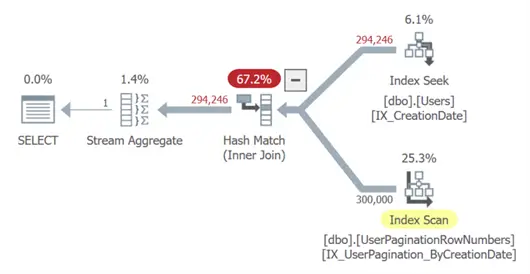
The real win is the paging performance, which is effectively constant – executing in under a millisecond even at high page numbers. We get two ordered seeks for page 29,000, even when the filter has been adjusted to include most of the table (2022-01-05):

UserName LIKE ‘%pattern%’
There might not be much we can do to support filtering that will always require a scan. The row numbers become almost useless because there is no way to use them to help filter. If I have these 5 users:
UserID   UserName   RowNumber_ByCreationDate
------   --------   ------------------------
4        Aaron_B    1
7        Adam       2
2        Alec       3
9        Alex_X     4
6        Alistair   5
And I want to filter out users who have an underscore in their name, I might think to just say:
DECLARE @PageNumber int = 1, @PageSize int = 10, @Pattern nvarchar(100) = N'%[_]%';
WITH x AS
(
  SELECT UserID, RowNumber_ByCreationDate
    FROM dbo.UserPaginationRowNumbers
   WHERE RowNumber_ByCreationDate BETWEEN @PageSize * (@PageNumber-1) + 1
                                      AND @PageSize *  @PageNumber
)
SELECT u.*
  FROM dbo.Users AS u
 INNER JOIN x
    ON u.UserID = x.UserID
 WHERE UserName NOT LIKE @Pattern
 ORDER BY x.RowNumber_CreationDate;
But then my first page is going to be missing rows!

I’m all for great performance, but the results need to be correct. What if I filter first, and then use the index in the row numbers table to hopefully avoid a sort on CreationDate?
DECLARE @PageNumber int = 1, @PageSize int = 10, @pattern nvarchar(32) = N'%[_]%';
WITH x AS
(
  SELECT UserID, RowNumber_ByCreationDate,
         rn = ROW_NUMBER() OVER (ORDER BY RowNumber_ByCreationDate)
    FROM dbo.UserPaginationRowNumbers AS r
   WHERE EXISTS
   (
     SELECT 1
       FROM dbo.Users AS u
      WHERE u.UserID = r.UserID
        AND u.UserName NOT LIKE @pattern
   )
)
SELECT u.*
  FROM dbo.Users AS u
 INNER JOIN x ON u.UserID = x.UserID
 WHERE x.rn BETWEEN @PageSize * (@PageNumber-1) + 1
                AND @PageSize *  @PageNumber
 ORDER BY x.rn;
I thought this might be clever, but gets progressively slower. At page 30,000, this takes 1.5s:

We’re in O(n) territory again, and a 1.5s+ page load is a deal-breaker for many sites. In this case, it might be better to ignore my materialized row numbers and revert to traditional OFFSET/FETCH pagination:
DECLARE @PageNumber int = 1, @PageSize int = 10, @Pattern nvarchar(100) = N'%[_]%';
SELECT u.*
   FROM dbo.Users AS u
  WHERE UserName NOT LIKE @Pattern
  ORDER BY UserName
 OFFSET @PageSize * (@PageNumber-1) ROWS
  FETCH NEXT @PageSize ROWS ONLY;
While this also has O(n) performance, it finishes about 20% faster on page 30,000 (1.2s) and avoids any concerns about stale data:

Damage Control
While it’s clear that there is no one-size-fits-all solution to pagination, there are some things you can do to pre-emptively damage control. In addition to materializing row numbers for popular sorting columns, you can consider functionality restrictions, including:
- Disallow leading wildcard searches – force “starts with” or equality. This way, you have a chance to use indexes to reduce the pain.
- Don’t support arbitrary combinations of filtering and sorting. Offer sorting by anything when including all users, but limit to sorting by
UserIDor some other sensible (and covered/indexed) column once filters come into play. - Limit how many pages a user can scroll through. In real life, we see performance issues when people ask for the 40,000th page of posts or 65,000th page of users. No person is scrolling to these page numbers on purpose. It can make sense to limit the number of users they can page through at all to, say, 1,000 users. This just involves adding a filter on
RowNumber_<column> <= 1000.
Final Thoughts
Sometimes the combination of filtering and pagination is a losing battle at scale. If users insist on %wildcard% searches, the engine has to scan, and no amount of clever pagination tricks can overcome that. Users need to be prepared to wait. If there is no middle ground, and you can’t add unlimited memory to your server, and you can’t explicitly prevent some of these performance-killing patterns, you may want to implement a search mechanism outside of SQL Server (e.g. Elasticsearch).
In my case, the benefits of pre-materialized row numbers for some pagination scenarios are really going to help remove some UI- and API-based queries off our “top 50 resource offenders” list.
Next Steps
Have pagination horror stories? Drop them in the comments!
Review the following tips and other resources:
- Pagination Performance in SQL Server
- Comparing performance for different SQL Server paging methods
- Page through SQL Server results with the ROWNUMBER() function
- SQL Server stored procedures to page large tables or queries
- Overview of OFFSET and FETCH feature of SQL Server 2012
- SQL Server 2012 server side paging

Aaron Bertrand (@AaronBertrand) is a passionate technologist with industry experience dating back to Classic ASP and SQL Server 6.5. He also blogs at sqlblog.org.
- MSSQLTips Awards: Author of the Year – 2016, 2023 | Leadership (200+ tips) – 2022