Problem
Many web applications and APIs implement pagination to control how much data is returned or displayed. Many paging solutions suffer from the linear scaling problem (often referred to as O(n)), meaning the amount of work increases as you get into higher page numbers. If a user has ever clicked “next page” or “last page” and your CPUs caught on fire, you may have been a victim of linear scaling. Are there any creative solutions that will achieve constant-time performance (O(1))?
Solution
Before we get into solutions, let’s look closer at the problem.
SQL Pagination Issue
Let’s look at a small table containing 300,000 users. I added a filler column to force any row to fill an 8K page, to make metrics like logical reads really stand out.
CREATE TABLE dbo.Users
(
  UserID              int IDENTITY(1,1) NOT NULL,
  UserName            nvarchar(128)     NOT NULL,
  CreationDate        date              NOT NULL DEFAULT sysdatetime(),
  UnicornPoints       int               NOT NULL DEFAULT 0,
  ForceOneRowPerPage  char(4000)        NOT NULL DEFAULT 'x',
  CONSTRAINT PK_Users PRIMARY KEY(UserID),
  CONSTRAINT UQ_Users_UserName UNIQUE(UserName)
);

INSERT dbo.Users(UserName, CreationDate)
SELECT LEFT(NEWID(), 10 + ASCII(LEFT(NEWID(), 1)) % 10),
       DATEADD(MINUTE, value+ABS(CHECKSUM(NEWID()) % 10), '20220101')
  FROM GENERATE_SERIES(1, 300000);
Here are four queries that achieve naïve pagination of the table, ordered by CreationDate; returning the first 10 rows, rows 2,991-3,000, rows 29,991-30,000, and then the last 10 rows.
SELECT /* page 1 */ * FROM dbo.Users
       ORDER BY CreationDate, UserID
       OFFSET 0      ROWS FETCH NEXT 10 ROWS ONLY;

SELECT /* page 299 */ * FROM dbo.Users
       ORDER BY CreationDate, UserID
       OFFSET 2990   ROWS FETCH NEXT 10 ROWS ONLY;

SELECT /* page 2,999 */ * FROM dbo.Users
       ORDER BY CreationDate, UserID
       OFFSET 29990  ROWS FETCH NEXT 10 ROWS ONLY;

SELECT /* page 29,999 */ * FROM dbo.Users
       ORDER BY CreationDate, UserID
       OFFSET 299990 ROWS FETCH NEXT 10 ROWS ONLY;
Notes:
UserIDis included to break ties in a deterministic way.- There’s an off-by-one error here; the page numbers in the following code samples and screenshots should be 300, 3,000, and 30,000.
- We’ll be measuring effective
O(n)behavior in practice, e.g. the engine has to read n rows. Not formal algorithmic complexity.
Query Results
With no supporting index on the primary sort column, you could probably predict how this went, and it wasn’t good:

As you can see in the reads, we end up reading all the rows up until the offset, discarding them, and then just taking the relevant 10 rows. This works okay for the first page, but it goes downhill quickly. While all four plans are estimated to cost about the same (and all do use a clustered index scan), the estimates are grossly misleading. You can see how the added reads affect runtime – and the sorting isn’t free, either. It takes us 36 seconds to get just the last page. Now imagine we scale 100X and have 30 million users: to get the last 10 rows, we’d be reading all 30 million rows, sorting them (spilling to tempdb), and discarding 29,999,990 rows.
Slight Improvements
Let’s look at some options to improve performance.
Add an Index to Improve
Adding an index on CreationDate, UserID helps a little, removing a sort since it exactly matches our ORDER BY. Just remember that if the end user can choose to sort by any combination of columns, it means you’d have to create supporting indexes for every valid choice (plus the tie-breaker when necessary) – this may not be practical in some cases.
CREATE INDEX IX_CreationDate ON dbo.Users(CreationDate, UserID);Query Results
At low pages, the same query yields better numbers, and hums along with a cheaper index scan + key lookup. When it gets to higher pages, unfortunately, it reverts to the same clustered index scan as above, and is still not acceptable for a web page or API in this decade:

A Filter Early Join Late Strategy
A further improvement is to follow a “filter early, join late” strategy, by isolating just the 10 UserID and CreationDate values from the desired page, and then joining back to the main table to get the rest of the columns:
WITH x /* page 1 */ AS
(
  SELECT UserID FROM dbo.Users
   ORDER BY CreationDate, UserID
  OFFSET 0       ROWS FETCH NEXT 10 ROWS ONLY
)
SELECT * FROM dbo.Users WHERE UserID IN (SELECT UserID FROM x);

WITH x /* page 299 */ AS
(
  SELECT UserID FROM dbo.Users
   ORDER BY CreationDate, UserID
  OFFSET 2990    ROWS FETCH NEXT 10 ROWS ONLY
)
SELECT * FROM dbo.Users WHERE UserID IN (SELECT UserID FROM x);

WITH x /* page 2,999 */ AS
(
  SELECT UserID FROM dbo.Users
   ORDER BY CreationDate, UserID
  OFFSET 29990   ROWS FETCH NEXT 10 ROWS ONLY
)
SELECT * FROM dbo.Users WHERE UserID IN (SELECT UserID FROM x);

WITH x /* page 29,999 */ AS
(
  SELECT UserID FROM dbo.Users
   ORDER BY CreationDate, UserID
  OFFSET 299990  ROWS FETCH NEXT 10 ROWS ONLY
)
SELECT * FROM dbo.Users WHERE UserID IN (SELECT UserID FROM x);
Query Results
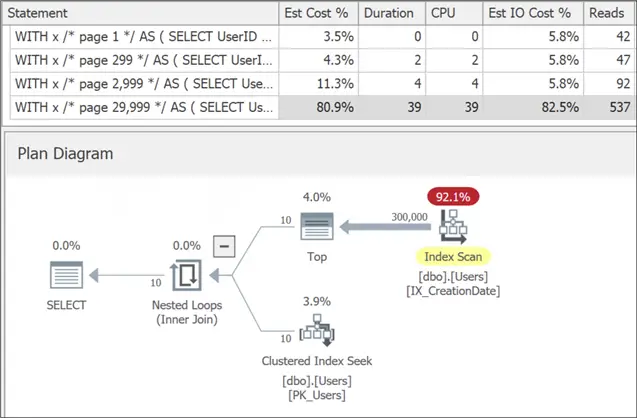
This works because we get an index scan against a very narrow index, and then we just seek the 10 rows from the wider clustered index. Even at the very last page, this is a tolerable number of reads, there is no sort to be found, and we have sub-second runtime. We’re close to O(1) but not quite there yet. It might still become unacceptable at 30 million users but, until you get there, this is often where tuning efforts are deemed “good enough.”
Track Key Values
A similar improvement is to have the app keep track of the highest CreationDate + UserID combo they saw on the current page (a watermark), then use that watermark in the where clause for the next page. Think of it like a bookmark – each page hands you the starting point for the next page.
(You could continue using OFFSET/FETCH in this case, but it’d always be OFFSET 0 / FETCH 10, so I find it more self-documenting to use TOP (10).) I’ll do the work behind the scenes for you here, for my very specific and synthetic data set, but the app would have to keep track of these values in some way in real life.
/* page 0 is '19000101' and UserID 0 */
WITH x /* page 1 */ AS
(
  SELECT TOP (10) UserID, CreationDate FROM dbo.Users
   WHERE CreationDate >= '19000101'
     AND UserID > 0
   ORDER BY CreationDate, UserID
)
SELECT * FROM dbo.Users WHERE UserID IN (SELECT UserID FROM x);

/* page 299 is '20220103' AND *happens to be* UserID > 2990 */
WITH x /* page 299 */ AS
(
  SELECT TOP (10) UserID, CreationDate FROM dbo.Users
   WHERE CreationDate >= '20220103'
     AND UserID > 2990
   ORDER BY CreationDate, UserID
)
SELECT * FROM dbo.Users WHERE UserID IN (SELECT UserID FROM x);

/* page 2,999 is '20220121' AND *happens to be* UserID > 29990 */
WITH x /* page 2,999 */ AS
(
  SELECT TOP (10) UserID, CreationDate FROM dbo.Users
   WHERE CreationDate >= '20220121'
     AND UserID > 29990
   ORDER BY CreationDate, UserID
)
SELECT * FROM dbo.Users WHERE UserID IN (SELECT UserID FROM x);

/* page 29,999 is '20220728' AND *happens to be* UserID > 299990 */
WITH x /* page 1 */ AS
(
  SELECT TOP (10) UserID, CreationDate FROM dbo.Users
   WHERE CreationDate >= '20220728'
     AND UserID > 299990
   ORDER BY CreationDate, UserID
)
SELECT * FROM dbo.Users WHERE UserID IN (SELECT UserID FROM x);
Query Results
The results show constant (O(1)) performance!

While this sounds very promising, at least three problems surface:
- This only supports “next-next”-style pagination; no skipping ahead or back to an arbitrary page without recalculating the row numbers.
- It also means the logic must be able to track as many columns as the user asked to sort by, plus a potential tie-breaker column. This can make the application logic complicated to write and maintain.
- It doesn’t account for any kind of filters, which will further complicate the logic.
But there’s an even bigger problem…
All these improvements work only when we have (or can create) a suitable supporting index. Sometimes we can’t create indexes to support every pagination scenario, depending on how many column combinations the UI or API makes possible. Try these same techniques against UnicornPoints and/or UserName, without creating indexes on those columns, and you’ll be plunged right back into the pain of O(n).
Technique: Precomputed Row Numbers (static ranking)
What if we could pre-generate all our ranking, so we are picking slices of static row numbers, instead of sorting the entire set every time, or relying on observed watermarks? We could store these row numbers and refresh them as often as we like. This should provide predictable performance under load and regardless of where in the set the user is paging, and works even when supporting indexes can’t exist on the underlying table.
Imagine this table:
CREATE TABLE dbo.UserPaginationRowNumbers
(
  UserID                   int NOT NULL,
  RowNumber_ByCreationDate int NOT NULL,
  CONSTRAINT PK_UserPaginationRowNumbers PRIMARY KEY (UserID),
  INDEX IX_UserPagination_ByCreationDate UNIQUE (RowNumber_ByCreationDate)
);
We populate this the first time using:
INSERT dbo.UserPaginationRowNumbers(UserID, RowNumber_ByCreationDate)
SELECT UserID, ROW_NUMBER() OVER (ORDER BY CreationDate, UserID)
  FROM dbo.Users;
The plan for the insert:

Pagination using Pagination Row Numbers
This is expensive, but it gives us exactly what we need: a stable, gapless row number we can store and reuse. The pagination query no longer even needs a tie-breaker – the materialized row numbers already can’t tie:
WITH x /* page 1 */ AS
(
  SELECT UserID FROM dbo.UserPaginationRowNumbers
   ORDER BY RowNumber_ByCreationDate
  OFFSET 0 ROWS FETCH NEXT 10 ROWS ONLY
)
SELECT * FROM dbo.Users WHERE UserID IN (SELECT UserID FROM x);

WITH x /* page 299 */ AS
(
  SELECT UserID FROM dbo.UserPaginationRowNumbers
   ORDER BY RowNumber_ByCreationDate
  OFFSET 2990 ROWS FETCH NEXT 10 ROWS ONLY
)
SELECT * FROM dbo.Users WHERE UserID IN (SELECT UserID FROM x);

WITH x /* page 2,999 */ AS
(
  SELECT UserID FROM dbo.UserPaginationRowNumbers
   ORDER BY RowNumber_ByCreationDate
  OFFSET 29990 ROWS FETCH NEXT 10 ROWS ONLY
)
SELECT * FROM dbo.Users WHERE UserID IN (SELECT UserID FROM x);

WITH x /* page 29,999 */ AS
(
  SELECT UserID FROM dbo.UserPaginationRowNumbers
   ORDER BY RowNumber_ByCreationDate
  OFFSET 299990 ROWS FETCH NEXT 10 ROWS ONLY
)
SELECT * FROM dbo.Users WHERE UserID IN (SELECT UserID FROM x);
Query Results
The plan (and pattern) is similar to the “filter early, join late” example from earlier.

Further Improvements
I don’t like how it’s scanning the index due to OFFSET/FETCH, causing increased duration at higher page numbers. Having a static data set, we can do better. Since we know the row numbers are contiguous and have no gaps, we can ask for the explicit row numbers that we know correspond to the current page:
WITH x /* page 1 */ AS
(
  SELECT UserID FROM dbo.UserPaginationRowNumbers
   WHERE RowNumber_ByCreationDate BETWEEN 1 AND 10
)
SELECT * FROM dbo.Users WHERE UserID IN (SELECT UserID FROM x);

WITH x /* page 299 */ AS
(
  SELECT UserID FROM dbo.UserPaginationRowNumbers
   WHERE RowNumber_ByCreationDate BETWEEN 2991 AND 3000
)
SELECT * FROM dbo.Users WHERE UserID IN (SELECT UserID FROM x);

WITH x /* page 2,999 */ AS
(
  SELECT UserID FROM dbo.UserPaginationRowNumbers
   WHERE RowNumber_ByCreationDate BETWEEN 29991 AND 30000
)
SELECT * FROM dbo.Users WHERE UserID IN (SELECT UserID FROM x);

WITH x /* page 29,999 */ AS
(
  SELECT UserID FROM dbo.UserPaginationRowNumbers
   WHERE RowNumber_ByCreationDate BETWEEN 299991 AND 300000
)
SELECT * FROM dbo.Users WHERE UserID IN (SELECT UserID FROM x);
Query Results
Now we’re back to O(1) territory, where every page costs the same:

Recreate User Pagination Row Numbers
This can work for any column, expression, or combination you want to let end users choose for sorting. Let’s drop and re-create our table with columns for UnicornPoints (descending), UserName, and then UnicornPoints descending but with UserName as the tie-breaker instead of UserID:
CREATE TABLE dbo.UserPaginationRowNumbers
(
  UserID int NOT NULL,
  RowNumber_ByCreationDate               int NOT NULL,
  RowNumber_ByUnicornPointsDesc          int NOT NULL,
  RowNumber_ByUserName                   int NOT NULL,
  RowNumber_ByUnicornPointsDesc_UserName int NOT NULL,
  CONSTRAINT PK_UserPaginationRowNumbers PRIMARY KEY (UserID),
  INDEX IX_UserPagination_ByCreationDate
        UNIQUE (RowNumber_ByCreationDate),
  INDEX IX_UserPagination_ByUnicornPointsDesc
        UNIQUE (RowNumber_ByUnicornPointsDesc),
  INDEX IX_UserPagination_ByUserName
        UNIQUE (RowNumber_ByUserName),
  INDEX IX_UserPagination_ByUnicornPointsDesc_UserName
        UNIQUE (RowNumber_ByUnicornPointsDesc_UserName)
);
The insert becomes more complicated and more expensive (since it must sort the result multiple times and writes to more indexes), finishing in about 5 seconds.

The pagination query just needs one additional piece of information: which column name matches the desired sort order. If I want the very last page, ordered by highest UnicornPoints first with a tie-breaker on UserName, my query is:
WITH x AS
(
  SELECT UserID FROM dbo.UserPaginationRowNumbers
   WHERE RowNumber_ByUnicornPointsDesc_UserName BETWEEN 299991 AND 300000
      -- ^^^^^^^^^^^^^^^^^^^^^^^^^^^^^^^^^^^^^^
)
SELECT * FROM dbo.Users WHERE UserID IN (SELECT UserID FROM x);
And I get this tidy plan (identical no matter which 10 rows I pick along the entire range):

Want a different sort order? Just go after a different ranking column. They’ll all perform the same.
Considerations
For testing purposes, and maybe even in production, you can simply refresh the table every n minutes by truncating and repopulating. Just know that users might query the table in between or get blocked for the 5-second duration. (And that the 5-second duration may be higher with scale and depending on how many ranks you need.) If you want to avoid this and make it more transparent to end users, you can use techniques like partition switching, as I’ve talked about before.
Either way, an important trade-off is that the static list doesn’t account for changes between refreshes – new users get added, old users close their accounts or otherwise fall off your filters, users get a bunch of points so are no longer representing their true rank, and so on. A page you see in the UI might not truly represent the underlying data with 100% accuracy at that second. And then the whole thing gets shuffled when the refresh happens, instead of incrementally.
But, hey, users are already getting that behavior, as rows can move up and down in rank for various reasons in all paging scenarios. If you can get through the whole table a thousand times faster, those positions jockeying around are less likely to affect end users and, in fact, will make the whole set a much more realistic snapshot of that point in time.
In a future tip, I’ll talk about what we do to help support queries that provide additional filters.
Why would I do this?
You might say, well, what have I really accomplished? I’ve created a bunch of indexes on this other table instead of on the main Users table. Those indexes still take space, they still need to be maintained, and they can still impact the write activity to that table. Except the indexes are all on the output of the rank (an int in every case) as opposed to the column(s) in the expression (datetime, large strings, and so on). And the peripheral table we created isn’t in the mix for all the writing and locking that happens for the main OLTP workload; by refreshing on a schedule, we are basically controlling and pacing the way we are writing to those indexes and ensuring constant performance for all the pagination queries. If we can’t guarantee supporting indexes, or if we allow arbitrary sort orders, we need a solution that disconnects pagination from the data in the main table.
Next Steps
Have pagination horror stories? Drop them in the comments!
Review the following tips and other resources:
- Comparing performance for different SQL Server paging methods
- Page through SQL Server results with the ROWNUMBER() function
- SQL Server stored procedures to page large tables or queries
- Overview of OFFSET and FETCH feature of SQL Server 2012
- SQL Server 2012 server side paging

Aaron Bertrand (@AaronBertrand) is a passionate technologist with industry experience dating back to Classic ASP and SQL Server 6.5. He also blogs at sqlblog.org.
- MSSQLTips Awards: Author of the Year – 2016, 2023 | Leadership (200+ tips) – 2022

Hi Aaron, First of all, I want to say that the advice I’ve gotten from your articles and posts over years has been very useful. So first, I want to say thanks for the tips. I’ve struggled through this scenario in the past where the user can filter on many columns, sort on many columns and the results are supposed to paginate fast. The queries were created dynamically. The method above is interesting but I don’t think it would have worked for us because of the need for filtering and the cost and latency of recomputing the auxiliary table.
What we found was that while the product requirements said that “users should be able to filter on any combination of these 20 columns” and “sort on any of these 15 columns”, users overwhelmingly used only a few combinations of filter columns and sort columns. We identified those combinations using the query store and created indexes specifically for those combinations. The dynamic query also sent in the tracked key value as you do in one of the experiments above.
Obviously, this is not a one-and-done solution. Usage patterns (and query logic) can change over time, but our monitoring tool would catch changes in usage that significantly affected performance and we would simply create a new index when it was necessary.
I’m looking forward to the follow-up article on this.