Problem
We need to find out how many times certain strings appear in a column. We’ve used the LEN and REPLACE functions for years, but recently heard about REGEXP_COUNT and want to evaluate it, since we plan to upgrade to SQL Server 2025. How can we test this new feature?
Solution
This article explores whether using regular expression (regex) functions is preferable to traditional methods. Since we plan to upgrade to SQL Server 2025, we can take advantage of the newer regex functions, which might simplify code and improve performance. I will compare the classic approach with regex to answer two questions: Is a regular expression easier to read and maintain? And does it offer faster performance?
Regular Expression Defined
A regular expression, or regex, is a syntax for analyzing text to find specific patterns. It helps developers identify and extract matching substrings. For example, if you want to find ‘apple’ at the end of a string, you can use apple\b$. The \b marks a word boundary, and $ marks the end of the string.
I won’t pretend to be an expert with regex. People who can write complex patterns on the fly operate on another level. I usually Google whenever anything complex comes up, but I’ve used regex for years to find and replace text in tools like Notepad++. I mean, haven’t you ever needed to add parentheses around a list of values? Before SQL Server 2025, native regex support didn’t exist; instead, you had to use CLR or Python via ML Services.
Regex and SQL Server 2025
Starting with SQL Server 2025, Microsoft introduced a series of functions that allow you to use regular expressions. These functions are also available in Azure SQL Database and a Managed Instance (Always-up-to-date update policy). Here is a link to a list of all of the regex functions. In this article, we’ll focus on REGEXP_COUNT, which, as the name implies, counts the occurrence of a pattern.
Why Use Regex in SQL?
Sometimes parsing text in SQL Server can be difficult, especially when you’re looking for a unique pattern. For example, imagine trying to match a complex email pattern that follows the RFC rules, or trying to match words that appear twice in a sentence.
You can attempt this by chaining existing text functions like SUBSTRING, CHARINDEX, and STUFF. But wouldn’t it be great if there were a simpler way? And to make it even better, what if that simpler method also performed faster?
Create Our Demo Environment
Keep in mind that you need SQL Server 2025, and I’m running it in Docker. Eduardo Pivaral recently wrote an article on this titled “Running SQL Server in Local Containers with VSCode MSSQL Extension.” If you’ve never used containers for this, you might be surprised at how easy it is to get up and running.
For this demo, I’ll create a database and a table with two columns: the first contains an integer, and the second contains a series of sentences. Let’s go ahead and run this script.
/* MSSQLTips.com */
USE [master];
GO

IF DB_ID('RegexCountingDemo') IS NOT NULL
BEGIN
    ALTER DATABASE RegexCountingDemo SET SINGLE_USER WITH ROLLBACK IMMEDIATE;
    DROP DATABASE RegexCountingDemo;
END;
GO

CREATE DATABASE RegexCountingDemo;
GO

ALTER DATABASE RegexCountingDemo SET RECOVERY SIMPLE;
GO

USE RegexCountingDemo;
GO

DROP TABLE IF EXISTS dbo.FavoritePeople;
GO

CREATE TABLE dbo.FavoritePeople
(
    Id INT IDENTITY(1, 1),
    SampleText NVARCHAR(4000) NULL,
    CONSTRAINT PK_FavoritePeople_Id PRIMARY KEY CLUSTERED (Id)
);
GO

WITH n AS
(
    SELECT TOP (100000) ROW_NUMBER() OVER (ORDER BY (SELECT NULL)) AS rn
    FROM sys.all_columns s1
    CROSS JOIN sys.all_columns s2
)
INSERT INTO dbo.FavoritePeople (SampleText)
SELECT CONCAT(
    CHOOSE(ABS(CHECKSUM(NEWID())) % 6 + 1,
        'Henry is a happy kid. ',
        'Many elephants walk slowly. ',
        'Liam roams the land. ',
        'The sun was bright this morning. ',
        'Noah saw a calf at the zoo. ',
        'A gentle breeze blew the leaves around Amanda. '
    ),
    CHOOSE(ABS(CHECKSUM(NEWID())) % 6 + 1,
        'Elephants are majestic. ',
        'Henry saw a few baby calves today. ',
        'Liam’s piano is impressive. ',
        'Birds gathered around the fountain. ',
        'The library stood on the corner. ',
        'While Henry played the piano, Noah listened. '
    ),
    CHOOSE(ABS(CHECKSUM(NEWID())) % 6 + 1,
        'Liam never forgets. ',
        'After Noah finished eating, the boys played Nintendo. ',
        'Elephantine size is unmatched. ',
        'Amanda noticed that the city lights flickered at dusk. ',
        'Lucy chased her shadow on the wall. ',
        'Liam hurried to catch the train.'
    )
)
FROM n;
GO

-- Display sample records for verification
SELECT TOP 10
    Id,
    SampleText
FROM dbo.FavoritePeople
ORDER BY Id ASC;
GO
Experiment Description
For this experiment, I will count all my favorite people. These are the four who matter most to me in life:
- Amanda
- Noah
- Henry
- Liam
My goal is to find the easiest method to write and maintain, as well as the quickest to execute for the average SQL developer. In the next section, I’ll compare a method I’ve used for years that involves the LEN and REPLACE functions.
Classic LEN and REPLACE Method
A popular method for completing this task is using multiple LEN functions with REPLACE. I didn’t create it; I probably pulled it from Stack Overflow years ago. Below is the syntax used to achieve the results.
/* MSSQLTips.com */
SELECT
    Id,
    (
        (LEN(p.SampleText) - LEN(REPLACE(p.SampleText, 'Henry', ''))) / LEN('Henry') +
        (LEN(p.SampleText) - LEN(REPLACE(p.SampleText, 'Liam', ''))) / LEN('Liam') +
        (LEN(p.SampleText) - LEN(REPLACE(p.SampleText, 'Noah', ''))) / LEN('Noah') +
        (LEN(p.SampleText) - LEN(REPLACE(p.SampleText, 'Amanda', ''))) / LEN('Amanda')
    ) AS MatchCount
FROM dbo.FavoritePeople AS p;
GO
At a basic level, the syntax determines the length of the original text. Then we replace a specific term with an empty string. In other words, it compares the text before and after removing that term. The difference in length, divided by the length of the term, shows how many times it appeared. Finally, we use the + sign to add up all four expressions.
REGEXP_COUNT Approach
Now, how can we do the same thing but with the new REGEXP_COUNT function? REGEXP_COUNT takes in four arguments as outlined in the code below.
/* MSSQLTips.com */
--REGEXP_COUNT(string_expression, pattern_expression [,start[,flags]])

SELECT REGEXP_COUNT('Say hello to my little friend', 'friend', 1, 'i');
By default, the start value is 1, so if that’s acceptable, you don’t need to specify it. According to Microsoft Learn, there are four supported flags (c, i, m, s). If you are interested in learning more about each of them, be sure to check out the article. I’ll use (i), which makes the match case-insensitive; by default, matching is case-sensitive (c). With that out of the way, here is the syntax we’ll be using.
/* MSSQLTips.com */
SELECT
    p.Id,
    REGEXP_COUNT(p.SampleText, 'Henry|Liam|Noah|Amanda', 1, 'i') AS MatchCount
FROM dbo.FavoritePeople p;
GO
Running Both Methods
First, I’ll run the classic method and review the execution plan and statistics. Directly below are the actual execution plan and the output from STATISTICS TIME and IO.
/* MSSQLTips.com */
SET STATISTICS TIME, IO ON;
SELECT
    Id,
    (
        (LEN(p.SampleText) - LEN(REPLACE(p.SampleText, 'Henry', ''))) / LEN('Henry') +
        (LEN(p.SampleText) - LEN(REPLACE(p.SampleText, 'Liam', ''))) / LEN('Liam') +
        (LEN(p.SampleText) - LEN(REPLACE(p.SampleText, 'Noah', ''))) / LEN('Noah') +
        (LEN(p.SampleText) - LEN(REPLACE(p.SampleText, 'Amanda', ''))) / LEN('Amanda')
    ) AS MatchCount
FROM dbo.FavoritePeople AS p;
GO
SET STATISTICS TIME, IO OFF;
Here is the output:
(100000 rows affected)
Table 'FavoritePeople'. Scan count 1, logical reads 1829, physical reads 0, page server reads 0, read-ahead reads 0,
page server read-ahead reads 0, lob logical reads 0, lob physical reads 0, lob page server reads 0, lob read-ahead reads 0,
lob page server read-ahead reads 0.

(1 row affected)

 SQL Server Execution Times:
   CPU time = 1059 ms,  elapsed time = 1069 ms.
SQL Server parse and compile time:
   CPU time = 0 ms, elapsed time = 0 ms.
Based on the statistics above, the query takes about 1 second to return results. Most of the CPU time is spent in the compute scalar operator, where the string manipulation occurs. I ran this query several times, and each run took roughly 1 second. I also chose to discard the results.
Now, let’s run the same test but use the regex method from above.
/* MSSQLTips.com */
SET STATISTICS TIME, IO ON;
SELECT
    p.Id,
    REGEXP_COUNT(p.SampleText, 'Henry|Liam|Noah|Amanda', 1, 'i') AS MatchCount
FROM dbo.FavoritePeople p;
GO
SET STATISTICS TIME, IO OFF;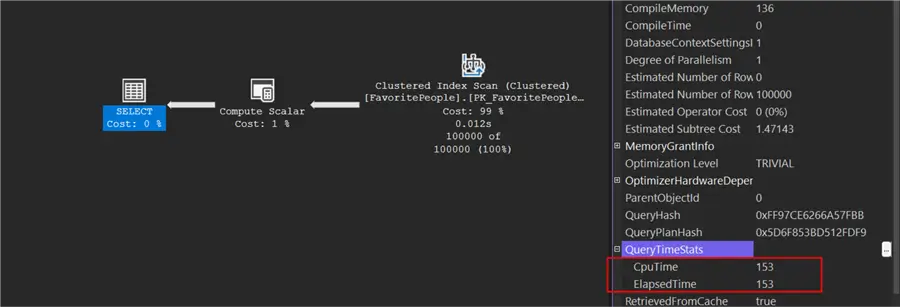
Here is the output:
(100000 rows affected)
Table 'FavoritePeople'. Scan count 1, logical reads 1829, physical reads 0, page server reads 0, read-ahead reads 0,
page server read-ahead reads 0, lob logical reads 0, lob physical reads 0, lob page server reads 0, lob read-ahead reads 0,
lob page server read-ahead reads 0.

(1 row affected)

 SQL Server Execution Times:
   CPU time = 150 ms,  elapsed time = 154 ms.
SQL Server parse and compile time:
   CPU time = 0 ms, elapsed time = 0 ms.
Granted, the string pattern I’m using isn’t very complex, but I wanted to demonstrate something simple.
Performance Results Comparison
The table below shows key performance metrics for each method, along with the percentage differences in CPU and elapsed time. Compared to the classic method, the regex approach cut CPU time by roughly 85.8% and elapsed time by about 85.6%, with logical reads staying the same.
| Method | CPU Time (ms) | Elapsed Time (ms) | Logical Reads | % Difference in CPU Time | % Difference in Elapsed Time |
|---|---|---|---|---|---|
| Classic | 1059 | 1069 | 1829 | — | — |
| Regex | 150 | 154 | 1829 | -85.8% | -85.6% |
This comparison clearly shows how much faster the regex method performed in SQL Server 2025. An important note is that both methods produce identical results.
Azure SQL DB and Managed Instance Performance
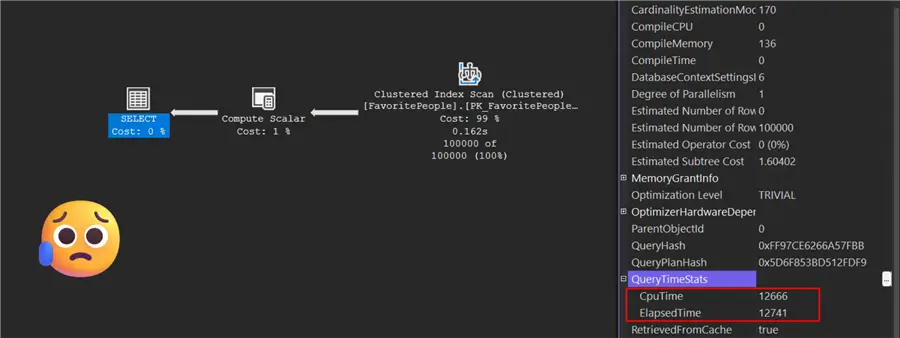
Initially, I didn’t plan to test on an Azure SQL DB or Managed Instance, but I couldn’t resist. The regex method’s performance was disappointing. The classic method returned in about 1-3 seconds, while the regex took about 12 seconds. I tested on several different SQL databases and two Managed Instances in different regions. For the Azure Managed Instance, here are my specs:
- 8 vCore
- Premium-series hardware
Seeing such a significant drop in performance after excellent results with SQL Server 2025 was frustrating. I wish someone else would test this and tell me I’m wrong or that a specific database setting explains it.
Conclusion
In this article, I aimed to answer two questions:
- Is a regular expression easier to read and maintain?
- Does the regex offer faster performance in SQL Server 2025?
The first question is somewhat subjective, but I find the regex approach easier to read and maintain. Imagine adding even more complexity to the expression, like handling punctuation or whole words. Also, the classic method contains 422 characters, while the regex version has only 125. I’m not claiming that shorter code is always better, but it’s worth noting. However, the regex function has a clear purpose (count this pattern), whereas the classic method consists of several solutions and is less intuitive. Another factor is how window functions are praised for simplifying many tasks; maybe regex functions will be viewed the same way in a few years. You might say regex can be complex and developers will struggle to learn it, and I agree it’s complex, but tools like ChatGPT or Claude can help by generating search patterns.
Now, onto the second question: Based on the evidence above, the regex method outperformed the classic approach, at least in SQL Server 2025. If we were dealing with a more complex pattern or a longer string of text, that result could change. Still, the slow performance on Azure left a bad taste in my mouth. Hopefully, it improves over time. Like window functions, regex might become my go-to method moving forward if Azure performance catches up.
Clean Up
Once you are done with this demo, don’t forget to delete the database.
/* MSSQLTips.com */
USE [master];
GO

IF DB_ID(‘RegexCountingDemo’) IS NOT NULL
BEGIN
    ALTER DATABASE RegexCountingDemo SET SINGLE_USER WITH ROLLBACK IMMEDIATE;
    DROP DATABASE RegexCountingDemo;
END;
Next Steps
- SQL Server 2025 introduces several new features. Koen Verbeeck discusses a promising one in his article, “JSON_CONTAINS Function in SQL Server 2025.”
- Would you like to learn more about ranking window functions in SQL? Then, check out the article “SQL Rank Functions – ROW_NUMBER, RANK, DENSE_RANK, NTILE.”
- If you can’t get enough of SQL Server 2025, Mehdi Ghapanvari wrote an interesting article looking at memory consumption titled “SQL Query Memory Consumption in SQL Server 2025.”

Jared Westover is a SQL Server specialist with two decades of industry experience covering T-SQL development, performance tuning, administration and Microsoft Fabric. He is currently a software architect at Crowe, an author at Pluralsight and primary contributor at sqlhabits.com. On MSSQLTips.com, Jared is a respected award-winning author for his clever T-SQL solutions and bringing to light new real-world solutions to age-old development problems.
- MSSQLTips Awards
- Achiever Award (75+ tips) – 2026
- Author of the Year – 2023
- Author Contender – 2024/2025