Problem
SQL Server has a Default Trace that runs automatically to collect various metrics that are used to help you monitor SQL Server. By default SQL Server only keeps the last 5 trace files that are created and deletes older files. Every time a trace file reaches 20MB or when the SQL Server instance is restarted, the oldest trace file is deleted. On a very busy server this could occur quite frequently, so any older events would be lost before you ever saw what was captured. Fortunately there is a WMI event that can help to capture this data for long term storage and analysis.
Solution
In a previous tip, we explained how to setup WMI alerts for database change monitoring. The setup consists of SQL Server Agent configuration steps, Database Mail configuration, creation of an alert and a SQL Server Agent Job.
Similar setup will be used in this example, so we can import trace data every time a new file is created. To do this, we will use the TRACE_FILE_CLOSE WMI event and we will utilize the sys.fn_trace_gettable function together with a method similar to the one described in another tip. Every time a new trace file generated the previous trace file is closed and WMI event is triggered. We will import the closed trace file’s events as soon as the new trace file is created.
In this example we will monitor only non-system databases events related to tables, views or stored procedures that are changed (new object, deleted object, modified object).
Create an Audit Table
First we will create the audit table where we will import the trace data into:
CREATE DATABASE [_Demo_DB1]
 ON  PRIMARY
( NAME = N'_Demo_DB1', FILENAME = N'S:\TESTSQL_DATA\_Demo_DB1.mdf' )
GO
USE [_Demo_DB1]
GO
CREATE TABLE dbo._demo_objects_changes(
 RowNumber int IDENTITY(0,1) NOT NULL,
 EventClass int NULL,
 ApplicationName nvarchar(128) NULL,
 LoginName nvarchar(128) NULL,
 StartTime datetime NULL,
 DatabaseName nvarchar(128) NULL,
 HostName nvarchar(128) NULL,
 ObjectName nvarchar(128) NULL,
 ObjectType nvarchar(20) NULL,
 TraceName nvarchar(128) NOT NULL,
 TextData nvarchar(MAX) NULL,
  PRIMARY KEY CLUSTERED (RowNumber ASC
   ) ON [PRIMARY]
   ) ON [PRIMARY]
GO
You can add other columns to the table if you want to save additional information from the trace file or you can remove some of the columns from the table as needed. Just make sure you update the job below with the correct columns.
Create a SQL Server Agent Job
Now we will create a un-scheduled SQL Server Agent Job called “WMI Response – Default Trace File Rollover” that will be executed as a SQL Server Alert’s response. The job will respond to the WMI alert every time a trace file is closed.
Here is the script for the job’s step:
DECLARE @rows INT, @subj_str NVARCHAR(200)
-- check if trace that is closed is default trace
IF ('$(ESCAPE_SQUOTE(WMI(FileName)))' =
 (SELECT REPLACE([path],
  REPLACE(RIGHT([path],CHARINDEX('_',REVERSE([path]))-1),'.trc',''),
  CAST(CAST(REPLACE(RIGHT([path],CHARINDEX('_',REVERSE([path]))-1),'.trc','')
    AS SMALLINT)-1 AS NVARCHAR(128)) )
 FROM master.sys.traces WHERE id = 1))
BEGIN
 INSERT INTO dbo.[_demo_objects_changes]
  (EventClass,
  ApplicationName,
  LoginName,
  StartTime,
  DatabaseName,
  HostName,
  ObjectName,
  ObjectType,
  TraceName,
  TextData)
 SELECT  EventClass,
  ApplicationName,
  LoginName,
  StartTime,
  DatabaseName,
  HostName,
  ObjectName,
  ObjectType,
  '$(ESCAPE_SQUOTE(WMI(FileName)))',
  CAST(TextData AS NVARCHAR(MAX))
 FROM sys.fn_trace_gettable( '$(ESCAPE_SQUOTE(WMI(FileName)))',1 )
 WHERE eventclass IN (164, -- Object:Altered
        46, -- Object:Created
        47 -- Object:Deleted
    ) AND DatabaseID > 4
   AND ObjectType IN ( 8272, -- Stored Procedure
      8277, -- (User-defined) Table
      8278  -- View
      )
 SELECT @rows = @@ROWCOUNT
 IF @rows > 0
   BEGIN
     SELECT @subj_str = cast(@rows as NVARCHAR(200)) +
   ' object(s) change event(s) during monitored period on ' + @@SERVERNAME
     EXEC msdb.dbo.sp_send_dbmail
     @profile_name = 'Mail_Profile_Name', -- update with your value
      @recipients = 'dba_alerts@YourCorpDomain.com', -- update with your value
       @subject =  @subj_str;
   END
END
You will need to update @profile_name and @recipients parameters with your values (@profile_name will be the “Mail profile” that you created during Database Mail configuration):
The job will select object change events from the trace file that was just closed, insert them into the audit table and send a generic email about the number of changed objects. To minimize the number of emails the email will be sent only if there are object change events in the closed trace file.
Please refer to the Microsoft documentation to learn about other trace object types (in addition to tables, views or stored procedures).
To get the full list of trace event classes read this article.
Setting up the WMI Alert
To set up the alert use this script:
EXEC msdb.dbo.sp_add_alert @name=N'WMI - Default Trace Rollover event',
  @message_id=0,
  @severity=0,
  @enabled=1,
  @delay_between_responses=0,
  @include_event_description_in=1,
  @wmi_namespace=N'\\.\root\Microsoft\SqlServer\ServerEvents\MSSQLSERVER',
  @wmi_query=N'select *  from TRACE_FILE_CLOSE',
  @job_name=N'WMI Response - Default Trace File Rollover'
GO
You can also use SQL Server Management Studio for this:
- set the alert type to “WMI event alert”
- make sure you use the correct WMI namespace (see below):

Note: the namespace will be different for the default instance and for the named instance:
-- DEFAULT instance's namespace ("DEMOSQL1" SQL Server):
\\.\root\Microsoft\SqlServer\ServerEvents\MSSQLSERVER
-- NAMED instance's namespace ("DEMOSQL1\INSTANCE1" SQL Server):
\\.\root\Microsoft\SqlServer\ServerEvents\INSTANCE1
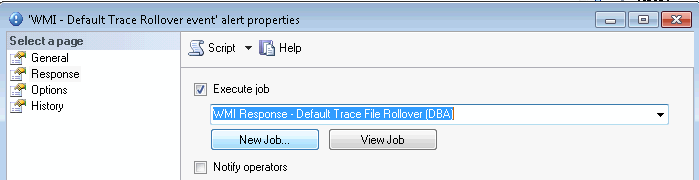
- Set the response for the alert’s properties to execute the SQL Agent job we created above:
Testing the Alert
Now we are ready to test and receive email notifications every time a new trace file is created and the old trace file contains object modification events.
NOTE: Make sure that for the following testing you use a test SQL Server and a separate test database. There will be a lot of database changes and some SSMS reports (for example “Schema Changes History”) may not work in the test database.
In this test we will artificially force the new trace file creation by running multiple create/alter/drop statements:
-- fill out the trace file by creating, altering and dropping objects with long names
USE [_Demo_DB1]
GO
SET NOCOUNT ON
DECLARE @n INT,  @t NVARCHAR(100) , @str NVARCHAR(1000)
SELECT @t = N'aaaaaaaaaaaaaaaaaaaaaaaaaaaaaaaaaaaaaaaaaaaaaaaaaaaaaaaa',@n = 1
WHILE @n < 7000
   BEGIN
      SELECT @str = N'create table dbo.' + @t + cast(@n AS NVARCHAR(20)) +
   N' (col1 varchar(10), col2 int);'
      EXEC sys.sp_executesql @str

      SELECT @str = N'create procedure dbo._demo_' + @t + cast(@n AS NVARCHAR(20)) +
   N' AS SELECT 1;'
      EXEC sys.sp_executesql @str

      SELECT @str = N'alter table dbo.' + @t + cast(@n AS NVARCHAR(20)) + N' add col3 int;'
      EXEC sys.sp_executesql @str

      SELECT @str = N'drop table dbo.' + @t + cast(@n AS NVARCHAR(20))
      EXEC sys.sp_executesql @str

      SELECT @str = N'drop procedure dbo._demo_' + @t + cast(@n AS NVARCHAR(20))
      EXEC sys.sp_executesql @str

      SELECT @n = @n + 1
   END
It may take several seconds before the new trace file is created and you may need to change the @n value to generate more changes if a new trace file is not created.
You should then get an email similar to this when a new trace file is created:

Review the Captured Trace Results
To see what information has been captured, you could run a query similar to the one below:
USE [_Demo_DB1]
GO
SELECT TOP 10 RowNumber
      ,CASE WHEN EventClass = 164 THEN 'Object:Altered'
  WHEN EventClass = 46 THEN 'Object:Created'
  WHEN EventClass = 47 THEN 'Object:Deleted' END AS EventClass
      ,ApplicationName
      ,LoginName
      ,StartTime
      ,DatabaseName
      ,HostName
      ,ObjectName
      ,CASE WHEN ObjectType = 8272 THEN 'Stored Procedure'
  WHEN ObjectType = 8277 THEN '(User-defined) Table'
  WHEN ObjectType = 8278 THEN 'View' END AS ObjectType
      ,TraceName
  FROM dbo._demo_objects_changes

Next Steps
- Modify the provided scripts to monitor events that you need to audit, so you don’t lose that information.
- Refer to this previous tip about setting up WMI alerts if you need to troubleshoot the WMI alert setup described in this tip.
- Read this tip about How to Automate SQL Server Monitoring with Email Alerts.
- Read this tip about How to setup SQL Server alerts and email operator notifications.
- Read another tip about monitoring SQL Server using WMI.
- Get familiar with “WMI Provider for Server Events Concepts“.
- Use other classes for your SQL Server events monitoring.
- Get a list of columns that are available for a given WMI event XML schema.

Svetlana has been working in IT for more than 17 years. Most of her career has focused on Database Administration (both SQL Server and Oracle) and Database Development. Databases are Svetlana’s passion, but she also has fun helping co-workers and friends in troubleshooting non-database related issues. Svetlana tries to explore and learn as many SQL Server features as possible. Her favorite SQL Server features are Policy Based Management, SSIS, SSRS and Master Data Services. One of Svetlana’s areas of expertize is cross systems / database integration. Svetlana is currently a hands-on Database Team Lead in Calgary, Canada where she promotes SQL Server.
Svetlana likes to share her knowledge with others and enjoys learning herself. Her hobby is photography, but now she spends her free time away from Database Administration with her little girl who proudly wears her MSSQLTips shirt. Svetlana blogs at http://databaserefresh.com and posts her pictures to https://plus.google.com/u/0/111115767149899859037/posts. Her Twitter account is @magasvs.
- MSSQLTips Awards: Rising Star (50+ tips) – 2018 | Author of the Year Contender – 2015-2017