Problem
Do you ever wonder why your query is slow when you use a table variable in a join operation? If you are interested in why this happens and how to improve query performance in such a scenario, keep reading to learn more.
Solution
Sometimes, we need to use a table variable in a join operation, like when developers pass a data table to a stored procedure from the application and then join it with another table. Usually, they pass a list of values to a stored procedure and use it to filter results.
Using a table variable in a join operation can reduce query performance. From database compatibility level 150 and forward, table variable performance is improved by the introduction of table variable deferred compilation. This feature improves overall performance for queries that involve table variables. However, table variables lack statistics, while SQL Server generates an execution plan based on statistics. Table variable deferred compilation doesn’t add column statistics to table variables. It just defers the compilation of a statement that references a table variable until the first actual execution of the statement. This feature doesn’t change any other characteristics of table variables.
For more information about table variables, refer to table (Transact-SQL).
And if you want to read more about table variable deferred compilation, see this article from Microsoft: Intelligent query processing features in detail.
Set Up Test Environment
SQL Server 2022 and the StackOverflow database will be used for this demonstration. The StackOverflow database is an open-source database from StackOverflow.com. Run the code below in the master database to set the database compatibility level to 160.
Use master
GO

Alter Database StackOverflow Set Compatibility_Level = 160
GO
The StackOverflow database has a Users table that holds user information like Location, DisplayName, Reputation, etc. First, I use the StackOverflow database to create a nonclustered index on the Location column in the Users table.
Use StackOverflow
GO

Create Index IX_Location On dbo.Users (Location) With (Data_Compression = Page)
GO
Testing with Table Variable
Simply press Ctrl+M to view the actual execution plan. The script will create a table variable, insert two locations (USA and France) into it, join it with the Users table, and finally sort the result by Reputation in descending order:
Declare @Location Table (Location Nvarchar(100));

Insert Into @Location Values (N'France'), (N'USA');
Select u.* From dbo.Users u
Inner Join @Location l
  On u.Location = l.Location
Order By Reputation Desc;
GO
Review Execution Plan
Here’s the actual execution plan, which is read from right to left and top to bottom.

The below image is a subset of the above image. The first thing SQL Server does is a table scan of the entire table variable @Location and then does an index seek on the Users table to find rows with a special location. Let’s assume it finds the users who live in France first and then finds those in the USA.
Look at the table scan operation in the image, both the estimated and actual number of rows are two. That is great, but pay attention to the index seek operation. The estimated number of rows is 129, while the actual number of rows is 24,574.

There is a significant difference between the estimated and actual number of rows in the index seek operation. It is an underestimation problem.
Memory Usage
SQL Server estimates that only 129 records will come back from the Users table, but there are nearly 24,600 people in this table who live in France or the USA. When the estimated number of rows is wrong, the memory grant will be wrong, and SQL Server has to use TempDB to sort the data. Indeed, a spill to disk happens, and the query runs slower. When a spill occurs, the data is written to TempDB and must be read from there. In short, when a query is not granted enough memory to finish the operation, SQL Server spills data to TempDB.
As you can see in the below image, SQL Server wrote 905 pages to TempDB and read them from there. Also, there is a yellow bang (warning indicator) on the Sort operator shown below that shows a spill to disk occurred. Since the estimated number of rows is much lower than the actual number of rows, the granted memory for query execution is insufficient.

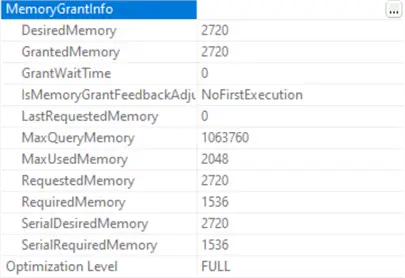
In the image below, you can see the memory grant information. The granted memory for the operation is 2.7 MB.
Take a look at the next image. SQL Server executed the query using a single logical CPU core. In other words, the query ran in serial mode.

As mentioned, the underestimation problem has led to several challenges.
Using a Temp Table to Solve Issue
A straightforward solution is to replace the table variable with a temporary table:
Create Table #Location (Location Nvarchar (100) Collate SQL_Latin1_General_CP1_CI_AS)
GO

Insert Into #Location Values (N'France'), (N'USA')
GO

Select u.* From dbo.Users u
Inner Join #Location l
 On u.Location = l.Location
Order By Reputation Desc
GO
Let’s see the actual execution plan after replacing the table variable with a temporary table and executing the query again.
Look at the index seek operator for the Users table in the image. The estimated number of rows is 13992 while the actual number of rows is 24574. When we used a table variable in the query, the estimated number of rows was only 129.
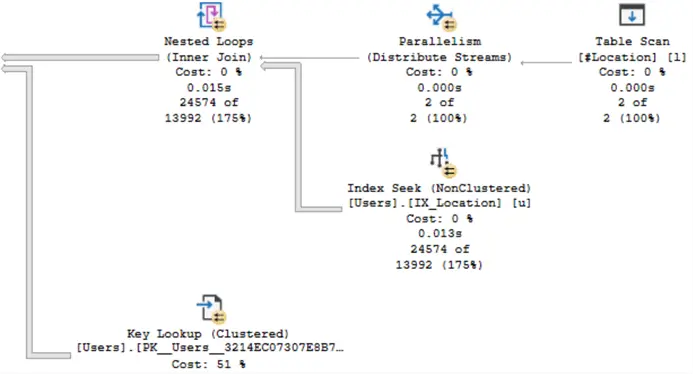
The image below shows that there is no longer a warning on the Sort operator.
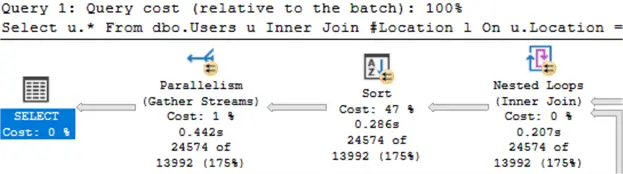
As we can see in the next image, the granted memory has increased to 38 MB.

Finally, the last image illustrates that SQL Server executed the query using two logical CPU cores.

All is well. It seems like all has been resolved.
Summary
Overall, temporary tables are a safer and more reliable choice compared to table variables.
Sometimes, we need to use a table variable in a join operation. When we use it in a query and join it with another table, poor cardinality estimation can lead to performance problems. Cardinality includes both the number of rows and their respective contents. If bad cardinality estimation is making your query slow while using a table variable as a part of a join operation, one easy solution is to replace the table variable with a temporary table.
Next Steps
- SQL Server Table Variable Example
- Differences between SQL Server temporary tables and table variables
- Table Variable Deferred Compilation in SQL Server

Mehdi Ghapanvari is an SQL Server database administrator with 6+ years of experience. His main area of expertise is improving database performance. He is skilled at managing high-performance servers that can handle several terabytes of data and hundreds of queries per second, ensuring their availability and reliability. To enhance the performance of the database, he has implemented various performance-tuning techniques, including query optimization and index tuning. He has also developed backup and recovery strategies to protect critical data in case of disasters. Mehdi currently manages the SQL Server databases for a large organization. Mehdi is actively seeking new opportunities to apply his expertise and contribute to impactful projects. You can reach him at SQLDBA.Mehdi@Gmail.com.
- MSSQLTips Awards: Rookie of the Year – 2023
- MSSQLTips Trendsetter Award: 2026
Hello,
could you please validate if Table Variables with indexes (it is possible direct in Variable-Declaration) have same performance?
Hello!
If you run a query like this:
Declare @Location Table (Location Nvarchar(100) Not Null Primary Key Clustered);
Insert Into @Location Values (N’France’), (N’USA’);
Select u.* From dbo.Users u
Inner Join @Location l
On u.Location = l.Location
Order By Reputation Desc;
You’ll find that the execution plans are exactly the same as when there is no index on the table variable.
Thanks!
Good Article; Tx!
Glad you liked it!
Be nice to see your results. If you put an index on the location in the temp. Table and in the variable table
Glad you liked it. If you run a query like this:
Declare @Location Table (Location Nvarchar(100) Not Null Primary Key Clustered);
Insert Into @Location Values (N’France’), (N’USA’);
Select u.* From dbo.Users u
Inner Join @Location l
On u.Location = l.Location
Order By Reputation Desc;
You’ll find that the execution plans are exactly the same as when there is no index on the table variable.
Thanks!
Hello,
what about INDEXes in Table Variables?
For Example:
DECLARE @Source TABLE (
CrefoRetrievedDataId INT NOT NULL PRIMARY KEY,
CrefoIdLong VARCHAR(25),
BranchCode_CREFO VARCHAR(10),
BranchCode_BO VARCHAR(10),
BranchCode AS ISNULL(BranchCode_BO, BranchCode_CREFO),
TitleOfMinimalCode VARCHAR(100),
INDEX [@Source.IX.CrefoRetrievedDataId+BranchCode_CREFO,BranchCode_BO] (CrefoRetrievedDataId) INCLUDE (BranchCode_CREFO, BranchCode_BO),
INDEX [@Source.IX.CrefoIdLong+BranchCode_CREFO,BranchCode_BO] (CrefoIdLong) INCLUDE (BranchCode_CREFO, BranchCode_BO)
);
This is a really insightful article.
A few years ago I was working on a (for me at least) fairly large application build which used SQL for the majority of the heavy lifting, and made extensive use of table variables. Initially everything seemed to be running smoothly but as time went on and the datasets we were working with grew larger we noticed that the system was running noticeably slower. At the time, one of my colleagues did some digging and concluded that one of the main culprits was my use of table variables. At the time, he felt that the issue itself was being caused by the number of records being processed through those table variables but based on this article, it looks as if it wasn’t necessarily the amount of data going through those table variables but rather the way in which the table variables utilise available server resources. At the time, we agreed to replace the table variables with temporary tables which certainly seemed to deliver a massive perfomance improvement.
Hi IAN !
I’m happy to hear that you found it helpful, and I appreciate you sharing your experience.
The core issue here is that table variables lack statistics, which is important because SQL Server generates execution plans based on statistics.