Problem
Imagine you manage an HR database that stores company employee information such as name, gender, DOB, email ID, and office address. Recently, your company opted for positions for remote employees. Now, you want a new column in your employee table indicating whether an employee is office-based or remote. How will you apply this requirement to the database? Let’s check out how to Alter a Table and Add a Column in SQL Server.
Solution
If you already have a table in your database, you have two options to work in a new requirement:
- Take a table backup, drop it, recreate it with new requirements or columns, and insert existing data.
- This is not the recommended practice due to the following reasons:
- It requires downtime because you are dropping an existing table, which will not be accessible during the activity.
- You might have a large table. If you intend to do this activity, it could take a lot of time.
- This could impact other database objects like stored procedures, views, triggers, etc. that reference this object.
- This is not the recommended practice due to the following reasons:
- Use ALTER TABLE commands. SQL Server provides ALTER TABLE commands to add, drop, and modify the existing table without impact.
Let’s explore the ALTER TABLE commands to add columns to a SQL Server table.
ALTER TABLE ADD COLUMN Syntax
ALTER TABLE <table_name> ADD <column_name> <data_type> <NULL | NOT NULL> <DEFAULT default_value>- table_name: Specify existing table name to modify.
- ADD: Keyword to add a new column.
- <column_name>: Specify the new column name.
- <data_type>: Specify the data type of the new column.
- NULL | NOT NULL: Specify whether the new column allows NULL values.
- DEFAULT: If you want to specify a default value for the new column, you can specify it here. If you insert an explicit value, it will override the default value.
Create Example Table
To understand this further, let’s create the Employees table with the following schema described in the problem statement.
CREATE TABLE Employees (
    EmployeeID INT IDENTITY(1,1) PRIMARY KEY,
    Name NVARCHAR(50) NOT NULL,
    Gender CHAR(1) CHECK (Gender IN ('M', 'F')) NOT NULL,
    DOB DATE NOT NULL,
    EmailID NVARCHAR(200) UNIQUE NOT NULL,
    OfficeAddress NVARCHAR(255)
);
Alter Existing Table
We need to add a new column [RemoteWorker], which will be a bit datatype column:
- Bit 1: Yes, Remote worker.
- Bit 0: No, Office worker.
Let’s use the following ALTER TABLE statement below.
ALTER TABLE Employees ADD [RemoteWorker] bit;
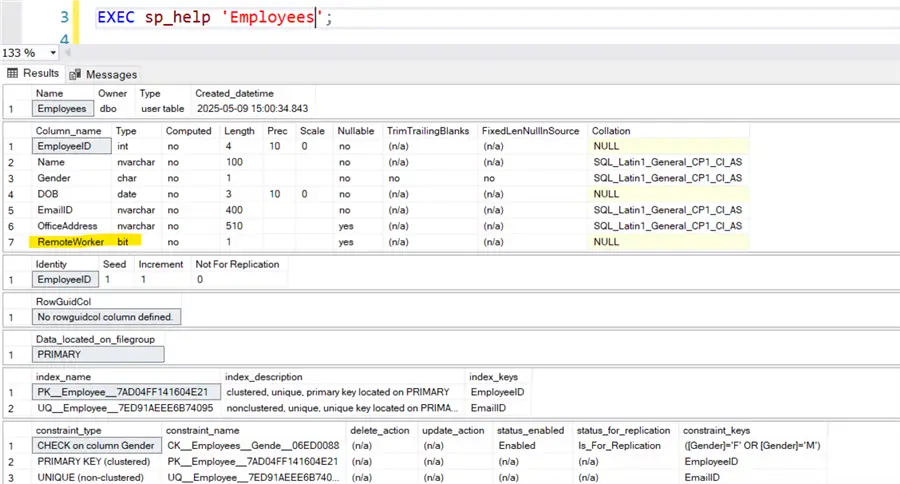
We can use the built-in system stored procedure sp_help to check the existing table schema. As shown below, it has a new column [RemoteWorker] with a [bit] datatype. This column allows NULL values (Nullable: yes) as the default option.
Drop and Add Column as NOT NULL with Default Value
Let’s drop this column and add it again with the default value of not NULL. It accepts the default value of 0 for all rows except for inserts with an explicit value. Something to keep in mind is that SQL Server will need to update all rows in the table with the default value, so if this is a large table it could take some time as well as create blocking.
ALTER TABLE Employees DROP COLUMN RemoteWorker
ALTER TABLE Employees ADD [RemoteWorker] bit NOT NULL DEFAULT 0;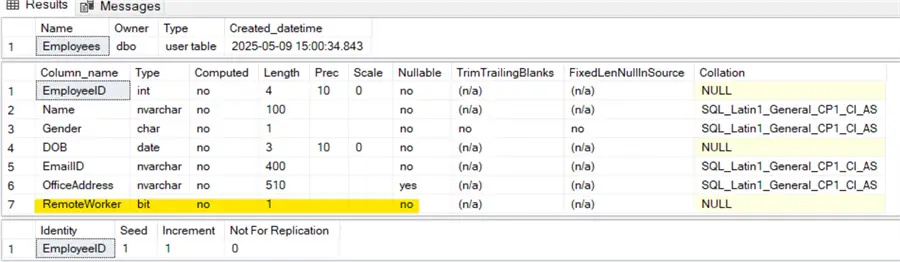
Add Column as NOT NULL without Default Value
If we try to add a new column with NOT NULL and without any default value, SQL Server will raise an exception as shown below because it needs to fill values for the existing rows, but the query did not instruct what value to use to fill it.
ALTER TABLE TestTable ADD inserteddate date NOT NULL
However, if the table is empty (has no rows), it works fine if a default value is not specified.
TRUNCATE TABLE TestTable;
ALTER TABLE TestTable ADD inserteddate date NOT NULL;
Add New Table Column with Constraints
We can add a new column with constraints as well. For example, we need to add an Age column. The employee’s age should be 18 years or older.
The following query adds the CHECK Constraint that checks for every value and allows only if the Age column value is >=18.
ALTER TABLE Employees ADD Age INT CHECK (Age >= 18);Add a Computed Column with ALTER TABLE Statement
We can add a computed column as a new column in the existing SQL table. For example, suppose we have Address1 and Address2 in the Employee table.
We require a computed column [Address] that is computed from the existing columns Address1 and Address2. We can add it using the ALTER TABLE statement below.
ALTER TABLE Employees ADD [Address] AS (Address1 + ' ' + Address2);Add Identity Column with ALTER TABLE ADD <Column> Statement
The identity column creates an auto-increment number for the specified column. Usually, an identity column is created during the table creation. Can we add it using the ALTER TABLE statement as well?
CREATE TABLE Customer (
     Name VARCHAR(100)
);
ALTER TABLE Customer
ADD CustID INT IDENTITY(1,1);
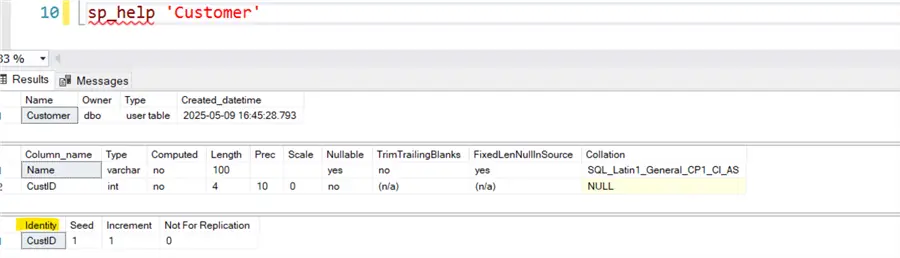
The script works fine, showing that the identity column was added to the table. A thing to note is that this will assign a value to every row in the table. If the table is large this could take some time and also creating blocking until completed.
Add Second Identity Column
What if we try to add another identity column? It will not work because SQL Server allows only one identity column per table. If we try to add it, SQL Server raises an exception as follows:
ALTER TABLE Customer
ADD Custaccount INT IDENTITY(1,1);
Add Multiple Columns to an Existing Table in SQL Server
We might have a requirement to add multiple columns to an existing table. We can run various ALTER TABLE ADD <COLUMN > statements or combine them into a single statement for this requirement. For example, add columns Address1, Address2, Address3, and Zip Code in the Employees table.
Individual Statements
This method uses four ALTER TABLE statements to add the four new columns. The individual statements might be easy to debug. However, adding many columns to a table might be cumbersome.
ALTER TABLE Employees
ADD Address1 VARCHAR(255) NULL;
Go
ALTER TABLE Employees
ADD Address2 VARCHAR(255) NULL;
Go
ALTER TABLE Employees
ADD Address3 VARCHAR(255) NULL;
Go
ALTER TABLE Employees
ADD ZipCode VARCHAR(20) NULL;
Go
One advantage of this approach is that it adds additional checks before running the ALTER TABLE statement. For example, suppose we want to execute the ALTER TABLE for a specific column, only if it does not exist.
In the following code, we check the [RemoteWorker] column in the Employees table and execute the alter table statement only if the column is absent. This helps you prune your code against errors if the same column is already present.
IF NOT EXISTS (
    SELECT 1 FROM INFORMATION_SCHEMA.COLUMNS
    WHERE TABLE_NAME = 'Employees' AND COLUMN_NAME = 'RemoteWorker'
)
BEGIN
   ALTER TABLE Employees ADD [RemoteWorker] bit NOT NULL DEFAULT 0;
END
ELSE
   PRINT 'Column [RemoteWorker] already exists on [Employees] table '
Single or Merged Statement
In the Single or Merged statement, we will combine all columns in a single ALTER TABLE statement, as below. This method is concise, faster in execution, and valuable if we do not need any intermediate checks.
ALTER TABLE Employees
ADD
    Address1 VARCHAR(255) NULL,
    Address2 VARCHAR(255) NULL,
    Address3 VARCHAR(255) NULL,
    ZipCode VARCHAR(20) NULL;
This code performs the ALTER TABLE statements and tries to add all columns specified in the ADD clause to the existing table. We cannot check the individual columns to run the alter statement unless the column is unavailable.
Note: It is good practice to check individual columns before adding them to the existing column. This will make your code error-safe and durable.
Performance Impact of Adding New Column to Existing Table
If we add a new column to an existing table, it can lead to some performance implications. Let’s check it out:
- Suppose we have a big table with millions of rows. We try to add a new column with NOT NULL with a default value. This can be a significant operation. SQL Server must go through every row in the table and assign a value to the new column. This can lead to increased I/O, transaction log activity, and potential blocking.
- If the newly added column is widely used in the queries, it might impact existing indexes. You can view query execution plans, I/O statistics, and wait times for any potential performance regressions. You must revisit the index definitions to see if there is any improvement after adding the new column.
- Adding a computed column might add overhead since SQL Server needs to compute values for all existing rows. Therefore, it becomes problematic for a large table. You should perform the activity during a maintenance window to have low impact on users.
Next Steps
- Go through the tip Create Tables in SQL Server with T-SQL to understand the tables.
- Explore database design tips to be familiar with database development.
- Explore existing tips on MSSQLTips.com for database administration and development.

Hi! I am Rajendra Gupta, Database Specialist and Architect, helping organizations implement Microsoft SQL Server, Azure, Couchbase, AWS solutions fast and efficiently, fix related issues, and Performance Tuning with over 14 years of experience.
I am the author of the book “DP-300 Administering Relational Database on Microsoft Azure.” I can be reached at: Rajendra.gupta16@gmail.com for any consulting help.
- MSSQLTips Awards:
- Author of the Year – 2022 | Author Contender – 2021/2023/2024 | Champion Award (100+ tips) – 2020


