Overview
In this chapter, we will see the most common type of triggers, DML triggers.
Explanation
DML Triggers
This type of trigger is the most well-known and used by developers. As you may already know, DML stands for Data Manipulation Language and refers to the SQL instructions that change data. Those instructions are INSERT, UPDATE, and DELETE. Basically, DML triggers can be defined as pieces of code written mostly in Transact SQL language whose execution is not performed manually by the user and instead is run automatically in response to DML events.
DML Triggers are associated to a table or view and to any of the DML events (INSERT, UPDATE, and DELETE). Something to note is that a trigger can only be associated with one single table or view, but can be associated with more than one DML event. For instance, you could have a trigger that is associated with a table that fires in response to INSERT and UPDATE events. We will see this later in the tutorial.
To create a trigger, we need to use the CREATE TRIGGER statement.
In this code section, you will see the basic CREATE TRIGGER syntax.
CREATE TRIGGER trigger_name
ON { Table name or view name }
{ FOR | AFTER | INSTEAD OF }
{ [INSERT], [UPDATE] , [DELETE] }
Additionally, the next table describes each of the arguments of the CREATE TRIGGER syntax.
| Argument | Description |
|---|---|
| FOR | AFTER | INSTEAD OF | Indicates when the trigger must fire. FOR or AFTER occurs after the insert, delete or update occurs. INSTEAD OF occurs instead of the insert, delete or update operation from occurring. |
| [INSERT], [UPDATE], [DELETE] | The DML event (or list of events) that will cause the trigger to fire. |
Let’s create a sample table to create our first trigger.
USE [SampleDB]
GO
CREATE TABLE Employees(
EmployeeID      INT IDENTITY(1,1) PRIMARY KEY,
EmployeeName    VARCHAR(50) NOT NULL,
EmployeeAddress VARCHAR(50) NOT NULL,
MonthSalary     NUMERIC(10,2) NOT NULL
)

INSERT INTO dbo.Employees
(
    EmployeeName,
    EmployeeAddress,
    MonthSalary
)
VALUES
(   'Mark Smith',
    'Ocean Dr 1234',
    10000
    ),
(   'Joe Wright',
    'Evergreen 1234',
    10000
),
(   'John Doe',
    'International Dr 1234',
    10000
),
(   'Peter Rodriguez',
    '74 Street 1234',
    10000
);
In the code below, you will see the most basic DML trigger we can make, which will return “Hello World.” This trigger will show a “Hello World!” line every time a row is added to the Employees table.
USE [SampleDB]
GO
CREATE TRIGGER [dbo].[TR_Employees] ON [dbo].[Employees]
FOR INSERT
AS
SELECT 'Hello World!'
GO
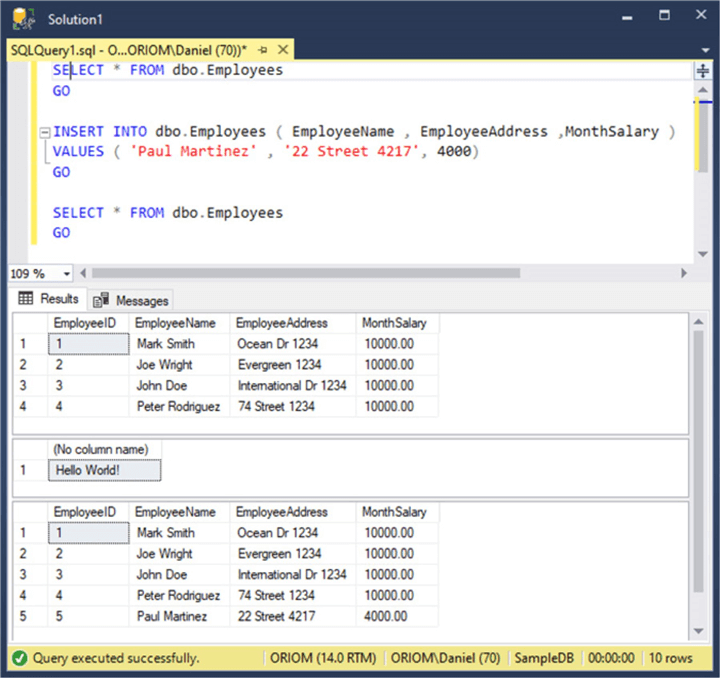
To test this trigger, we need to insert some data into the Employees table. We can do so with the next script.
SELECT * FROM dbo.Employees
GO
INSERT INTO dbo.Employees ( EmployeeName , EmployeeAddress ,MonthSalary )
VALUES ( 'Paul Martinez' , '22 Street 4217', 4000)
GO
SELECT * FROM dbo.Employees
GO
In the next image, you can see the execution of the previous script. Notice that when the INSERT statement executes, it prints a “Hello World!” message.
Additional Information

Daniel Farina was born in Buenos Aires, Argentina. Self-educated, since childhood he showed a passion for learning. He studied at Universidad de Buenos Aires. Daniel started working as a programmer at a young age. Over the years he specialized in databases, particularly SQL Server and Oracle. Now with 30 years of age, his work experience includes working with various technologies like VB, C, .NET, web development, Windows and Linux systems. He likes to read about science, psychology, philosophy and many other things. In his spare time, he trains powerlifting aiming to compete.
- MSSQLTips Awards: Author of the Year – 2018 | Champion (100+ tips) – 2018 | Author Contender – 2015-2017, 2019
