Overview
In the previous chapters, we have seen how to create triggers that fire after insert and update statements. This chapter will focus on using triggers with delete statements.
Explanation
Sample Test Scenario
We are going to create a trigger on the PurchaseOrderDetail table that fires when a delete statement is executed to adjust the TotalDue column of PurchaseOrderHeader table by subtracting the LineTotal value from the deleted rows. Of course, first, we need to validate that the order hasn’t been processed yet.
Take a look at the code below and you will see that this delete trigger is composed with an IF EXISTS statement block where we check the purchase order processing status and throw an exception in case there is an order item referencing a processed order. Otherwise, in the ELSE clause, we proceed to update the PurchaseOrderHeader table and set the TotalDue with the result of resting it to the sum of the LineTotal from each item in the purchase order.
CREATE TRIGGER TR_D_PurchaseOrderDetail
ON dbo.PurchaseOrderDetail
FOR DELETE
AS
IF EXISTS (   SELECT 0
              FROM   dbo.PurchaseOrderHeader POH
                     INNER JOIN Deleted D ON D.PurchaseOrderID = POH.PurchaseOrderID
              WHERE  POH.IsProcessed = 'Y' )
    BEGIN
        ; THROW 51000, 'Purchase Order Items can only be updated before processing order ', 1;
    END;
ELSE
    BEGIN
        UPDATE dbo.PurchaseOrderHeader
        SET    TotalDue = TotalDue - S.LineTotal
        FROM   dbo.PurchaseOrderHeader POH
               INNER JOIN (   SELECT   D.PurchaseOrderID ,
                                       SUM(D.LineTotal) LineTotal
                              FROM     Deleted D
                              GROUP BY D.PurchaseOrderID ) S ON S.PurchaseOrderID = POH.PurchaseOrderID;
    END;
GO
Before testing this trigger, let’s add another purchase order to our database.
INSERT INTO dbo.PurchaseOrderHeader ( IsProcessed, EmployeeID, VendorID, OrderDate, TotalDue )
VALUES ( 'N'  , 5 , 1 , '2019-07-09 11:29:53.000' , 190)

INSERT INTO dbo.PurchaseOrderDetail ( PurchaseOrderID ,  OrderQty ,  Product , UnitPrice , LineTotal )
VALUES ( 4 , 3 ,  'Orange' , 30 , 90 )

INSERT INTO dbo.PurchaseOrderDetail ( PurchaseOrderID ,  OrderQty ,  Product , UnitPrice , LineTotal )
VALUES ( 4 , 2 , 'Apple' ,  20 , 40 )

INSERT INTO dbo.PurchaseOrderDetail ( PurchaseOrderID ,  OrderQty ,  Product , UnitPrice , LineTotal )
VALUES ( 4 , 2 , 'Lemmon' ,  30 , 60 )
In the image below, you will see that we added a new purchase order with 3 items: Orange, Apple, and Lemon.

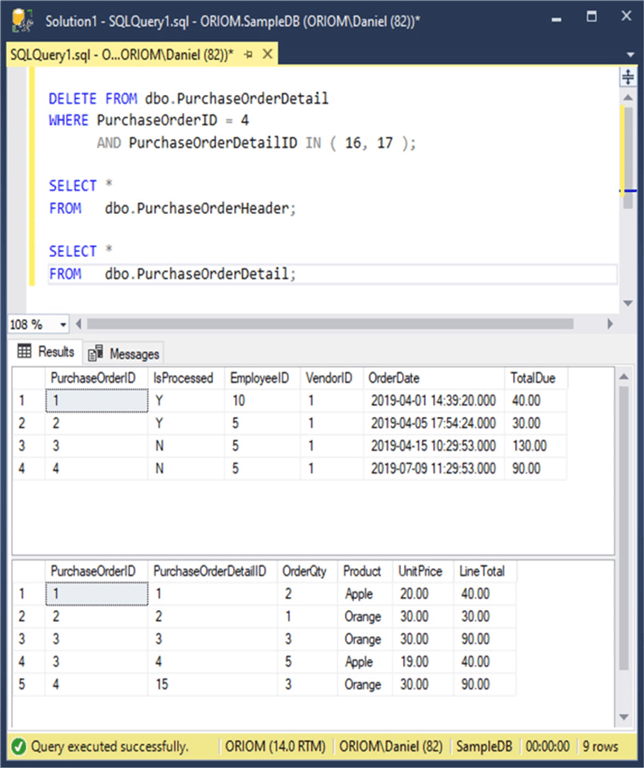
Now let’s delete Apple and Lemon from the order. (Note: Please consider that you may have different values for the PurchaseOrderDetailID column if you are following along with your own system.)
DELETE FROM dbo.PurchaseOrderDetail
WHERE PurchaseOrderID = 4
      AND PurchaseOrderDetailID IN ( 16, 17 );
As you can see in the next image, our delete trigger worked as expected by resetting the TotalDue for the order from $190 to $90.
Additional Information

Daniel Farina was born in Buenos Aires, Argentina. Self-educated, since childhood he showed a passion for learning. He studied at Universidad de Buenos Aires. Daniel started working as a programmer at a young age. Over the years he specialized in databases, particularly SQL Server and Oracle. Now with 30 years of age, his work experience includes working with various technologies like VB, C, .NET, web development, Windows and Linux systems. He likes to read about science, psychology, philosophy and many other things. In his spare time, he trains powerlifting aiming to compete.
- MSSQLTips Awards: Author of the Year – 2018 | Champion (100+ tips) – 2018 | Author Contender – 2015-2017, 2019
