Problem
I recently resolved an issue where a query pulling data from the last 30 days would time out due to the table’s size and the lack of a supporting index. Creating a supporting index is possible, but not ideal; it will be very large and may not be useful for most queries and use cases. I wonder how I could implement a filtered index that follows time and is always limited to the last n days.
Solution
The table in this example is fictitious; we do not actually have a table called ReviewNotes. But it works just fine for demonstration purposes:
CREATE TABLE dbo.ReviewNotes
(
  Id           int IDENTITY(1,1),
  ReviewId     int, /* foreign key to Reviews */
  UserId       int, /* foreign key to Users */
  Text         nvarchar(600),
  CreationDate datetime,
  /* … other columns … */
);

CREATE UNIQUE CLUSTERED INDEX CIX_ReviewNotes
       ON dbo.ReviewNotes(Id);

CREATE INDEX ReviewNotes_UserId_CreationDate
       ON dbo.ReviewNotes(UserId, CreationDate);
This table has nearly 140 million rows and occupies ~50 GB; sp_spaceused yields:
Name          rows        reserved      data          index_size   unused
-----------   ---------   -----------   -----------   ----------   ------
ReviewNotes   138732371   51927328 KB   48715680 KB   3210912 KB   736 KB
The table maintains all of the time for various other purposes, and most parts of the application just retrieve review notes for a specific user.
Problematic Query
For this particular purpose, we only need the last trailing 30 days, but we need review notes for all users, and the UI shows them 50 notes at a time. The problematic query looks like this:
DECLARE @Offset   int = 6000,
        @PageSize int = 50;

SELECT Id,
       ReviewId,
       Text,
       CreationDate
  FROM dbo.ReviewNotes
 WHERE CreationDate >= DATEADD(MONTH, -1, GETUTCDATE())
 ORDER BY CreationDate DESC
OFFSET @Offset ROWS
 FETCH NEXT @PageSize ROWS ONLY;
As you can imagine, the query plan for this is not very appealing:
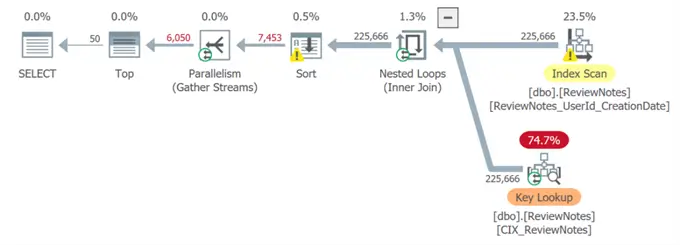
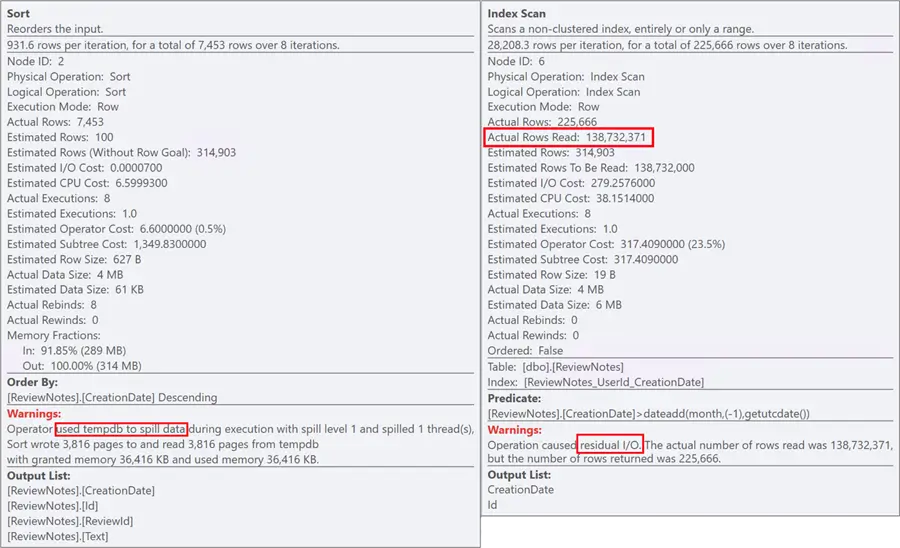
The optimizer chooses to scan the entire non-clustered index, then pulls in Text via a key lookup, and then sorts the entire set before finally limiting the output to the 50 required rows. The subtree cost on this plan is just over 1,349, and it may run upwards of 30 seconds. And all the nasty things that come along with those warnings on the sort and the scan:
Possible Index Fix
Let’s consider an index like this:
CREATE INDEX ReviewNotes_CreationDateDesc
       ON dbo.ReviewNotes(CreationDate DESC)
       INCLUDE (ReviewId, UserId, Text);
And with that index the query produces a much more appealing plan:
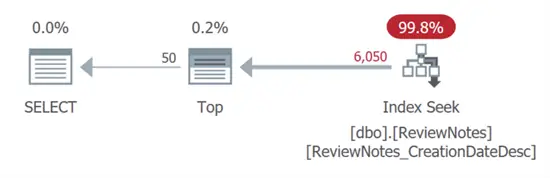
We have a seek with no warnings, no sorts, no spills, no scans, no residual I/O… and a subtree cost that is almost free (0.0064599). This seems like it solves our problem!
But as I mentioned above, this index is huge. Plus, we need to pay for all the maintenance on all the rows, even though the index is only useful on a very small portion of the data. Sure enough, sp_spaceused yielded:
Name          rows        reserved      data          index_size    unused
-----------   ---------   -----------   -----------   -----------   -------
ReviewNotes   138732371   98331256 KB   48715680 KB   49614464 KB   1112 KB
To show why, let’s look at the approximate size of our indexes using sys.dm_db_partition_stats:
SELECT IndexName   = i.name,
       IndexSizeMB = SUM(ps.used_page_count) / 128,
       Rows        = SUM(ps.row_count)
  FROM sys.indexes AS i
 INNER JOIN sys.tables AS t
    ON i.[object_id] = t.[object_id]
 INNER JOIN sys.schemas AS s
    ON t.[schema_id] = s.[schema_id]
 INNER JOIN sys.dm_db_partition_stats AS ps
    ON i.[object_id] = ps.[object_id]
   AND i.index_id = ps.index_id
 WHERE s.name = N'dbo'
   AND t.name = N'ReviewNotes'
 GROUP BY i.name
 ORDER BY IndexSizeMB DESC;
Results:
IndexName                         IndexSizeMB   Rows
-------------------------------   -----------   ---------
CIX_ReviewNotes                         47753   138732371
ReviewNotes_CreationDateDesc            45315   138732371
ReviewNotes_UserId_CreationDate          2955   138732371
It almost doubled the size of the table. Even with that sweet execution plan, this is not a good trade-off.
Filtered Index
Next, let’s consider a filtered index, like this:
CREATE INDEX ReviewNotes_CreationDateDesc_Filtered
       ON dbo.ReviewNotes(CreationDate DESC)
    WHERE CreationDate >= '20250501'
  INCLUDE (ReviewId, UserId, Text);
“But wait, Aaron, doesn’t that mean the query must change to use the same predicate, WHERE CreationDate >= '20250501'?”
Not exactly. One nice thing about filtered indexes is that, contrary to popular belief, the predicate in the query doesn’t have to match the predicate in the index definition exactly. It just needs to be able to logically guarantee that the query’s predicate can only possibly include rows that could be matched by the filter on the index. With this filter definition:
WHERE CreationDate >= '20250501'Then you can have a query that asks for rows on or after any later point in time, such as…
WHERE CreationDate >= '20250515 03:45:02.564'…and SQL Server is smart enough to know that, logically, the filtered index can always satisfy that exact predicate.
Not a Perfect Fix
That’s the good news. The bad news is that SQL Server can’t build the plan based on a predicate that doesn’t have a known value at compile time. So, even with that filtered index, the original query:
DECLARE  @Offset   int = 6000,
         @PageSize int = 50;

  SELECT Id,
         ReviewId,
         Text,
         CreationDate
    FROM dbo.ReviewNotes
   WHERE CreationDate > DATEADD(MONTH, -1, GETUTCDATE())
   ORDER BY CreationDate DESC
  OFFSET @Offset ROWS
   FETCH NEXT @PageSize ROWS ONLY;
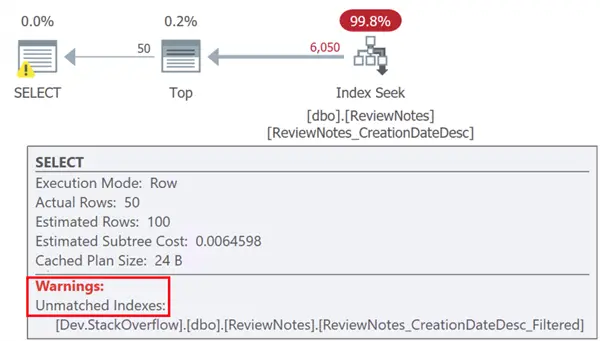
Uses the larger index we just created, and gives a warning in the plan that it wasn’t able to consider the filtered index:
Refactor Query
To use the filtered index, I asked the engineers to refactor the query in one of two ways:
1 – Put the cutoff in a variable and use OPTION (RECOMPILE):
 DECLARE @Offset   int    = 6000,
         @PageSize int    = 50,
         @cutoff datetime = DATEADD(MONTH, -1, GETUTCDATE());

  SELECT Id,
         ReviewID,
         Text,
         CreationDate
    FROM dbo.ReviewNotes
   WHERE CreationDate >= @cutoff
   ORDER BY CreationDate DESC
  OFFSET @Offset ROWS
   FETCH NEXT @PageSize ROWS ONLY
  OPTION (RECOMPILE);
(Without the recompile, SQL Server will need to assume that @cutoff could be anything.)
2 – Use direct interpolation – calculate the cutoff date in C#, and then embed a constant so that the resulting query looks like this:
DECLARE  @Offset   int    = 6000,
         @PageSize int    = 50;

  SELECT Id,
         ReviewID,
         Text,
         CreationDate
    FROM dbo.ReviewNotes
   WHERE CreationDate >= '20250515 03:45:02.564'
   ORDER BY CreationDate DESC
  OFFSET @Offset ROWS
   FETCH NEXT @PageSize ROWS ONLY;
I dropped the big index, had them change the C# to embed the constant, and now the query can use the filtered index:
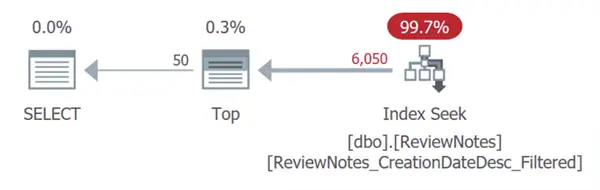
…with a slightly lower subtree cost of 0.0034107.
But I wasn’t satisfied there. I didn’t think it was necessary to duplicate all that data from the Text column, which made the index 129 MB for just 300,000 rows:
IndexName                               IndexSizeMB   Rows
-------------------------------         -----------   ---------
CIX_ReviewNotes                               47753   138732371
ReviewNotes_CreationDateDesc_Filtered           129      317306
ReviewNotes_UserId_CreationDate                2955   138732371
Further Tweak the Index
I thought that we could still drastically improve the performance of the UI with a much skinnier index, so I recreated it without the Text column in the include:
CREATE INDEX ReviewNotes_CreationDateDesc_Filtered
       ON dbo.ReviewNotes(CreationDate DESC)
  INCLUDE (ReviewId, UserId)
    WHERE CreationDate >= '20250501'
     WITH (ONLINE = ON, DROP_EXISTING = ON);
Now the size was even smaller (only 12 MB):
IndexName                               IndexSizeMB   Rows
-------------------------------         -----------   ---------
CIX_ReviewNotes                               47753   138732371
ReviewNotes_CreationDateDesc_Filtered            12     317306
ReviewNotes_UserId_CreationDate                2955   138732371
And the adjusted query produced a slightly different plan:
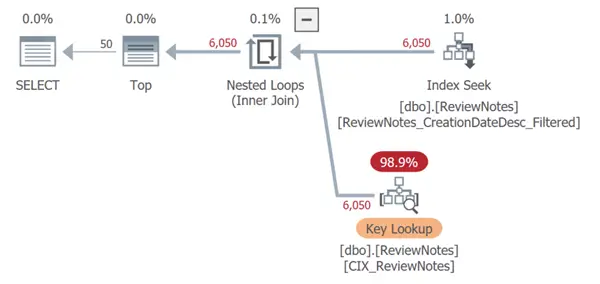
Yes, it leads to a key lookup, and it looks big and red and scary, but it only increased the estimated cost of the query to 0.3353310 – and it still ran in 3 milliseconds. Add the realized savings of 90% of the index size and the unseen future savings of not having to maintain the index every time a Text value is updated, and we have a winner. (You might place a higher priority on eliminating the key lookup, too, and that’s okay.)
Now, How to Keep It Current
Of course, this index isn’t useful to be stuck at a cutoff date of May 1, because the index will only get larger and larger, and, eventually, that key lookup might become a problem.
We know that the application will always only ask for the last 30 days. So, to keep the index sliding along and matching the application’s window, we can periodically drop it and recreate it with a new predicate using a SQL Server Agent job. Heck, we can run it daily if we want. The logic is pretty simple: we pick a cutoff date slightly outside the window:
DECLARE @date char(8) = CONVERT(char(8), DATEADD(DAY, -33, getdate()), 112);

DECLARE @sql nvarchar(max) = N'
   CREATE INDEX ReviewNotes_CreationDateDesc_Filtered
       ON dbo.ReviewNotes(CreationDate DESC)
  INCLUDE (ReviewId, UserId)
    WHERE CreationDate >= ''' + @date + '''
     WITH (ONLINE = ON, DROP_EXISTING = ON);';

EXEC sys.sp_executesql @sql;
If you’re not on Enterprise, that’s okay. You can leave out the ONLINE = ON and risk about a second of blocking (that’s how long the index took to create in my environment).
This automation allows us to keep a nice, tidy index at very little cost in terms of storage and maintenance, and without any tangible disruptions to user activity. They only had to change their query to stop using an expression in the predicate.
Key Takeaways
- Creating a regular index for large tables can lead to inefficiencies and increased maintenance costs.
- Filtered indexes in SQL Server can optimize queries by limiting data to specific conditions without requiring matching predicates.
- Refactoring queries to use filtered indexes can significantly improve performance and reduce execution times.
- Periodic recreation of filtered indexes helps maintain their efficiency without bloating storage requirements.
- Automating index management ensures the query keeps retrieving the latest data efficiently with minimal disruption.
Next Steps
Review the following tips and other resources:
- How Forced Parameterization in SQL Server Affects Filtered Indexes
- SQL Server Filtered Index Essentials Guide
- Filtered Indexes Ignored in SQL Server
- Optimizer Limitations with Filtered Indexes
- How filtered indexes could be a more powerful feature
- All indexing tips

Aaron Bertrand (@AaronBertrand) is a passionate technologist with industry experience dating back to Classic ASP and SQL Server 6.5. He also blogs at sqlblog.org.
- MSSQLTips Awards: Author of the Year – 2016, 2023 | Leadership (200+ tips) – 2022



Miron, I think you may have misinterpreted part of the goal here, and it wasn’t to keep duplicate copies of a text field that is constantly changing. I don’t want an index on the entire table because 95+% of the index would never be read once it falls outside the query’s parameter window, and I don’t want to incur key lookups on the other 5%. You might not have a use case for filtered indexes, and that’s ok.
I think you overdid it.
Index with maintenance really lends itself nicely to include text field.
However, if you were to use an index without text field, than it makes sense to create index without filter.
It will be marginally larger than the other non – clustered index ( 4 GB? ) and won’t need maintenance.
However, if text field is expected to be changing, than you need to implement snapshot transaction isolation, to ensure transactional consistency, while ensuring efficient access to concurrent requests of data on multiple queries, except those, allowing transaction isolation level uncommitted ( which can still be problematic, as it was proven in one of the companies I worked for under even moderate load, due to pressure on the transaction lof file, which becomes fair target to concurrent access, direct or indirect it is, with attendant reading / writing / hardening algorithms competing for access under the hood with little known trick of “reset” of running query buffer, basically, re – issuing execution of query under the hood ).
If you’re jamming user input in there, sure. But we’re using interpolation for things the software controls, like {=PostTypeId} and {=CutoffDate} which are derived from variables of explicit data types. So even if a user could inject values there, it’s not like strings would get them anywhere. And even if some software flagged it as sql injection, we know it’s not and would tell the software to be quiet.
If you are building filtered indexes based on user input, the data types should still be able to protect you – the interpolation only works if the user entered a date, a number, and so on. If you’re doing this with _string_ input, I’d love to hear about the use case so I can better understand possible options.
We happen to really like interpolation but in the general case – and especially with a sliding datetime value, meaning the query will always be slightly different – recompile is probably the better option. Note that some people out there are really sensitive to recompile, so you may need to convince them of the nuance/trade-offs in this case.
Thank you for sharing this, I found it very insightful.
Regarding the “Refactor Query” part, I might consider adding `OPTION (RECOMPILE)`.
My concern is that if values are passed directly from C#, some security software could flag it as a potential SQL Injection issue.
Do you have a better approach to handle this scenario?