Problem
Sometimes it is convenient to generate calendar dates, such as for Fridays across multiple years. This tip demonstrates two different solutions for this kind of task. The demonstrations implement recursive CTEs, chained CTEs, as well as a stored procedure with both input and output parameters. These two different demonstrations are described so that you can incorporate either or both into your own calendar date generation projects.
Solution
Databases regularly include dates along with date processing requirements. Recursive common table expressions (CTE) can be particularly useful for fulfilling calendar date generation requirements. One advantage of recursive CTEs is that they do not require WHILE loops, which can be slow to execute, for iterative tasks, such as returning successive calendar dates or looking up direct reports in an employee hierarchical map. Stored procedures are a convenient way of encapsulating reusable queries, such as returning calendar dates for the first Friday in one or more years.
The solutions in this tip are meant to motivate you to adapt recursive CTEs and/or stored procedures for your own date processing projects. It is not unusual for date processing requirements to vary substantially depending on the specific types of values being tracked over time. For example, the demonstrations in this tip track calendar dates for Fridays across one or more years. However, you can also readily adapt this code framework for tracking calendar dates for month ends across multiple calendar years. Additionally, if you need to extract a subset of data from a time series dataset, such as weekly sales or daily temperatures, you can join by date a custom list of generated dates with the dates in the time series dataset.
Whether or not you work with dates, you are still likely to benefit from this tip because it covers recursive CTEs, chained CTEs, and stored procedures, which have broad application potential for all kinds of data management projects.
Here are some prior MSSQLTips.com articles that you may find helpful as you explore how to benefit from recursive CTEs, chained CTEs, and stored procedures in the applications that you develop:
- Recursive Common Table Expression in SQL Server Examples
- SQL Server Common Table Expressions (CTE) usage and examples
- Troubleshoot Chained SQL Server CTE
- Getting started with Stored Procedures in SQL Server
- SQL Stored Procedures, Views and Functions Examples
- Create, Alter, Drop and Execute SQL Server Stored Procedures
- SQL Server Stored Procedure with Parameters
- Modifying an existing SQL Server stored procedure
Demonstration #1 – Date Generation
The first demonstration provides a straightforward example of how to implement a date generation project with a mix of steps that are run sequentially. Each step is isolated in a separate SQL Server batch. The steps perform such tasks as creating tables and populating them with either a stored procedure or a recursive CTE.
In SQL Server, a batch is a collection of one or more T-SQL statements executed as a unit. SQL Server lets you specify batches from within SQL Server Management Services (SSMS). You can also run batches from within sqlcmd, a command-line utility for invoking T-SQL statements outside of SSMS. Other information regarding batches includes:
- T-SQL batches are delimited with the GO keyword at their end.
- Variables declared within a batch inside a script are not accessible from other batches — even from within the same script.
- Batches are used in this tip for three main reasons:
- Statements like CREATE PROCEDURE must be in their own separate batch.
- They help organize scripts into logical, manageable steps, as demonstrated throughout this tip.
- Batches allow for easier code updates, minimizing the risk of errors propagating across a long script.
Demonstration #1 Code
The code for this demonstration appears in the script below. Each batch is preceded by one or more comment lines that identify the batch number and describe the role of the batch.
Batch 1 sets a default database for the script. You can reference any database that already exists in a SQL Server environment. In the example below, the default database is the DataScience database.
Batch 2 creates a fresh copy of the first_Friday_log table. The purpose of this table is to log the calendar date of the first Friday in each logged year tracked by the application. The CREATE TABLE statement inside the batch specifies four table columns:
- Run_id is an identity field that serves as a primary key for the rows in the table.
- The logged_year and first_Friday_date columns are populated by a subsequent batch.
- The logged_at column records the date when the logged_year and first_Friday_date column values are inserted into a table row.
Batch 3 creates a fresh copy of the stored procedure named dbo.get_first_friday_of_year. The procedure returns two scalar output parameters named @year and @first_Friday_date. The @year parameter serves a dual role as both an input parameter to and output parameter from the dbo.get_first_friday_of_year procedure. The @year parameter value is an argument for the datefromparts function within the select statement in the procedure. The @first_Friday_date parameter value is computed as the return value from the select statement in the procedure.
Batch 4 executes the dbo.get_first_friday_of_year procedure five times for years 2020 through 2024. The insert into statement after each exec statement passes the output parameter values from the dbo.get_first_friday_of_year procedure to the logged_year and first_Friday_date values in the dbo.first_friday_log table.
Batch 5 conditionally adjusts the first_friday_date column value for each row in the dbo.first_friday_log table when the first_friday_date column value equals the first date of the first month for the @year input parameter (in other words, January 1). This is a simple example of date processing for time series data. Batch 5 ends by displaying the rows in the dbo.first_friday_log table. These rows will either be the original values returned by batch 4 or the updated rows from the code in batch 5.
Batch 6 creates a table named dbo.friday_dates with columns named logged_year and friday_date.
Batch 7 contains a recursive CTE named friday_dates_cte. This recursive CTE returns a temporary result set based on the dbo.first_friday_log table in its anchor element and a SELECT statement in its recursive element. The INSERT INTO statement trailing the recursive CTE populates the dbo.friday_dates table created in batch 6. Batch 7 ends by displaying the contents of the dbo.friday_dates table ordered by logged_year and friday_date.
SQL Code
-- batch 1: set default db
use DataScience;
go

-- batch 2: create a fresh dbo.first_friday_log table
if object_id('dbo.first_friday_log', 'u') is not null
    drop table first_friday_log;

create table dbo.first_friday_log (
    run_id int identity(1,1) primary key,
    logged_year int,
    first_friday_date date,
    logged_at datetime default getdate()
);

-- batch 3: create a fresh dbo.get_first_friday_of_year sp
if object_id('dbo.get_first_friday_of_year', 'p') is not null
    drop procedure dbo.get_first_friday_of_year;
go

create procedure dbo.get_first_friday_of_year
    @year int output,
    @first_friday_date date output
as
begin
    select @first_friday_date = min(datevalue)
    from (
        select datefromparts(@year, 1, number) as datevalue
        from master.dbo.spt_values
        where type = 'P' and number between 1 and 7
    ) as dates
    where datename(weekday, datevalue) = 'Friday';
end;

go

-- batch 4: populate dbo.first_friday_log
-- for @year = 2020 through 2024
-- and display populated dbo.first_friday_log

-- populate first_friday_log for 2020
declare @y int = 2020, @ff date;
exec dbo.get_first_friday_of_year @year = @y output, @first_friday_date = @ff output;
insert into first_friday_log (logged_year, first_friday_date)
select @y, @ff

-- populate first_friday_log for 2021
set @y = 2021
exec dbo.get_first_friday_of_year @year = @y output, @first_friday_date = @ff output;
insert into first_friday_log (logged_year, first_friday_date)
select @y, @ff

-- populate first_friday_log for 2022
set @y = 2022
exec dbo.get_first_friday_of_year @year = @y output, @first_friday_date = @ff output;
insert into first_friday_log (logged_year, first_friday_date)
select @y, @ff

-- populate first_friday_log for 2023
set @y = 2023
exec dbo.get_first_friday_of_year @year = @y output, @first_friday_date = @ff output;
insert into first_friday_log (logged_year, first_friday_date)
select @y, @ff

-- populate first_friday_log for 2024
set @y = 2024
exec dbo.get_first_friday_of_year @year = @y output, @first_friday_date = @ff output;
insert into first_friday_log (logged_year, first_friday_date)
select @y, @ff

-- optionally display dbo.first_friday_log with original first_friday_date values
-- select * from dbo.first_friday_log;

go

-- batch 5: conditionally adjust first_friday_date for
-- first day in first month of the year
-- to ensure every friday in a year has at least one
-- other day in the first month of the year
declare @run_id int = 1;
declare @max_run_id int;
declare @original_date date;
declare @adjusted_date date;

-- get the highest run_id to define loop boundary
select @max_run_id = max(run_id) from dbo.first_friday_log;

while @run_id <= @max_run_id
begin
    -- get the original date for this run_id
    select @original_date = first_friday_date
    from dbo.first_friday_log
    where run_id = @run_id;

    -- apply the conversion logic
    set @adjusted_date = case
        when month(@original_date) = 1 and day(@original_date) = 1
            then dateadd(day, 7, @original_date)
        else @original_date
    end;

    -- update the table with the adjusted date
    update dbo.first_friday_log
    set first_friday_date = @adjusted_date
    where run_id = @run_id;

    -- move to next run_id
    set @run_id = @run_id + 1;
end;


-- display conditionally adjusted first_friday_date values
 select * from dbo.first_friday_log;

go

-- batch 6: create a table called dbo.friday_dates with a
-- recursive cte based on the values in the logged_year
-- and first_friday_date columns of dbo.first_friday_log

-- create a fresh version of dbo.friday_dates
if object_id('dbo.friday_dates', 'u') is not null
    drop table dbo.friday_dates;
go

create table dbo.friday_dates (
    logged_year int,
    friday_date date
);


go
-- batch 7: populate dbo.friday_dates with
-- the friday_dates_cte
-- the fd prefix in the recursive step is an alias
-- that refers back to the anchor step code
with friday_dates_cte as (
    -- anchor: start with first_friday_date
    select
        logged_year,
        first_friday_date as friday_date
    from dbo.first_friday_log

    union all

    -- recursive step: add 7 days to previous friday
    select
        fd.logged_year,
        dateadd(day, 7, fd.friday_date)
    from friday_dates_cte fd
    join dbo.first_friday_log log
        on fd.logged_year = log.logged_year
    where dateadd(day, 7, fd.friday_date) <= datefromparts(fd.logged_year, 12, 31)
)
insert into dbo.friday_dates (logged_year, friday_date)
select
    logged_year,
    friday_date
from friday_dates_cte
option (maxrecursion 1000);

select * from dbo.friday_dates
order by logged_year, friday_date;
Demonstration #1 Selected Result Sets
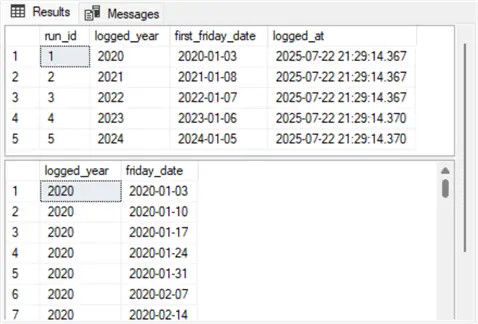
The following screenshot shows all rows generated by the last SELECT statement in batch 5, as well as the first seven rows from the last SELECT statement in batch 7. There are only five rows in the result set from batch 5 — one row for each of the logged_year values. The bottom result set in the screenshot displays the first seven rows from the last SELECT statement in batch 7. Notice how the first friday_date column value in the top result set matches the initial friday_date column value in the second result set. Additionally, the second through the seventh rows in the friday_date column are precisely seven days apart because of the second select statement within friday_dates_cte.
Demonstration #2 – CTE Date Generation
The following script implements a more CTE-centric approach than the one in the preceding section for creating, populating, and displaying contents from the dbo.first_friday_log table. Note: The code for creating, populating, and displaying contents from the dbo.friday_dates table is the same in this section as the preceding section.
This section employs a completely set-based approach to populating and displaying the dbo.first_friday_log table. The prior section does use a CTE, which is set-based, but it also relies on a stored procedure returning scalar values and a WHILE loop to generate its displayed results.
Code Explanation
The code in this section is built around two CTEs: first_Fridays and friday_dates_cte. Each CTE returns a temporary result set, and then persists the temporary result set in a SQL Server table:
- The first_Fridays CTE in batch 3 of the following script is a chained CTE. A chained CTE consists of two or more CTEs delimited by commas. Each CTE is a link in the chained CTE.
- The first CTE in the chained CTE has its name (first_Fridays) preceded by the WITH keyword; its defining code in parentheses trails the name.
- A comma trails the closing parenthesis for the first CTE.
- The name for the second CTE (adjusted_Fridays) and its defining code in parentheses is the second and final link in this chained CTE.
- An INSERT INTO statement following the first CTE copies the temporary result set from the last link in the chain to the dbo.first_friday_log table.
- The friday_dates_cte in batch 5 is a recursive CTE. This CTE has the same design and function as in the preceding section. More specifically, the friday_dates_cte in the script below creates a temporary result set for populating the dbo.friday_dates table with a trailing insert into statement. Additionally, batch 5 closes with a SELECT statement that displays the rows from the dbo.friday_dates table sorted by logged_year and friday_date column values.
SQL Code
-- batch 1: set default db
use DataScience;
go

-- batch 2: create a fresh first_friday_log table
if object_id('first_friday_log', 'u') is not null
    drop table first_friday_log;

create table first_friday_log (
    run_id int identity(1,1) primary key,
    logged_year int,
    first_friday_date date,
    logged_at datetime default getdate()
);
go

-- batch 3: create and use the first_fridays chained cte
-- to populate and adjust values in dbo.first_friday_log
with first_fridays as (
    select y as logged_year,
           min(d.datevalue) as first_friday_date
    from (values (2020), (2021), (2022), (2023), (2024)) as y(y)
    cross apply (
        select datefromparts(y, 1, number) as datevalue
        from master.dbo.spt_values
        where type = 'P' and number between 1 and 7
    ) as d
    where datename(weekday, d.datevalue) = 'Friday'
    group by y
),
adjusted_fridays as (
    select logged_year,
           case
               when month(first_friday_date) = 1 and day(first_friday_date) = 1
                   then dateadd(day, 7, first_friday_date)
               else first_friday_date
           end as first_friday_date
    from first_fridays
)
insert into dbo.first_friday_log (logged_year, first_friday_date)
select logged_year, first_friday_date
from adjusted_fridays;

-- display dbo.first_friday_log after adustment
select * from dbo.first_friday_log
go

-- batch 4: create a table called dbo.friday_dates for
-- subsequent population by a recursive cte

-- create a fresh version of dbo.friday_dates
if object_id('dbo.friday_dates', 'u') is not null
    drop table dbo.friday_dates;
go

create table dbo.friday_dates (
    logged_year int,
    friday_date date
);
go

-- batch 5: populate dbo.friday_dates with
-- the friday_dates_cte
-- the fd prefix in the recursive step is an alias
-- that refers back to the anchor step code
with friday_dates_cte as (
    -- anchor: start with first_friday_date
    select
        logged_year,
        first_friday_date as friday_date
    from dbo.first_friday_log

    union all

    -- recursive step: add 7 days to previous friday
    select
        fd.logged_year,
        dateadd(day, 7, fd.friday_date)
    from friday_dates_cte fd
    join dbo.first_friday_log log
        on fd.logged_year = log.logged_year
    where dateadd(day, 7, fd.friday_date) <= datefromparts(fd.logged_year, 12, 31)
)
insert into dbo.friday_dates (logged_year, friday_date)
select
    logged_year,
    friday_date
from friday_dates_cte
option (maxrecursion 1000);

-- display logged_year and friday_date column values
-- from dbo.friday_dates
select * from dbo.friday_dates
order by logged_year, friday_date
Next Steps
In thinking about next steps for the two scripts described in this tip, I am reminded of a classic advertising jingle (“Sometimes you feel like a nut; sometimes you don’t.”).
- The first script illustrates how to perform underlying tasks sequentially while it creates and invokes a stored procedure. Additionally, the first script relies on a WHILE loop to sort five records. Although two CTEs appear in the script, they perform isolated tasks and are not critical for the flow of the script because of intervening statements.
- The second script is largely a set-based solution to the same tasks that the first script addresses. Two CTEs populate two tables whose contents are displayed with trailing SELECT statements.
- If you prefer set-based approaches and are comfortable with coding chained CTEs, it is likely that the second solution may be your preferred approach. However, if your programming experience mainly includes Visual Basic, Java, C, and/or Python instead of T-SQL, then you may prefer the first solution.
- If a solution runs frequently and requires iterative tasks over many rows of data, CTEs may be worth consideration, no matter what your programming background. If a set of iterative tasks is likely to run infrequently and/or does not process many rows, and your prior programming is mostly in Visual Basic, Python, Java or C, then you may benefit from a procedural approach, like the one in the first demonstration, instead of a CTE-centric approach.

Rick Dobson is a SQL Server professional with decades of T-SQL experience that includes authoring books, running a national seminar practice, working for businesses on finance and healthcare development projects, and serving as a regular contributor to MSSQLTips.com. He has been a practicing Python developer for more than the past half decade – with a special emphasis for data visualization and ETL tasks with JSON and CSV files. His most recent professional passions include financial time series data and analyses, AI models, and statistics. If you are interested in growing your skills in any of these areas especially as they relate to financial securities, consider visiting his blog at https://securitytradinganalytics.blogspot.com/2023/12/.
- MSSQLTips Awards: Leadership (200+ tips) – 2025 | Author of the Year Contender – 2017-2024