Problem
One’s genealogy has become a hot topic around the world, for those who want to unlock their family’s past or to keep an accurate record of their lineage. SQL Server might be a useful tool throughout this process. Is it possible to work with genealogy data in SQL Server?
Solution
Genealogy is the study of families, family history, and the tracing of their lineages. Genealogical data has gained a lot of attention recently because people are looking for their identity and belonging. Nowadays, it is increasing the accessibility of historical records that are now digitized and searchable, making the process of obtaining information about ancestors easy and fast.
In this article, we look at how we can use SQL Server to store and easily report back lineage information related to genealogy data.
Terms and Definitions
GEDCOM
GEDCOM, an acronym for Genealogical Data Communications, which was created by The Church of Jesus Christ of Latter-day Saints, in 1984, is a specification for exchanging genealogical data between different software applications. Multiple versions have since been released and copyrighted by them, including the release of version 5 in 2019, which is the most used version. In 2021, version 7 was released and is the last one, but is still being implemented.
GRAMPS
For this article, I will use GRAMPS, which is a free genealogical software project and community that is both intuitive for hobbyists and feature-complete for professional genealogists. It is a community project, created, developed, and governed by genealogists. You can download it from the GRAMPS website.
Genealogy in SQL Server
Genealogical Database Diagram (Suggestion)
If I had to propose a database diagram to hold genealogic data, I would suggest something like the diagram below. But, since this article is to discuss tools to help use genealogical data, I will use a very small and simplified database diagram with only two tables: one for Individuals and another for Couples. For the purpose of finding kindship, I will include a table to hold the ancestral path.
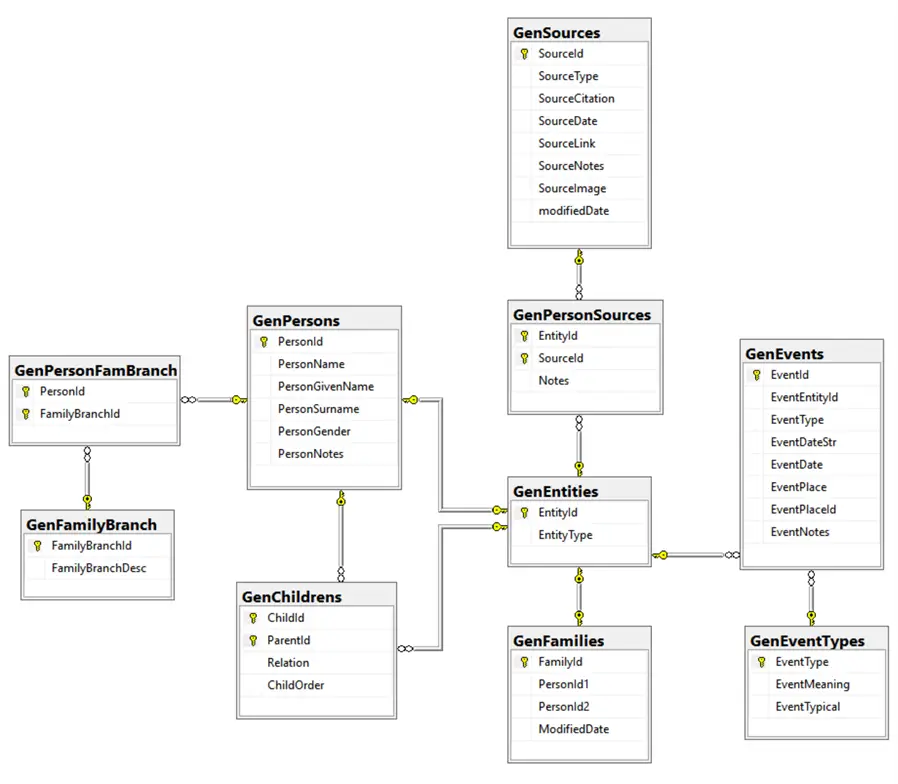
Table for Individuals
-- MSSQLTips (TSQL)

CREATE TABLE [dbo].[GenTree](
    [PersonId] [int] NOT NULL,
    [FatherId] [int] NULL,
    [MotherId] [int] NULL,
    [FamId] [int] NULL,
    [ChildOrder] [smallint] NULL,
    [PersonName] [nvarchar](150) NULL,
    [PersonGivenName] [nvarchar](150) NULL,
    [PersonSurname] [nvarchar](150) NULL,
    [Gender] [char](1) NULL,
    [BirthDateStr] [nvarchar](50) NULL,
    [BirthDate] [date] NULL,
    [BirthPlace] [nvarchar](250) NULL,
    [DeathDateStr] [nvarchar](50) NULL,
    [DeathDate] [date] NULL,
    [DeathPlace] [nvarchar](250) NULL,
    [IsDateApproximate] [bit] NULL,
 CONSTRAINT [PK_GenTree] PRIMARY KEY CLUSTERED
(
    [PersonId] ASC
)WITH (PAD_INDEX = OFF, STATISTICS_NORECOMPUTE = OFF, IGNORE_DUP_KEY = OFF, ALLOW_ROW_LOCKS = ON, ALLOW_PAGE_LOCKS = ON, OPTIMIZE_FOR_SEQUENTIAL_KEY = OFF) ON [PRIMARY]
) ON [PRIMARY]
GO

ALTER TABLE [dbo].[GenTree] ADD  CONSTRAINT [DF_GenTree_IsDateAbout]  DEFAULT ((0)) FOR [IsDateApproximate]
GO
Table for Couples
-- MSSQLTips (TSQL)

CREATE TABLE [dbo].[GenTreeCouples](
    [PersonId1] [int] NOT NULL,
    [PersonId2] [int] NOT NULL,
    [FamilyId] [int] NULL,
    [MarriageDateStr] [nvarchar](50) NULL,
    [MarriageDate] [date] NULL,
    [MarriagePlace] [nvarchar](250) NULL,
    [IsDateApproximate] [bit] NULL,
 CONSTRAINT [PK_GenTreeCouples] PRIMARY KEY CLUSTERED
(
    [PersonId1] ASC,
    [PersonId2] ASC
)WITH (PAD_INDEX = OFF, STATISTICS_NORECOMPUTE = OFF, IGNORE_DUP_KEY = OFF, ALLOW_ROW_LOCKS = ON, ALLOW_PAGE_LOCKS = ON, FILLFACTOR = 90, OPTIMIZE_FOR_SEQUENTIAL_KEY = OFF) ON [PRIMARY]
) ON [PRIMARY]
GO

ALTER TABLE [dbo].[GenTreeCouples] ADD  CONSTRAINT [DF_GenTreeCouples_IsDateApproximate]  DEFAULT ((0)) FOR [IsDateApproximate]
GO
Table for Ancestors Path
-- MSSQLTips (TSQL)

CREATE TABLE [dbo].[GenTreeAncestors](
    [AncestorLineId] [int] IDENTITY(1,1) NOT NULL,
    [AncestorLine] [varchar](800) NULL,
    [PersonId] [int] NULL,
    [ParentId] [int] NULL,
    [FirstId]  AS (case when [ancestorline] like '%-%' then left([ancestorline],charindex('-',[ancestorline])-(1)) else [ancestorline] end),
    [Depth] [int] NULL,
 CONSTRAINT [PK_GenTreeAncestors] PRIMARY KEY CLUSTERED
(
    [AncestorLineId] ASC
)WITH (PAD_INDEX = OFF, STATISTICS_NORECOMPUTE = OFF, IGNORE_DUP_KEY = OFF, ALLOW_ROW_LOCKS = ON, ALLOW_PAGE_LOCKS = ON, OPTIMIZE_FOR_SEQUENTIAL_KEY = OFF) ON [PRIMARY]
) ON [PRIMARY]
GO
Conversion Date Strings to ISO Date
This store procedure tries to convert string dates to ISO format dates. The reason to include an additional column for Date as string is because of the GEDCOM specs for writing dates with qualifier terms like about, before, after, and others. After running it, please adjust the respective column date to whatever it should be or makes sense for those not converted. I only simplified for the ABOUT qualifier, where I converted the year to start on January 1.
-- =============================================
-- Author:      SCP - MSSQLTips
-- Create date: 20250410
-- Description: Genealogy Dates to ISO Format
-- =============================================
CREATE OR ALTER PROCEDURE [dbo].[uspGenTreeToIsoDates]
AS
BEGIN
    SET NOCOUNT ON;
    BEGIN TRY
       IF (SELECT       COUNT(*)
               FROM     [dbo].[GenTree]) < 1 BEGIN
           PRINT 'No records found!';
           RETURN
       END;

      -- ==============================================================================

    UPDATE         [dbo].[GenTreeCouples]
        SET         [MarriageDateStr] = CONCAT('01 JAN ',[MarriageDateStr])
                ,[IsDateApproximate] = 1
        WHERE     LEN([MarriageDateStr]) = 4;

    UPDATE         [dbo].[GenTreeCouples]
        SET         [MarriageDate] = PARSE(REPLACE([MarriageDateStr],'ABT ','01 JAN') AS date)
                ,[IsDateApproximate] = CASE WHEN [MarriageDateStr] LIKE '%ABT%' THEN 1 ELSE 0 END
        WHERE     ISDATE(REPLACE([MarriageDateStr],'ABT ','01 JAN')) = 1;

    UPDATE         [dbo].[GenTree]
        SET         [IsDateApproximate] = 1
        WHERE     [BirthDateStr] LIKE '%ABT%' OR
                    [DeathDate] LIKE '%ABT%';

    UPDATE         [dbo].[GenTree]
        SET         [BirthDateStr] = CONCAT('01 JAN ',[BirthDateStr])
                ,[IsDateApproximate] = 1
        WHERE     LEN([BirthDateStr]) = 4;

    UPDATE         [dbo].[GenTree]
        SET         [BirthDate] = PARSE(REPLACE([BirthDateStr],'ABT ','01 JAN') AS date)
        WHERE     ISDATE(REPLACE([BirthDateStr],'ABT ','01 JAN')) = 1;

    UPDATE         [dbo].[GenTree]
        SET         [DeathDateStr] = CONCAT('01 JAN ',[DeathDateStr])
                ,[IsDateApproximate] = 1
        WHERE     LEN([DeathDateStr]) = 4;

    UPDATE         [dbo].[GenTree]
        SET         [DeathDate] = PARSE(REPLACE([DeathDateStr],'ABT ','01 JAN') AS date)
        WHERE     ISDATE(REPLACE([DeathDateStr],'ABT ','01 JAN')) = 1;

       RETURN;
    END TRY
    BEGIN CATCH
        IF @@TRANCOUNT > 0
            BEGIN
                ROLLBACK TRANSACTION;
            END

            -- Print error information.
            PRINT      'Error: ' + CONVERT(varchar(50), ERROR_NUMBER()) +
                    ', Severity: ' + CONVERT(varchar(5), ERROR_SEVERITY()) +
                    ', State: ' + CONVERT(varchar(5), ERROR_STATE()) +
                    ', Procedure: ' + ISNULL(ERROR_PROCEDURE(), '-') +
                    ', Line: ' + CONVERT(varchar(5), ERROR_LINE());

            PRINT ERROR_MESSAGE();
    END CATCH;
END
GO
Person Age
This function returns the person’s age based on the person ID.
-- =============================================
-- Author:      SCP - MSSQLTips
-- Create date: 20250415
-- Description: Person age by date
-- =============================================
CREATE OR ALTER FUNCTION [dbo].[ufnGenPersonAge]
                (@BirthDate date
                ,@Date date)
RETURNS nvarchar(50)
WITH EXECUTE AS CALLER
AS
BEGIN
    DECLARE  @Age nvarchar(50)
            ,@Temp date
            ,@Years int
            ,@Months int
            ,@Days int;

    SELECT @Temp = @BirthDate;

    SET @Years =     DATEDIFF(yy, @Temp, @Date) -
                 CASE WHEN    (MONTH(@BirthDate) > MONTH(@Date)) OR
                            (MONTH(@BirthDate) = MONTH(@Date) AND
                            DAY(@BirthDate) > DAY(@Date))
                      THEN 1
                      ELSE 0
                 END;

    SET @Temp =    DATEADD(yy, @Years, @Temp);

    SET @Months = DATEDIFF(m, @Temp, @Date) -
                 CASE WHEN DAY(@BirthDate) > DAY(@Date)
                      THEN 1
                      ELSE 0
                 END;

    SET @Temp =    DATEADD(m, @Months, @Temp);

    SET @Days =    DATEDIFF(d, @Temp, @Date);

    SET @Age =    CAST(@Years AS nvarchar(3)) + 'y ' +
                CAST(@Months AS nvarchar(3)) + 'm ' +
                CAST(@Days AS nvarchar(3)) + 'd';

    RETURN @Age;
END
GO
Person Birth Date
This function returns the person’s birth date based on the person ID.
-- =============================================
-- Author:      SCP - MSSQLTips
-- Create date: 20250415
-- Description: Genealogy Person Birthdate
-- =============================================
CREATE OR ALTER FUNCTION [dbo].[ufnGenPersonBirthDate]
                (@PersonId int)
RETURNS date
WITH EXECUTE AS CALLER
AS
BEGIN
    DECLARE @BirthDate date;

    SELECT       @BirthDate = [BirthDate]
        FROM     [dbo].[GenTree]
        WHERE    ([PersonId] = @PersonId);

    RETURN @BirthDate;
END
GO
View for Individuals
CREATE OR ALTER VIEW [dbo].[vGenTree]
AS
SELECT PersonId, FatherId, MotherId, FamId, ChildOrder, PersonName, PersonGivenName, PersonSurname, Gender, BirthDateStr, BirthDate, BirthPlace, DeathDateStr, DeathDate, dbo.ufnGenPersonAge(BirthDate,
    DeathDate) AS DeathAge, DeathPlace, IsDateApproximate
FROM dbo.GenTree
GO
View for Couples
CREATE OR ALTER VIEW [dbo].[vGenCouples]
AS
SELECT C.FamilyId, F.PersonId AS FatherId, F.PersonName AS FatherName, F.BirthDate AS FatherBirthDate, F.BirthPlace AS FatherBirthPlace, F.DeathDate AS FatherDeathDate, dbo.ufnGenPersonAge(F.BirthDate,
    F.DeathDate) AS FatherDeathAge, F.DeathPlace AS FatherDeathPlace, F.IsDateApproximate AS FatherDatesAprox, M.PersonId AS MotherId, M.PersonName AS MotherName, M.BirthDate AS MotherBirthDate,
    M.BirthPlace AS MotherBirthPlace, M.DeathDate AS MotherDeathDate, dbo.ufnGenPersonAge(M.BirthDate, M.DeathDate) AS MotherDeathAge, M.DeathPlace AS MotherDeathPlace,
    M.IsDateApproximate AS MotherDatesAprox, C.MarriageDate, dbo.ufnGenPersonAge(F.BirthDate, C.MarriageDate) AS FatherMarriageAge, dbo.ufnGenPersonAge(M.BirthDate, C.MarriageDate) AS MotherMarriageAge,
    C.MarriagePlace, C.IsDateApproximate AS MarriageIsDateApproximate
FROM dbo.GenTree AS F INNER JOIN
    dbo.GenTreeCouples AS C ON F.PersonId = C.PersonId1 INNER JOIN
    dbo.GenTree AS M ON C.PersonId2 = M.PersonId
GO
Person Briefing
To have a briefing for a person is to provide a snapshot of essential facts, helping to distinguish individuals and clarify how they are related to other persons across generations.
-- =============================================
-- Author:      SCP - MSSQLTips
-- Create date: 20250417
-- Description: Person´s briefing
-- =============================================
CREATE OR ALTER FUNCTION [dbo].[ufnGenPersonBriefing]
                (@PersonId int)
RETURNS nvarchar(MAX)
WITH EXECUTE AS CALLER
AS
BEGIN
    DECLARE          @Marriage nvarchar(MAX) = ''
                    ,@Briefing nvarchar(MAX) = '';

    DECLARE          @Gen
        TABLE       ([PersonPronoun] nvarchar(10)
                    ,[PersonName] nvarchar(150)
                    ,[BirthDate] date
                    ,[BirthPlace] nvarchar(150)
                    ,[FatherName] nvarchar(150)
                    ,[FatherAgeBirth] nvarchar(20)
                    ,[MotherName] nvarchar(150)
                    ,[MotherAgeBirth] nvarchar(20)
                    ,[DeathDate] date
                    ,[DeathPlace] nvarchar(150)
                    ,[DeathAge] nvarchar(20)
                    ,[FatherId] int
                    ,[MotherId] int);

    DECLARE          @GenMarried
        TABLE       ([EventId] int IDENTITY
                    ,[PersonPronoun] nvarchar(10)
                    ,[PersonAgeMarried] nvarchar(20)
                    ,[SpouseId] int
                    ,[SpouseName] nvarchar(150)
                    ,[SpouseAgeMarried] nvarchar(20)
                    ,[MarriageDate] date
                    ,[MarriagePlace] nvarchar(150)
                    ,[Sons] nvarchar(50)
                    ,[Daughters] nvarchar(50)
                    ,[Childrens] nvarchar(MAX));

    --  Person =====================================================================

    INSERT INTO      @Gen
                    ([PersonPronoun]
                    ,[PersonName]
                    ,[BirthDate]
                    ,[BirthPlace]
                    ,[DeathDate]
                    ,[DeathPlace]
                    ,[DeathAge]
                    ,[FatherId]
                    ,[MotherId])
        SELECT       CASE WHEN Gender = 'M' THEN 'He' ELSE 'She' END
                    ,[PersonName]
                    ,[BirthDate]
                    ,[BirthPlace]
                    ,[DeathDate]
                    ,[DeathPlace]
                    ,[DeathAge]
                    ,[FatherId]
                    ,[MotherId]
            FROM     [dbo].[vGenTree]
            WHERE    [personId] = @PersonId;

    --  Couple =====================================================================

    INSERT INTO      @GenMarried
                    ([PersonPronoun]
                    ,[PersonAgeMarried]
                    ,[SpouseId]
                    ,[SpouseName]
                    ,[SpouseAgeMarried]
                    ,[MarriageDate]
                    ,[MarriagePlace])
        SELECT       CASE WHEN [FatherId] = @PersonId THEN 'He' ELSE 'She' END
                    ,CASE WHEN [FatherId] = @PersonId THEN [FatherMarriageAge] ELSE [MotherMarriageAge] END
                    ,CASE WHEN [FatherId] = @PersonId THEN [MotherId] ELSE [FatherId] END
                    ,CASE WHEN [FatherId] = @PersonId THEN [MotherName] ELSE [FatherName] END
                    ,CASE WHEN [FatherId] = @PersonId THEN [MotherMarriageAge] ELSE [FatherMarriageAge] END
                    ,[marriageDate]
                    ,[marriagePlace]
            FROM     [dbo].[vGenCouples]
            WHERE    [FatherId] = @PersonId OR
                     [MotherId] = @PersonId
            ORDER BY [MarriageDate];

    UPDATE           @GenMarried
        SET          [Sons] =
                    (SELECT      COUNT(*)
                        FROM     [dbo].[GenTree]
                        WHERE    [gender] = 'M' AND
                                ([fatherId] = @PersonId AND [motherId] = [SpouseId] OR
                                 [fatherId] = [SpouseId] AND [motherId] = @PersonId))
                    ,[Daughters] =
                    (SELECT      COUNT(*)
                        FROM     [dbo].[GenTree]
                        WHERE    [gender] = 'F' AND
                                ([fatherId] = @PersonId AND [motherId] = [SpouseId] OR
                                 [fatherId] = [SpouseId] AND [motherId] = @PersonId));

    UPDATE           @GenMarried
        SET          [Sons] =
                        CASE
                            WHEN [Sons] = 0 THEN NULL
                            WHEN [Sons] = 1 THEN [Sons] + ' son'
                            WHEN [Sons] > 1 THEN [Sons] + ' sons'
                        END
                    ,[Daughters] =
                        CASE
                            WHEN [Daughters] = 0 THEN NULL
                            WHEN [Daughters] = 1 THEN [Daughters] + ' daughter'
                            WHEN [Daughters] > 1 THEN [Daughters] + ' daughters'
                        END;


    UPDATE           @GenMarried
        SET          [Children] =
                        CASE
                            WHEN [Sons] IS NULL AND [Daughters] IS NULL THEN ' No children recorded.'
                            WHEN [Sons] IS NULL AND [Daughters] IS NOT NULL THEN ' They were the parents of at least ' + [Daughters] + '.'
                            WHEN [Sons] IS NOT NULL AND [Daughters] IS NULL THEN ' They were the parents of at least ' + [Sons] + '.'
                            WHEN [Sons] IS NOT NULL AND [Daughters] IS NOT NULL THEN ' They were the parents of at least ' + [Sons] + ' and ' + [Daughters] + '.'
                            ELSE NULL
                        END;

    SELECT           @Marriage += CONCAT(CHAR(9),'On ',FORMAT([MarriageDate],'dd MMMM yyyy')
                    ,' in ' + [MarriagePlace] + ',',' at the age of '
                    ,[PersonAgeMarried],' old ',LOWER([PersonPronoun]),' married ',[SpouseName]
                    ,' at the age of ' + [SpouseAgeMarried] + ' old.'
                    ,[Children],CHAR(10))
        FROM         @GenMarried;

    UPDATE           @Gen
        SET          [FatherName] = G.FatherName
                    ,[FatherAgeBirth] = dbo.ufnGenPersonAge(G.FatherBirthDate,[BirthDate])
                    ,[MotherName] = G.MotherName
                    ,[MotherAgeBirth] = dbo.ufnGenPersonAge(G.MotherBirthDate,[BirthDate])
        FROM         [dbo].[vGenCouples] G
        WHERE        [@Gen].[FatherId] = G.FatherId AND
                     [@Gen].[MotherId] = G.MotherId;

    SELECT           @Briefing = CONCAT('BRIEFING'
                            ,CHAR(10),'Name:   ',CHAR(9),[PersonName]
                            ,CHAR(10),'Birth:  ',CHAR(9),FORMAT([BirthDate],'dd MMMM yyyy'),' - ' + [BirthPlace]
                            ,CHAR(10),'Father: ',CHAR(9),[FatherName],', aged ' + [FatherAgeBirth] + ' old at his birth '
                            ,CHAR(10),'Mother: ',CHAR(9),[MotherName],', aged ' + [MotherAgeBirth] + ' old at his birth.'
                            ,CHAR(10),'Marriage: ',@Marriage
                            ,'Death:  ',CHAR(9),FORMAT([DeathDate],'dd MMMM yyyy')
                            ,' - ' + [DeathPlace],' at the age of ' + [DeathAge] + ' old.')
        FROM         @Gen;

    RETURN @Briefing;
END
GO
Person Life Span
It is a reference to a person’s Birth-to-Death range.
-- =============================================
-- Author:      SCP - MSSQLTips
-- Create date: 20250414
-- Description: Genealogy Person Lifespan
-- =============================================
CREATE OR ALTER FUNCTION [dbo].[ufnGenPersonLifeSpan]
                (@PersonId int)
RETURNS nvarchar(25)
WITH EXECUTE AS CALLER
AS
BEGIN
    DECLARE     @Lifespan nvarchar(25)
            ,@Birth nvarchar(10)
            ,@Death nvarchar(10);

    SELECT         @Birth =  YEAR(BirthDate)
                ,@Death =  YEAR(DeathDate)
        FROM     [dbo].[GenTree]
        WHERE    ([PersonId] = @PersonId);

    SET @Lifespan = COALESCE(@Birth,'?') + '-' + COALESCE(@Death,'?');

    IF @Lifespan = '?-?'
        SET @Lifespan = '-';

    SET @Lifespan = ' (' + @Lifespan + ')';

    RETURN @Lifespan;
END
GO
Person Name
This function returns the person’s name based on the person ID.
-- =============================================
-- Author:      SCP - MSSQLTips
-- Create date: 20250423
-- Description: Person name
-- =============================================
CREATE OR ALTER FUNCTION [dbo].[ufnGenPersonName]
                (@PersonId int)
RETURNS nvarchar(150)
AS
BEGIN
    DECLARE @PersonName nvarchar(150);

    SELECT        @PersonName = [PersonName]
        FROM    [dbo].[GenTree]
        WHERE    [PersonId] = @PersonId;

    RETURN @PersonName;
END
GO
Ancestors Update
Every time you enter a new person, you must run the code to update the ancestor table.
-- =============================================
-- Author:      SCP - MSSQLTips
-- Create date: 20250423
-- Description: Ancestor table update
-- =============================================
CREATE OR ALTER   PROCEDURE [dbo].[uspGenAncestors]
WITH EXECUTE AS CALLER
AS
BEGIN;

    TRUNCATE TABLE     [dbo].[GenTreeAncestors];

    WITH ctetable    (id, pid, depth, parents) AS
        (SELECT         S.personId
                    ,S.personId
                    ,0 AS depth
                    ,CONVERT(varchar(MAX), S.personId) AS parents
            FROM     [dbo].[GenTree] AS S


        UNION ALL

        SELECT         S2.personId
                    ,p.id
                    ,p.depth + 1 AS depth
                    ,CONCAT(p.parents,'->',S2.personId)
            FROM     ctetable AS p JOIN
                     [dbo].[GenTree] AS S2 ON
                    (S2.fatherId = p.id OR S2.motherId = p.id)
            WHERE    (p.id IS NOT NULL))
    INSERT INTO         [dbo].[GenTreeAncestors]
                    ([AncestorLine]
                    ,[PersonId]
                    ,[ParentId]
                    ,[Depth])
        SELECT DISTINCT
                     [parents],[id],[pId],[depth]--,@Ancestor
            FROM     [ctetable]
            ORDER BY [depth];

    RETURN;
END
GO
GEDCOM Import
The following store procedure will import the GED file directly to our tables. Note: I will use only the retrieval of basic information, but the process is the same for the missing ones.
-- =============================================
-- Author: SCP - MSSQLTips
-- Create date: 20250410
-- Description: GEDCOM v5.5.5 to SQL Genealogy
-- =============================================
CREATE OR ALTER PROCEDURE [dbo].[uspGenTreeImport]
(@PathAndFile nvarchar(500))
AS
BEGIN
SET NOCOUNT ON;
BEGIN TRY
-- ==============================================================================
TRUNCATE TABLE [dbo].[GenTree];
TRUNCATE TABLE [dbo].[GenTreeCouples];
-- ==============================================================================
DECLARE @GedLine nvarchar(500)
,@PersonId int = -1
,@FamId int = -1
,@FatherId int
,@MotherId int
,@PersonName nvarchar(150)
,@PersonGivenName nvarchar(150)
,@PersonSurname nvarchar(150)
,@Gender char(1)
,@BirthDate nvarchar(50)
,@BirthPlace nvarchar(250)
,@DeathDate nvarchar(50)
,@MarriagePlace nvarchar(250)
,@MarriageDate nvarchar(50)
,@DeathPlace nvarchar(250)
,@CoupleId int
,@Section nvarchar(50)
,@Data nvarchar(MAX)
,@Sql nvarchar(MAX)
,@ChildOrder smallint = 0;
DECLARE @GenData
TABLE (Item int IDENTITY
,GedLine nvarchar(500));
-- ==============================================================================
SET @Sql = CONCAT('SELECT @DataOut = BULKCOLUMN FROM OPENROWSET(BULK '''
,@PathAndFile,''', SINGLE_CLOB) AS Gen;');
EXEC sp_executesql @Sql,N'@DataOut nvarchar(MAX) OUTPUT',@DataOut = @Data OUTPUT;
INSERT INTO @GenData
SELECT value
FROM string_split(@Data,CHAR(10));
UPDATE @GenData
SET GedLine = REPLACE(GedLine,CHAR(13),'');
-- INDIVIDUAL ===================================================================
DECLARE CrsIndi CURSOR FAST_FORWARD READ_ONLY FOR
SELECT GedLine
FROM @GenData;
OPEN CrsIndi
FETCH NEXT FROM CrsIndi INTO @GedLine
WHILE @@FETCH_STATUS = 0
BEGIN
IF @GedLine LIKE '%@ INDI' OR @GedLine LIKE '%@ FAM' BEGIN
IF @PersonId >= 0
INSERT INTO [dbo].[GenTree]
([PersonId]
,[FatherId]
,[MotherId]
,[PersonName]
,[PersonGivenName]
,[PersonSurname]
,[Gender]
,[BirthDateStr]
,[BirthPlace]
,[DeathDateStr]
,[DeathPlace])
VALUES (@PersonId
,@FatherId
,@MotherId
,@PersonName
,@PersonGivenName
,@PersonSurname
,@Gender
,@BirthDate
,@BirthPlace
,@DeathDate
,@DeathPlace);
IF @GedLine NOT LIKE '%@ FAM%'
SET @PersonId = REPLACE(REPLACE(@GedLine,'0 @I',''),'@ INDI','');
ELSE
SET @PersonId = -1;
SET @PersonName = NULL;
SET @PersonGivenName = NULL;
SET @PersonSurname = NULL;
SET @Gender = NULL;
SET @BirthDate = NULL;
SET @BirthPlace = NULL;
SET @DeathDate = NULL;
SET @DeathPlace = NULL;
END
IF @GedLine LIKE '%@ INDI'
SET @Section = 'INDI';
IF @GedLine = '1 BIRT'
SET @Section = 'BIRT';
IF @GedLine = '1 CHR'
SET @Section = 'CHR';
IF @GedLine = '1 DEAT'
SET @Section = 'DEAT';
IF @GedLine = '1 MARR'
SET @Section = 'MARR';
IF @GedLine = '1 CHAN'
SET @Section = 'CHAN';
IF @GedLine = '1 DIV'
SET @Section = 'DIV';
IF @GedLine = '1 EVEN'
SET @Section = 'EVEN';
IF @GedLine = '1 GRAD'
SET @Section = 'GRAD';
IF @GedLine = '1 BURI'
SET @Section = 'BURI';
IF @GedLine LIKE '%@ REPO'
SET @Section = 'REPO';
IF @GedLine LIKE '1 EDUC'
SET @Section = 'EDUC';
IF @GedLine LIKE '1 NAME%' AND @PersonName IS NULL
SET @PersonName = REPLACE(REPLACE(@GedLine,'1 NAME ',''),'/','');
IF @GedLine LIKE '2 GIVN%' AND @PersonGivenName IS NULL
SET @PersonGivenName = REPLACE(@GedLine,'2 GIVN ','');
IF @GedLine LIKE '2 SURN%' AND @PersonSurname IS NULL
SET @PersonSurname = REPLACE(@GedLine,'2 SURN ','');
IF @GedLine LIKE '1 SEX%' AND @Gender IS NULL
SET @Gender = REPLACE(@GedLine,'1 SEX ','');
IF @GedLine LIKE '2 DATE%' AND @Section = 'BIRT' AND @BirthDate IS NULL
SET @BirthDate = REPLACE(@GedLine,'2 DATE ','');
IF @GedLine LIKE '2 PLAC%' AND @Section = 'BIRT' AND @BirthPlace IS NULL
SET @BirthPlace = REPLACE(@GedLine,'2 PLAC ','');
IF @GedLine LIKE '2 DATE%' AND @Section = 'DEAT' AND @DeathDate IS NULL
SET @DeathDate = REPLACE(@GedLine,'2 DATE ','');
IF @GedLine LIKE '2 PLAC%' AND @Section = 'DEAT' AND @DeathPlace IS NULL
SET @DeathPlace = REPLACE(@GedLine,'2 PLAC ','');
-- FAMILY =======================================================================
IF @GedLine LIKE '%@ FAM' OR @GedLine LIKE '%TRLR%' BEGIN
SET @Section = 'FAM';
IF @FamId >= 0 AND @FatherId IS NOT NULL AND @MotherId IS NOT NULL BEGIN
INSERT INTO [dbo].[GenTreeCouples]
([PersonId1]
,[PersonId2]
,[MarriageDateStr]
,[MarriagePlace]
,[FamilyId])
VALUES (@FatherId
,@MotherId
,@MarriageDate
,@MarriagePlace
,@FamId);
END;
IF @GedLine <> '0 TRLR'
SET @FamId = REPLACE(REPLACE(@GedLine,'0 @F',''),'@ FAM','');
SET @MarriageDate = NULL;
SET @MarriagePlace = NULL;
SET @ChildOrder = 0;
END
IF @GedLine LIKE '1 HUSB%'
SET @FatherId = REPLACE(REPLACE(@GedLine,'1 HUSB @I',''),'@','');
IF @GedLine LIKE '1 WIFE%'
SET @MotherId = REPLACE(REPLACE(@GedLine,'1 WIFE @I',''),'@','');
IF @GedLine LIKE '2 DATE%' AND @Section = 'MARR'
SET @MarriageDate = REPLACE(@GedLine,'2 DATE ','');
IF @GedLine LIKE '2 PLAC%' AND @Section = 'MARR'
SET @MarriagePlace = REPLACE(@GedLine,'2 PLAC ','');
IF @GedLine LIKE '1 CHIL%' BEGIN
SET @ChildOrder += 1;
UPDATE [dbo].[GenTree]
SET [FatherId] = @FatherId
,[MotherId] = @MotherId
,[ChildOrder] = @ChildOrder
WHERE [PersonId] = REPLACE(REPLACE(@GedLine,'1 CHIL @I',''),'@','');
END;
FETCH NEXT FROM CrsIndi INTO @GedLine
END
CLOSE CrsIndi
DEALLOCATE CrsIndi
-- DATES ========================================================================
UPDATE [dbo].[GenTreeCouples]
SET [MarriageDateStr] = CONCAT('01 JAN ',[MarriageDate])
,[IsDateApproximate] = 1
WHERE LEN([MarriageDateStr]) = 4;
UPDATE [dbo].[GenTreeCouples]
SET [MarriageDate] = PARSE(REPLACE([MarriageDateStr],'ABT ','01 JAN') AS date)
,[IsDateApproximate] = CASE WHEN [MarriageDateStr] LIKE '%ABT%' THEN 1 ELSE 0 END
WHERE ISDATE(REPLACE([MarriageDateStr],'ABT ','01 JAN')) = 1;
UPDATE [dbo].[GenTree]
SET [IsDateApproximate] = 1
WHERE [BirthDateStr] LIKE '%ABT%' OR
[DeathDate] LIKE '%ABT%';
UPDATE [dbo].[GenTree]
SET [BirthDateStr] = CONCAT('01 JAN ',[BirthDateStr])
,[IsDateApproximate] = 1
WHERE LEN([BirthDateStr]) = 4;
UPDATE [dbo].[GenTree]
SET [BirthDate] = PARSE(REPLACE([BirthDateStr],'ABT ','01 JAN') AS date)
WHERE ISDATE(REPLACE([BirthDateStr],'ABT ','01 JAN')) = 1;
UPDATE [dbo].[GenTree]
SET [DeathDateStr] = CONCAT('01 JAN ',[DeathDateStr])
,[IsDateApproximate] = 1
WHERE LEN([DeathDateStr]) = 4;
UPDATE [dbo].[GenTree]
SET [DeathDate] = PARSE(REPLACE([DeathDateStr],'ABT ','01 JAN') AS date)
WHERE ISDATE(REPLACE([DeathDateStr],'ABT ','01 JAN')) = 1;
-- ==============================================================================
UPDATE [dbo].[GenTree]
SET [FamId] =
(SELECT [FamilyId]
FROM [dbo].[GenTreeCouples]
WHERE [PersonId1] = [FatherId] AND
[PersonId2] = [MotherId]);
-- ==============================================================================
SELECT [PersonId]
,[FatherId]
,[MotherId]
,[FamId]
,[ChildOrder]
,[PersonName]
,[PersonGivenName]
,[PersonSurname]
,[Gender]
,[BirthDateStr]
,[BirthDate]
,[BirthPlace]
,[DeathDateStr]
,[DeathDate]
,[DeathPlace]
,[IsDateApproximate]
FROM [dbo].[GenTree];
RETURN;
END TRY
BEGIN CATCH
IF @@TRANCOUNT > 0
BEGIN
ROLLBACK TRANSACTION;
END
-- Print error information.
PRINT 'Error: ' + CONVERT(varchar(50), ERROR_NUMBER()) +
', Severity: ' + CONVERT(varchar(5), ERROR_SEVERITY()) +
', State: ' + CONVERT(varchar(5), ERROR_STATE()) +
', Procedure: ' + ISNULL(ERROR_PROCEDURE(), '-') +
', Line: ' + CONVERT(varchar(5), ERROR_LINE());
PRINT ERROR_MESSAGE();
END CATCH;
END
GOGEDCOM Export
The following store procedure will export the data of our two tables, generating a new GED file content. After running the store procedure, copy the entire GED line content to your file, using the NOTEPAD app, and save it with the extension GED. Observe the encoding that best fits your needs. You can also save the content directly to a file. Use the SSMS option Results to File. But, in this case, after saving it with the extension GED, you have to remove any extra lines included by the SSMS.
-- =============================================
-- Author:      SCP - MSSQLTips
-- Create date: 20250410
-- Description: SQL Genealogy to GEDCOM v5.5.5
-- =============================================
CREATE OR ALTER PROCEDURE [dbo].[uspGenTreeExport]
AS
BEGIN
    SET NOCOUNT ON;
    BEGIN TRY
       IF (SELECT       COUNT(*)
               FROM     [dbo].[GenTree]) < 1 BEGIN
           PRINT 'No records found!';
           RETURN
       END;

       DECLARE          @PersonId nvarchar(10)
                       ,@Name nvarchar(150)
                       ,@Surname nvarchar(50)
                       ,@Gender char(1)
                       ,@Birth nvarchar(10)
                       ,@BirthPlace nvarchar(250)
                       ,@Death nvarchar(10)
                       ,@DeathPlace nvarchar(250)
                       ,@FatherId nvarchar(10)
                       ,@MotherId nvarchar(10)
                       ,@Couple nvarchar(20)
                       ,@FamId nvarchar(10)
                    ,@MarriagePlace nvarchar(250)
                    ,@MarriageDate nvarchar(50);

       DECLARE          @GenFamily
           TABLE       (GedItem int IDENTITY
                       ,GedLine nvarchar(500));

       INSERT INTO      @GenFamily
           VALUES       ('0 HEAD')
                       ,('1 GEDC')
                       ,('2 VERS 5.5.5')
                       ,('2 FORM LINEAGE-LINKED')
                       ,('1 CHAR UTF-8')
                       ,('1 LANG English')
                       ,('1 SUBM @SUB1@')
                       ,('0 @SUB1@ SUBM');

       -- INDIVIDUAL ===================================================================

       DECLARE CrsIndi CURSOR FAST_FORWARD READ_ONLY FOR
           SELECT       [PersonId]
                       ,[PersonName]
                       ,[PersonSurname]
                       ,[Gender]
                       ,[BirthDate]
                       ,[BirthPlace]
                       ,[DeathDate]
                       ,[DeathPlace]
                       ,[FatherId]
                       ,[MotherId]
                       ,[FamId]
               FROM     [dbo].[GenTree];

       OPEN CrsIndi
       FETCH NEXT
           FROM CrsIndi
           INTO @PersonId,@Name,@Surname,@Gender,@Birth,@BirthPlace
               ,@Death,@DeathPlace,@FatherId,@MotherId,@FamId;

       WHILE @@FETCH_STATUS = 0
        BEGIN

               SET @Name = TRIM(REPLACE(@Name,@Surname,''));

               INSERT INTO       @GenFamily
                   VALUES       ('0 @I' + @PersonId + '@ INDI')
                               ,('1 NAME ' + @Name + ' /' + @Surname + '/')
                               ,('2 SURN ' + @Surname)
                               ,('2 GIVN ' + @Name)
                               ,('1 SEX ' + @Gender);

               IF @Birth IS NOT NULL
                   INSERT INTO   @GenFamily
                       VALUES   ('1 BIRT')
                               ,('2 DATE ' + @Birth);

               IF @BirthPlace IS NOT NULL AND LEN(@BirthPlace) > 0
                   INSERT INTO  @GenFamily
                       VALUES  ('2 PLAC ' + @BirthPlace);

               IF @Death IS NOT NULL
                   INSERT INTO   @GenFamily
                       VALUES   ('1 DEAT')
                               ,('2 DATE ' + @Death);

               IF @Death IS NOT NULL AND @DeathPlace IS NOT NULL AND LEN(@DeathPlace) > 0
                   INSERT INTO  @GenFamily
                       VALUES  ('2 PLAC ' + @DeathPlace);

               IF @FamId IS NOT NULL
                   INSERT INTO  @GenFamily
                       VALUES  ('1 FAMC @F' + @FamId + '@');

               INSERT INTO      @GenFamily
                   SELECT       CONCAT('1 FAMS @F',[FamilyId],'@')
                       FROM     [dbo].[GenTreeCouples]
                       WHERE    [personId1] = @PersonId OR
                                [personId2] = @PersonId;

            FETCH NEXT
                   FROM CrsIndi
                   INTO @PersonId,@Name,@Surname,@Gender,@Birth,@BirthPlace
                       ,@Death,@DeathPlace,@FatherId,@MotherId,@FamId;
        END
       CLOSE CrsIndi
       DEALLOCATE CrsIndi

       -- FAMILY =======================================================================

       DECLARE CrsFam CURSOR FAST_FORWARD READ_ONLY FOR
           SELECT       [PersonId1]
                       ,[PersonId2]
                       ,[FamilyId]
                       ,COALESCE(CONVERT(nvarchar(50),[MarriageDate]),[MarriageDateStr])
                       ,[MarriagePlace]
               FROM     [dbo].[GenTreeCouples]
               ORDER BY [FamilyId];

       OPEN CrsFam
       FETCH NEXT
           FROM CrsFam
           INTO @FatherId,@MotherId,@FamId,@MarriageDate,@MarriagePlace;

       WHILE @@FETCH_STATUS = 0
        BEGIN
               INSERT INTO       @GenFamily
                   VALUES       ('0 @F' + @FamId + '@ FAM')
                               ,('2 HUSB @I' + @FatherId + '@')
                               ,('2 WIFE @I' + @MotherId + '@');

               IF @MarriageDate IS NOT NULL OR @MarriagePlace IS NOT NULL  BEGIN
                   INSERT INTO   @GenFamily
                       VALUES   ('1 MARR')
                               ,('2 DATE ' + @MarriageDate)
                               ,('2 PLAC ' + @MarriagePlace);
               END;

               INSERT INTO      @GenFamily
                   SELECT       CONCAT('1 CHIL @I',PersonId,'@')
                       FROM     [dbo].[GenTree]
                       WHERE    [FamId] = @FamId
                       ORDER BY [ChildOrder];

            FETCH NEXT
                   FROM CrsFam
                   INTO @FatherId,@MotherId,@FamId,@MarriageDate,@MarriagePlace;
        END
       CLOSE CrsFam
       DEALLOCATE CrsFam

       -- ==============================================================================

       INSERT INTO  @GenFamily
           VALUES  ('0 TRLR');

       -- ==============================================================================

       SELECT       [GedLine]
           FROM     @GenFamily
           WHERE    [GedLine] IS NOT NULL
           ORDER BY [GedItem];

       RETURN;
    END TRY
    BEGIN CATCH
        IF @@TRANCOUNT > 0
            BEGIN
                ROLLBACK TRANSACTION;
            END

            -- Print error information.
            PRINT      'Error: ' + CONVERT(varchar(50), ERROR_NUMBER()) +
                    ', Severity: ' + CONVERT(varchar(5), ERROR_SEVERITY()) +
                    ', State: ' + CONVERT(varchar(5), ERROR_STATE()) +
                    ', Procedure: ' + ISNULL(ERROR_PROCEDURE(), '-') +
                    ', Line: ' + CONVERT(varchar(5), ERROR_LINE());

            PRINT ERROR_MESSAGE();
    END CATCH;
END
GO
AHNENTAFEL Numbering (Ancestor)
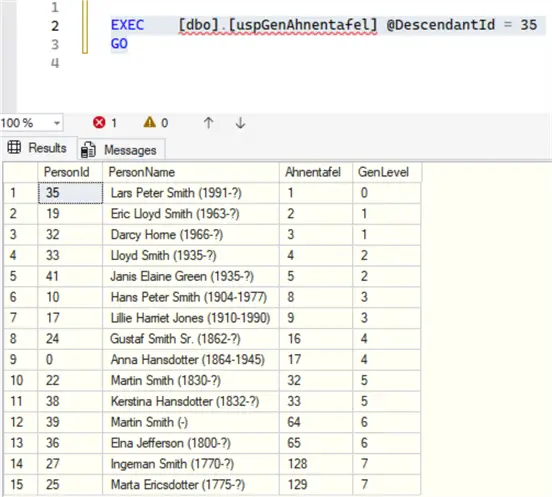
In German, AHNENTAFEL means ancestor table. It is an ascending numbering system for ordering and identifying direct ancestors, starting with the subject of the tree and working backwards. Every direct ancestor is given a number, starting with 1 for the subject, 2 to his father, 3 to his mother, 4 to paternal grandfather, 5 to paternal grandmother, 6 and 7 to maternal grandparents, and so on. In summary, male ancestors receive even numbers and female ancestors the odd numbers.
-- =============================================
-- Author:      SCP - MSSQLTips
-- Create date: 20250414
-- Description: Ahnentafel Numbering (Ancestor)
-- =============================================
CREATE OR ALTER PROCEDURE [dbo].[uspGenAhnentafel]
                (@DescendantId int)
WITH EXECUTE AS CALLER
AS
BEGIN;

    /*

        Ahnentafel for Father = 2 * parent
        Ahnentafel for Mother = 2 * parent  + 1

    */

    WITH CteAncestor AS
        (SELECT      PersonId
                    ,PersonName + [dbo].[ufnGenPersonLifeSpan] (PersonId) AS PersonName
                    ,CAST(1 AS bigint) AS Ahnentafel
                    ,0 AS [GenLevel]
            FROM     [dbo].[GenTree]
            WHERE    [PersonId] = @DescendantId

        UNION ALL

        SELECT       p.FatherId
                    ,p.PersonName + [dbo].[ufnGenPersonLifeSpan] (p.PersonId)
                    ,a.Ahnentafel * 2
                    ,[GenLevel] + 1
            FROM     [dbo].[GenTree] p JOIN CteAncestor a ON
                     p.PersonId = a.PersonId
            WHERE    p.FatherId IS NOT NULL

        UNION ALL

        SELECT       p.MotherId
                    ,p.PersonName + [dbo].[ufnGenPersonLifeSpan] (p.PersonId)
                    ,a.Ahnentafel * 2 + 1
                    ,[GenLevel] + 1
            FROM     [dbo].[GenTree] p JOIN CteAncestor a ON
                     p.PersonId = a.PersonId
            WHERE    p.MotherId IS NOT NULL)

        SELECT       p.PersonId
                    ,p.PersonName + [dbo].[ufnGenPersonLifeSpan] (p.PersonId) [PersonName]
                    ,a.Ahnentafel
                    ,a.GenLevel
            FROM     [dbo].[GenTree] p JOIN CteAncestor a ON
                     p.PersonId = a.PersonId
            ORDER BY [Ahnentafel];

    RETURN;
END
GO
D’ABOVILLE Numbering (Descendant)
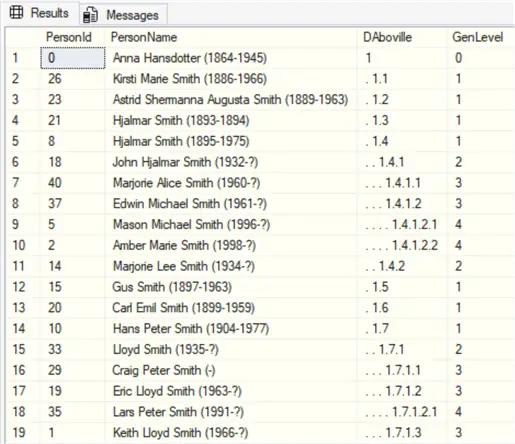
It is a decimal-based descendant numbering format to track an individual’s position within a family tree, starting from a common ancestor.
-- =============================================
-- Author:      SCP
-- Create date: 20250414
-- Description: DAboville Numbering (Descendant)
-- =============================================
CREATE OR ALTER PROCEDURE [dbo].[uspGenDAboville]
                (@AncestorId int)
WITH EXECUTE AS CALLER
AS
BEGIN;

    WITH CteDescendants AS
        (SELECT      PersonId
                    ,FatherId
                    ,CONCAT(PersonName,[dbo].[ufnGenPersonLifespan] (PersonId)) AS PersonName
                    ,CONVERT(nvarchar(MAX),1) AS DAboville
                    ,BirthDate
                    ,0 AS [GenLevel]
            FROM     [dbo].[GenTree]
            WHERE    [PersonId] = @AncestorId

        UNION ALL

        SELECT       p.PersonId
                    ,p.FatherId
                    ,CONCAT(p.PersonName,[dbo].[ufnGenPersonLifespan] (p.PersonId))
                    ,CONCAT(d.DAboville,'.'
                            ,(ROW_NUMBER() OVER (PARTITION BY p.FatherId ORDER BY p.BirthDate)))
                    ,p.BirthDate
                    ,[GenLevel] + 1
            FROM     [dbo].[GenTree] p JOIN CteDescendants d ON
                    (p.FatherId = d.PersonId or  p.motherId = d.PersonId))

        SELECT       p.PersonId
                    ,CONCAT(P.PersonName,[dbo].[ufnGenPersonLifespan] (P.PersonId)) AS [PersonName]
                    ,REPLICATE('. ', a.GenLevel) + a.DAboville AS [DAboville]
                    ,a.GenLevel
            FROM     [dbo].[GenTree] p JOIN CteDescendants a ON
                     p.PersonId = a.PersonId
            ORDER BY a.DAboville;

    RETURN;
END
GO
Kinship
This is the relationship between family members. I am not covering all possibilities, but the most important ones. (I did not work with any in-law relatives. Since English is not my native-language, there are probably better words to use. I did not take into consideration the gender to define the exact word to use, in the case of uncle or aunt, and niece or nephew.
-- =============================================
-- Author:      SCP - MSSQLTips
-- Create date: 20250423
-- Description: Family relationship
-- =============================================
CREATE OR ALTER FUNCTION [dbo].[ufnGenKinship]
                (@Ego int
                ,@Target int)
RETURNS nvarchar(150)
AS
BEGIN;

    DECLARE @Kinship nvarchar(150);

    IF EXISTS
        (SELECT         1
            FROM     [dbo].[GenTreeCouples]
            WHERE     [personId1] IN (@Ego,@Target) AND
                     [personId2] IN (@Ego,@Target))
        SET @Kinship = 'Spouse';
    ELSE BEGIN
        DECLARE         @p1 int = 0
                    ,@p2 int = 0;

        SELECT TOP 1 @p2 = COALESCE([depth],0)
            FROM     [dbo].[GenTreeAncestors]
            WHERE     [PersonId] = @Ego AND
                     [FirstId] IN
                    (SELECT         [FirstId]
                        FROM     [dbo].[GenTreeAncestors]
                        WHERE     [PersonId] = @Target)
            ORDER BY [depth];

        SELECT TOP 1 @p1 = [depth]
            FROM     [dbo].[GenTreeAncestors]
            WHERE     [PersonId] = @Target AND
                     [FirstId] IN
                    (SELECT         [FirstId]
                        FROM     [dbo].[GenTreeAncestors]
                        WHERE     [PersonId] = @Ego)
            ORDER BY [depth];

        SELECT @Kinship =
            CASE
                WHEN @p1 = 1 AND @p2 = 0 THEN 'Parent'
                WHEN @p1 = 1 AND @p2 = 1 THEN 'Siblings'

                WHEN @p1 = 1 AND @p2 = 2 THEN 'Niece/nephew'
                WHEN @p1 = 1 AND @p2 = 3 THEN 'Great-niece/nephew'
                WHEN @p1 = 1 AND @p2 > 3 THEN CONCAT('Great-(x',@p2-2,')-niece/nephew')

                WHEN @p1 = 2 AND @p2 = 0 THEN 'Grandparent'
                WHEN @p1 = 3 AND @p2 = 0 THEN 'Great-grandparent'
                WHEN @p1 > 3 AND @p2 = 0 THEN CONCAT('Great-(x',@p1-2,')-grandparent')

                WHEN @p1 = 2 AND @p2 = 1 THEN 'Uncle/Aunt'
                WHEN @p1 = 3 AND @p2 = 1 THEN 'Great-uncle/aunt'
                WHEN @p1 > 3 AND @p2 = 1 THEN CONCAT('Great-(x',@p1-2,')-uncle/aunt')

                WHEN @p1 = 2 AND @p2 = 2 THEN 'Cousin'
                WHEN @p1 = 3 AND @p2 = 3 THEN '2nd cousin'
                WHEN @p1 = 4 AND @p2 = 4 THEN '3rd cousin'
                WHEN @p1 > 4 AND @p1 = @p2 THEN CONCAT(@p1-1,'th cousin')

                WHEN @p1 = 0 AND @p2 = 1 THEN 'Children'
                WHEN @p1 = 0 AND @p2 = 2 THEN 'Grandchildren'
                WHEN @p1 = 0 AND @p2 = 3 THEN 'Great-grandchildren'
                WHEN @p1 = 0 AND @p2 > 3 THEN CONCAT('Great-(x',@p2-2,')-grandchildren')

                ELSE 'Ego'
            END;
    END

    RETURN @Kinship;
END
GO
Examples
Import from GRAMPS Sample
If you want to test the GEDCOM import and export features, after installing the GRAMPS software, you are going to find a sample GED file at:
-- MSSQLTips (FILE PATH)

C:\Program Files\GrampsAIO64-6.0.0\share\doc\gramps\example\gedcom\sample.ged
Run the statement below to upload the data to the SQL Server. Remember that any data will be deleted before loading the new one.
-- MSSQLTips (TSQL)

EXEC    [dbo].[uspGenTreeImport]
        @PathAndFile = N'C:\Program Files\GrampsAIO64-6.0.0\share\doc\gramps\example\gedcom\sample.ged';
GO
If you find problems with encoding, open the sample file in Notepad and save it in ANSI format to fix it, and run the above statement again.

Do the adjustments from the columns date string to date as you wish, once calculated values uses those columns.
Export to GEDCOM File
-- MSSQLTips (TSQL)

EXEC [dbo].[uspGenTreeExport]
GO
Will result in:
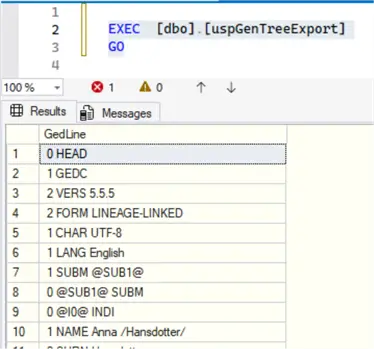
Copy the column GEDLINE to a notepad and save it with the name you wish, but with the extension GED.
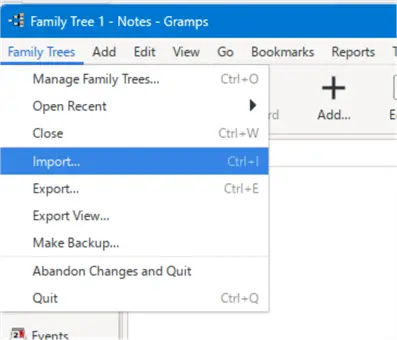
Open the GRAMPS program, click on Family Trees (1), then on New (2), then on Load Family Tree (3).
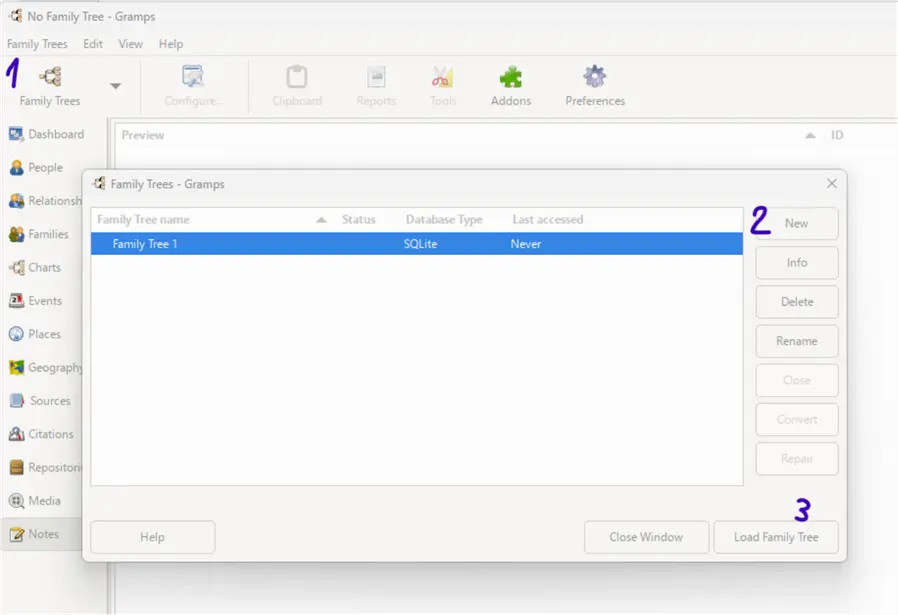
Click on Family Trees and then Import; a window will open. Go to where you save your file and import it. You should see the messages Results done and No errors detected.
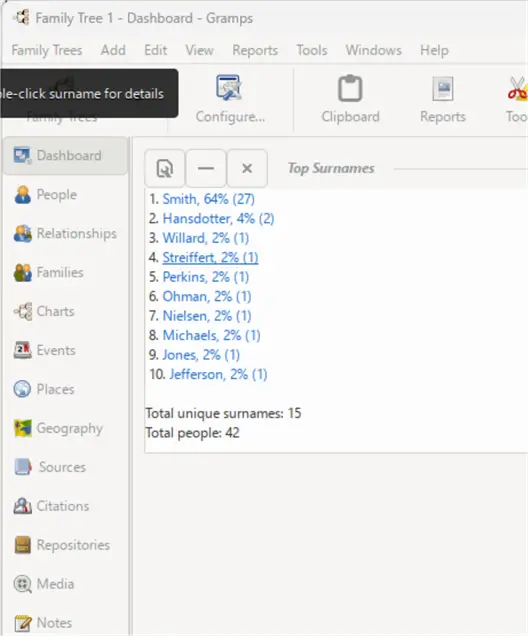
Go to the dashboard and explore the loaded data.
AHNENTAFEL Number
-- MSSQLTips (TSQL)

EXEC [dbo].[uspGenAhnentafel] @DescendantId = 35
GO
Will result in:
D´ABOVILLE Number
-- MSSQLTips (TSQL)

EXEC [dbo].[uspGenDAboville] @AncestorId = 0
GO
This will result in a good way to show and visualize the genealogical tree, starting from ANA (level 0), her sons (level 1), her grandsons (level 2), and so on. Some genealogical books report individuals using this numbering system.
Individual Briefing
-- MSSQLTips (TSQL)

SELECT [dbo].[ufnGenPersonBriefing] (8) AS Briefing
GO
This will result in this text, copied below in a text document:

If you want, you can use the same logic used for children to identify and report how many brothers and sisters an individual had.
KINSHIP
First of all, update the ancestors executing:
-- MSSQLTips (TSQL)

EXEC [dbo].[uspGenAncestors]
GO
Choose two persons’ ID from the ABOVILLE or AHNENTAFEL results and run the code.
-- MSSQLTips (TSQL)

DECLARE          @personId1 int = 35
                ,@personId2 int = 32;

SELECT    [dbo].[ufnGenPersonName] (@personId1)
        + ' is the ' + [dbo].[ufnGenKinship] (@personId1,@personId2) + ' of '
        + [dbo].[ufnGenPersonName] (@personId2) AS Kinship;
GO
It will show the relationship between them:
- Lars Peter Smith is the Child of Darcy Horne
Next Steps
There are a lot more features, but this covers the main ones.
- WIKIPEDIA – Genealogy
- WIKIPEDIA – GEDCOM
- WIKIPEDIA – Genealogical numbering systems
- FAMILY SEARCH – What is a GEDCOM file
- FAMILY SEARCH – GEDCOM 7 standard
- GRAMPS – Project
- See additional SQL related articles

Sebastião Pereira has over 40 years of experience in database development including T-SQL, algorithm design, machine learning and bringing innovative mathematical formulas to SQL Server. He started his career at a transnational fast-moving consumer goods (FMCG) company as an employee then later transitioning into a consultant role. He eventually founded his own company to develop software solutions for the healthcare industry. Sebastião is a respected award-winning author on MSSQLTips.com extending SQL Server capabilities beyond traditional workloads.
- MSSQLTips Awards
- Author of the Year – 2025
- Trendsetter (25+ tips) – 2025
- Rookie of the Year – 2024


There’s an odd error in this blog post. The author’s code uses the latest versin of GEDCOM, GEDOCM version 5.5.5, as we should.
There are two mistakes in the accompanying text. The most used version is not version 5.5, but version 5.5.1 Annotated Edition, now slowly, very slowly, being replaced by 5.5.5. There is no GEDCOM version 6 or 7 yet. The latest official specs are on gedcom.org
The latest version of GEDCOM 5.5.5, see gedcom.org. Version 5.5.5 brought many technical improvements. It also brough inclusion and equlaity to GEDCOM.
GEDCOM 6 does not exist yet. ‘GEDCOM 7’ is a technical mess created by an inexperienced CS student, that rips off all of 5.5.5’s improvements and then messes things up again.