Problem
In an earlier tip, A history of accessing REST APIs and web pages from SQL Server, I talked about reaching out to external endpoints from SQL Server, including the new sys.sp_invoke_external_rest_endpoint procedure that hit the on-premises editions in SQL Server 2025. This seemed like an ideal use case to enhance our current solution for sending a message to Slack: using xp_cmdshell to call a PowerShell script that calls Invoke-RestMethod. In this tip, I’ll describe how we changed our implementation and why it is a marked improvement for us.
Solution
The existing solution worked, but we wanted it to be more portable, self-contained, and environment-agnostic. With xp_cmdshell and PowerShell approaches, we have to keep all our environments consistent in terms of PowerShell version, xp_cmdshell being enabled, the (correct version of the) PowerShell script to be in the correct location, and the right execution policies in place. A better solution would aim to eliminate these variables and dependencies.
Some might suggest this is a step in the wrong direction, and that we should be moving things away from SQL Server and out to PowerShell. We have a lot of things that happen inside SQL Server where we want observability, and so the prospect of an all-inside-SQL approach makes sense for several of our use cases. This is not a replacement, of course, for other observability methods we continue to use, including Datadog, OpServer, SQL Sentry, and others. These solutions meet many of our needs quite well, but are hard to bend into alerting on, say, someone manually adding a column to a table, or the ongoing status of a long-running process.
How we were doing it:
xp_cmdshell and Invoke-WebRequest
The existing solution had a PowerShell file, SendSlackAlert.ps1, stored on the filesystem. Since we had already set up a webhook for use by other systems that write to the same channel, we continued to use that method here:
param
(
  [String] $level,
  [String] $source,
  [String] $headline,
  [String] $message
)

# in real life, this would come from a secret
# $url = gcloud secrets versions access latest --secret="DBRE-SlackWebhookURL";
$url = "https://hooks.slack.com/services/T{…}/B{…}/Z{…}I";

$color = switch ($level) {
  1 { "#00cc00" }
  2 { "#ffff00" }
  3 { "#ff7800" }
  4 { "#ff0000" }
}

$json = @"
{
  "attachments": [
    {
      "color": "$($color)",
      "title": "$($headline)",
      "text": "$($message)",
      "fields": [
        {
          "title": "Source",
          "value": "$($source)",
          "short": true
        },
        {
          "title": "Time (UTC)",
          "value": "$((Get-Date).ToString('HH:mm:ss')) ",
          "short": true
        }
      ]
    }
  ]
}
"@

try
{
    Invoke-RestMethod -Uri $url -Method Post -Body $json -ContentType "application/json";
    Write-Host "Slack message sent successfully!";
}
catch
{
    Write-Error "Failed to send Slack message: $($_.Exception.Message)"
}
The secret sauce is all in the $url for the webhook, which Ian Fogelman explains how to generate in Posting SQL Server Notifications to Slack. In short, create (or select) a Slack app at https://api.slack.com/apps. Enable Incoming Webhooks in Features > Incoming Webhooks, then click Add New Webhook to Workspace. Slack will prompt you to choose a channel and then will provide a unique webhook URL. (You may not have appropriate permissions and may need to request this from another team.)
Slack API Webhooks

I created a wrapper procedure that would build the command we could pass to xp_cmdshell and then PowerShell, with the five arguments inlined:
CREATE OR ALTER PROCEDURE dbre.SendSlackAlert
  @level    tinyint = 1,
  @source   nvarchar(256),
  @headline nvarchar(128),
  @message  nvarchar(max)
AS
BEGIN
  SET NOCOUNT ON;

  DECLARE @cmd varchar(4000) = 'powershell -NoProfile -ExecutionPolicy Bypass -File C:\ scripts\SendSlackAlert.ps1 -level '
    + RTRIM(@level)
    + ' -source   "From ' + COALESCE(@source, UPPER(HOST_NAME())) + '"'
    + ' -headline "' + REPLACE(REPLACE(REPLACE(@headline, char(13), ' `'), char(10), ''), '"', '`"') + '"'
    + ' -message  "' + REPLACE(REPLACE(REPLACE(@message,  char(13), ' `'), char(10), ''), '"', '`"') + '"';

  PRINT @cmd;

  EXEC master.sys.xp_cmdshell @cmd;
END
In any code where we want to send an alert, we just pass the parameters to the wrapper, and it does the rest. For example:
EXEC dbre.SendSlackAlert
     @level    = 3,
     @source   = N'DEV-C-AG101',
     @message  = N':robot_face: Relax, nothing is broken. Yet.',
     @headline = N'This is just a test.';
This would generate an always standalone message like this:
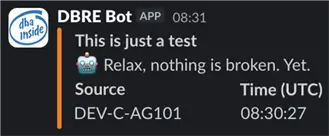
Now, the webhook approach isn’t perfect, and is labeled “legacy” in Slack’s own marketing. Some downsides:
- Webhook is fire-and-forget: you can’t retrieve the timestamp (
ts) value from the response, for example, to send follow-up messages and have them threaded. In a long-running process, where we might post multiple progress messages, it is nice to be able to place them all under a single thread. - Each webhook is tied to a single channel. In an environment focused on observability, we don’t want to have to create a new webhook for every potential target channel.
- Each message sent via a webhook always appears from the same username and with the same icon. If we want a message to be “from” a different app or to have a different icon, we need to create a different webhook.
- Lots of string gymnastics there. I need to remove or escape various types of quotes, and had problems getting things working with any carriage returns or line feeds. And that is not exhaustive; there are likely other characters you’d need to watch out for if you’re accepting arbitrary input.
Converting to chat.postMessage
When I revisited this to take advantage of the new SQL Server 2025 procedure, I also converted away from the webhook and to the more flexible (and recommended) chat.postMessage method. This allows for ts retrieval (to support threading) and generally supports a much richer API (including deleting and editing existing messages and scheduling posts for later delivery). It also allows for more straightforward string handling (think embedded quotes or other problematic characters) when you don’t have to pass the strings through both the command line and PowerShell as intermediaries.
While the webhook requires you to know a URL, using chat.postMessage needs an authorization token. You get the token by creating (or selecting) a Slack app at https://api.slack.com/apps, granting it the chat:write scope, and installing it to your workspace. This produces a Bot User OAuth Token (in the form xoxb-…) that you pass to chat.postMessage. (Again, if it doesn’t already exist, you may need to request this from another team.)
Slack API Tokens

We decided to store this token as a configuration value in a table in each environment (there’s a control database for DBRE use), rather than pulling from GCP Secret Manager from within T-SQL. The complexity and moving parts outweigh the benefit and defeat the whole purpose of removing dependencies on xp_cmdshell, PowerShell, and the gcloud CLI. This can very quickly become a “there’s a hole in the bucket…” problem.
I also decided to move away from the legacy attachments approach and use Block Kit instead. This meant I would lose the color sidebars and fields, but this is more forward compatible and gives us much more control over the message content should we decide to get fancier.
And finally, I opted for proper JSON functions (specifically, json_object and json_array) as opposed to manually hand-crafted JSON strings. This code becomes a bit more verbose but a lot less brittle. I hid this handling away in a function.
GenerateSlackJSON Function
CREATE OR ALTER FUNCTION dbre.GenerateSlackJSON
(
  @source   nvarchar(256),
  @message  nvarchar(max),
  @headline nvarchar(256),
  @thread   varchar(128)
)
RETURNS TABLE
AS
  RETURN
  (
    SELECT headers = JSON_OBJECT
           (
             'Content-Type'  : 'application/json',
             'Authorization' : 'Bearer ' +
               (
                 SELECT StringValue
                   FROM DBREControl.dbre.Configurations
                  WHERE Configuration = N'DBRE.slack.bot.token'
               )
           ),
           payload = JSON_OBJECT
           (
             'channel'    : '#<name of dbre alert channel>,
             'thread_ts'  : @thread,
             'text'       : @message,  /* fallback */
             'blocks'     : JSON_ARRAY
             (
               JSON_OBJECT
               (
                 'type' : 'header',
                 'text' : JSON_OBJECT
                          (
                            'type'  : 'plain_text',
                            'text'  : @headline
                          )
               ),
               JSON_OBJECT(
                 'type' : 'section',
                 'text' : JSON_OBJECT
                          (
                            'type' : 'mrkdwn',
                            'text' : @message
                          )
               ),
               JSON_OBJECT
               (
                 'type' : 'section',
                 'text' : JSON_OBJECT
                          (
                            'type' : 'mrkdwn',
                            'text' : @source
                          )
               ),
               JSON_OBJECT('type' : 'divider')
             )
             ABSENT ON NULL /* in case thread is NULL */
          )
  );
The function will return the header values, letting you authenticate, as well as the JSON body for the message. Note that you need to specify the channel; previously, the URL dictated the channel. If you have a bot that can post to multiple channels, you can pass this through as a parameter instead of hard-coding it.
The stored procedure the apps can call looks like this:
CREATE OR ALTER PROCEDURE dbo.SendSlackAlert
  @level    tinyint = 1,
  @source   nvarchar(256),
  @message  nvarchar(max),
  @headline nvarchar(256),
  @thread   varchar(128) = NULL OUTPUT
AS
BEGIN
  SET NOCOUNT ON;

  DECLARE @payload  nvarchar(max),
          @headers  varchar(500),
          @response nvarchar(max);
  SET @message = CHOOSE(@level, ':ok:', ':warning:', ':x:', ':fire:')
               + ' ' + @message;

  SET @source = N'_From ' + REPLACE(COALESCE(@source, HOST_NAME()), '_', '\_')
              + ' at ' + CONVERT(char(8), getutcdate(), 108) + '_';

  SELECT @headers = headers, @payload = payload
    FROM dbre.GenerateSlackJSON(@source, @message, @headline, @thread);

  EXEC sys.sp_invoke_external_rest_endpoint
    @url     = 'https://slack.com/api/chat.postMessage',
    @method  = 'POST',
    @headers = @headers,
    @payload = @payload,
    @response  = @response OUTPUT;

  SELECT @thread = JSON_VALUE(@response, '$.result.message.thread_ts');
END
To send an alert with no concern for threading, I can just:
EXEC dbre.SendSlackAlert
     @level    = 3,
     @source   = N'DEV-C-AG101',
     @message  = N'Testing, testing, 1… 2… 3.',
     @headline = N'There is no problem, just testing.';
The message that gets posted to the channel looks like this:

If I have a long-running process and I want it to use threading, then I can use the procedure’s output parameter to get the thread for the first message:
DECLARE @thread varchar(128);
EXEC dbo.SendSlackAlert
     @level    = 1,
     @source   = N'DEV-C-AG101',
     @message  = N'We are going to back up all the databases one by one.',
     @headline = N'This is the start of the backup process.',
     @thread   = @thread OUTPUT;
Then I can just keep track of the generated thread_ts and pass it back in on subsequent calls (e.g. in a loop). Let’s pretend two backups succeeded and then the third one failed:
EXEC dbo.SendSlackAlert
     @level    = 1,
     @source   = N'DEV-C-AG101',
     @message  = N'DB 1 backed up successfully.',
     @headline = N'...Backup process...',
     @thread   = @thread;
EXEC dbo.SendSlackAlert
     @level    = 1,
     @source   = N'DEV-C-AG101',
     @message  = N'DB 1 backed up successfully.',
     @headline = N'...Backup process...',
     @thread   = @thread;
/* DB 3 failed, so this is from the CATCH block: */
EXEC dbo.SendSlackAlert
     @level    = 4,
     @source   = N'DEV-C-AG101',
     @message  = N'DB 3 Failed spectacularly!',
     @headline = N'...Backup process...',
     @thread   = @thread;
This will end up in a thread in our Slack channel:

How this is better
For one, I like that I don’t have to stress about the strings I’m passing from T-SQL to CMD to PowerShell. One wrong quote or apostrophe or backtick and the entire thing breaks down. Now, I didn’t just snap my fingers to create the JSON handling I placed in the function; this took quite a bit of trial and error before I was satisfied I had nailed the format correctly. I put this in the function, away from the procedure, so that others on my team wouldn’t have to look at it unless they had to change it.
Block Kit
Another plus is that Block Kit is clearly the way forward, according to Slack. I already miss the additional visual cues I was able to achieve with attachments, but I don’t want to bury myself under technical debt that is completely controlled by some other organization.
And finally, in our environment, the PowerShell that had to move around from host to host caused some real heartburn, since we don’t have deployments that target SQL Server VMs. Now the only dependency is the SQL Server instance being configured correctly (external endpoints enabled, the configuration table correctly populated, and this function and procedure existing). The entire solution can otherwise just come along to any instance anywhere, including local development and PR environments, instead of requiring multiple configurations and exposing multiple operating system surface areas. We’d just change the procedure in lower environments to return the JSON payload instead of actually posting the message.
Key Takeaways
- The article discusses a new implementation for sending alerts to Slack from SQL Server using the chat.postMessage method instead of the legacy webhook.
- This approach improves portability and eliminates dependencies on PowerShell and xp_cmdshell, allowing for better observability within SQL Server.
- Using chat.postMessage allows retrieval of timestamps for threading messages and supports richer APIs for message management.
- Replacing the webhook with chat.postMessage also streamlines string handling and enhances configuration by using stored tokens for authorization.
- Overall, this solution simplifies sending alerts while maintaining compatibility across SQL Server instances and environments.
Next Steps
Grab an Evaluation or Developer Edition of SQL Server 2025 and take it for a spin.
Review the following tips and other resources:
- Receive SQL Server Alerts through Slack (Python solution by Maria Zakourdaev)
- Posting SQL Server Notifications to Slack (sp_OACreate solution by Ian Fogelman)
- Understanding Azure Functions for Microservice Architecture (by Temidayo Omoniyi)
- Invoke REST API Endpoint from SQL Server 2025 (by Hristo Hristov)
- json_object and json_array SQL Server Functions (by Daniel Calbimonte)
- Microsoft documentation: sp_invoke_external_rest_endpoint
- Slack documentation:

Aaron Bertrand (@AaronBertrand) is a passionate technologist with industry experience dating back to Classic ASP and SQL Server 6.5. He also blogs at sqlblog.org.
- MSSQLTips Awards: Author of the Year – 2016, 2023 | Leadership (200+ tips) – 2022


Great post, as always, Aaron! How you manage to get a message for DB2 after sending the alert for DB1 twice is beyond me, though. 😉 Must be some AI involved…