Problem
Bitwise operations are simple and fast instructions that work on the individual bits of a number and often less taxing than other operations. Low-level programming, cryptography, graphics, and embedded systems use Bitwise operations. Let’s see what bitwise operations exist in SQL Server.
Let’s see what bitwise operations exist in SQL Server.
Solution
Before we begin, let’s cover some terms and definitions.
Terms and definitions
Here are some things that will be helpful to know and understand for this article.
Endianness
This is the order in which bytes within a word data type are addressed.
- Big-endian (BE) when it starts from left to right
- Little-endian (LE) from right to left
Basic Types
- Bit: a bit is a binary digit and is the smallest unit of digital information with a value of 0 or 1
- Byte: a group of 8 bits, a standard chunk of data used to represent a character
- Signed byte: 1 bit for the sign plus 7 bits for the value
- Unsigned byte: all eight bits for the value and only for positive numbers
Binary number
A binary number uses only 0 and 1 digits, where each position in a binary number represents a power of 2, similar to decimal represented as a power of 10.
The number 42 in decimal where 4*101 + 2*100 and in binary is 00101010. Determined as follows:

Bitwise operations
Operations that work efficiently with math directly on the binary representation of numbers instead of dealing with the number as a whole, these operations manipulate each bit individually.
Bit mask
It is just a binary number used to isolate, set, clear, or toggle specific bits of another number. This is like a stencil you lay over the bits and only the 1s count. Bit masks are used for device drivers, protocols, encryption, games, and performance-critical code.
Bitwise operator AND (&)
This compares the bits of two items and shows the bitwise value where the bits are the same.

There are two ways to apply the operator, direct or assigned as shown below:
-- MSSQLTips (TSQL)

DECLARE     @bitwiseAnd int = 40;
SET         @bitwiseAnd &= 10;

SELECT     @bitwiseAnd operatorAndAssigned -- assigned
          ,40 & 10 operatorAnd;            -- direct
GO
This returns a value of 8 for both of these methods. This is because only the bit in the base 2 value of 8 match.
Bitwise operator OR (|)
This compares the bits of two items and shows the bitwise value for all positions.

There are two ways to apply the operator, direct or assigned.
-- MSSQLTips (TSQL)

DECLARE     @bitwiseOr int = 40;
SET         @bitwiseOr |= 10;

SELECT     @bitwiseOr operatorOrAssigned -- assigned
          ,40 | 10 operatorOr;           -- direct
GO
Both methods return 42. This is because there are base 2 bits for 32+8+2=42.
Bitwise operator Exclusive XOR (^)
This returns the bits where the bit only exists in one of the items.

There are two ways to apply the operator, direct or assigned.
-- MSSQLTips (TSQL)

DECLARE     @bitwiseXOr int = 40;
SET         @bitwiseXOr ^= 10;
SELECT     @bitwiseXOr operatorXorAssigned
        ,40 ^ 10 operatorXOr;
GO
Both result to 34.
Bitwise operator NOT (~)
The operator NOT flips all bits forming the complement, where the first bit is the signal, then inverted again, and add 1, forming the two’s complement.

Basically, NOT x = -x -1.
-- MSSQLTips (TSQL)

SELECT         ~40 AS operatorNot;
GO
The result is -41.
Bitwise function SHIFT LEFT (<<)
This shifts all bits left a specified number of positions. This was introduced in SQL Server 2022.

The below shifts the bits 1 position left. There are two ways to apply the operator.
-- MSSQLTips (TSQL)

SELECT   LEFT_SHIFT(40, 1) AS LeftShiftedA -- using LEFT_SHIFT
        ,40 << 1 LeftShiftedB;             -- using <<
GO
Both of these result to 80.
Bitwise function SHIFT RIGHT (>>)
This shifts all bits left a specified number of positions. This was introduced in SQL Server 2022.
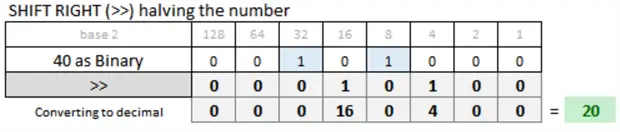
The below shifts the bits 1 position right. There are two ways to apply the operator.
-- MSSQLTips (TSQL)

SELECT   RIGHT_SHIFT(40, 1) AS RightShiftedA -- using RIGHT_SHIFT
        ,40 >> 1 RightShiftedB;              -- using >>
GO
Both result to 20.
Bitwise function BIT COUNT
This counts how many bits are on. This was introduced in SQL Server 2022.

This function returns the number of bits set to 1.
-- MSSQLTips (TSQL)
SELECT BIT_COUNT(40) AS BitCount;
GO
Returns 2.
Bitwise function GET BIT
This returns the value for a specific bit based on position from right to left. This was introduced in SQL Server 2022.
Here are two examples.
-- MSSQLTips (TSQL)

SELECT   GET_BIT (40,0) as BitAtPos0
        ,GET_BIT (40,3) as BitAtPos3;
GO
The bit at position 0 is 0 and the bit at the position 3 is 1.
Bitwise function SET BIT
This allow you to set the value for a specific bit either on or off. This was introduced in SQL Server 2022.
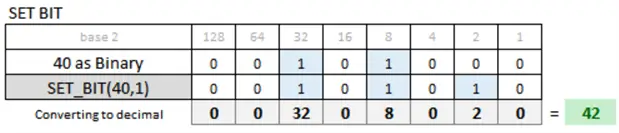
Will set the bit on at the position offset to 1 and get a value of 42.
-- MSSQLTips (TSQL)

SELECT SET_BIT(40,1) as BitSetted; -- set bit on
GO
Returning 42.
Here we can turn off the bit at offset 3.
-- MSSQLTips (TSQL)

SELECT SET_BIT(40,3,0) as BitSetted; -- set bit off
GO
Returns 32.
Function to convert integer to binary value
I created a user defined function to return an integer in its binary form.
-- ==================================================
-- Author:        SCP
-- Create date: 20250917
-- Description:    Integer number in its binary form
-- ==================================================
CREATE OR ALTER   FUNCTION [dbo].[ufnNumberFormBin]
                (@Number bigint)
RETURNS varchar(MAX)
AS
BEGIN
    DECLARE @Result varchar(32) = '';
    DECLARE @n bigint = @Number;

    IF @n = 0
        RETURN '0';

    WHILE @n > 0 BEGIN
        SET @Result = CAST(@n % 2 AS varchar(1)) + @Result;
        SET @n = @n / 2;
    END

    SET @Result = REPLICATE('0', 8 - LEN(@Result) % 8) + @Result;

    RETURN @Result;
END
GO
Examples
Flags or permissions
In this example, we can represent different values for user permissions based on the bit values.
Defined as a flag for permissions of 4 bits, little-endian, where 0 is Read, 1 is Write, 2 is Execute, and 3 is Delete.
We will permissions for two users:
- Delete and Execute
- Execute, Read, and Write

We can use this SQL code to set the permissions for Delete and Execute using the operator OR (|).
-- MSSQLTips (TSQL)

DECLARE @Permissions int = 0;

-- Turn on Delete + Execute
SET @Permissions = @Permissions | (1 * POWER(2,2)); -- to Execute is bit 2
SET @Permissions = @Permissions | (1 * POWER(2,3)); -- to Delete is bit 3

SELECT @Permissions;
GO
This returns 12.
For the second case, we are going to give permission to Execute, Write, and Read using the operator OR (|).
-- MSSQLTips (TSQL)

DECLARE @Permissions int = 0;

SET @Permissions = @Permissions | (1 * POWER(2,0)); -- to Read is bit 0
SET @Permissions = @Permissions | (1 * POWER(2,1)); -- to Write is bit 1
SET @Permissions = @Permissions | (1 * POWER(2,2)); -- to Execute is bit 2

SELECT @Permissions;
GO
This returns 7.
Remove Permission
If I want to remove the permission for the person that has Execute, Read, and Write I will can use the operator AND (&) combined with the operator NOT (~).

Executing the remove operation.
-- MSSQLTips (TSQL)

DECLARE @Permissions int = 7;                         -- Execute, Write, Read
SET @Permissions = @Permissions & ~ (1 * POWER(2,2)); -- remove Execute which is bit 2

SELECT @Permissions;
GO
Returns 3 which is just Write and Read.
Masking
Suppose I need to mask the Region, Department, and Sector values. This can be done in hexadecimal (base 16) format as 0xAABBCC.
Here is the SQL code.
-- MSSQLTips (TSQL)

-- Creating the mask
DECLARE  @Region int = 25
        ,@Department int = 170
        ,@Sector int = 37;

DECLARE @Mask int = @Region << 16;
SET @Mask += @Department << 8;
SET @Mask += @Sector;

-- Reading the mask
SELECT   @Mask [Mask]
        ,[dbo].[ufnNumberFormBin] (@Mask) [Mask_Binary]
        ,@Mask >> 16 [Region (AA)]
        ,(@Mask >> 8) & 255 [Department (BB)]
        ,@Mask & 255 [Sector (CC)];
GO
This returns:

The Mask value is determined as follows:
- Each block AA, BB, and CC has 8 bits
- block AA is 16 bits from left and I moved left using @Region << 16
- block BB is 8 bits from left and I moved left using @Department << 8
- block CC just adds the value.
To retrieve the values from the mask:
- Region – I move right 16 bits
- Department – I move 8 bits to the right with a AND operation where 255 is represented as 11111111 with zeroes on the left. In other words the AND will retrieve only the values with 1 in both sides, in my case only for the eight first little-endian digits
- Sector – I use the AND operator with 255 without moving left to return the value
Color
A complementary color is the one that is on the opposite side of the color wheel providing high contrast and impact combination. For example, the complementary color of #72AB54 is #8D54AB.
The code below divides the color 72AB54 into three segments and applies operations for the three groups of bytes to get the opposite color.
-- MSSQLTips (TSQL)

DECLARE  @Color int = 0x72AB54;

DECLARE  @Red   int = @Color >> 16
        ,@Green int = (@Color >> 8) & 255
        ,@Blue  int = (@Color & 255);

DECLARE  @CompRed   int = 255 - @Red
        ,@CompGreen int = 255 - @Green
        ,@CompBlue  int = 255 - @Blue

SELECT   @Color [Color]
        ,@Red [Red]
        ,@Green [Green]
        ,@Blue [Blue]
        ,CONCAT('#'
               ,CONVERT(varchar(2),CONVERT(varbinary(1),255 - @Red),2)
               ,CONVERT(varchar(2),CONVERT(varbinary(1),255 - @Green),2)
               ,CONVERT(varchar(2),CONVERT(varbinary(1),255 - @Blue),2)) [CompColor]
GO
Resulting in

Checksum
This technique is helpful for fast error detection and integrity checks between items.
-- MSSQLTips (TSQL)

DECLARE  @Number1 int = 12345
        ,@Number2 int = 67890;

SELECT @Number1 ^ @Number2 [XorChecksum];
GO
The result checksum of 12345 and 67890 is 80139. This is a result of applying XOR between the two numbers.
Key Takeaways
- Bitwise operations are crucial in low-level programming, cryptography, graphics, and embedded systems, optimizing performance by manipulating individual bits.
- SQL Server supports various bitwise operators like AND, OR, XOR, and NOT, each serving distinct purposes in binary comparisons.
- New functions introduced in SQL Server 2022 include SHIFT LEFT, SHIFT RIGHT, BIT COUNT, GET BIT, and SET BIT, enhancing bitwise manipulation capabilities.
- Examples demonstrate practical applications of sql bitwise operations, like managing user permissions and color calculations based on bit values.
- For further learning, the article provides links to resources about endianness and practical uses of SQL Server bitwise operators.
Next Steps
You can find more information in these articles
- WIKIPEDIA – Endianness
- MSSQLTips – SQL Server Bitwise operators to store multiple values in one column
- MSSQLTips – T-SQL Bitwise Operators in SQL Server
- MSSQLTips – New SQL Server 2022 Bitwise Operators with Practical Examples
- MSSQLTips – SQL Server LEFT_SHIFT and RIGHT_SHIFT Examples
- MICROSOFT – Bitwise operators
- WIKIPEDIA – Bitwise operation

Sebastião Pereira has over 40 years of experience in database development including T-SQL, algorithm design, machine learning and bringing innovative mathematical formulas to SQL Server. He started his career at a transnational fast-moving consumer goods (FMCG) company as an employee then later transitioning into a consultant role. He eventually founded his own company to develop software solutions for the healthcare industry. Sebastião is a respected award-winning author on MSSQLTips.com extending SQL Server capabilities beyond traditional workloads.
- MSSQLTips Awards
- Author of the Year – 2025
- Trendsetter (25+ tips) – 2025
- Rookie of the Year – 2024



Warning, the bitwise functions only exist in SQL 2022 or later!
There are some functions that work with SQL 2022 and later, but this is specified in the article. All others will work in early versions of SQL Server.