Problem
My company has a very replication intensive environment (mostly transactional replication) and recently I started to see that replicating data was taking longer and longer. In this tip I will show you some of the techniques that I used to troubleshoot the issue as well as what the final resolution was.
Solution
In addition to providing the solution, let me provide the symptoms to my issue and provide how I started troubleshooting the issue.
Basic Symptoms
Here are list of symptoms that I had.
- Taking longer to replicate data.
- High CPU on Distributor server
- High Disk IO on Distributor server
- High growth rate on Distribution database
Troubleshooting High CPU and High Disk IO
First, I wanted to know why I was getting high CPU and high Disk IO on the distributor server, so I setup Performance Monitor (also known as perfmon) on the server. You can read this article “Creating SQL Server performance based reports using Excel” on how I setup perfmon to collect data and how I found high CPU/Disk IO for about 7~8min every 10min. That means, we had a job running every 10min with a duration of 7~8min.
I was able to found out there are two jobs that are causing the issue and they were related to replication clean up.
- Agent history clean up: distribution
- Distribution clean up: distribution
So, I disabled these two jobs and ran them manually to see if that was causing the high CPU/Disk IO and I was able to find out the “Distribution clean up: distribution” job that runs “EXEC dbo.sp_MSdistribution_cleanup @min_distretention = 0, @max_distretention = 48” stored procedure was causing the problem and when I ran it manually, it ran for more than 7min and returned the below message.
(0 rows/sec).
Troubleshooting Distribution cleanup issue
From previous research, I was able to find out why we were having high CPU issues and why the distributor database was getting bigger. The issue was that the clean up job was not removing the commands and I was able to see that table “dbo.MSrepl_commands” was 27GB and kept growing everyday.
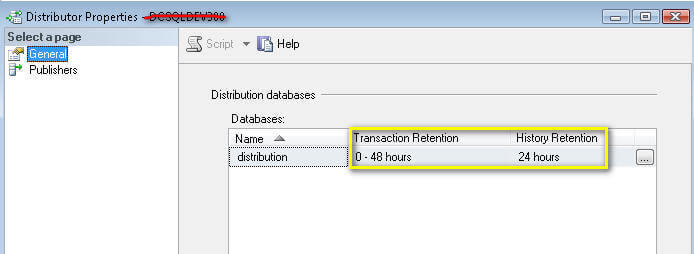
So, I took a look at the Distributor Properties and I confirmed that retention was set correctly as you can see below.
Fixing Retention days for Each Publication
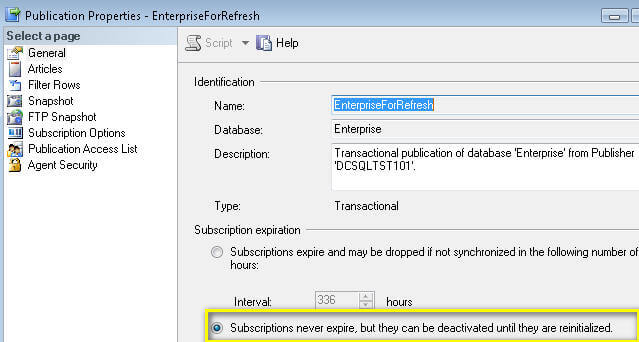
The next step is to check the retention days for each publication and that is where I found the problem. Many of our publication properties subscription expiration setup was set to “never expire” as you can see from the screen capture below.
Now, I can open each publication to see how it is setup, but as I mentioned we have many publications so I didn’t want to waste my time opening each publication using SQL Server Management Studio. So instead, I used the query that I wrote in this tip “SQL Server Replication Scripts to Pull Replication Configuration Information” and added one more column to the script to pull retention days as shown below.
set transaction isolation level read uncommitted
select distinct
srv.srvname publication_server
, a.publisher_db
, p.publication publication_name
, p.retention
, ss.srvname subscription_server
, s.subscriber_db
from MSArticles a
join MSpublications p on a.publication_id = p.publication_id
join MSsubscriptions s on p.publication_id = s.publication_id
join master..sysservers ss on s.subscriber_id = ss.srvid
join master..sysservers srv on srv.srvid = p.publisher_id
join MSdistribution_agents da on da.publisher_id = p.publisher_id
and da.subscriber_id = s.subscriber_id
ORDER BY p.retention

Confirmation
After I identified and changed the retention days to 120 hours and ran the above job, the distributor database space used was reduced from 27GB to 300MB. After that I shrunk the database to 500MB and then I re-indexed all tables in the distribution database and ran the clean up job again. Now, it takes less 3 sec to run the clean up job. Also, replication as a whole is a lot faster.
Next Steps
- Setup an Alert to notify if any new publication is created where retention day is set to never expire
- Implement additional replication monitoring
- To shrink databases or database files look at DBCC SHRINKDATABASE and DBCC SHRINKFILE

Kun is a database administrator in Washington, DC. His areas of interest are database administration, architecture, data modeling and development. He loves technologies of all kinds.
I have slightly modified your query because it is not correct to join sysservers. It is necessary to join MSreplservers.
use [distribution]
SET TRANSACTION ISOLATION LEVEL READ UNCOMMITTED;
SELECT DISTINCT
reps.srvname AS publication_server,
–srv.srvname AS publication_server,
a.publisher_db,
p.publication AS publication_name,
p.retention,
ss.srvname AS subscription_server,
s.subscriber_db
FROM MSArticles a
JOIN MSpublications p ON a.publication_id = p.publication_id
JOIN MSsubscriptions s ON p.publication_id = s.publication_id
JOIN master..sysservers ss ON s.subscriber_id = ss.srvid
–JOIN master..sysservers srv ON srv.srvid = p.publisher_id
JOIN MSreplservers reps ON reps.srvid = p.publisher_id
JOIN MSdistribution_agents da ON da.publisher_id = p.publisher_id
AND da.subscriber_id = s.subscriber_id
ORDER BY p.retention;