Problem
Data analysis from a cube starts with aggregated and summarized data, followed by drill-down and drill-through of the data for a deeper and intelligent analysis. Drill down is inherently supported when you browse the data of the cube, but drill through has to be defined as per the requirements of analysis. In this tip we will see how to enable drill through on a cube.
Solution
In SSAS, actions are one of the best ways to customize browsing and drilling of data for the end-user.
There are three types of actions in SSAS:
- Report
- Drillthrough
- Standard
The action of interest that we cover in this tip is Drillthrough.
For this example, we will be using the sample Adventureworks SSAS project that ships with SQL Server 2008.
Step 1
Open the Adventureworks cube.
Step 2
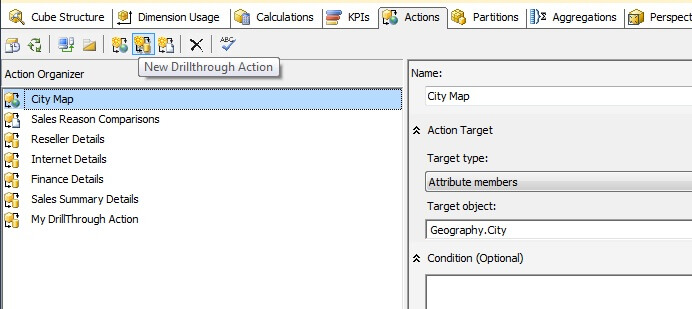
Open the Actions tab and from the toolbar select “New Drillthrough Action” as shown below.
Step 3
When you create a new action, you will get a screen like below to define the action.
Let’s say we want to see products related to the Reseller Sales amount.
- Name: I named the action “Show Related Products”.
- Measure group members: we need to select the target field that should offer the drillthrough action and in our case we selected Reseller Sales amount.
- Condition: to keep it simple for now, we will not use the condition property.
- Return Columns: select the columns to show when the user selects this action.

Step 4
Deploy this change and browse the cube in the browser tab.
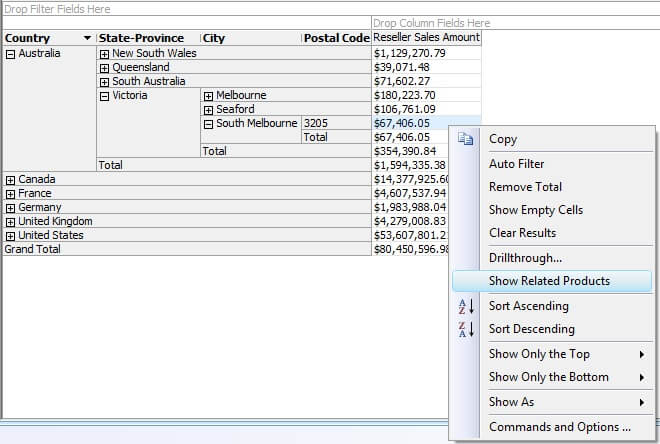
I selected the Reseller Sales Amount measure and sliced it by the Geography hierarchy from the Geography dimension as shown below.
Right click on any value in the Reseller Sales Amount and you should find “Show Related Products” in the menu as shown below.
Step 5
Clikc on the Show Related Products menu option and you will get a pop-up window with the fields we defined in the action showing all the records that make up the value on which we selected the drillthrough action.

Next Steps
- Check out other actions available in SSAS.
- Configure additional properties available in the Drillthrough action to fine tune results of your action.
- Review these other SSAS tips

Siddharth has more than 14 years of experience in the IT Industry, with more than a decade of experience in Business Intelligence and Analytics, for clients banking, logistics, government, Media Entertainment, products, life sciences and other domains. He has been a lead architect for a portfolio of 40+ apps, containing apps in web, mobile, BI, Analytics, data warehousing, reporting, collaboration, CMS, NoSQL and other technologies. He has several certifications and is a published author for online and print-media publications, as well as the MSDN Library.
In his present role, he remains responsible for architecture design, technology stack selection, infrastructure design, 3rd party products evaluation and procurement, and performance engineering. These applications use technologies like Elasticsearch / Lucene, MongoDB, SharePoint 2013 and 2010, jQuery-based framework like Highcharts and GoJS, SQL Server and the Microsoft Business Intelligence stack (SSIS, SSAS, SSRS, MDX, PowerPivot, PowerView), jQueryMobile, Bootstrap, iOS xCode framework, and many others.
- MSSQLTips Awards: Champion (100+ tips) – 2018 | Author of the Year – 2017 | Author Contender – 2016, 2018-2019