Problem
You are tuning a SQL Server query and for some reason you think that it will do better if you disable an optimizer rule. In this tip I will show you the undocumented QUERYRULEOFF hint.
Solution
Performance query tuning is a complex task because it involves many different aspects like proper indexing, good statistics maintenance and even data partitioning. It depends on your desired level of optimization. In my past tip Enabling SQL Server Trace Flag for a Poor Performing Query Using QUERYTRACEON I explained the usage of the undocumented query hint QUERYTRACEON that allows us to enable a trace flag for a query instead of enabling the flag at the instance level. But the possibilities for tuning that SQL Server doesn’t end here. There is another undocumented hint, QUERYRULEOFF that lets us disable an optimizer rule for a specific query.
What Are the Optimizer Rules?
We all know that every time SQL Server executes a query it builds an execution plan that translates the logical operations like joins and predicates into physical operations that are implemented in the SQL Server source code. That conversion is based on certain rules known as the Optimizer Rules. They define for example how to perform an INNER JOIN. When we write a simple select statement with an inner join, the query optimizer chooses based on statistics, indexes and enabled rules if the join is executed as a Merge Join, Nested Loop or a Hash Join and also if the join can use the commutative property of joins. Mathematically A join B is equal to B join A, but the computational cost generally is not the same.
Getting the List of Available Rules
To obtain the list of rules of your version of SQL Server we must use the undocumented DBCC commands SHOWONRULES and SHOWOFFRULES. Those commands display the enabled and disabled rules for the whole instance respectively. As you may guess, the number of rules varies amongst versions.
USE master
GO
DBCC TRACEON(3604)
GO
DBCC SHOWONRULES
GO
DBCC SHOWOFFRULES
GO
The names of the rules are easy to interpret in the most cases. On the next table I will describe some of the rule names related to joins.
| Rule Name | Description |
|---|---|
| JNtoNL | Join to Nested Loop |
| JNtoHS | Join to Hash |
| JNtoSM | Join to Sort Merge |
| LOJNtoNL | Left Outer Join to Nested Loop |
| LSJNtoHS | Left Semi Join to Hash |
| LASJNtoSM | Left Anti Semi Join to Sort Merge |
Sample
For the purpose of this tip, I am using the AdventureWorks2012 database.
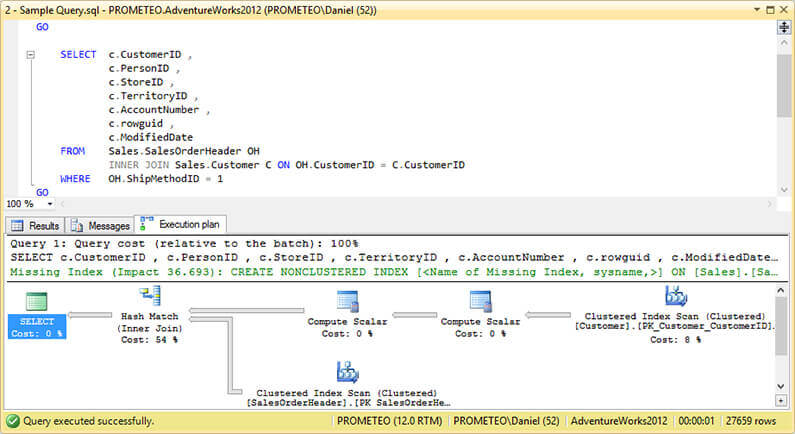
Let’s take a look at the following query and its execution plan.
USE AdventureWorks2012
GO

 SELECT  c.CustomerID ,
   c.PersonID ,
   c.StoreID ,
   c.TerritoryID ,
   c.AccountNumber ,
   c.rowguid ,
   c.ModifiedDate
 FROM Sales.SalesOrderHeader OH
   INNER JOIN Sales.Customer C ON OH.CustomerID = C.CustomerID
 WHERE   OH.ShipMethodID = 1
GO
As you can see on the next image, the query optimizer decided that the best approach to execute the query is to use a Hash Join and compute the join order.
Now we are going to disable the commutatively (i.e. order) of joins by setting off the rule JoinCommute.
USE AdventureWorks2012
GO

SELECT  c.CustomerID ,
   c.PersonID ,
   c.StoreID ,
   c.TerritoryID ,
   c.AccountNumber ,
   c.rowguid ,
   c.ModifiedDate
FROM Sales.SalesOrderHeader OH
   INNER JOIN Sales.Customer C ON OH.CustomerID = C.CustomerID
WHERE OH.ShipMethodID = 1
OPTION( QUERYRULEOFF JoinCommute )
GO
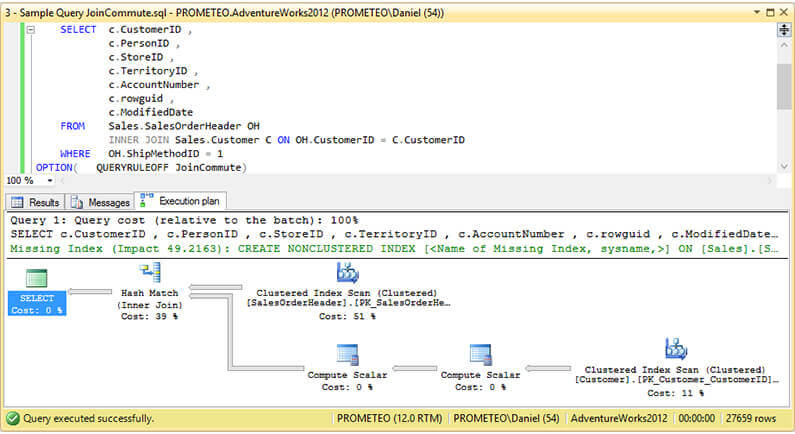
The following image shows that the join order has changed as well as the missing index impact.
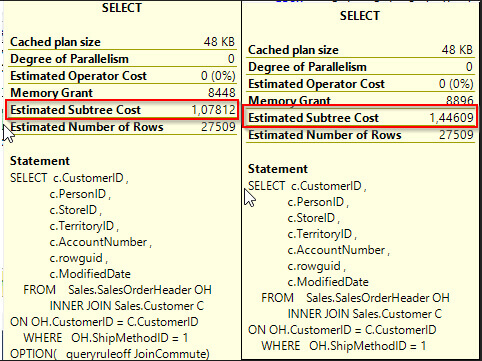
But in order to compare which plan is better, we must compare the Estimated Subtree Cost for each query. If you do so, you will notice that the plan without the JoinCommute has a lower cost like the following image shows.
Let’s see what happens with the execution plan if we disable the Join to Hash Join rule.
USE AdventureWorks2012
GO

SELECT  c.CustomerID ,
   c.PersonID ,
   c.StoreID ,
   c.TerritoryID ,
   c.AccountNumber ,
   c.rowguid ,
   c.ModifiedDate
FROM Sales.SalesOrderHeader OH
   INNER JOIN Sales.Customer C ON OH.CustomerID = C.CustomerID
WHERE OH.ShipMethodID = 1
OPTION( QUERYRULEOFF JNtoHS )
GO
On the next image we can observe that the query optimizer has decided to use a Merge Join.
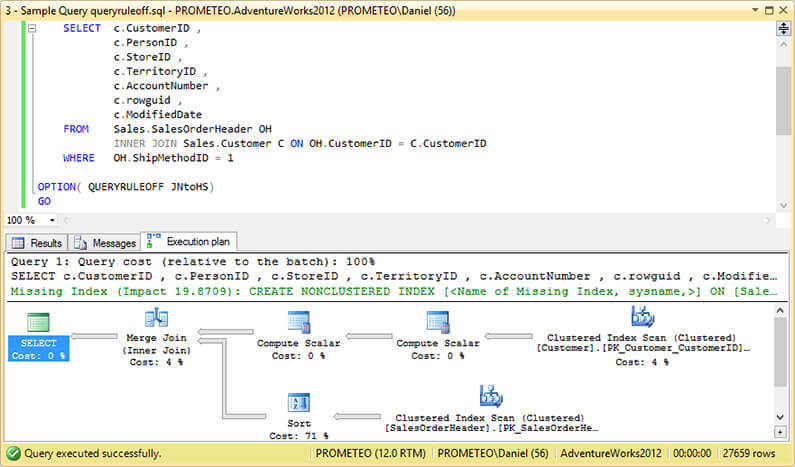
But if we look at the Estimated Subtree Cost we can see that it was a bad choice to disable that rule.

Next Steps
- You can read my previous tip Enabling SQL Server Trace Flag for a Poor Performing Query Using QUERYTRACEON to learn how to enable plan affecting trace flags for specific queries.
- You can read the SQL Server Graphical Query Plans Tutorial if you don’t know much about execution plans.
- If you are new to query tuning you will benefit from this tutorial: SQL Server Query Performance Guidelines Tutorial.
- In case you have a basic knowledge of query tuning the following tip can be used as an intermediate guide to query tuning and is worth the read: Techniques For Improving SQL Query Performance – Indexing, Parameterization and Partitioning.
- If you are interested in other undocumented features that can be used in performance tuning take a look at my previous tips Usage of DBCC OPTIMIZER_WHATIF for SQL Server Query Tuning and SQL Server Performance Tuning with Hypothetical Indexes.
- Check out SQL Server Performance Tuning Tips for new tips.

Daniel Farina was born in Buenos Aires, Argentina. Self-educated, since childhood he showed a passion for learning. He studied at Universidad de Buenos Aires. Daniel started working as a programmer at a young age. Over the years he specialized in databases, particularly SQL Server and Oracle. Now with 30 years of age, his work experience includes working with various technologies like VB, C, .NET, web development, Windows and Linux systems. He likes to read about science, psychology, philosophy and many other things. In his spare time, he trains powerlifting aiming to compete.
- MSSQLTips Awards: Author of the Year – 2018 | Champion (100+ tips) – 2018 | Author Contender – 2015-2017, 2019