Problem
In the previous tip we outlined the new functionality related to SQL Server 2016 Database Scoped Configuration Options. In this tip we are going to demonstrate how parameter sniffing can be controlled at the database level now instead of at the instance level or by modifying stored procedures.
Solution
SQL Server uses parameter sniffing to create the execution plan for the parameters specified in the query or as variables. To learn more about parameter sniffing see these tips: Analyzing SQL Server Performance Impact of Parameter Sniffing and Different Approaches to Correct SQL Server Parameter Sniffing.
Normally SQL Server parameter sniffing is helpful for query optimization, but the benefits are workload dependent. If we have workloads with too many ad-hoc queries this might cause issues for parameter sniffing. With SQL Server 2014 we have different options including:
- Using query hints like OPTIMIZE FOR, RECOMPILE, OPTIMIZE FOR UNKNOWN, etc.
- Optimize for ad hoc workload
- SET PARAMETERIZATION FORCED
We also have the option to disable parameter sniffing by enabling Trace Flag 4136 at the instance level, but this will impact all databases. Generally each SQL Server instance supports numerous instances and applications, so we don’t want each database and application to get impacted. With SQL Server 2016 we can turn off parameter sniffing at the database level by using Database Scoped Configuration Options.
Before we make any changes, we can see the default behavior of the SQL Server using the sys.database_scoped_configurations DMV.

We can see that by default parameter sniffing is set to ON, so queries will use this by feature by default.
To validate SQL Server is using parameter sniffing, if we run the below query in the AdventureWorks2016 database and review the actual execution plan, we can see that for the same query with different parameters we are getting different execution plans. The first uses a Clustered Index Scan while the second is using a NonClustered Index Scan and a Key Lookup.


Now if we create a stored procedure and run the code with different parameters, we get the following query plans that match based on the parameters passed:
CREATE PROCEDURE sp_personaddress (@city nvarchar(20))
AS
      SELECT *
      FROM Person.Address
      WHERE city=@city
GO

Since stored procedures are precompiled with the execution plan created on the initial execution, the stored procedure will use the same plan for subsequent executions regardless of the parameters. However, sometimes we might want to generate the execution plan based on the parameter passed. To do so, we will turn off the parameter sniffing with SQL Server Management Studio or via T-SQL at the database level as shown below.

ALTER DATABASE SCOPED CONFIGURATION SET PARAMETER_SNIFFING = OFF;
Now we will clear the cache and run the stored procedures again.
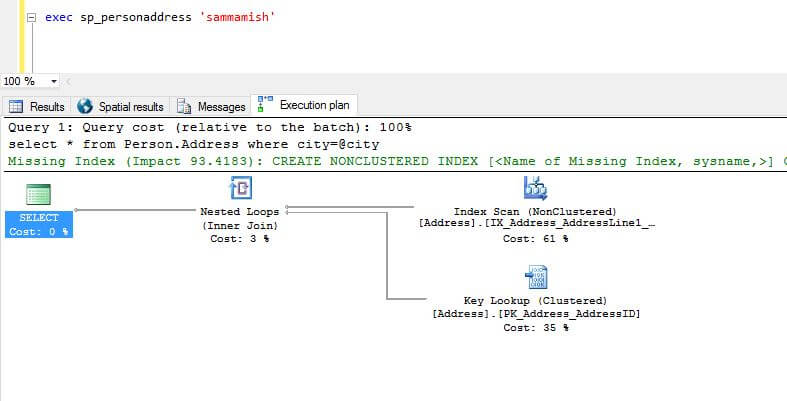

Now we can see that same execution plan is used with different execution parameters. Be sure to enabled this option and test properly based on the workload in non-production environments prior to introducing this setting in a production environment.
Next Steps
- Download and explore SQL Server 2016 Release candidate 3.
- Check out these resources:

Hi! I am Rajendra Gupta, Database Specialist and Architect, helping organizations implement Microsoft SQL Server, Azure, Couchbase, AWS solutions fast and efficiently, fix related issues, and Performance Tuning with over 14 years of experience.
I am the author of the book “DP-300 Administering Relational Database on Microsoft Azure.” I can be reached at: Rajendra.gupta16@gmail.com for any consulting help.
- MSSQLTips Awards:
- Author of the Year – 2022 | Author Contender – 2021/2023/2024 | Champion Award (100+ tips) – 2020