Problem
Given modern hardware, you might hear that the default setting of 5 for the Cost Threshold for Parallelism (CTFP) is far too low. However, people are left with a decision: Should they change it or leave it alone? If I change it and the performance gets worse, I’ll be left with egg on my face. What exactly is the benefit of increasing it, especially for smaller-cost queries?
Solution
This article looks at the performance benefits of bumping up the Cost Threshold for Parallelism (CTFP) to 35. We’ll start by discussing what CTFP does in SQL Server. Next, we’ll review how to change the CTFP setting—spoiler alert: it’s super easy. Finally, we’ll review the performance improvements from reducing parallelism for smaller queries.
Defining Cost Threshold for Parallelism (CTFP)
Microsoft defines CTFP as an option to specify the threshold at which SQL Server creates and runs parallel plans for queries. Simply put: SQL Server uses multiple threads to make your query run faster. If you’ve ever put a 1,000-piece puzzle together, you know it’s easier when multiple people each tackle a corner. That’s how parallelism works in SQL Server when running a query.
The default CTFP value is 5 on SQL Server, Azure SQL Database, and Managed Instance. To my knowledge, this default value has never changed. Yet, hardware has certainly improved over the past 20 years—at least my server is much better than it was five years ago. With the rise in hardware performance, maybe it’s time to raise the value of CTFP.
Verify Current CTFP
Before making changes, it’s a good idea to know where things stand. There are a couple of ways to check what the current setting is for your CTFP.
SQL Server Management Studio (SSMS)
First, you can check it via SSMS. To do this, right-click on your SQL Server instance and choose Properties. Next, click the Advanced page. You’ll find it under the Parallelism setting, along with its sibling, MAXDOP.

T-SQL
If you prefer using T-SQL, you can run the script below to check the value along with MAXDOP.
-- mssqltips.com
SELECT name,
       value,
       value_in_use
FROM sys.configurations
WHERE name IN ( 'cost threshold for parallelism', 'max degree of parallelism' );
GO

Creating Demo Data
To see the impact of raising our CTFP to 35, we need to create a sample dataset. Execute the script below to create one database (CTFPDemo) and three tables:
- dbo.Orders: 2,000 rows
- dbo.OrdersDetail: 2,000,000 rows
- dbo.OrdersApproval: 100,000 rows
-- mssqltips.com
USE [master];
GO
SET NOCOUNT ON;
IF EXISTS (SELECT 1 FROM sys.databases WHERE name = 'CTFPDemo')
BEGIN
    ALTER DATABASE CTFPDemo SET SINGLE_USER WITH ROLLBACK IMMEDIATE;
    DROP DATABASE CTFPDemo;
END;
GO
CREATE DATABASE CTFPDemo;
ALTER DATABASE CTFPDemo SET RECOVERY SIMPLE;
GO
USE CTFPDemo;
GO
DECLARE @UpperBound INT = 2000000;
;WITH cteN (Number)
AS (SELECT ROW_NUMBER() OVER (ORDER BY s1.[object_id])
    FROM sys.all_columns AS s1
        CROSS JOIN sys.all_columns AS s2
   )
SELECT [Number]
INTO dbo.Numbers
FROM cteN
WHERE [Number] <= @UpperBound;
GO
CREATE TABLE dbo.Orders
(
    Id INT IDENTITY(1, 1) NOT NULL,
    StateId INT NOT NULL,
    OrderStatusId INT NOT NULL,
    CustomerId INT NOT NULL,
    DiscountId INT NULL,
    Notes NVARCHAR(500) NULL,
    CreatedDate DATETIME
        DEFAULT GETDATE()
        CONSTRAINT PK_Orders_Id
        PRIMARY KEY CLUSTERED (Id)
);
INSERT INTO dbo.Orders
(
    StateId,
    OrderStatusId,
    CustomerId,
    DiscountId,
    Notes
)
SELECT (ABS(CHECKSUM(NEWID()) % (50 - 1 + 1)) + 1),
       (ABS(CHECKSUM(NEWID()) % (10 - 1 + 1)) + 1),
       (ABS(CHECKSUM(NEWID()) % (10000 - 1 + 1)) + 1),
       (ABS(CHECKSUM(NEWID()) % (4 - 1 + 1)) + 1),
       CASE
           WHEN n.Number % 10 = 0 THEN
               SUBSTRING(
                            REPLICATE('abcdefghijklmnopqrstuvwxyz', 2),
                            (ABS(CHECKSUM(NEWID())) % 26) + 1,
                            (ABS(CHECKSUM(NEWID()) % (500 - 50 + 10)) + 50)
                        )
           ELSE
               NULL
       END AS Notes
FROM Numbers n
WHERE n.Number <= 2000;
GO
CREATE TABLE dbo.OrdersDetail
(
    Id INT IDENTITY(1, 1) NOT NULL,
    OrderId INT NOT NULL,
    Price DECIMAL(26, 2) NULL,
    LineStatusId INT NOT NULL,
    Notes NVARCHAR(500) NULL,
    CreatedDate DATETIME
        DEFAULT GETDATE()
        CONSTRAINT PK_OrdersDetail_Id
        PRIMARY KEY CLUSTERED (Id),
    CONSTRAINT FK_Order_OrderId
        FOREIGN KEY (OrderId)
        REFERENCES Orders (Id)
);
INSERT INTO dbo.OrdersDetail
(
    OrderId,
    Price,
    LineStatusId,
    Notes
)
SELECT (ABS(CHECKSUM(NEWID()) % (2000 - 1 + 1)) + 1) AS OrderId,
       (ABS(CHECKSUM(NEWID()) % (100 - 1 + 1)) + 1) AS Price,
       (ABS(CHECKSUM(NEWID()) % (25 - 1 + 1)) + 1) AS LineStatusId,
       CASE
           WHEN n.Number % 15 = 0 THEN -- Every 25 rows add notes
               SUBSTRING(
                            REPLICATE('abcdefghijklmnopqrstuvwxyz', 2),
                            (ABS(CHECKSUM(NEWID())) % 26) + 1,
                            (ABS(CHECKSUM(NEWID()) % (500 - 50 + 10)) + 50)
                        )
           ELSE
               NULL
       END AS Notes
FROM dbo.Numbers n;
GO
CREATE TABLE dbo.OrdersApproval
(
    Id INT IDENTITY(1, 1) NOT NULL,
    OrdersDetailId INT NOT NULL,
    ApproverId INT NOT NULL,
    CONSTRAINT PK_OrdersApproval_Id
        PRIMARY KEY CLUSTERED (Id),
    CONSTRAINT FK_OrdersDetail_OrderId
        FOREIGN KEY (OrdersDetailId)
        REFERENCES dbo.OrdersDetail (Id)
)
INSERT INTO dbo.OrdersApproval
(
    OrdersDetailId,
    ApproverId
)
SELECT (ABS(CHECKSUM(NEWID()) % (100000 - 1 + 1)) + 1),
       (ABS(CHECKSUM(NEWID()) % (500 - 1 + 1)) + 1)
FROM dbo.Numbers n
WHERE n.Number <= 100000;
GO
DROP INDEX IF EXISTS IX_OrdersDetail_OrderId_LineStatusId ON dbo.OrdersDetail;
DROP INDEX IF EXISTS IX_OrdersApproval_OrdersDetailId ON dbo.OrdersApproval;
GO
CREATE NONCLUSTERED INDEX IX_OrdersDetail_OrderId_LineStatusId
ON dbo.OrdersDetail
(OrderId, LineStatusId)
INCLUDE (Price);
CREATE NONCLUSTERED INDEX IX_OrdersApproval_OrdersDetailId
ON dbo.OrdersApproval (OrdersDetailId)
INCLUDE (ApproverId);
GO
CHECKPOINT;

I’ve also created a few indexes; however, I’m not trying to engineer the results one way or another. With the demo data created, let’s move on to generating a baseline.
Gather the Baseline
To simulate our workload, I’ll use Adam Machanic’s SqlQueryStress. We have one query that runs constantly and likely shouldn’t use parallelism, as its cost without parallelism is barely above 5. Before running the workload, let’s review a few key data points about the query, which I’ll summarize in the table below.
-- mssqltips.com
SELECT SUM(od.Price) AS TotalPrice,
       o.CustomerId,
       MAX(oa.ApproverId) LastApproverId
FROM dbo.Orders o
    INNER JOIN dbo.OrdersDetail od
        ON o.Id = od.OrderId
    INNER JOIN dbo.OrdersApproval oa
        ON oa.OrdersDetailId = od.Id
WHERE od.LineStatusId = 19
GROUP BY o.CustomerId,
         od.LineStatusId
ORDER BY TotalPrice DESC;
The screenshot below shows the Properties window of the actual execution plan. On the MAXDOP 1 side, I used a hint to avoid parallelism for illustration.

| Parallelism | Cost | Logical Reads | CPU Time | Elapsed Time |
|---|---|---|---|---|
| Yes | 7.07 | 7,607 | 65ms | 14ms |
| No | 8.70 | 6,954 | 45ms | 45ms |
From the table above, it’s clear that the elapsed time for the parallel plan was considerably less than that for the serial plan, but the total CPU time was higher for the parallel plan. There wasn’t much of a cost-savings benefit here.
Monitoring CPU
Let’s see what happens to my server’s CPU with the default CTFP setting of 5. I’ll use Windows Performance Monitor (Perfmon) to check the [% Processor Time] counter. I’ll also use a data collector to save the results as a CSV file and analyze the data in Excel (my fourth favorite database platform—just kidding). There’s no other activity on this virtual machine during the test.

SqlQueryStress
If you’re looking for a lightweight, query testing tool, SqlQueryStress is a great choice. When users report bugs, Erik Jenson promptly fixes them—at least that’s been my experience. The screenshot below shows the settings I used for SqlQueryStress, which include:
- Number of Iterations: 100
- Number of Threads: 10
- Delay between queries: 500ms

The first test is complete. With my CSV file in hand, it’s time to update CTFP to 35 using the script below. The value of 35 isn’t magical—it could be set to 30 or even 50 for our purposes. However, please don’t make this change on a whim in production.
USE [master];
GO
-- Enable advanced options
EXEC sp_configure 'show advanced options', 1;
GO
RECONFIGURE;
GO
-- Set the cost threshold for parallelism to 35
EXEC sp_configure 'cost threshold for parallelism', 35;
GO
RECONFIGURE;
GO
I’ll rerun my SqlQueryStress workload with the same settings as before and present the results in the next section.
Results
First, let’s look at the chart where the horizontal axis represents the number of seconds, and the vertical axis shows the CPU usage. The CPU usage with CTFP-5 is consistently higher than CTFP-35. It’s also clear that CTFP-5 took a few seconds longer.
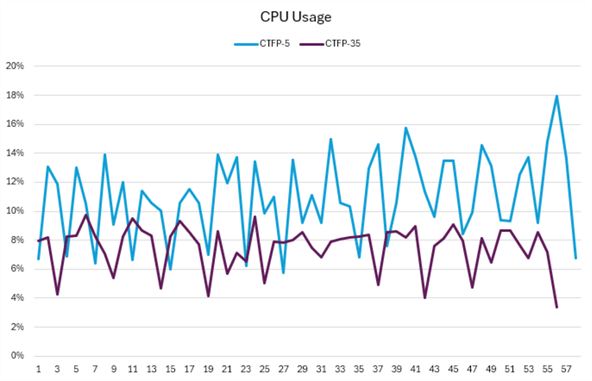
The table below summarizes the performance results. The average CPU usage for CTFP-5 is about 27% higher, and the chart shows more pronounced peaks and valleys.
| CTFP | Average CPU | Maximum CPU | Difference |
|---|---|---|---|
| 5 | 11% | 18% | 27% |
| 35 | 8% | 10% | 44% |
Finally, you might expect CTFP-5 to complete faster since the elapsed time was much shorter (which was the goal), but that didn’t happen. To be clear, I performed this test several times, and the results were similar each time.
Summary
As I mentioned earlier, if you have a big puzzle, having a lot of people working on it is a smart move. But if your puzzle only has 25 pieces, too many people might slow things down. Plus, they’ll probably expect you to pay or feed them for their help. The key takeaway is that the overhead of parallelism for small queries cancels out the performance benefits.
Clean Up
Now that we’re done, let’s drop the demo database. However, feel free to keep it around and run your own experiments. If you do, let everyone know the outcomes in the comments below.
-- mssqltips.com
USE [master];
GO
SET NOCOUNT ON;
IF EXISTS (SELECT 1 FROM sys.databases WHERE name = 'CTFPDemo')
BEGIN
    ALTER DATABASE CTFPDemo SET SINGLE_USER WITH ROLLBACK IMMEDIATE;
    DROP DATABASE CTFPDemo;
END;
GO
Key Points
- My experiment certainly has several limitations. For example, I’m only using one query, and it’s not an actual workload. However, the table size and query makeup resemble a real-world production environment. Plus, I added indexes to help boost performance.
- Changing the default value can be scary. If your workload has run fine for years at 5, it’s hard to make the argument to rock the boat.
- From an efficiency perspective, raising your CTFP from the default value of 5 is likely a good idea. However, you shouldn’t do this without first testing to find the sweet spot.
Next Steps
- Michael J. Swart’s article, “Measure the Effect of Cost Threshold for Parallelism.” provides a detailed look at how to measure the impact of changing the Cost Threshold for Parallelism (CTFP) in SQL Server.
- For more insights on CTFP, check out some of Grant Fritchey’s posts, starting with “Why You Should Change the Cost Threshold for Parallelism,” where he explains why and when to modify this setting.
- In the article “Planning to Increase Cost Threshold for Parallelism—Like a Smart Person!” Eitan Blumin offers a smart approach to adjusting CTFP.
- Jonathan Kehayias walks you through how to tune CTFP by analyzing the plan cache in the article “Tuning Cost Threshold for Parallelism from the Plan Cache.“

Jared Westover is a SQL Server specialist with two decades of industry experience covering T-SQL development, performance tuning, administration and Microsoft Fabric. He is currently a software architect at Crowe, an author at Pluralsight and primary contributor at sqlhabits.com. On MSSQLTips.com, Jared is a respected award-winning author for his clever T-SQL solutions and bringing to light new real-world solutions to age-old development problems.
- MSSQLTips Awards
- Achiever Award (75+ tips) – 2026
- Author of the Year – 2023
- Author Contender – 2024/2025



Hey Brian, thank you for the additional clarification. I’ll check out the LinkedIn post below and the article you referenced on sqlservercentral.com.
https://www.sqlservercentral.com/articles/performance-tuning-with-sqlfacts-tools
I value your robust dialogue and sharing of your experiences with the community.
@Jared
I agree, you made it clear that 35 was not a specific value to simply use. You said testing was necessary to find the sweet spot. However, that’s exactly the point of my comment.
Whether you start with 35, or some other value, it’s an arbitrary number with no basis. It could be very inappropriate. You could be testing for a LONG time to find a “sweet spot” when you have no idea where the “sweet spot” might be. Further, it’s nearly impossible to adequately simulate a production workload for the necessary testing.
The “sweet spot” can be quickly determined by using a tool that gives you a solid basis for a CTFP value. The tool, completely FREE, analyzes the actual production workload to show you the cost estimate (and much more) for each query. The information allows you to choose a CTFP value that you can be assured is reasonable. The best value might be higher than the current value, or it might be lower. The point is that when you are armed with empirical data you do not have to shoot in the dark.
@Brian
Thank you for stopping by and reading my article.
I’m confused by your comment that I’m suggesting that anyone change their CTFP blindly to 35. I used the value of 35 in my example, but as I noted, the value could have been something else (higher or lower).
“The value of 35 isn’t magical—it could be set to 30 or even 50 for our purposes. However, please don’t make this change on a whim in production.”
Here is another line from the article.
“From an efficiency perspective, raising your CTFP from the default value of 5 is likely a good idea. However, you shouldn’t do this without first testing to find the sweet spot.”
In writing the article, I intended to highlight the added CPU cost of parallelism, especially for queries that don’t need it.
The approach described in this article is roughly like the approaches in some of the linked articles. It involves blindly choosing an arbitrary value for CTFP and then messing around to find out if the chosen value has a desirable impact.
A value of 35 might be too low if a large percentage of your queries would qualify for parallelism. A value of 35 might be too high if a very small percentage of your queries would qualify for parallelism. It’s very hard to adequately simulate a production workload, and a trial-and-error testing method in production is risky.
There’s a better way.
The better approach is to analyze the actual production workload and choose a value for CTFP that you know is reasonable. Two of the linked articles point in that direction, but neither one goes far enough and neither one offers any guidance on potentially reducing the value for CTFP after it has been set arbitrarily higher. The best decision for CTFP is made when you can see which queries would be impacted by a change in either direction.
The better approach is discussed here – https://www.linkedin.com/pulse/ctfp-myth-versus-method-brian-walker/