Overview
The purpose of aliasing a table is to have a short abbreviation for the table. Typically, a long table name can easily be aliased with one to three characters. By doing so, the code is typically much shorter and easier to read when troubleshooting. Taking this small step will hopefully lead to a simpler next step with JOINs where table aliasing is key. Let’s take a look at an example.
Explanation
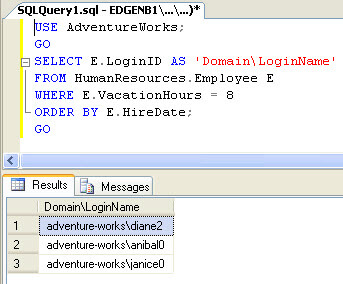
Let’s use the same query from an earlier tutorial with a few minor modifications for table aliasing. In the example below, we are selecting the LoginID column aliased as ‘Domain\LoginName’ from the HumanResources.Employee table where the VacationHours column equals 8, and we are ordering the data by the HireDate in ascending order, which is implied. What is different is that we are aliasing the HumanResources.Employee table as ‘E’ to simplify the code in preparation for the JOIN examples.
USE AdventureWorks;
GO
SELECT E.LoginID AS 'Domain\LoginName'
FROM HumanResources.Employee E
WHERE E.VacationHours = 8
ORDER BY E.HireDate;
GO
Below is the sample result set:

Jeremy Kadlec is a Founder, Editor and Author at MSSQLTips.com with more than 300 contributions and 25+ years of SQL Server experience. Jeremy leads a team of more than 300 authors helping millions of SQL Server professionals around the globe every second of the day for the last 20 years. He is also the CTO @ Edgewood Solutions and a six-time SQL Server MVP based on his community contributions. Jeremy brings 25+ years of SQL Server DBA and Developer knowledge to the community and holds a bachelor’s degree from SSU and master’s degree from UMBC.


