Overview
From your previous examples, I want to find out how to get SQL Server Management Studio (SSMS) to do the work for me. How can I have this tool generate a SELECT statement rather than typing out each of the columns?
Explanation
SQL Server Management Studio does have a simple means to automatically generate a SELECT statement from a single table. Let’s follow the steps below:
Once you are in SQL Server Management Studio, right click on the table you which you would like to have the SELECT statement generated for.

On the subsequent interface, select the ‘Script Table as’ option.

On the subsequent interface, select the ‘SELECT To’ option.

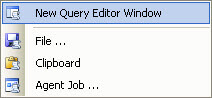
On the subsequent interface, select the ‘New Query Editor Window’ option.
Below is a sample image of the SELECT code generated for a table.


Jeremy Kadlec is a Founder, Editor and Author at MSSQLTips.com with more than 300 contributions and 25+ years of SQL Server experience. Jeremy leads a team of more than 300 authors helping millions of SQL Server professionals around the globe every second of the day for the last 20 years. He is also the CTO @ Edgewood Solutions and a six-time SQL Server MVP based on his community contributions. Jeremy brings 25+ years of SQL Server DBA and Developer knowledge to the community and holds a bachelor’s degree from SSU and master’s degree from UMBC.


