Overview
In this section, we will cover questions like what stored procedures are in the master database, can I see the code, and can I change the stored procedures in the master database.
Explanation
What are the key stored procedures in the SQL Server master database that are important for SQL Server Professionals to know about?
This is another situation where an entire book could be dedicated to these procedures. Here is a sampling of some of the more popular procedures.
The procedure sp_help will return information about another object that it accepts as a parameter. For instance, calling sp_help with another stored procedure name as the parameter will return the parameter list of the target procedure. Calling it with a table name as the parameter will show the column list, index list, and a few other data elements for that table. Here is a sample where it is asking for the parameters available to itself.
exec sys.sp_help sp_helpThe procedure sp_helptext accepts an object name as a parameter and will return the text of the object as a create object script. Here is it asking for the text of sp_help.
exec sys.sp_helptext sp_helpThe helpindex procedure accepts a table name as a parameter and provides details of the rowstore and columnstore indexes for the target table. This example is going to return index details for a table called orders.
exec sys.sp_helpindex ordersThis procedure adds a user to a role. It is commonly called using the SSMS GUI, but can be called directly. This execution would add the user “ERIC” to the db_owner role.
exec sys.sp_addrolemember 'db_owner', 'ERIC'This procedure presents a list of linked servers on the instance.
exec sys.sp_linkedserversThis procedure is used to view or change systemwide settings. If called without parameters, it lists all available settings. If called with only a setting name, it displays that setting. If called with a setting name and a new value, then the setting is changed to that value. The execution below would change the max server memory setting to 28 GB.
exec sys.sp_configure 'max server memory (MB)', 28672This procedure gives a snapshot of everyone who is logged in to the instance and includes blocking information.
exec sys.sp_who2Can I see the code for the objects in the SQL Server master database and if so, how?
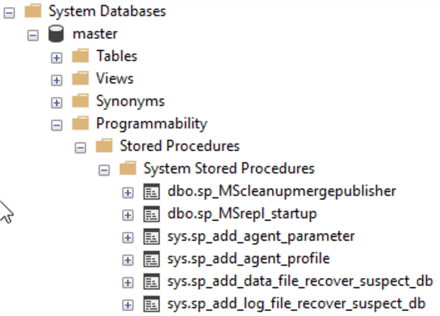
These stored procedures are mostly TSQL based and can be viewed by either scripting them in SSMS or using sp_helptext. In the SSMS Object Explorer, the procedures will be buried pretty deep in the tree under the database, Programmability, Stored Procedures, and, finally, System Stored Procedures.
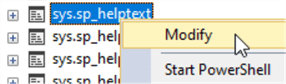
Just like any other procedure, right-clicking will open a context menu with the Modify option.
exec [sys].[sp_helptext] sp_helptextYes, sp_helptext can be used to view the procedure text of sp_heptext. This screenshot shows what happens when the query is executed.

Can I change the objects in the SQL Server master database?
Remember that most of these objects are actually stored in the read-only database mssqlsystemresource and therefore cannot be changed. Attempting to change them will result in an error, as seen below.

Can I store my own objects in the SQL Server master database?
SQL Server will allow objects to be added to the master database, but it is better not to add stored procedures and keep the database as clean as possible.

Eric has been a SQL Server DBA and Architect in the legal, software, transportation, and insurance industries for over 10 years. Currently he is the Sr Data Architect for Squire Patton Boggs, a leading provider of legal services with 47 offices in 20 countries.
Eric is a 2018-2019 Idera Ace and has co-authored 2 Idera Whitepapers.
He has been a presenter at PASS Summit, IT/DevConnections, SQLSaturdays, the in.sight transportation conference, and the Ohio North SQL Server User’s Group.
- MSSQLTips Awards: Author of the Year Contender – 2021, 2022 | Trendsetter (25+ tips) – 2021
