Problem
TempDB is the unsung hero of SQL Server that is silently assisting temporary objects, large sorting, hash joining, and session-specific tasks. Understanding how it works and how to optimize it plays a crucial role for maintaining a high performing production environment.
Solution
We will examine what TempDB is, monitor its size, stress test it, and review some best practices for optimizing its performance. Let’s start.
SQL Server TempDB FAQs
TempDB is a system database that stores temporary objects like tables, variables, and intermediate result sets. TempDB is a global resource that supports internal operations, sorting, versioning for row modifications, and maintaining worktables of some queries. This is sometimes referred to as the “Dumping Grounds”. It is crucial for SQL Server to satisfy query needs, but is recreated when SQL Server restarts.
Temporary objects and internal operations extensively reply on TempDB. Often it becomes a bottleneck due to contention or insufficient disk I/O. Queries relying on TempDB can slow down significantly. Without TempDB, many SQL Server processes would fail, making it essential for smooth database operations. Ensure that it does not hinder overall system performance.
There are three different types of objects stored in TempDB. First, are User Objects such as Local and global temporary tables, bulk insert and BCP intermediate results. This also includes index rebuilds with “SORT IN TEMPDB” option. Second are Version Store objects such as Snapshot Isolation / Read Committed Snapshot Isolation, MARS (Multiple Active Result Sets) and Index Rebuilds. Third are Internal SQL Server Objects that are created by the database engine. These include sort, hash join and hash aggregates, XML variables, queries that need a spool to store intermediate results and DBCC CHECKDB operations.
Some common SQL Server processes that will fill up TempDB include:
– Sorting commands that require more memory than initial allocation
– DBCC CHECKDB
– Online index rebuilds
– Large result sets that use UNION, ORDER BY, GROUP BY, etc.
– Cartesian joins or outer joins
– Cursors or triggers
– Temporary user objects like temp tables, table variables and table value functions that generate large data sets
– High number of transactions with row versioning for snapshot isolation
– Internal worktables for spool, sorting and hashing
– MARS (Multiple Active Resultsets)
Some restricted TempDB operations include:
– Adding or removing a TempDB filegroup
– Backing up or restoring TempDB database
– Changing the TempDB collation or database owner
– Creating a TempDB database snapshot
– Dropping the TempDB database or guest user
– Database Mirroring of the TempDB database
– Running DBCC CHECKALLOC or CHECKCATALOG on TempDB
– Setting the TempDB database to OFFLINE
– Setting the TempDB database or primary filegroup to READ_ONLY
Contention in TempDB
TempDB data files are global resource and working spaces used by both user and SQL Server’s internal objects. Three special pages (1) Global Allocation Map (GAM), (2) Shared Global Allocation Map (SGAM), and (3) Page Free Space (PFS) are responsible for allocating these working spaces.
If a task wants to access this resource, SQL Server lock manager places an appropriate latch on these pages to ensure serializing access. Many concurrent requests can quickly queue up resulting in “contention”.
Common contentions are:
- Object Allocation Contention – This is contention for metadata pages those manage space allocation.
- Metadata Contention – This is contention for metadata pages tracking the creation and destruction of temporary tables and deallocating them.
- Temp Table Cache Contention – Temporary table cache helps metadata and object allocation for reusing of temp tables.
Simulate TempDB Contention and Memory Utilization
Let’s use SQLQueryStress to generate stress on TempDB and monitor it with sp_WhoIsActive on AdventureWorks2022.
First of all, run below Query Snippet-1 to monitor current utilization of your TempDB (Figure-1).
--Query Snippet-1
SELECT
  -- Determining the amount of free space in tempdb
  SUM(unallocated_extent_page_count) AS [Free Pages]
,(SUM(unallocated_extent_page_count)*1.0/128) AS [Free Space (MB)]
  -- Determining the amount of space used by the version store
, SUM(version_store_reserved_page_count) AS [Version Store Pages Used]
,(SUM(version_store_reserved_page_count)*1.0/128) AS [Version Store Space (MB)]
  -- Determining the amount of space used by internal objects
, SUM(internal_object_reserved_page_count) AS [Internal Object Pages used]
,(SUM(internal_object_reserved_page_count)*1.0/128) AS [Internal Object Space (MB)]
  -- Determining the amount of space used by user objects
, SUM(user_object_reserved_page_count) AS [User Object Pages Used]
,(SUM(user_object_reserved_page_count)*1.0/128) AS [User Object Space (MB)]
FROM tempdb.sys.dm_db_file_space_usage;
(Figure – 1: TempDB’s utilization before stress test)
Now create a stored procedure and paste Query Snippet-2 in SQLQueryStress to generate artificial load (Figure-2).
--Query Snippet-2
CREATE OR ALTER Proc proc_TempDB_Test
As
CREATE TABLE #T (
    Name NVARCHAR(500)
)
INSERT INTO #T
SELECT [FirstName] + ' ' + [MiddleName] FROM [Person].[Person]

-- Paste following query in SQLQueryStress.
DECLARE @i INT;
SET @i = 1;
WHILE @i <= 100
    BEGIN
        exec proc_TempDB_Test;
        SET @i = @i + 1;
    END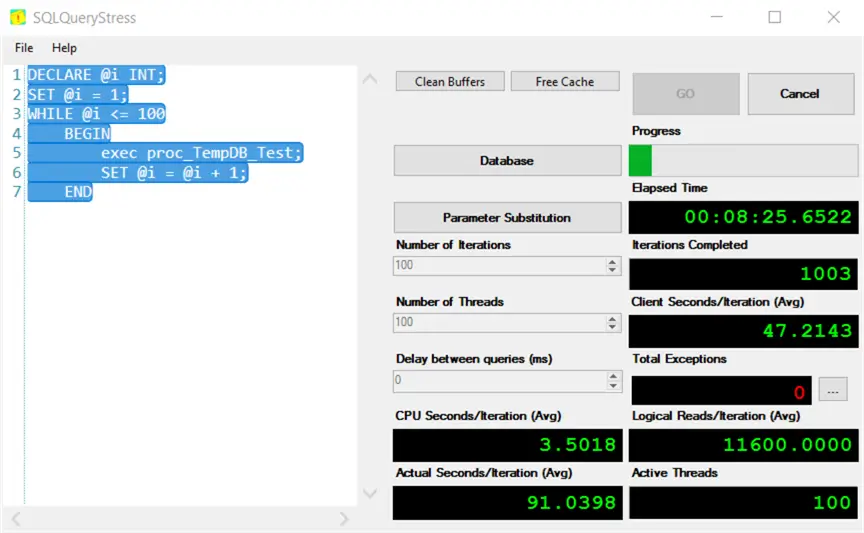
(Figure – 2: Putting stress on TempDB using SQLQueryStress)
Run Query Snippet-1 again to observe your TempDB utilization. You will see that free pages, spaces are reducing and user object pages and object spaces are increasing as shown below.

(Figure – 3: TempDB’s status during stress test)
Now run sp_WhoIsActive, you will see lots of PAGELATCH_EX wait types in TempDB as shown below.

(Figure – 4: Monitor TempDB using sp_WhoIsActive)
Best Practices for Contention Mitigation and Performance Enhancement
- Separate your TempDB from user database & log files, and put it on separate physical drives, preferably SSDs.
- Microsoft has following recommendations about TempDB data files to minimize GAM/SGAM/PFS page contention.
- If the number of logical processors ≤ 8, use the same number of data files.
- If the number of logical processors > 8, use eight data files.
- If there is still contention, increase the number of data files by multiples of four until the contention decreases to acceptable levels, or make changes to the workload.
- Configure space for all TempDB files large enough to fit your workload, which prevents TempDB from expanding too often and improves performance.
- Cumulative updates – Microsoft often releases patches for bug fixing of TempDB contentions. Apply them regularly.
Planning for TempDB Capacity
For determining capacity in your production environment, analyze below in your test environment.
- Set auto grow on for TempDB.
- Monitor TempDB space, running individual queries or workload trace files.
- Execute index maintenance operations such as rebuilding indexes, and monitor TempDB space.
- Use the above value to predict your total workload usage. Adjust this value for projected concurrent activity, and then set the size of TempDB accordingly.
Key Takeaways
- SQL Server TempDB handles temporary objects, sorting, and session-specific tasks, making it crucial for maintaining performance.
- Common activities like sorting commands and large result sets can quickly fill up TempDB and lead to contention issues.
- It’s essential to optimize TempDB by separating it from user databases, adjusting data file numbers based on logical processors, and ensuring adequate space.
- Monitoring and stress testing TempDB using tools like SQLQueryStress helps identify performance issues and utilization rates.
- Regularly applying updates and following best practices can mitigate contention and enhance overall system performance.
Next Steps
- Additional Reading

M A A Mehedi Hasan has been working with EBS Group since 2005. He started his career as a Software Developer and he is now Chief Technology Officer (CTO) of EBS Group. In his long journey, he had the opportunity to work with various technologies like the Microsoft Data Platform, SMS/USSD/IVR based Telecom Value Added Service, and Audio/Video streaming.
As a Microsoft certified Azure Database Administrator Associate, he manages large databases, testing and deployment, performance tuning, long term capacity planning, and streamlining operational workflow. He is also a certified AWS Cloud Practitioner and his team is migrating on-prem services to AWS.
Being a member of techforumbd, a Bangladeshi tech community, he regularly speaks and organizes sessions at local and virtual PASS chapters, SQL Saturdays, and Azure conferences. He also has a course about SQL Server available on the Ghoori Learning and Ostad.app platforms.
In his free time, he loves exploring and learning as much as possible about SQL Server.