Problem
One of the simplest yet least-popular ranking functions in T-SQL is NTILE. It’s useful for dividing data into buckets or tiles. However, when your data isn’t evenly distributed across buckets, the results are confusing. Also, NTILE sometimes returns rows in a seemingly random order. What’s happening here?
Solution
In this article, I want to explore the NTILE function. First, we’ll review the basic syntax and compare it with other ranking functions. We’ll also look at how the OVER clause works. Next, we’ll discuss a common point of confusion for developers when using NTILE with unevenly distributed data. By the end, we’ll understand how NTILE behaves when the number of rows isn’t evenly divided into buckets.
Exploring NTILE with T-SQL
There’s no shortage of articles about window functions, especially the ranking types. This is because they are handy. Not a day goes by that I don’t use the popular ROW_NUMBER, which assigns a unique number to each row (1, 2, 3, etc.), even when two rows share the same value. I also use RANK, which assigns ranks based on each row’s position in the sorted order and leaves gaps after ties (1, 2, 2, 4).
However, one you don’t see very often is NTILE. You might go your whole career without ever using it, but there are situations where it can be helpful. For example, your sales team wants to group customers into top spenders and low spenders. Another example is the HR department wanting to categorize employees into performance tiers. Yes, HR, we know you do that.
Simply put, NTILE distributes rows into a specified number of tiles, or, as some prefer, buckets or groups. The basic NTILE syntax is shown below. Remember that the OVER clause is required, but you don’t need to specify a partition; however, you must include an ORDER BY.
NTILE(integer_expression) OVER ( [ <partition_by_clause> ] <order_by_clause> )For the integer_expression, you can use a dynamic value instead of a static integer or bigint, although I can’t recall ever needing to do so. To see NTILE in action, we first need to set up our demo environment.
Demo Environment
For this demo, let’s create a single temp table with four columns based on my favorite childhood cartoon, TurtleTraining:
- TrainingId – Integer so that we will have a unique Id, which might come in handy later on.
- TurtleName – This one should be self-explanatory, one of the four turtles.
- Discipline – One of two values (Combat and Teamwork)
- SessionDate – The date of the training session where the turtle proved itself.
- Score – This value shows how well the turtle performed in the specific discipline (0-100).
The code below creates a simple working example.
/* MSSQLTips.com */
DROP TABLE IF EXISTS #TurtleTraining;
GO
CREATE TABLE #TurtleTraining
(
    TrainingId INT IDENTITY(1,1),
    TurtleName VARCHAR(20),
    Discipline VARCHAR(30),
    SessionDate DATE,
    Score INT
);
GO
INSERT INTO #TurtleTraining
(
    TurtleName,
    Discipline,
    SessionDate,
    Score
)
VALUES
('Leonardo', 'Combat', '2025-11-01', 95),
('Leonardo', 'Teamwork', '2025-11-03', 82),
('Donatello', 'Combat', '2025-11-01', 92),
('Donatello', 'Teamwork', '2025-11-03', 78),
('Michelangelo', 'Combat', '2025-11-01', 90),
('Michelangelo', 'Teamwork', '2025-11-03', 76),
('Raphael', 'Combat', '2025-11-01', 93),
('Raphael', 'Teamwork', '2025-11-03', 79);
GO
SELECT *
FROM #TurtleTraining
ORDER BY TrainingId;
GO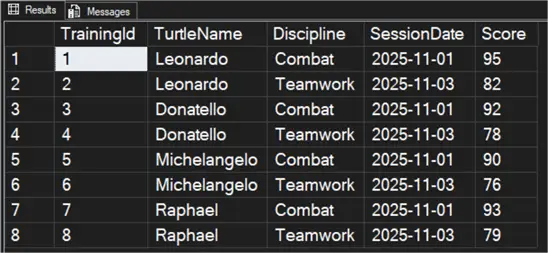
Using NTILE with T-SQL
With our table set up, let’s see the NTILE function in action. You’ll notice I’m using four as the integer value, which means we’ll have up to four tiles or buckets. The integer will never surpass the specified number. So, if you input a 4, you’ll never get a value higher than that. However, if you only have one row, the only value displayed will be 1.
Notice that I’m not using PARTITION BY in the example, which means the entire result set is a single partition.
/* MSSQLTips.com */
SELECT TrainingID,
       TurtleName,
       Discipline,
       SessionDate,
       Score,
       NTILE(4) OVER (ORDER BY Score DESC) AS ScoreTier
FROM #TurtleTraining
ORDER BY Score DESC,
         TrainingID;
GO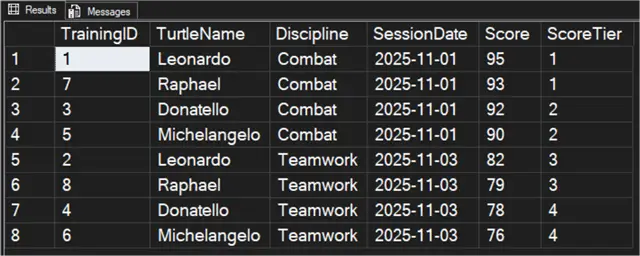
Something important to remember when working with NTILE is that the ORDER BY clause inside the OVER clause determines which rows are assigned the highest or lowest tile range. For example, let’s switch around the order and review the results.
/* MSSQLTips.com */
SELECT TrainingID,
       TurtleName,
       Discipline,
       SessionDate,
       Score,
       NTILE(4) OVER (ORDER BY Score ASC) AS ScoreTier
FROM #TurtleTraining
ORDER BY Score ASC,
         TrainingID;
GO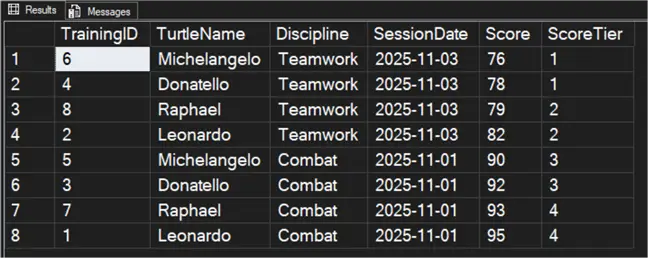
Notice now that Michelangelo is in the first quartile.
What if you include a PARTITION BY clause? In the code below, I’m partitioning by discipline. Notice that the tile resets for each unique value in the partition.
/* MSSQLTips.com */
SELECT TrainingId,
       TurtleName,
       Discipline,
       SessionDate,
       Score,
       NTILE(4) OVER (PARTITION BY Discipline ORDER BY Score DESC) AS DisciplineTile
FROM #TurtleTraining
ORDER BY Discipline,
         DisciplineTile,
         Score DESC,
         TrainingId;
GO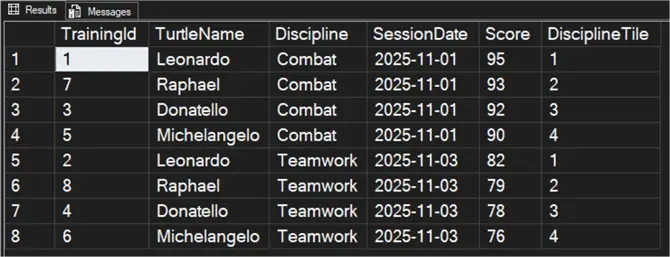
From the screenshot above, you can see that Leonardo leads the Combat and Teamwork disciplines.
If you have a larger result set, you might not be able to easily see how they are distributed just by looking at the tile. To help, we can add a COUNT function.
/* MSSQLTips.com */
;WITH Ranked
AS (SELECT TrainingId,
           TurtleName,
           Score,
           NTILE(4) OVER (ORDER BY Score DESC) AS ScoreTier
    FROM #TurtleTraining
   )
SELECT ScoreTier,
       COUNT(*) AS RowsInTile
FROM Ranked
GROUP BY ScoreTier
ORDER BY ScoreTier;
GO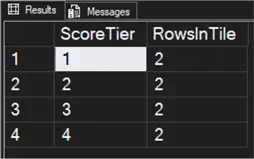
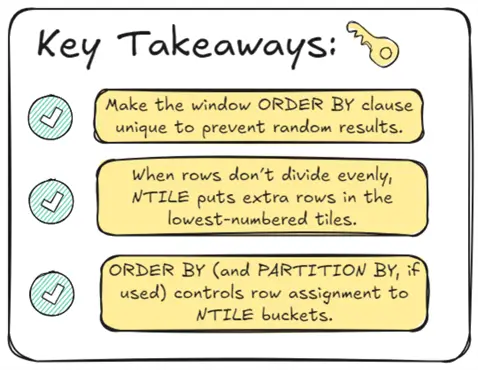
As with other window functions, to produce a repeatable result, you need to handle ties properly. If your partition has ties for the ORDER BY, ensure the ORDER BY clause is unique. In our example, adding the TrainingId to the OVER clause ensures a consistent result each time.
Isn’t that an ideal example? The distribution is wholly divisible.
Uneven Distribution
Lots of NTILE examples online only show a perfectly even distribution, like in the example output above. However, what happens when the distribution isn’t even? It seems most of the data I work with isn’t evenly distributed because I work in the real world. Let’s use the code below to add one more row to our table.
/* MSSQLTips.com */
INSERT INTO #TurtleTraining
(
    TurtleName,
    Discipline,
    SessionDate,
    Score
)
VALUES
('Leonardo', 'Combat', '2025-11-04', 96);
GO
Now let’s rerun our original SELECT statement without specifying a partition.
/* MSSQLTips.com */
SELECT TrainingId,
       TurtleName,
       Discipline,
       SessionDate,
       Score,
       NTILE(4) OVER (ORDER BY Score DESC) AS ScoreTier
FROM #TurtleTraining
ORDER BY Score DESC,
         TrainingId;
GO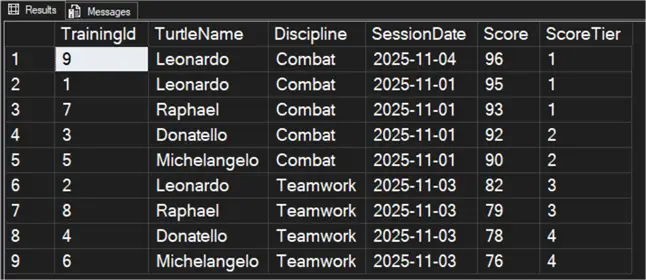
We don’t have an even number of rows to distribute, so the first quadrant has three rows, and the others have two. However, NTILE tries to distribute rows evenly. Now, let’s add two more rows and perform the SELECT statement again.
/* MSSQLTips.com */
INSERT INTO #TurtleTraining
(
    TurtleName,
    Discipline,
    SessionDate,
    Score
)
VALUES
('Raphael', 'Combat', '2025-11-04', 91),
('Michelangelo', 'Teamwork', '2025-11-04', 70);
GO
SELECT TrainingId,
       TurtleName,
       Discipline,
       SessionDate,
       Score,
       NTILE(4) OVER (ORDER BY Score DESC) AS ScoreTier
FROM #TurtleTraining
ORDER BY Score DESC,
         TrainingId;
GO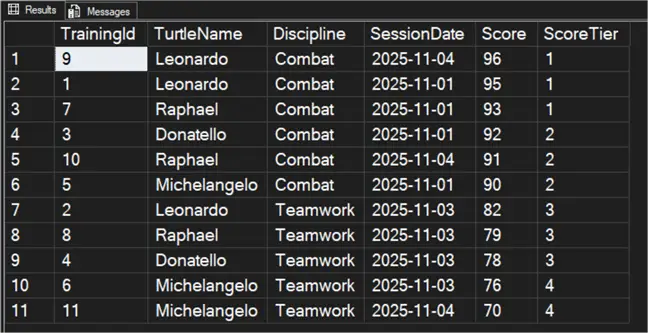
In this example, tiles 1-3 are assigned three rows, while the last tile is assigned two. In short, NTILE starts with the smallest tile number and proceeds upward, filling each tile to its base size plus 1 as needed. Let’s look at an example using one of my least favorite subjects, math.
How NTILE Does the Math
Even simple math can be tricky when you’ve relied on a calculator for most of your life. Still, the math behind NTILE isn’t that difficult.
In the last section, we learned that NTILE assigns any leftover rows to the lowest-numbered tiles. Let’s examine this mathematically. We’ll use an example of 11 rows with a tile expression of 4.
- N = number of rows (11).
- N ÷ 4 (tiles) = 2.75.
Two is the base number of rows per tile, meaning each tile will have at least two rows. The remaining rows come from the remainder (11 mod 4 = 3), so the first three tiles each get one extra row. Another way to visualize it is as follows.
| Tile | Rows Assigned |
|---|---|
| 1 | Base + 1 |
| 2 | Base + 1 |
| 3 | Base + 1 |
| 4 | Base |
You would never end up with a distribution like this:
| Tile | Rows Assigned |
|---|---|
| 1 | Base + 2 |
| 2 | Base + 1 |
| 3 | Base + 1 |
| 4 | Base |
Because of this base-plus-remainder logic, NTILE ensures that no two tiles differ in size by more than one row, which is why you’ll never see a pattern like Tile 1 having Base + 2 while another tile only has base.
Quick Debug Checklist
I am a big fan of checklists, especially when troubleshooting problems. Here are some questions to help you diagnose any issues with NTILE:
- Is the ORDER BY clause unique?
- Are the rows evenly divisible?
- Will leftover rows affect lower tiles?
- Are you partitioning as intended?
The answers should point you directly to the problem.
Conclusion
NTILE isn’t something I use every day, week, or even month, but it has helped solve a few problems over the years. It’s one of the easiest ranking functions to write, but when there’s an uneven distribution, things can get confusing. In cases of uneven distribution, NTILE assigns the extra rows to the lowest tile value, ensuring no two tiles have a gap greater than 1.
Next Steps
- In your sandbox environment, play around with different NTILE distributions and let me know in the comments below if you find any odd results.
- If you’re like me and can’t get enough of window functions, check out “SQL Server ROW_NUMBER for Ranking Rows.”
- For another informative read on NTILE, check out “NTILE SQL Function to Group and Rank Datasets” by Harris Amjad.
- Koen Verbeeck wrote the article, “SQL Rank Functions – ROW_NUMBER, RANK, DENSE_RANK, NTILE,” as a general overview and comparison of all the ranking functions.

Jared Westover is a SQL Server specialist with two decades of industry experience covering T-SQL development, performance tuning, administration and Microsoft Fabric. He is currently a software architect at Crowe, an author at Pluralsight and primary contributor at sqlhabits.com. On MSSQLTips.com, Jared is a respected award-winning author for his clever T-SQL solutions and bringing to light new real-world solutions to age-old development problems.
- MSSQLTips Awards
- Achiever Award (75+ tips) – 2026
- Author of the Year – 2023
- Author Contender – 2024/2025


