Problem
Most front-end web applications write operational data to Amazon DynamoDB as it is designed for low latency, massive scale, and unpredictable traffic. The traditional ETL process involves exporting data to S3, performing batch transformations, and nightly loading into a data lake or data warehouse, it often results in delayed data availability. It leads to outdated dashboards and operational inefficiencies. Due to the rapid growth of data in volume, velocity and veracity there is a pressing need for a near real-time pipeline that efficiently moves data from operational sources to analytical systems. This article provides a step-by-step guide to implementing a data pipeline from DynamoDB, utilizing Kinesis data streams, and loading the data into a Redshift data warehouse.
Solution
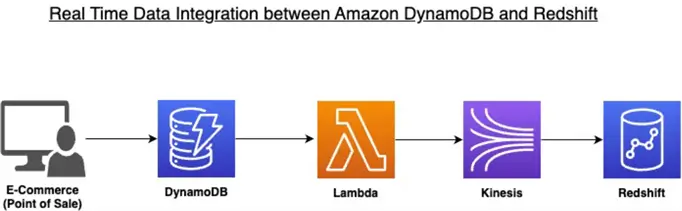
We leverage event-driven architecture concept that enables real-time data changes than relying on scheduled batch processes. This solution enables real-time data movement from Amazon DynamoDB to Amazon Redshift by leveraging Amazon Kinesis Data Streams as an intermediary. DynamoDB Streams capture operational data changes (INSERT, MODIFY, REMOVE events), which are processed by a Lambda function that deserializes the data and publishes it to Kinesis. The Kinesis stream then delivers the transformed data to Redshift, eliminating the traditional nightly batch ETL delays. This architecture provides near real-time analytics and operational dashboards while maintaining data consistency and handling failures through batch item retry mechanisms.
Key Takeaways
- Traditional ETL processes for moving data from DynamoDB to Redshift lead to delays in data availability.
- The new solution uses an event-driven architecture with Kinesis to enable real-time data transfer.
- We set up two IAM roles to facilitate data movement between Lambda, Kinesis, and Redshift.
- The pipeline captures changes in DynamoDB and processes them through a Lambda function to stream data into Redshift.
- This architecture allows for near real-time analytics while maintaining data consistency and minimizing operational inefficiencies.
Solution Architecture
Below is the model we will create.
Solution – Setting up the IAM Permissions
We have to create two IAM roles for this solution. The first one is aws-lambda-dynamodb-stream-extract that works between lambda, S3 and Kinesis. The second one is aws-kinesis-redshift-streaming-role that works between Kinesis and Redshift.
Sign in to the AWS Console and select the IAM service in the list of AWS Services. Go to Roles and Create a role named aws-lambda-dynamodb-stream-extract.
Go to attach and attach the following policies AmazonKinesisFullAccess, AmazonS3FullAccess, AWSLambdaDynamoDBExecutionRole.
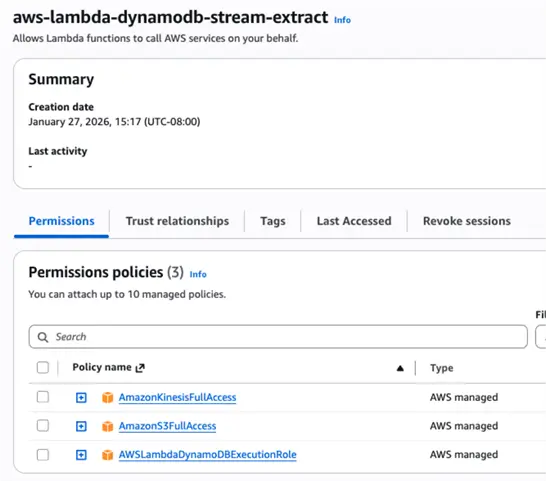
Now, go to the Trust relationship section and add the below trust policies so the role can interact with lambda.
--MSSQLTips.com (JSON)
{
    "Version": "2012-10-17",
    "Statement": [
        {
            "Effect": "Allow",
            "Principal": {
                "Service": "lambda.amazonaws.com"
            },
            "Action": "sts:AssumeRole"
        }
    ]
}
Let’s create the second IAM role as aws-kinesis-redshift-streaming-role and attach AmazonKinesisReadOnlyAccess.

Now let’s go to this Trust Policy section of IAM role and add the below policy so the Kinesis can interact with Redshift.
--MSSQLTips.com (JSON)
{
    "Version": "2012-10-17",
    "Statement": [
        {
            "Effect": "Allow",
            "Principal": {
                "Service": "redshift.amazonaws.com"
            },
            "Action": "sts:AssumeRole"
        }
    ]
}
Configuring the DynamoDB Source
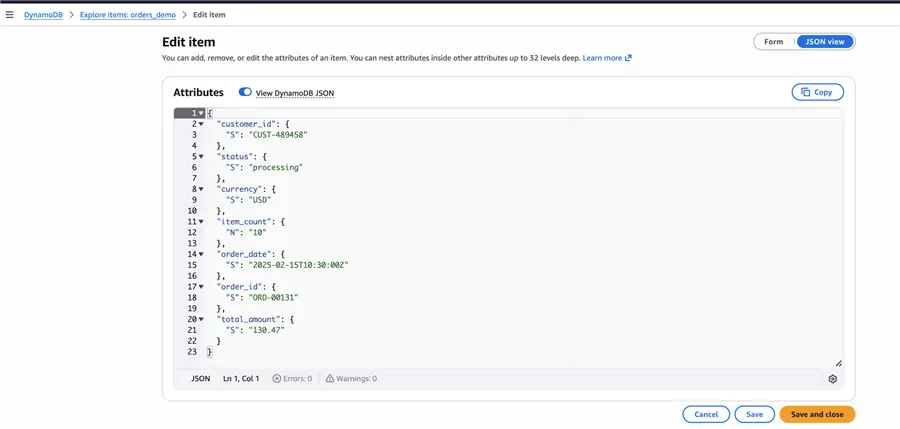
For our demo purpose, we use the orders_demo dataset in Amazon DynamoDB.

The DDB JSON record value looks like below which we have to integrate in near real time to Redshift.
Now go to the Exports and Stream section and enable the DynamoDB stream.

Setting up the Lambda
Let’s create a Lambda function aws-dynamodb-stream extractor and use the IAM role aws-lambda-dynamodb-stream-extract in the execution role section.

Add the below code in Lambda:
--MSSQLTips.com (python)
import json
import boto3
import logging
from boto3.dynamodb.types import TypeDeserializer
# Initialize the DynamoDB deserializer
deserializer = TypeDeserializer()
def lambda_handler(event, context):
    kinesis = boto3.client('kinesis')
    STREAM_NAME = 'aws-dynamodb-kinesis-demo-stream'
    out = []

    for record in event['Records']:
# Get the event type and DynamoDB data
        event_name = record['eventName']
# Initialize base record structure
        flattened_record = {
           'eventName': event_name,
           'eventTime': record.get('dynamodb', {}).get('ApproximateCreationDateTime'),
           'tableName': record.get('eventSourceARN', '').split('/')[-3] if 'eventSourceARN' in record else None
        }
        flattened_new = {}
# Deserialize and flatten DynamoDB JSON based on event type
        if event_name in ['INSERT', 'MODIFY'] and 'NewImage' in record['dynamodb']:
# Flatten the NewImage
           new_image = record['dynamodb']['NewImage']
           for key, value in new_image.items():
               flattened_new[key] = deserializer.deserialize(value)
           flattened_record['newImage'] = flattened_new
# Add flattened fields to root level
           flattened_record.update({
'order_id': flattened_new.get('order_id'),
'customer_id': flattened_new.get('customer_id'),
'total_amount': flattened_new.get('total_amount'),
'currency': flattened_new.get('currency'),
'status': flattened_new.get('status'),
'order_date': flattened_new.get('order_date'),
'item_count': flattened_new.get('item_count')
})
# Flatten the OldImage for MODIFY events
         if event_name == 'MODIFY' and 'OldImage' in record['dynamodb']:
     old_image = record['dynamodb']['OldImage']
     flattened_old = {}
     for key, value in old_image.items():
  flattened_old[key] = deserializer.deserialize(value)
            flattened_record['oldImage'] = flattened_old
# For REMOVE events, flatten the Keys and OldImage if available
         if event_name == 'REMOVE':
            if 'Keys' in record['dynamodb']:
                keys = record['dynamodb']['Keys']
                flattened_keys = {}
                for key, value in keys.items():
                    flattened_keys[key] = deserializer.deserialize(value)
                flattened_record['keys'] = flattened_keys
     if 'OldImage' in record['dynamodb']:
  old_image = record['dynamodb']['OldImage']
        flattened_old = {}
        for key, value in old_image.items():
     flattened_old[key] = deserializer.deserialize(value)
  flattened_record['oldImage'] = flattened_old
# Prepare for Kinesis - use appropriate partition key based on event type
         partition_key = 'default'
         if 'keys' in flattened_record and flattened_record['keys']:
             partition_key = str(list(flattened_record['keys'].values())[0])
         elif flattened_new and 'order_id' in flattened_new:
              partition_key = str(flattened_new['order_id'])
         kinesis_record = {
'Data': json.dumps(flattened_record, default=str),
'PartitionKey': partition_key
   }
    out.append(kinesis_record)
# Send to Kinesis with print statements
   for i in range(0, len(out), 500):
       batch = out[i:i+500]
       print(f"Sending batch {i//500 + 1}: {len(batch)} records")
       print(f"Sample flattened record: {json.loads(batch[0]['Data']) if batch else 'None'}")
       kinesis.put_records(StreamName=STREAM_NAME, Records=batch)
   return {'statusCode': 200, 'body': f'Processed {len(out)} records'}
Setting up the Trigger in DynamoDB
Go to the Dynamo DB table, Exports and Streams > Trigger section. Click Add new trigger and map the lambda function created.


Once the trigger is added, you will see it in the Lambda’s general configuration, this enables the Dynamo DB streams updates/inserts to be passed to Lambda synchronously and pass the flattened values to Kinesis.
Configuring the Kinesis
Go to the Amazon Kinesis Service and create a stream named aws-dynamobdb-kinesis-demo-stream. The kinesis stream name should match the kinesis stream given in the lambda function.

You can go to the kinesis stream data retention and increase the days as needed in the configuration section. This enables if there are any failures the data will be in the stream.

Setting up the Materialized View
We must create an external schema in Redshift to access the data from the kinesis stream using the below command.
--MSSQLTips.com (PostgresSQL)
CREATE EXTERNAL SCHEMA kinesis_ext FROM KINESIS IAM_ROLE 'arn:aws:iam:::role/aws-kinesis-redshift-streaming-role';
Let’s create a materialized view.
--MSSQLTips.com (PostgresSQL)
CREATE MATERIALIZED VIEW orders_stream_view AUTO REFRESH YES AS
SELECT
    approximate_arrival_timestamp,
    partition_key,
    shard_id,
    sequence_number,
    CASE WHEN CAN_JSON_PARSE(kinesis_data)
         THEN JSON_PARSE(kinesis_data)
         ELSE NULL END as payload
FROM kinesis_ext."aws-dynamodb-kinesis-demo-stream";
When you query the materialized view, you will be able to view the records in DDBJSON format.

We have to parse the data from the JSON format by creating another view.
--MSSQLTips.com (PostgresSQL)
CREATE VIEW orders_stream_parsed  AS
SELECT
    payload.order_id::VARCHAR AS order_id,
    payload.customer_id::VARCHAR AS customer_id,
    payload.total_amount::DECIMAL(10,2) AS total_amount,
    payload.currency::VARCHAR AS currency,
    payload.status::VARCHAR AS status,
    payload.order_date::TIMESTAMP AS order_date,
    payload.item_count::INTEGER AS item_count
FROM orders_stream_view;
SELECT * FROM Orders_stream_parsed;
Once you query the view, you will be able to view the flattened records from DynamoDB.

Summary
In summary, we are able to establish a real time data transfer between Transaction and Analytical processing systems. Now if you go to the DynamoDB table and add new records, you will see them appear in Redshift within seconds avoiding the traditional ETL approach
Common Troubleshooting and Best Practices
Implementing an event drive architecture comes up with its own challenges as we work between multiple services, below are the troubleshooting guidelines which can help you save hours.
- IAM role: Ensure the trust policies are added in both IAM role else the IAM role will not show up in lambda or you will not be able to write the kinesis records into redshift
- Lambda: For large volume data processing update the lambda timeout to 15 minutes
- Kinesis: Update the data retention period to 15 days
- Be cognizant of the compute costs as you’re using multiple services and always monitor them in cost explorer.
Next Steps
- Start re-evaluating your existing ETL pipelines to be converted into event driven architecture design. Implement data quality in the downstream datasets of this solution by following this article.

Junaith Haja is a senior data engineering leader with over a decade of experience transforming raw data into scalable platforms and actionable insights that drive business performance, operational excellence, and sustainability. At Amazon, he applies a “data as a product” philosophy to architect resilient data infrastructures supporting global domains such as identity verification and financial risk mitigation.
Beyond engineering execution, Junaith is an active voice in the global data and AI ecosystem. He has authored over 100+ articles in major database and AI platforms including MSSQLTips.com, AITimeJournal, AI Frontier Network, DZone. He writes a weekly LinkedIn newsletter, Signal Over Noise and his personal blog juniathhaja.com where he shares insights on data engineering, AI and leadership. He serves as a Senior Member of IEEE, a Fellow at the Institute of Analytics, and a Distinguished Fellow at the Soft Computing Research Society, reinforcing his commitment to responsible, sustainable, and impactful data practices.