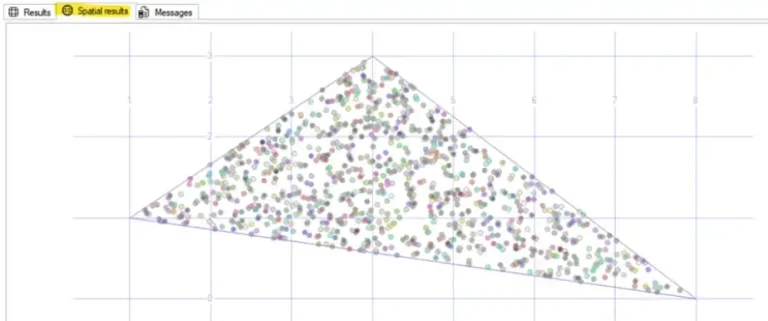
Problem
Generating random numbers from a normal distribution is essential for accuracy and realistic modeling, simulation, inference, and algorithm design. This is useful for scientific, engineering, statistical, and AI domains. Let’s see how we can create Box Muller transform functionality in SQL Server without the use of external tools.
Solution
It is a common necessity to have data to test functions for:
- Modeling natural phenomena: Measurements of errors, sensor noise in signal processing, financial returns, and test scores.
- Simulations: Weather and climate modeling, risk analysis in finance, reliability tests, and stock prices simulations.
- Machine learning: Weight initialization in neural networks, Bayesian models, and Gaussian mixture models.
- Statistical inference and testing of hypotheses.
- Randomization algorithms.
- Physics and engineering.
The Box-Muller transform takes two independent uniform random numbers (0,1) and maps them to two independent standard normal random variables, having mean zero and standard deviation of one.
The first step is to generate the number of rows desired with random numbers for the columns defined. Then we can do the following.
From the random number one, we calculate the first normally distributed variable, using the formula:

And for the second normally distributed variable, using the formula:

Let’s see how we can build this in SQL Server.
Generated Numbers Table
First we will create a table to store the data.
-- MSSQLTips (TSQL)

CREATE TABLE [dbo].[RndNormalDist](
    [ClusterId] [int] NOT NULL,
    [PointId] [int] NOT NULL,
    [X] [float] NOT NULL,
    [Y] [float] NOT NULL,
    [SpatialPoint]  AS ([geometry]::Point([x],[y],(0))),
 CONSTRAINT [PK_RndNormalDist] PRIMARY KEY CLUSTERED
(
    [ClusterId] ASC,
    [PointId] ASC
)WITH (PAD_INDEX = OFF, STATISTICS_NORECOMPUTE = OFF, IGNORE_DUP_KEY = OFF, ALLOW_ROW_LOCKS = ON, ALLOW_PAGE_LOCKS = ON, OPTIMIZE_FOR_SEQUENTIAL_KEY = OFF) ON [PRIMARY]
) ON [PRIMARY]
GO
Box-Muller Stored Procedure
This is the stored procedure for the Box-Muller Transform.
-- =============================================
-- Author:      SCP - MSSQLTips
-- Create date: 20250716
-- Description: Normal Box-Muller Transform
-- =============================================
CREATE OR ALTER PROCEDURE [dbo].[uspRandGenBoxMuller]
                (@Points int
                ,@X_Offset decimal(18,6)
                ,@Y_Offset decimal(18,6)
                ,@Scale decimal(18,6)
                ,@ClusterId int)
WITH EXECUTE AS CALLER
AS
BEGIN;

    BEGIN TRY

        DECLARE             @GenPoints
            TABLE        ([PointId] int IDENTITY(1,1)
                        ,[X] decimal(18, 6)
                        ,[Y] decimal(18, 6));

        WITH Numbers AS
            (SELECT      1 AS n

             UNION ALL

             SELECT      n + 1
                FROM     Numbers
                WHERE    n < @Points),
             RandomPairs AS
            (SELECT      n
                        ,RAND(CHECKSUM(NEWID())) AS U1
                        ,RAND(CHECKSUM(NEWID())) AS U2
                FROM     Numbers)
        INSERT INTO      @GenPoints
                        ([X]
                        ,[Y])
            SELECT       @X_Offset + @Scale * (SQRT(-2 * LOG(rp.U1)) * COS(2 * PI() * rp.U2))
                        ,@Y_Offset + @Scale * (SQRT(-2 * LOG(rp.U1)) * SIN(2 * PI() * rp.U2))
                FROM     RandomPairs rp
                OPTION  (MAXRECURSION 0);

        SELECT             [PointId]
                        ,[X]
                        ,[Y]
                        ,@ClusterId
            FROM         @GenPoints;

        RETURN;
    END TRY
    BEGIN CATCH
        PRINT    'Error: ' + CONVERT(varchar(50), ERROR_NUMBER()) +
                ', Severity: ' + CONVERT(varchar(5), ERROR_SEVERITY()) +
                ', State: ' + CONVERT(varchar(5), ERROR_STATE()) +
                ', Procedure: ' + ISNULL(ERROR_PROCEDURE(), '-') +
                ', Line: ' + CONVERT(varchar(5), ERROR_LINE());
        PRINT ERROR_MESSAGE();
    END CATCH;
END
GO
If you need more variables, you can add more offset parameters and its respective lines for the calculation and also the return point in the SELECT clause for the temporary table.
Generating Random Numbers
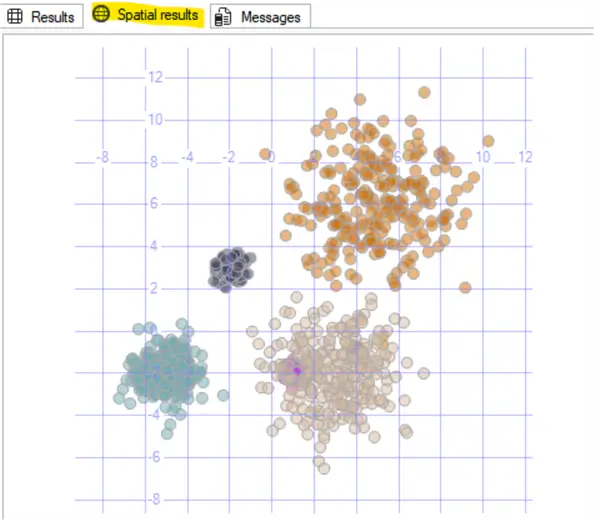
Let’s generate a group of six random clusters. We will do an INSERT and insert the results from the stored procedure execution. Below, we are creating 6 cluster groups.
The parameters for the stored procedure are:
- number of points
- x offset value
- y offset value
- scale
- and the cluster number.
-- MSSQLTips (TSQL)

TRUNCATE TABLE [dbo].[RndNormalDist];

-- Cluster 1
INSERT INTO  [dbo].[RndNormalDist]
            ([PointId]
            ,[X]
            ,[Y]
            ,[ClusterId])
    EXEC [dbo].[uspRandGenBoxMuller] 250,-5,-2,0.8,1;

-- Cluster 2
INSERT INTO  [dbo].[RndNormalDist]
            ([PointId]
            ,[X]
            ,[Y]
            ,[ClusterId])
    EXEC [dbo].[uspRandGenBoxMuller] 250,5,6,2,2;

-- Cluster 3
INSERT INTO  [dbo].[RndNormalDist]
            ([PointId]
            ,[X]
            ,[Y]
            ,[ClusterId])
    EXEC [dbo].[uspRandGenBoxMuller] 250,4,-1,0.1,3;

-- Cluster 4
INSERT INTO  [dbo].[RndNormalDist]
            ([PointId]
            ,[X]
            ,[Y]
            ,[ClusterId])
    EXEC [dbo].[uspRandGenBoxMuller] 250,1,-2,0.2,4;

-- Cluster 5
INSERT INTO  [dbo].[RndNormalDist]
            ([PointId]
            ,[X]
            ,[Y]
            ,[ClusterId])
    EXEC [dbo].[uspRandGenBoxMuller] 250,-2,3,0.3,5;

-- Cluster 6
INSERT INTO  [dbo].[RndNormalDist]
            ([PointId]
            ,[X]
            ,[Y]
            ,[ClusterId])
    EXEC [dbo].[uspRandGenBoxMuller] 250,3,-2,1.6,6;

-- Returning the generated values
SELECT       [ClusterId]
            ,[PointId]
            ,[X]
            ,[Y]
            ,[SpatialPoint]
    FROM     [dbo].[RndNormalDist];
GO
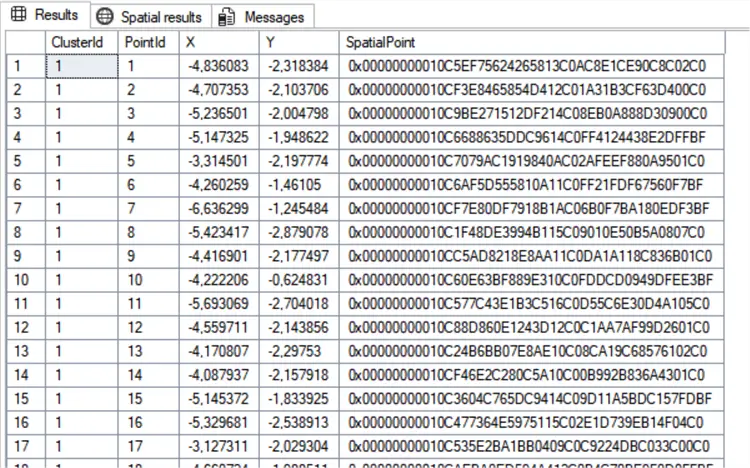
Resulting in:
Visual the Data with Spatial Results
If you want to have a better visualization using the Spatial Results tab, you can use the following:
-- MSSQLTips (TSQL)

DECLARE  @OverallExtent geometry
        ,@ProportionalBuffer float;

SELECT       @OverallExtent = geometry::EnvelopeAggregate([SpatialPoint])
    FROM     [dbo].[RndNormalDist];

DECLARE @MinX float = @OverallExtent.STPointN(1).STX;
DECLARE @MinY float = @OverallExtent.STPointN(1).STY;
DECLARE @MaxX float = @OverallExtent.STPointN(3).STX;
DECLARE @MaxY float = @OverallExtent.STPointN(3).STY;

DECLARE @ExtentWidth float = @MaxX - @MinX;
DECLARE @ExtentHeight float = @MaxY - @MinY;

DECLARE @MinDimension float = IIF(@ExtentWidth < @ExtentHeight, @ExtentWidth, @ExtentHeight);

DECLARE @Ratio float = @MinDimension * 0.015;

        -- Returning the clusters

SELECT       [ClusterId]
            ,COUNT(*) AS N
            ,geometry::CollectionAggregate(SpatialPoint) AS geom
    FROM    (SELECT      [ClusterId]
                        ,SpatialPoint.STBuffer(@Ratio)  AS SpatialPoint
                FROM     [dbo].[RndNormalDist]) AS X
            GROUP BY [ClusterId];
GO
Resulting in:
Next Steps
- WIKIPEDIA – Box Muller transform
- Check out more TSQL related articles

Sebastião Pereira has over 40 years of experience in database development including T-SQL, algorithm design, machine learning and bringing innovative mathematical formulas to SQL Server. He started his career at a transnational fast-moving consumer goods (FMCG) company as an employee then later transitioning into a consultant role. He eventually founded his own company to develop software solutions for the healthcare industry. Sebastião is a respected award-winning author on MSSQLTips.com extending SQL Server capabilities beyond traditional workloads.
- MSSQLTips Awards
- Author of the Year – 2025
- Trendsetter (25+ tips) – 2025
- Rookie of the Year – 2024