Problem
Working with SQL Server from Python code requires a driver to connect and perform database operations such as execute different queries to read data. There are several Python drivers out there, e.g., pyodbc, and the recently released mssql-python. Which driver is the most efficient when reading programmatically from an SQL Server on-premises database?
Solution
To compare the different drivers, I will perform a set of different read operations on AdventureWorks 2022 with increasing complexity and result set size. I have created a solution that will execute a predefined number of times a set of queries using the pyodbc with SQLAlchemy wrapper, pyodbc raw and mssql-python drivers. We will record the execution times over the different runs and provide a comparison of which driver is the best.
Key Takeaways
- This is a Python driver for SQL Server (pyodbc vs. mssql-python) performance comparison article.
- It benchmarks read operations using AdventureWorks 2022 to evaluate driver performance.
- mssql-python (Download Now) generally outperforms pyodbc, especially with larger result sets.
- Installation requires SQL Server 2025 and Python setup with specific libraries noted.
- mssql-python offers advantages like no external dependencies and built-in connection pooling.
Setup for Solution
To follow this document hands-on, you need to:
- Install SQL Server 2025. Follow this link to register for a free trial.
- Next, import the Adventure Works 2022 sample database to your newly installed SQL Server instance. To get the database backup file follow this link. For a step by step guide how to import the backup check this article.
After having your database ready, we need to create a dedicated Python environment.

In the file requirements.txt I have specified the required packages:
pyodbcandmssql-pythonare the drivers we will be testingSQLAlchemyis an ORM library but has a wrapper overpyodbc, so we will evaluatepyodbcwith it as well.attrsis required for writing cleaner class definitions- Finally,
python-dotenvis there for convenient environment variables handling from a separate file.
Note mssql-python requires Python 3.10 or greater:

Make sure to have a global Python installation that complies with this requirement. Then follow the VS Code prompts to complete the environment setup. The overall environment specifications are:
- python v3.11
- pyodbc v5.2.0
- SQLAlchemy v2.0.43
- ODBC Driver 18 for SQL Server (required for pyodbc and SQLAlchemy)
- mssql-python >= v1.0.0
- SQL Server 2025 Developer edition preview
Scenario
The goal is to record the execution times of four different queries over multiple runs. The queries will be executed in order of their increasing complexity. Each query produces an increasingly larger result set, except the last one. As the baseline we will use the SQL connection over pyodbc with SQLAlchemy wrapper. The pyodbc connection is channeled through SQLAlchemy, which adds some overhead but also includes connection pooling and optimization. The benefit of using SQLAlchemy comes from using its ORM functionality. However, we are not going to leverage that functionality to give the other drivers an equal start. Against this baseline we will compare:
- the SQL connection using
pyodbcwithout theSQLAlchemywrapper, and mssql-python, Microsoft’s own Python driver for SQL.
The solution uses SQL client class definitions for each driver variation. Let us begin by examining the module that contains these classes.
SQL Client module
First, we need a module to contain the three SQL Client classes:
001: """
002: MSSQLTips.com General database connection configuration class
003: """
004: import os
005: from attrs import define, field, validators
006: from sqlalchemy.engine import Engine, create_engine, URL
007: import mssql_python
008: from mssql_python import Connection
009: import pyodbc
010: from dotenv import load_dotenv
011:
012:
013: load_dotenv()
014:
015:
016: @define
017: class RDSConfigPyODBC:
018:     """Pyodbc with SQLAlchemy wrapper"""
019:     DB_SERVER: str = field(
020:         factory=lambda: os.getenv("DB_SERVER", ".\\MSSQLSERVER02"),
021:         validator=validators.instance_of(str)
022:     )
023:     DB_DATABASE: str = field(
024:         factory=lambda: os.getenv("DB_DATABASE", "AdventureWorks2022"),
025:         validator=validators.instance_of(str)
026:     )
027:     DB_USERNAME: str = field(
028:         factory=lambda: os.getenv("DB_USERNAME", ""),
029:         validator=validators.instance_of(str)
030:     )
031:     DB_PASSWORD: str = field(
032:         factory=lambda: os.getenv("DB_PASSWORD", ""),
033:         validator=validators.instance_of(str)
034:     )
035:     DB_PORT: int = field(
036:         factory=lambda: int(os.getenv("DB_PORT", 0)),
037:         converter=int,
038:         validator=validators.instance_of(int)
039:     )
040:     DB_DRIVER: str = field(
041:         factory=lambda: os.getenv("DB_DRIVER", "mssql+pyodbc"),
042:         validator=validators.instance_of(str)
043:     )
044:
045:     @property
046:     def url(self) -> URL:
047:         if not self.DB_USERNAME or not self.DB_PASSWORD:
048:             # Windows Authentication
049:             return URL.create(
050:                 drivername=self.DB_DRIVER,
051:                 host=self.DB_SERVER,
052:                 database=self.DB_DATABASE,
053:                 username=self.DB_USERNAME,
054:                 password=self.DB_PASSWORD,
055:                 # port=self.DB_PORT,
056:                 query=dict(driver='ODBC Driver 18 for SQL Server',
057:                            Trusted_Connection='True',
058:                            TrustServerCertificate='yes')
059:             )
060:         else:
061:             # SQL Server Authentication
062:             return URL.create(
063:                 drivername=self.DB_DRIVER,
064:                 host=self.DB_SERVER,
065:                 database=self.DB_DATABASE,
066:                 username=self.DB_USERNAME,
067:                 password=self.DB_PASSWORD,
068:                 # port=self.DB_PORT,
069:                 query=dict(driver='ODBC Driver 18 for SQL Server',
070:                            TrustServerCertificate='yes')
071:             )
072:
073:     def get_engine(self) -> Engine:
074:         return create_engine(self.url)
075:
076:
077: @define
078: class RDSConfigPyODBCRaw:
079:     """Raw pyodbc without SQLAlchemy wrapper"""
080:     DB_SERVER: str = field(
081:         factory=lambda: os.getenv("DB_SERVER", ".\\MSSQLSERVER02"),
082:         validator=validators.instance_of(str)
083:     )
084:     DB_DATABASE: str = field(
085:         factory=lambda: os.getenv("DB_DATABASE", "AdventureWorks2022"),
086:         validator=validators.instance_of(str)
087:     )
088:     DB_USERNAME: str = field(
089:         factory=lambda: os.getenv("DB_USERNAME", ""),
090:         validator=validators.instance_of(str)
091:     )
092:     DB_PASSWORD: str = field(
093:         factory=lambda: os.getenv("DB_PASSWORD", ""),
094:         validator=validators.instance_of(str)
095:     )
096:     DB_DRIVER: str = field(
097:         factory=lambda: os.getenv("DB_ODBC_DRIVER", "ODBC Driver 18 for SQL Server"),
098:         validator=validators.instance_of(str)
099:     )
100:
101:     @property
102:     def connection_string(self) -> str:
103:         if not self.DB_USERNAME or not self.DB_PASSWORD:
104:             # Windows Authentication
105:             return (f'DRIVER={{{self.DB_DRIVER}}};\
106:                     SERVER={self.DB_SERVER};\
107:                     DATABASE={self.DB_DATABASE};\
108:                     Trusted_Connection=yes;\
109:                     TrustServerCertificate=yes;')
110:         else:
111:             # SQL Server Authentication
112:             return (f'DRIVER={{{self.DB_DRIVER}}};\
113:                     SERVER={self.DB_SERVER};\
114:                     DATABASE={self.DB_DATABASE};\
115:                     UID={self.DB_USERNAME};\
116:                     PWD={self.DB_PASSWORD};\
117:                     TrustServerCertificate=yes;')
118:
119:     def get_connection(self) -> pyodbc.Connection:
120:         return pyodbc.connect(self.connection_string)
121:
122:
123: @define
124: class RDSConfigMSSQLPython:
125:     DB_SERVER: str = field(
126:         factory=lambda: os.getenv("DB_SERVER", ".\\MSSQLSERVER02"),
127:         validator=validators.instance_of(str)
128:     )
129:     DB_DATABASE: str = field(
130:         factory=lambda: os.getenv("DB_DATABASE", "AdventureWorks2022"),
131:         validator=validators.instance_of(str)
132:     )
133:     DB_USERNAME: str = field(
134:         factory=lambda: os.getenv("DB_USERNAME", ""),
135:         validator=validators.instance_of(str)
136:     )
137:     DB_PASSWORD: str = field(
138:         factory=lambda: os.getenv("DB_PASSWORD", ""),
139:         validator=validators.instance_of(str)
140:     )
141:
142:     def get_connection(self) -> Connection:
143:         connection_str = ""
144:         if not self.DB_USERNAME or not self.DB_PASSWORD:
145:             # Windows Authentication
146:             connection_str = f"Server={self.DB_SERVER};\
147:                 Database={self.DB_DATABASE};\
148:                 UID={self.DB_USERNAME};\
149:                 PWD={self.DB_PASSWORD};\
150:                 Trusted_Connection=yes;\
151:                 TrustServerCertificate=yes;"
152:         else:
153:             # SQL Server Authentication
154:             connection_str = f"Server={self.DB_SERVER};\
155:                 Database={self.DB_DATABASE};\
156:                 UID={self.DB_USERNAME};\
157:                 PWD={self.DB_PASSWORD};\
158:                 TrustServerCertificate=yes;"
159:
160:         return mssql_python.connect(connection_str)
Here is what this module does:
- 01 – 13: mandatory imports, data type definitions and loading environment variables from a file
- 16 – 74: defines a configuration class for
pyodbcwithSQLAlchemywrapper:- 19 – 43: set mandatory connection attributes from environment variables
- 45 – 71: build a URL string for Windows or SQL Server authentication
- 73 – 74: function to get an engine so we can use it from another module.
- 77-120: defines a configuration class for pure
pyodbc:- 80 – 99: set mandatory connection attributes from environment variables
- 101 – 117: build a connection string for Windows or SQL Server authentication
- 119 – 120: function to get a connection so we can use it from another module.
- 123 – 160: defines a configuration class for
mssql-python:- 125 – 140: set mandatory connection attributes from environment variables
- 142 – 158: build a connection string for Windows or SQL Server authentication and return an
mssql-pythonConnection object.


Having this module in place, we can turn our attention to the query module.
Query module
I will perform the benchmark over four queries with varying complexity and result set size:
Query 1 – Complex join aggregation query – performs multiple joins and aggregations (242 rows):
        SELECT p.ProductID
                   , p.Name                        AS ProductName
                   , pc.Name                       AS Category
                   , psc.Name                      AS Subcategory
                   , Count(sod.SalesOrderDetailID) AS TotalOrders
                   , SUM(sod.OrderQty)             AS TotalQuantity
                   , SUM(sod.LineTotal)            AS TotalRevenue
                   , Avg(sod.UnitPrice)            AS AvgPrice
              FROM Sales.SalesOrderDetail sod
        INNER JOIN Production.Product p
                ON sod.ProductID = p.ProductID
        INNER JOIN Production.ProductSubcategory psc
                ON p.ProductSubcategoryID = psc.ProductSubcategoryID
        INNER JOIN Production.ProductCategory pc
                ON psc.ProductCategoryID = pc.ProductCategoryID
          GROUP BY p.ProductID
                   , p.Name
                   , pc.Name
                   , psc.Name
            HAVING SUM(sod.LineTotal) > 10000
ORDER BY TotalRevenue DESC; 
Second Query – Large dataset – performs multiple joins (23 743 rows):
       SELECT soh.SalesOrderID
                  , soh.OrderDate
                  , soh.DueDate
                  , soh.ShipDate
                  , soh.Status
                  , soh.SubTotal
                  , soh.TaxAmt
                  , soh.Freight
                  , soh.TotalDue
                  , c.CustomerID
                  , p.FirstName
                  , p.LastName
                  , a.AddressLine1
                  , a.City
                  , sp.NAME AS StateProvince
                  , cr.NAME AS Country
             FROM Sales.SalesOrderHeader soh
       INNER JOIN Sales.Customer c
               ON soh.CustomerID = c.CustomerID
       INNER JOIN Person.Person p
               ON c.PersonID = p.BusinessEntityID
       INNER JOIN Person.BusinessEntityAddress bea
               ON p.BusinessEntityID = bea.BusinessEntityID
       INNER JOIN Person.Address a
               ON bea.AddressID = a.AddressID
       INNER JOIN Person.StateProvince sp
               ON a.StateProvinceID = sp.StateProvinceID
       INNER JOIN Person.CountryRegion cr
               ON sp.CountryRegionCode = cr.CountryRegionCode
            WHERE soh.OrderDate >= '2013-01-01';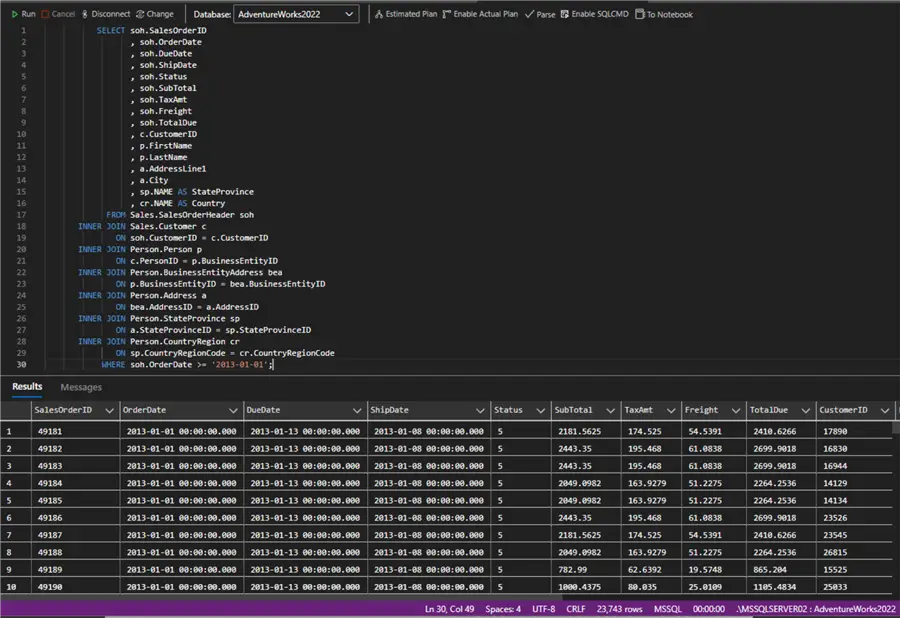
Query 3 – A larger dataset – performs multiple joins and a cross join to artificially inflate the dataset to ten times the original size (1 213 170 rows):
       SELECT sod.SalesOrderID
                  , sod.SalesOrderDetailID
                  , sod.ProductID
                  , sod.OrderQty
                  , sod.UnitPrice
                  , sod.LineTotal
                  , p.NAME    AS ProductName
                  , p.ProductNumber
                  , p.Color
                  , p.ListPrice
                  , n1.number AS RowMultiplier1
             FROM Sales.SalesOrderDetail sod
       CROSS JOIN (SELECT TOP 10 Row_number()
                                   OVER (
                                     ORDER BY (SELECT NULL)) AS number
                     FROM Sales.SalesOrderDetail) n1
       INNER JOIN Production.Product p
               ON sod.ProductID = p.ProductID;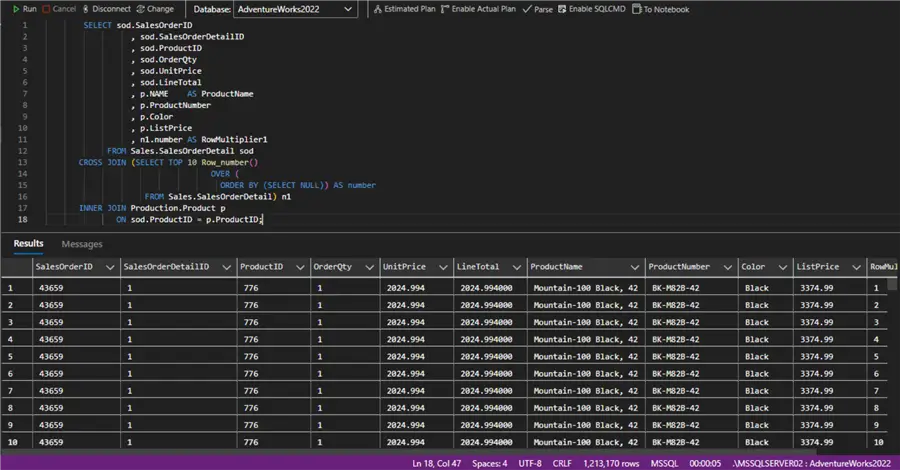
Query 4 – Subquery with CTE – defines two CTEs to use in a final query (40 rows):
   WITH SalesSummary
        AS (SELECT soh.SalesPersonID
                    , Year(soh.OrderDate) AS OrderYear
                    , Sum(soh.TotalDue)   AS YearlyTotal
            FROM Sales.SalesOrderHeader soh
            WHERE soh.SalesPersonID IS NOT NULL
            GROUP BY soh.SalesPersonID
                    , Year(soh.OrderDate)),
        RankedSales
        AS (SELECT SalesPersonID
                    , OrderYear
                    , YearlyTotal
                    , Rank()
                        OVER (
                        PARTITION BY OrderYear
                        ORDER BY YearlyTotal DESC) AS SalesRank
            FROM SalesSummary)
        SELECT rs.SalesPersonID
               , p.FirstName
               , p.LastName
               , rs.OrderYear
               , rs.YearlyTotal
               , rs.SalesRank
          FROM RankedSales rs
    INNER JOIN Person.Person p
            ON rs.SalesPersonID = p.BusinessEntityID
         WHERE rs.SalesRank <= 10
      ORDER BY rs.OrderYear DESC
, rs.SalesRank; 
All queries are wrapped in this single module as class variables for convenient reference and reuse, along with a function to retrieve one or multiple of them:
from attrs import define
from typing import ClassVar

@define
class QueryContainer:
    """Container for SQL queries used in performance testing"""
    # Query 1
    COMPLEX_JOIN_AGGREGATION: ClassVar[str] = ""
    # Query 2
    LARGE_DATASET: ClassVar[str] = ""
    # Query 3
    VERY_LARGE_DATASET: ClassVar[str] = ""
    # Query 4
    SUBQUERY_WITH_CTE: ClassVar[str] = ""

    @classmethod
    def get_query(cls, key: str | None = None) -> dict[str, str]:
        """Retrieves a query or all queries.
        Args:
            key (str | None, optional): query name. Defaults to None.
        Raises:
            KeyError: error if the query does not exist.
        Returns:
            str | dict[str, str]: query definition or dictionary of all queries.
        """
        queries = {
            'Complex JOIN Aggregation': cls.COMPLEX_JOIN_AGGREGATION,
            'Large Dataset': cls.LARGE_DATASET,
            'Very Large Dataset': cls.VERY_LARGE_DATASET,
            'Subquery with CTE': cls.SUBQUERY_WITH_CTE
        }

        if key is None:
            return queries

        if key not in queries:
            raise KeyError(f"Query '{key}' not found. Available keys: {list(queries.keys())}")

        return {key: queries[key]}  # must return a dict either way
I have minimized the query strings for brevity:

So far, we have functionality for SQL connectivity and query definition and retrieval. Now let us move to defining the benchmark module.
Core Benchmark module
Let us define the benchmarking functionality. The idea is to call each query several times using the three different drivers:
01: import time
02: from sqlalchemy import text
03: from attrs import define
04: import pyodbc
05: from mssql_python.connection import Connection
06:
07:
08: @define
09: class PerformanceTester():
10:     """Container for benchmark function"""
11:
12:     @classmethod
13:     def benchmark_query(cls,
14:                         connection: pyodbc.Connection | Connection,
15:                         query: str,
16:                         driver_name: str,
17:                         iterations: int = 5) -> dict[str, str | float | int]:
18:         """Runs a query multiple times and returns timing statistics
19:
20:         Args:
21:             connection (pyodbc.Connection | Connection): database connection
22:             query (str): select statement
23:             driver_name (str): driver name
24:             iterations (int, optional): number of times the query will be executed. Defaults to 5.
25:
26:         Returns:
27:             dict[str, str | float | int]: results dictionary containing execution times.
28:         """
29:         times = []
30:         row_counts = []
31:
32:         for i in range(iterations):
33:             start = time.perf_counter()
34:
35:             if driver_name in ('pyodbc', 'pyodbc + SQLAlchemy'):
36:                 cursor = connection.execute(text(query))
37:                 result = cursor.fetchall()
38:                 cursor.close()
39:             else:  # mssql-python
40:                 cursor = connection.cursor()
41:                 cursor.execute(query)
42:                 result = cursor.fetchall()
43:                 cursor.close()
44:
45:             end = time.perf_counter()
46:             elapsed = end - start
47:             times.append(elapsed)
48:             row_counts.append(len(result))
49:
50:         return {
51:             'driver': driver_name,
52:             'avg_time': sum(times) / len(times),
53:             'min_time': min(times),
54:             'max_time': max(times),
55:             'total_time': sum(times),
56:             'rows': row_counts[0],
57:             'iterations': iterations
58:         }
The class contains a single function benchmark_query expecting a pyodbc or mssql-python Connection, a query, a driver name for logging and number of iterations as parameters. Line 32 defines a loop where:
- 33: a performance counter function is called
- 35 – 38: if the driver is any variation of
pyodbc, we create a cursor to execute the query, fetch the results, and close the cursor. - 39 – 43: if the driver is
mssql-pythonwe create a cursor, then execute the query, fetch results and close the connection. - 45 – 48: for each iteration we calculate the elapsed time and store in a data structure for the final comparison
- 50 – 58: finally, we return a dictionary containing the driver’s name, average, min and max execution time, total time, row count, and iterations. These are the metrics we will use to rank the driver’s performance.
Putting it all together
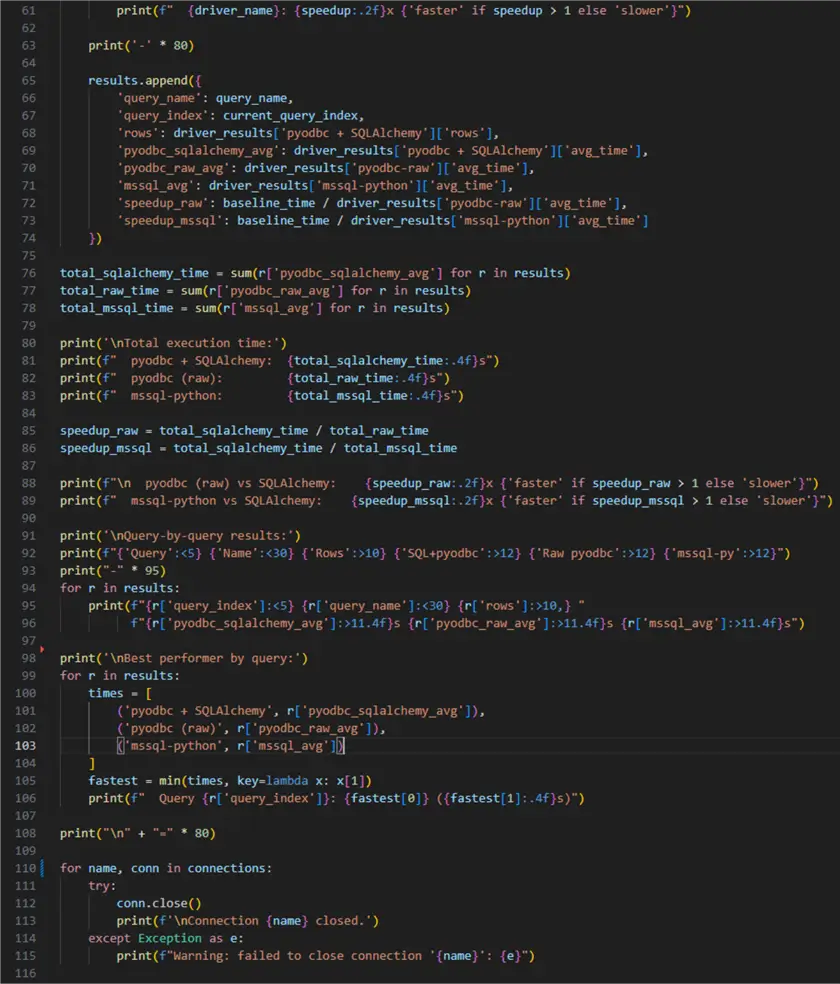
Now that we have all modules of the solution, we can use them together to get our ranking. This final module will be the entry point of our benchmark program. It will produce console output describing the invoked query and the related metrics. Let us see it work altogether:
001: from sql_client import (
002:     RDSConfigPyODBC,
003:     RDSConfigPyODBCRaw,
004:     RDSConfigMSSQLPython
005:     )
006: from query import QueryContainer
007: from benchmark import PerformanceTester as pt
008:
009: # pyodbc with sqlalchemy
010: pyodbc_cfg = RDSConfigPyODBC()
011: pyodbc_engine = pyodbc_cfg.get_engine()
012: pyodbc_sqlalchemy_connection = pyodbc_engine.connect()
013:
014: # Raw pyodbc
015: pyodbc_raw_cfg = RDSConfigPyODBCRaw()
016: pyodbc_raw_connection = pyodbc_raw_cfg.get_connection()
017:
018: # mssql-python
019: mssql_python_cfg = RDSConfigMSSQLPython()
020: mssql_python_connection = mssql_python_cfg.get_connection()
021:
022: connections = [
023:     ('pyodbc + SQLAlchemy', pyodbc_sqlalchemy_connection),
024:     ('pyodbc-raw', pyodbc_raw_connection),
025:     ('mssql-python', mssql_python_connection)
026: ]
027:
028: queries = QueryContainer.get_query()
029:
030: print('=' * 80)
031: print('MSSQL Driver Performance Benchmark - AdventureWorks2022')
032: print('=' * 80)
033:
034: driver_results = {}
035: results = []
036:
037: for i, (query_name, query) in enumerate(queries.items()):
038:     current_query_index = i+1
039:
040:     print('-' * 80)
041:     print(f'\n[Query {current_query_index}] {query_name}')
042:
043:     query_results = []
044:
045:     for driver_name, connection in connections:
046:         result = pt.benchmark_query(connection, query, driver_name)
047:         query_results.append((driver_name, result))
048:
049:     for driver_name, result in query_results:
050:         driver_results[driver_name] = result
051:         print(f'\n{driver_name} Results:')
052:         print(f"  Rows returned: {result['rows']}")
053:         print(f"  Average time:  {result['avg_time']:.4f}s")
054:
055:     baseline_time = driver_results['pyodbc + SQLAlchemy']['avg_time']
056:
057:     print('\nPerformance Comparison (vs pyodbc + SQLAlchemy):')
058:     for driver_name in ['pyodbc-raw', 'mssql-python']:
059:         driver_time = driver_results[driver_name]['avg_time']
060:         speedup = baseline_time / driver_time
061:         print(f"  {driver_name}: {speedup:.2f}x {'faster' if speedup > 1 else 'slower'}")
062:
063:     print('-' * 80)
064:
065:     results.append({
066:         'query_name': query_name,
067:         'query_index': current_query_index,
068:         'rows': driver_results['pyodbc + SQLAlchemy']['rows'],
069:         'pyodbc_sqlalchemy_avg': driver_results['pyodbc + SQLAlchemy']['avg_time'],
070:         'pyodbc_raw_avg': driver_results['pyodbc-raw']['avg_time'],
071:         'mssql_avg': driver_results['mssql-python']['avg_time'],
072:         'speedup_raw': baseline_time / driver_results['pyodbc-raw']['avg_time'],
073:         'speedup_mssql': baseline_time / driver_results['mssql-python']['avg_time']
074:     })
075:
076: total_sqlalchemy_time = sum(r['pyodbc_sqlalchemy_avg'] for r in results)
077: total_raw_time = sum(r['pyodbc_raw_avg'] for r in results)
078: total_mssql_time = sum(r['mssql_avg'] for r in results)
079:
080: print('\nTotal execution time:')
081: print(f"  pyodbc + SQLAlchemy:  {total_sqlalchemy_time:.4f}s")
082: print(f"  pyodbc (raw):         {total_raw_time:.4f}s")
083: print(f"  mssql-python:         {total_mssql_time:.4f}s")
084:
085: speedup_raw = total_sqlalchemy_time / total_raw_time
086: speedup_mssql = total_sqlalchemy_time / total_mssql_time
087:
088: print(f"\n  pyodbc (raw) vs SQLAlchemy:    {speedup_raw:.2f}x {'faster' if speedup_raw > 1 else 'slower'}")
089: print(f"  mssql-python vs SQLAlchemy:    {speedup_mssql:.2f}x {'faster' if speedup_mssql > 1 else 'slower'}")
090:
091: print('\nQuery-by-query results:')
092: print(f"{'Query':<5} {'Name':<30} {'Rows':>10} {'SQL+pyodbc':>12} {'Raw pyodbc':>12} {'mssql-py':>12}")
093: print("-" * 95)
094: for r in results:
095:     print(f"{r['query_index']:<5} {r['query_name']:<30} {r['rows']:>10,} "
096:           f"{r['pyodbc_sqlalchemy_avg']:>11.4f}s {r['pyodbc_raw_avg']:>11.4f}s {r['mssql_avg']:>11.4f}s")
097:
098: print('\nBest performer by query:')
099: for r in results:
100:     times = [
101:         ('pyodbc + SQLAlchemy', r['pyodbc_sqlalchemy_avg']),
102:         ('pyodbc (raw)', r['pyodbc_raw_avg']),
103:         ('mssql-python', r['mssql_avg'])
104:     ]
105:     fastest = min(times, key=lambda x: x[1])
106:     print(f"  Query {r['query_index']}: {fastest[0]} ({fastest[1]:.4f}s)")
107:
108: print("\n" + "=" * 80)
109:
110: for name, conn in connections:
111:     try:
112:         conn.close()
113:         print(f'\nConnection {name} closed.')
114:     except Exception as e:
115:         print(f"Warning: failed to close connection '{name}': {e}")
Here is what the code does:
- 1 – 7: import the previously defined custom modules
- 10 – 12: create a
pyodbcwithSQLAlchemyconnection - 15 – 16: create a
pyodbcconnection - 19 – 20: create an
mssql-pythonconnection - 21 – 26: create a list of tuples store each connection name and instance
- 28: get all queries from the
QueryContainermodule - 30 – 32: print some text
- 34, 35: instantiate empty data structures to store the results
- 37 – 74: core execution loop, where for each query:
- 40, 41: print some text
- 43: empty data structure for individual query results
- 45 – 47: Nested loop to iterate over each driver, execute the query and append results
- 49 – 53: assign each result and print the retrieved rows and average execution time
- 55 : assign the baseline
- 57 – 61: print the results for then non-baseline drivers
- 65 – 74: to the results list append a dictionary with all retrieved metrics.
- 76 – 78: calculate total execution time
- 80 – 83: print total execution time
- 85, 86: calculate speedup for
pyodbcandmssql-python(less than one will means slower) - 88, 89: print speedup results
- 91 – 95: print query by query results
- 98 – 106: print best performer by query
- 110 – 115: close each connection gracefully.

With this module in place, this is what the namespace looks like:

Let us run the script and see the results.
Results
Query 1

Results for Query 2

Query 3

Query 4

Overall benchmark results:

To summarize the results, the following points stand out:
- For queries with small results set, the difference in performance in favor of mssql-python is barely noticeable, however it does exist.
- For query number three, which produces the largest result set, the
mssql-pythondriver outpacespyodbc1.49 times, or almost forty percent, indicating significant performance gain for these types of result sets. - While query four has a correlated subquery it still produces a tiny result set, where all the drivers appear to be on par, likely related to the small size of the result set.
- While this benchmark is performed in static simulated conditions, I dare to suspect that in real-world scenarios when retrieving larger result set the differences may accumulate. As a result, using mssql-python may end up being more efficient saving query and processing time.
Note on mssql-python
Up until Microsoft announced the GA of mssql-python on November 18, 2025, pyodbc (with or without the SQLAlchemy wrapper) was the de facto ruling solution for SQL Server (cloud or on-prem) connectivity from Python code. As our benchmark suggests, mssql-python is a strong contender to potentially replace the dominance of pyodbc by providing better performance and more straightforward code. Here are several important points to know about mssql-python that might be considered an advantage in certain cases:
- It does not require any external dependencies on Windows like ODBC drivers.
- Provides built-in support for connection pooling, which helps improve performance and scalability by reusing active database connections instead of creating a new connection for every request.
- It supports Entra ID authentication, including service principal.
- The JSON and vector data types (available in SQL Server 2025) are not yet supported.
Final Thoughts
This document aims to give a performance overview of Python drivers for SQL. During multiple runs of this benchmarking solution, mssql-python consistently had an advantage, with some exceptions in favor of pyodbc for the less complex queries. in the case of the query three, producing the largest result set, mssql-python performs the best. Overall, for complex read operations mssql-python may be a preferred driver depending on the scenario.
Next Steps
- Check out these Microsoft resources:
- Don’t miss the Python Reference Guide for Data Professionals
- All Python tips on MSSQLTips.com

Hristo Hristov is a seasoned data professional with 10+ years of experience spanning the intersection of data engineering and smart manufacturing solutions. Since 2017, he has specialized in implementing advanced analytics solutions for bridging the IT/OT gap.
A technical writer with over 80 published articles on data and AI technologies, Python development, and cloud solutions. Passionate about transforming complex data into business value through innovative applications of Azure Data Platform, Python, IoT solutions, databases, and other cloud technologies.
Currently applying Industry 4.0 best practices, focusing on IoT connectivity, and implementing data and AI systems in manufacturing. Hristo holds a degree in Data Science and several Microsoft certifications covering SQL Server, Power BI, and related technologies.
- MSSQLTips Awards
- Achiever Award (75+ tips) – 2026
- Rookie of the Year – 2021
- Author Contender – 2022/2023/2024/2025


