Problem
PostgreSQL 18 was released in September 2025. This release was followed up by version 18.1 in November 2025. With these releases, what are the most important PostgreSQL 18 improvements and new features?
Solution
This is a two-part tip series where we will review what I consider the most important features and improvements of PostgreSQL 18. This is by no means a complete list of all new topics, just the most significant IMHO.
These topics include:
Part 1
- Support of UUID v7
- B-Tree Skip Scan
- Various Improvements on execution plans
- EXPLAIN changes
Part 2
- Async I/O
- Plan ID tracking
- Virtual columns improvements
- RETURNING OLD, NEW
Note – I will use the freely downloadable Chinook database for practical examples in this tip series.
Support of UUID v7 in PostgreSQL
Working with Universal Unique Identifiers (UUID) in every RDBMS can be tricky due to the random nature of the values. However, UUID version 7 has a built-in timestamp that overcomes this randomness.
The randomness of UUID values is inherent by design. These values can be problematic if we have a Primary Key or index on the column. Correlation between the order of the insert data and order of the id is completely lost. So, 2 values inserted one after another, that are using an identity column would be stored next to one another. However, when using an UUID those values will end up in two totally different locations on the page! This will lead to a highly fragmented index, which will reflect poor performance and large dimensions.
UUID Version 4 Test
Let’s work through a quick example, where we create a table with a column with the UUID data type, which is based on UUID version 4.
--MSSQLTips.com
create table test_uuid (id uuid, description text);
alter table test_uuid add primary key (id);
Next, we insert some data:
--MSSQLTips.com

insert into test_uuid (id, description)
SELECT gen_random_uuid() , 'descrizione'||gen_random_uuid()
FROM generate_series(1, 5000000);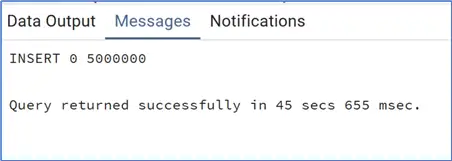
Now we need to add the pgstattuple extension in order to easily check the properties of the index:
--MSSQLTips.com
create extension pgstattuple;
Next, we check the primary key properties:
--MSSQLTips.com

select pg_size_pretty(index_size) as index_size, leaf_pages, avg_leaf_density,leaf_fragmentation
from pgstatindex('test_uuid_pkey'::regclass);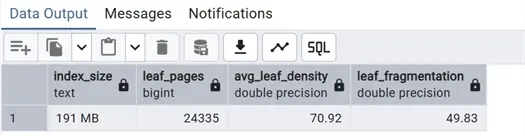
The query indicates the index size is 191 MB with a high leaf fragmentation.
UUID Version 7 Test
Now let’s try the same exercise with UUID V7, but first let’s check that we are in PostgreSQL 18:
--MSSQLTips.com
select version();
In this case we are using version 18.
Let’s, create another table with the UUID column.
--MSSQLTips.com

create table test_uuidv7 (id uuid, description text);
alter table test_uuidv7 add primary key (id);
Next let’s insert values using the new function uuidv7() to generate the UUID:
--MSSQLTips.com

insert into test_uuid (id, description)
SELECT uuidv7() , 'descrizione'||uuidv7()
FROM generate_series(1, 1000000);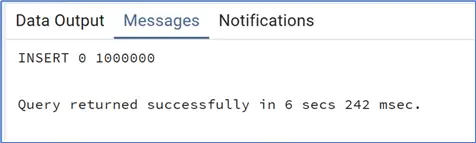
Let’s check the Primary Key with the same query as before:
--MSSQLTips.com

select pg_size_pretty(index_size) as index_size, leaf_pages, avg_leaf_density,leaf_fragmentation
from pgstatindex('test_uuidv7_pkey'::regclass);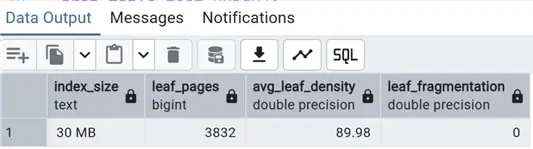
As we can see the difference is huge, as the number of pages is highly different and no fragmentation in the UUID version 7 case. This is due to the fact that with UUID version 4 we end up with a large number of split pages, which are generally half empty pages. Because each UUID sorts differently, each insert lands in a different part of the storage pages.
B-B-Tree Skip Scan in PostgreSQL
B-Tree Skip Scan is a huge improvement for indexing and performance in PostgreSQL. This feature addresses a big limitation on usage of multicolumn indexes. In practice until now, if we had an index with say 3 columns (col1, col2, col3) and the WHERE clause does not include the left foremost column of the index, in this case col1, the planner was not using this index. The order of columns in an index is extremely important!
In PostgreSQL 18, a new feature is introduced called Skip Scan that is able to overcome this limitation. Albeit only on B-Tree indexes and on certain conditions, where the planner considers it to be more efficient than a sequential table scan. By the way, having an index covering the filter with its left foremost column is surely better than the skip scan, but with this option we can avoid index proliferation where a single index is good enough for multiple queries.
PostgreSQL documentation:
A multicolumn B-tree index can be used with query conditions that involve any subset of the index’s columns, but the index is most efficient when there are constraints on the leading (leftmost) columns. The exact rule is that equality constraints on leading columns, plus any inequality constraints on the first column that does not have an equality constraint, will always be used to limit the portion of the index that is scanned.
Completed by this part:
If a B-tree index scan can apply the skip scan optimization effectively, it will apply every column constraint when navigating through the index via repeated index searches. This can reduce the portion of the index that has to be read, even though one or more columns (prior to the least significant index column from the query predicate) lacks a conventional equality constraint.
For example, given an index on (x, y), and a query condition WHERE y = 7700, a B-tree index scan might be able to apply the skip scan optimization. This generally happens when the query planner expects that repeated WHERE x = N AND y = 7700 searches for every possible value of N (or for every x value that is actually stored in the index) is the fastest possible approach, given the available indexes on the table.
Index Use Prior to PostgreSQL 18
First, create a new table with an index and inserting some data in it in PostgreSQL 17, using chinook database and ending up with more distinct values in the second column of the index:
--MSSQLTips.com create table test_btreeskip (supportrepid int, customerid int, total bigint);

create index idx_test_btreeskip on test_btreeskip(supportrepid, customerid);

insert into test_btreeskip (supportrepid, customerid, total)
select "EmployeeId", generate_series(0, 10000000), generate_series(1, 10000000)*5
from "Employee";
Now we check that we are on a PostgreSQL version 17:
--MSSQLTips.com

select version();
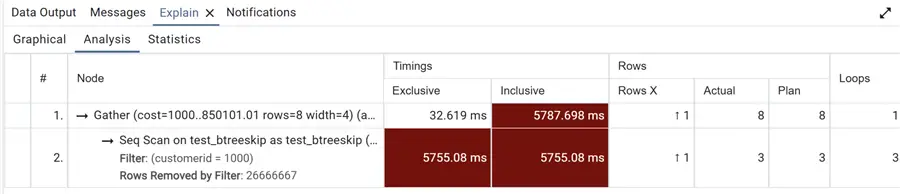
And now we can issue this query filtering on the second column of the index and checking the plan:
--MSSQLTips.com

explain (analyze, format json)
select supportrepid
from test_btreeskip
where customerid=1000;
As expected, we have a plan with a sequential scan, as we have filtered on the second column of the index.
Just to be sure we issue another query now filtering on the first column of the index:
--MSSQLTips.com

explain (analyze, format json)
select customerid
from test_btreeskip
where supportrepid=7;
We can see we have an index only scan.

B-Tree Skip Scan in PostgreSQL 18
We see that in this case the plan makes use of the index (in this case an index only scan as we have also the required column in it), let’s now repeat the same in PostgreSQL 18:
--MSSQLTips.com

create table test_btreeskip (supportrepid int, customerid int, total bigint);

create index idx_test_btreeskip on test_btreeskip(supportrepid, customerid);

insert into test_btreeskip (supportrepid, customerid, total)
select "EmployeeId", generate_series(0, 10000000), generate_series(1, 10000000)*5
from "Employee";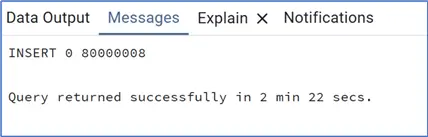
Check again the version:
--MSSQLTips.com

select version();
Repeat the same query:
--MSSQLTips.com

explain (analyze, format json)
select supportrepid
from test_btreeskip
where customerid=1000;
This time we have an index only scan even faster than the index only scan on the second example in PostgreSQL 17! An amazing result!

Repeating the query filtering on the first column we can see that we also have an index only scan:
--MSSQLTips.com

explain (analyze, format json)
select customerid
from test_btreeskip
where supportrepid=7;
Various Improvements on execution plans
PostgreSQL 18 introduces better execution plans for a lot of queries involving:
- Various join types, in particular it eliminates not needed self-joins
- Does a better job with joins on partitioned table
- With OR conditions
- With SELECT DISTINCT
Let’s see just a couple of these new features in action, starting with self joins elimination.
Self-Join Elimination
We build up a query with a CTE on the same table and join them:
--MSSQLTips.com

explain (analyze, format json)
with invoices as
(select "InvoiceId" as idi, "CustomerId" as customer, "Total"
from "Invoice"
where "Total">10)
select "InvoiceId", "CustomerId"
from "Invoice"
inner join invoices
on "InvoiceId"=idi;
In PostgreSQL 17 the execution plan looks like this, with joins:
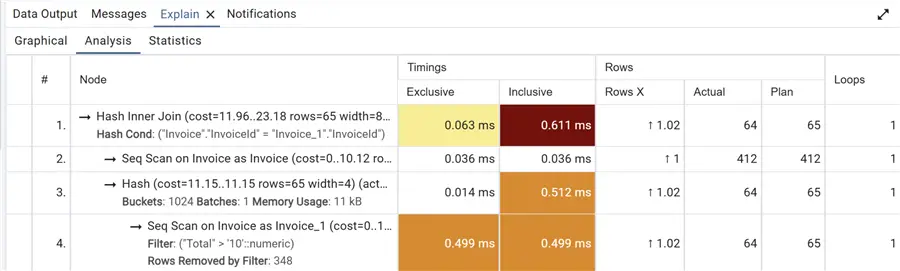
But if we ran the exact same query on PostgreSQL 18, we see that we have only the sequential scan and no need for the join and two different sequential scans on the same table and data, a huge improvement!

DISTINCT Improvements
Let’s see how much better the DISTINCT plan is by issuing this query first in PostgreSQL 17:
--MSSQLTips.com

explain (analyze, format json)
select distinct invoice."InvoiceId"
from "Invoice" invoice
inner join "InvoiceLine" invoicel
on invoice."InvoiceId"=invoicel."InvoiceId"
where "CustomerId" in (2,3,7,10);
We can see that the execution plan requires multiple scans of the Invoice table.

Let’s see now how the same query is executed in PostgreSQL 18:

We can see that there is one less scan with exactly same number of rows, with a huge difference in timings! These are just two examples of the various improvements on the execution plans, I will add links to official documentation with a complete list.
EXPLAIN changes
There are a number of new features on the EXPLAIN command that I covered in my last tip.
- First, the BUFFERS option was always recommended to be issued in conjunction with EXPLAIN ANALYZE. This is now a default for this command.
- Another very interesting addition is that now index searches shows the efficiency of index scans with a number, with the lesser this number the better.
- Finally, when a planner setting is turned off it is now displayed, for example
set enable_seqscan = off;is now displayed without using SETTINGS option.
Let’s see these features in action.
EXPLAIN ANALYZE
First displaying the difference in results of EXPLAIN ANALYZE in PostgreSQL 17 and 18, using one of the queries of my last tip:
--MSSQLTips.com

EXPLAIN ANALYZE
SELECT abalance
FROM pgbench_accounts
WHERE aid = 10001;
First in PostgreSQL 17:
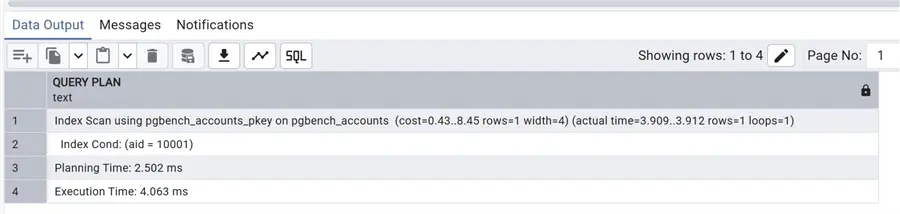
Then in PostgreSQL 18:

EXPLAIN Output
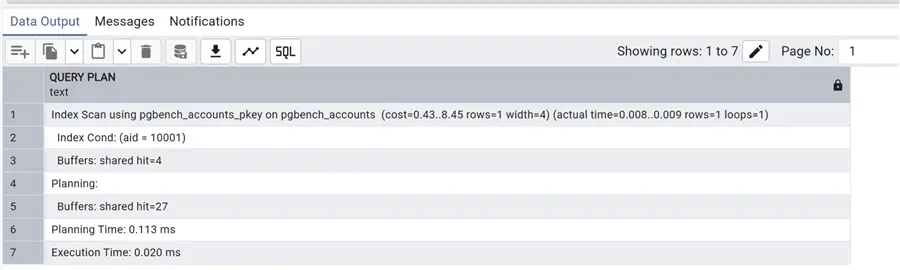
We have also showed, since we have an index search in this execution plan, that now we have an Index Searches number displayed even with the BUFFERS option activated which was not available in PostgreSQL 17:
--MSSQLTips.com

EXPLAIN (ANALYZE, buffers)
SELECT abalance
FROM pgbench_accounts
WHERE aid = 10001;
As expected, we see only the Buffers hit.
Let’s take a look now to the settings showing in PostgreSQL 18, without using the SETTINGS option:
--MSSQLTips.com

set enable_seqscan = off;
EXPLAIN (analyze)
SELECT abalance
FROM pgbench_accounts
WHERE bid = 10001;
Note the Disabled: True in the Parallel Seq Scan part of the execution plan. In this case, we see that we’ve made use of JIT, Just In Time compilation of our query…but that’s a story for another day!

Next Steps
In this tip we have reviewed some of the new features available in PostgreSQL 18, it will be followed by another one covering some more improvements, so…stay tuned!
As always links to official documentation:
- UUID Documentation and UUID Functions
- Multicolumn Indexes
- Planner/Optimizer and Optimizer part in PostgreSQL Release 18
- Explain Plans

Andrea Gnemmi is a Database and Data Warehouse professional with almost 20 years of experience, having started his career in Database Administration with SQL Server 2000.
His expertise ranges from SQL Server to Oracle and Postgres for database administration and from SAP BO to SSIS, SSRS and Power BI regarding BI and ETL.
He has worked both in SQL Server and Oracle mostly in multinational environments with very high transaction volumes and large datasets. Performance tuning, indexing techniques and in general Database administration are his hot topics. Ensuring a 24/7 uptime of the various databases in shop is his main responsibility, as well as the best possible performances of all queries run on the databases. He has started working with PostgreSQL two years ago loving many of the features of this RDBMS.
- MSSQLTips Awards: Trendsetter (25+ tips) – 2024 | Rookie of the Year – 2021