Problem
Many organizations store cash-flow data inside SQL Server and decision-makers often need metrics like Net Present Value (NPV) and Internal Rate of Return (IRR) to evaluate those cash flows. Is it possible to calculate NPV and IIR values in SQL Server without the use of external tools?
Solution
Implementing these calculations in the database ensures automation, consistency, and reproducibility, enabling decision-makers to evaluate investments, projects, or loans efficiently. SQL Server does not include built-in NPV or IRR functions. In this tip I will demonstrate how to build these functions, allowing developers to compute these key financial metrics directly from stored cash-flow tables, integrating seamlessly with reports, dashboards, and business processes.
Basic calculations of interest
Let’s look at how to do calculations we need to use to build these functions.
Simple interest
Interest is only earned on the original money. For example, $1000 invested at 10% interest per year, for 3 years, will be calculated as 1000 * (1 + 0.10 * 3) = 1300

Compound interest
Interest is earned on the original money plus any interest that has already been previously earned. For example, 1000 * (1 + 0.10) ^ 3 = 1331

Interest rate
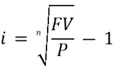
To calculate interest, if you have the future value factor and the period then you can calculate the interest using the formula, like (1331 / 1000) ^ (1 / 3) – 1 = 0.10
Net Present Value (NPV)
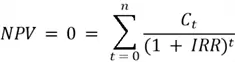
Net Present Value is a metric used to evaluate the profitability of an investment representing the difference between the present value of cash inflows and outflows over a period of time.
It is commonly used in real estate, leasing, investments, industrial production, and accounting.
NPV T-SQL Function
-- ==================================================
-- Author:      SCP - MSSQLTips
-- Create date: 20250922
-- Description: Finance - Net Present Value
-- ==================================================
CREATE OR ALTER FUNCTION    [dbo].[ufnFinNpv]
                (@interest float)
RETURNS float
WITH EXECUTE AS CALLER
AS
BEGIN
    IF (SELECT         COUNT(*)
            FROM     [dbo].[FinCashflow]) < 1
        RETURN NULL;

    DECLARE  @period int = 0
            ,@amount float = 0.0
            ,@k int = 0
            ,@npv float;

    DECLARE crsNpv CURSOR FAST_FORWARD READ_ONLY FOR
        SELECT         [Period]
                    ,[Amount]
            FROM     [dbo].[FinCashflow];

    OPEN crsNpv
        FETCH NEXT FROM crsNpv INTO @period,@amount;

        WHILE @@FETCH_STATUS = 0
            BEGIN

                IF @period = 0
                    SET @npv = @amount;
                ELSE
                    SET @npv += @amount / POWER(1 + @interest,@k);

                -- select @k Cashflow,@npv NPV;

                SET @k += 1;

                FETCH NEXT FROM crsNpv INTO @period,@amount;
            END
    CLOSE crsNpv
    DEALLOCATE crsNpv

    RETURN ROUND(@npv,2);
END
GO
NPV Example
A company needs to determine if it is best to buy or to lease equipment. The end-of-the-year cash cost of each option is:
| Year-end | PURCHASE | LEASE |
|---|---|---|
| 1 | 500 | 1250 |
| 2 | 950 | 1250 |
| 3 | 1400 | 1250 |
| 4 | 1700 | 1250 |
| 5 | 2000 | 1250 |
| TOTAL | 6550 | 6250 |
In this case, we can see above the leased equipment appears to be less expensive.
However, the company knows that it can generate a 15% return on every dollar invested (purchase) in the business.
-- MSSQLTips (TSQL)

TRUNCATE TABLE [dbo].[FinCashflow];
INSERT INTO     [dbo].[FinCashflow]
            ([Period]
            ,[Amount])
    VALUES     ( 0,   0)
            ,( 1, 500)
            ,( 2, 950)
            ,( 3,1400)
            ,( 4,1700)
            ,( 5,2000);

SELECT [dbo].[ufnFinNpv] (0) AS Purchasing0, [dbo].[ufnFinNpv] (0.15) AS Purchasing15;
GO

TRUNCATE TABLE [dbo].[FinCashflow];

INSERT INTO     [dbo].[FinCashflow]
            ([Period]
            ,[Amount])
    VALUES     ( 0,   0)
            ,( 1,1250)
            ,( 2,1250)
            ,( 3,1250)
            ,( 4,1250)
            ,( 5,1250);

SELECT [dbo].[ufnFinNpv] (0) AS Leasing0, [dbo].[ufnFinNpv] (0.15) AS Leasing15;
GO
This result in calculating with a 15% interest rate, to buy is about US$4,040 versus US$4,190 for leasing, so buying actually ends up being cheaper. If we run the numbers at 0% interest, it returns the straight totals as shown in the table.
Internal Rate of Return (IRR)
Internal Rate of Return is defined as the discount rate at which the Net Present Value (NPV) of all future cash flows of an investment is equal to zero. Or in other words, IRR is the rate of return where your investment breaks even in present-value terms.
It is commonly used in real estate, leasing, investments, industrial production, and accounting.
We will use the same NPV formula, but now we are looking for the IRR value, which we obtain through interactions.
IRR T-SQL function
-- ==================================================
-- Author:      SCP - MSSQLTips
-- Create date: 20250922
-- Description: Finance - Internal Rate of Return
-- ==================================================
CREATE OR ALTER FUNCTION    [dbo].[ufnFinIrr]
                ()
RETURNS float
WITH EXECUTE AS CALLER
AS
BEGIN
    IF (SELECT         COUNT(*)
            FROM     [dbo].[FinCashflow]) < 1
        RETURN NULL;

    -- Parameters pre-defined
    DECLARE  @IRR float = 0.1
            ,@IRR_new float = 0.0
            ,@tolerance float = 1E-6
            ,@npv float = 0
            ,@npv_d float = 0
            ,@maxInteractions int = 1000
            ,@count int = 0;

    WHILE @count < @maxInteractions BEGIN
        SET             @npv = 0;
        SET             @npv_d = 0;

        SELECT         @npv += [Amount] / POWER(1 + @IRR, [Period])
            FROM     [dbo].[FinCashflow];

        SELECT         @npv_d += -[Period] * [Amount] / POWER(1 + @IRR, [Period] + 1)
            FROM     [dbo].[FinCashflow];

        IF @npv_d = 0
            BREAK;

        SET    @IRR_new = @IRR - @npv / @npv_d;

        IF ABS(@IRR_new - @IRR) < @tolerance BEGIN
            SET @IRR = @IRR_new;
            BREAK
        END

        SET @IRR = @IRR_new;

        SET @count += 1;
    END

    RETURN @IRR;
END
GO
IRR Example 1
A property requires a US$250,000 equity investment to be sold in ten years and it is expected to generate after tax, cash flows at the end of the year, as shown in the values in the below SQL code. So, what is the expected yield or IRR?
-- MSSQLTips (TSQL)

TRUNCATE TABLE [dbo].[FinCashflow];

INSERT INTO     [dbo].[FinCashflow]
            ([Period]
            ,[Amount])
    VALUES   ( 0, -250000)  -- initial investment
            ,( 1,   33297)
            ,( 2,   25707)
            ,( 3,   34725)
            ,( 4,   25554)
            ,( 5,   34956)
            ,( 6,   36655)
            ,( 7,   36880)
            ,( 8,   22648)
            ,( 9,   18859)
            ,(10,  309500);  -- property sold

SELECT [dbo].[ufnFinIrr] () AS [IRR];
GO
This results to 12.82%.
IRR Example 2
| Period | Net Cash Flow | Explanation |
|---|---|---|
| 0 | -300 | Purchase of three shares at $100 per share |
| 1 | -208 | Purchase of two shares at $110, plus dividend income on three shares held |
| 2 | 110 | Dividends on five shares, plus sale of one share at $90 |
| 3 | 396 | Dividends on four shares, plus sale of four shares at $95 per share |
Calculating
-- MSSQLTips (TSQL)

TRUNCATE TABLE [dbo].[FinCashflow];
INSERT INTO     [dbo].[FinCashflow]
            ([Period]
            ,[Amount])
    VALUES   ( 0, -300)
            ,( 1, -208)
            ,( 2,  110)
            ,( 3,  396);

SELECT [dbo].[ufnFinIrr] () AS [IRR];
GO
Resulting in an IRR of -0.1661%.
Internal Rate of Return – Groups (IRR)
Internal Rate of Return – Groups is the same calculation as IRR, but it is applied when uneven cash flows are involved, in other words the values are grouped.
It is commonly used in real estate, leasing, investments, industrial production, and accounting.
I decided to split the grouped ones and then apply the same method for IRR.
IRR for Grouped T-SQL function
-- ==================================================
-- Author:      SCP - MSSQLTips
-- Create date: 20250923
-- Description: Finance - Internal Rate of Return
-- ==================================================
CREATE OR ALTER FUNCTION    [dbo].[ufnFinIrrGrouped]
                ()
RETURNS float
WITH EXECUTE AS CALLER
AS
BEGIN
    IF (SELECT         COUNT(*)
            FROM     [dbo].[FinCashflow]) < 1
        RETURN NULL;

    DECLARE  @IRR float = 0.1
            ,@IRR_new float = 0.0
            ,@tolerance float = 1E-6
            ,@npv float = 0
            ,@npv_d float = 0
            ,@maxInteractions int = 1000
            ,@count int = 0
            ,@k int = 0
            ,@period int
            ,@amount float;

    DECLARE          @Table
        TABLE        ([Period] int IDENTITY (0,1) PRIMARY KEY
                    ,[Amount] float);

    DECLARE crsNpv CURSOR FAST_FORWARD READ_ONLY FOR
        SELECT       [Period]
                    ,[Amount]
            FROM     [dbo].[FinCashflow];

    OPEN crsNpv
        FETCH NEXT FROM crsNpv INTO @period,@amount;

        WHILE @@FETCH_STATUS = 0
            BEGIN

                IF @period < 2
                    INSERT INTO     @Table
                        VALUES    (@amount);
                ELSE BEGIN
                    SET @k = 1;
                    WHILE @k <= @period BEGIN
                        INSERT INTO     @Table
                            VALUES    (@amount);

                        SET @k += 1;
                    END
                END

                FETCH NEXT FROM crsNpv INTO @period,@amount;
            END
    CLOSE crsNpv
    DEALLOCATE crsNpv

    WHILE @count < @maxInteractions BEGIN
        SET             @npv = 0;
        SET             @npv_d = 0;

        SELECT         @npv += [Amount] / POWER(1 + @IRR, [Period])
            FROM     @Table;

        SELECT         @npv_d += -[Period] * [Amount] / POWER(1 + @IRR, [Period] + 1)
            FROM     @Table;

        IF @npv_d = 0
            BREAK;

        SET    @IRR_new = @IRR - @npv / @npv_d;

        IF ABS(@IRR_new - @IRR) < @tolerance BEGIN
            SET @IRR = @IRR_new;
            BREAK
        END

        SET @IRR = @IRR_new;

        SET @count += 1;
    END

    RETURN @IRR;
END
GO
IRR for Grouped Example
A property is available at $50,000 and the annual income over a 23-year projection period is listed below, where the payments are received at the end of the year, and grouped as:
| Number of Years | Cash Flow (US$) |
|---|---|
| First 5 years | 9000 |
| Next 4 years | 7500 |
| Next 4 years | 6000 |
| Next 3 years | 7500 |
| Next 7 years | 5000 |
Running the function
-- MSSQLTips (TSQL)

TRUNCATE TABLE [dbo].[FinCashflow];
INSERT INTO     [dbo].[FinCashflow]
            ([Period]
            ,[Amount])
    VALUES   ( 0,-50000)
            ,( 5, 9000)
            ,( 4, 7500)
            ,( 4, 6000)
            ,( 3, 7500)
            ,( 7, 5000);

SELECT [dbo].[ufnFinIrrGrouped] () AS [IRRGroup];
GO
Resulting in an annual IRR of 15.27%.
Next Steps

Sebastião Pereira has over 40 years of experience in database development including T-SQL, algorithm design, machine learning and bringing innovative mathematical formulas to SQL Server. He started his career at a transnational fast-moving consumer goods (FMCG) company as an employee then later transitioning into a consultant role. He eventually founded his own company to develop software solutions for the healthcare industry. Sebastião is a respected award-winning author on MSSQLTips.com extending SQL Server capabilities beyond traditional workloads.
- MSSQLTips Awards
- Author of the Year – 2025
- Trendsetter (25+ tips) – 2025
- Rookie of the Year – 2024